Quick Translate instantly captures and translates any onscreen text with a simple hotkey. Translate foreign content or write in another language with ease. Perfect for games, manga, chatting, and learning. Powered by the latest advanced AI models, it’s fast, accurate, and always one keystroke away.

Zaloguj się, aby dodać tę pozycję do listy życzeń, zacząć ją obserwować lub oznaczyć jako ignorowaną

Polski język nie jest obsługiwany

Ten produkt nie obsługuje twojego lokalnego języka. Przed zakupem zapoznaj się z listą obsługiwanych języków, która znajduje się poniżej.

Ta gra nie jest jeszcze dostępna na Steam

Planowana data wydania: 13 marca 2026

Ta aplikacja zostanie odblokowana za około 2 dni

Interesuje cię ten produkt?
Dodaj go do swojej listy życzeń i otrzymaj powiadomienie, gdy stanie się dostępny.
 

O tym programie

Quick Translate is a powerful screen translation tool designed for gamers, manga readers, language learners, and anyone who encounters foreign language content on their screen. With a simple hotkey, capture any region of your screen and get reliable, accurate translations.

Free Credits for New Users

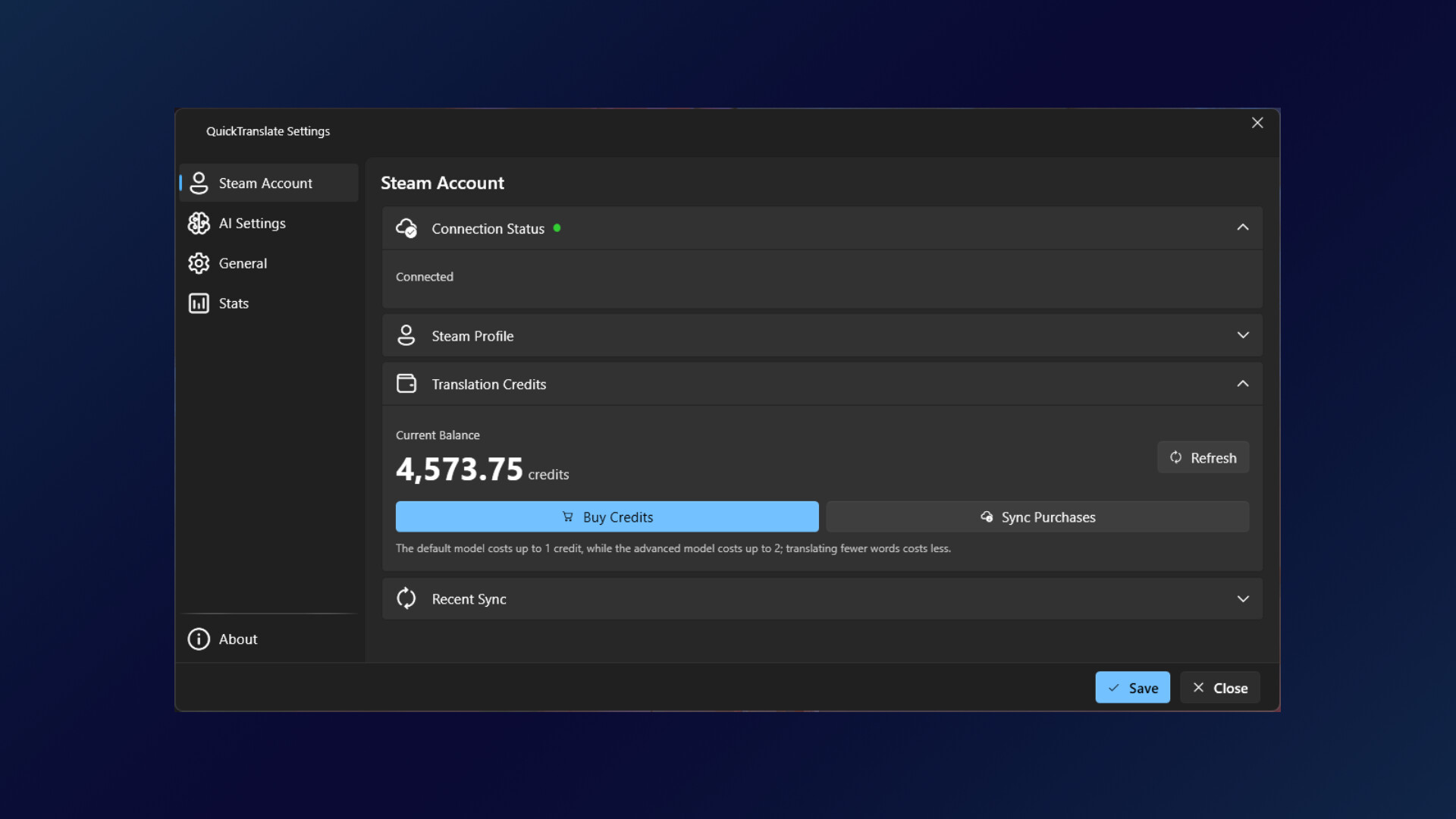
New users receive 50 free credits, covering up to 100 translations, to help you explore the app's functionality. You can easily purchase additional credit packs in the Item Store.

Key Features

Instant Screen Capture and Translation

Select any area of your screen and get translations in seconds. No need to manually type or copy text. Quick Translate handles it all automatically using latest advanced AI models. The tool is optimized for short texts and works with any application, whether it is a game, a PDF document, a website, or an image viewer.

Multi-Language Support

Translate between multiple languages including English, Chinese (Simplified and Traditional), Japanese, Korean, Spanish, French, German, Italian, and Portuguese.

Perfect for Gaming and Manga

Playing a game that is not available in your language? Reading raw manga or manhua without official translations? Quick Translate lets you understand dialogue, menus, item descriptions, and speech bubbles without leaving your application. Simply capture the text area and get your translation.

Language Learning Made Easy

Quick Translate is not just for understanding foreign content, it is also a powerful tool for language learners. Translate text from your native language into the language you are studying to see how words and phrases are expressed. Practice reading foreign content with quick translation support when you get stuck.

You can also use it to communicate with foreign friends and people you meet online or in games. Screenshot their messages, translate them instantly, and craft your responses in their language to keep the conversation flowing naturally.

Track Your Progress & Customization

Quick Translate includes a detailed statistics page to monitor your translation activity. Track your daily streak to stay motivated, view your total text and image translations, see your most used language pairs, and monitor your session history. You can also tailor the experience to your needs by customizing hotkeys, adjusting font sizes, and enabling Chinese localization.

Clean and Lightweight

Built with a sleek modern interface that feels native to Windows. Quick Translate runs quietly in your system tray, staying out of your way until you need it. Press your customizable hotkey, select your region, and get your translation. All in just a few seconds.

Credit-Based System

Our credit system powers high-quality translations from advanced AI models, so you pay only for what you use. Each translation uses credits based on text length and the model you choose: the default model uses up to 1 credit per translation, and the advanced model uses up to 2 credits per translation. Purchase translation credits directly through Steam for seamless and secure transactions.

Your Privacy Matters

Quick Translate exclusively uses AI models from providers that do not use your data for training. Your captured images, text inputs, and translations are processed in real-time and are never stored, logged, or used to improve AI models

How It Works

Quick Translate offers two ways to translate text:

  • Screen Capture Mode
    Press your hotkey to activate screen capture, then click and drag to select any area containing text. Quick Translate uses AI to recognize and translate the text. Perfect for games, manga, images, and any application where you cannot copy text directly.

  • Text Input Mode
    Press your text input hotkey to open a simple input window. Type or paste the text you want to translate and hit Enter. Ideal for translating your own messages before sending them to foreign friends.

Both methods deliver reliable and accurate translations in just seconds. Choose your target language and translation style, and Quick Translate handles the rest.

Oświadczenie w sprawie treści generowanych przez SI

Producenci opisują, jak ich gra korzysta z treści generowanych przez SI, w następujący sposób:

Quick Translate uses generative AI technology to provide its core functionality. When you capture a screen region or input text, the content is sent to cloud-based AI models that perform text recognition and translation. No AI-generated content is pre-packaged with the application, all translations are generated in real-time based on user input.

The AI is used for two purposes:

1. Text Recognition
When you capture a screen region, AI models analyze the image to identify and extract any text present, regardless of font, style, or language.

2. Translation
The recognized or user-provided text is processed by AI language models to generate accurate, context-aware translations in your chosen target language.

All AI processing occurs on secure remote servers. Your captured images and text are transmitted securely, used solely for generating translations, and are not stored or used for training purposes. Each translation request requires credits, which can be purchased through Steam.

Wymagania systemowe

    Konfiguracja minimalna:
    • Wymaga 64-bitowego procesora i systemu operacyjnego
    • System operacyjny: Windows 10 (64-bit)
    • Procesor: Dual-core 1.5 GHz
    • Pamięć: 2 GB RAM
    Konfiguracja zalecana:
    • Wymaga 64-bitowego procesora i systemu operacyjnego
    • System operacyjny: Windows 10 (64-bit)
    • Procesor: Dual-core 1.5 GHz
    • Pamięć: 2 GB RAM
Brak recenzji dla tego produktu

Możesz napisać swoją własną recenzję dla tego produktu, żeby podzielić się swoimi wrażeniami ze społecznością. Użyj obszaru, który znajduje się na tej stronie nad przyciskiem zakupu, żeby napisać swoją recenzję.