FilterMob – Screen Filter for Gaming, Work & Eye Strain
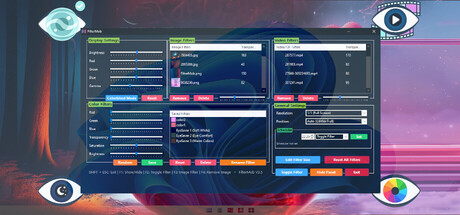
Transform your screen with FilterMob! Perfect for eye protection, gaming/work atmosphere, and accessibility. Easily apply color, image or video filters. Customize RGB, Saturation, Brightness, and Transparency in real time. Save Profiles and Schedule.

Sign in to add this item to your wishlist, follow it, or mark it as ignored

Buy FilterMob

SPECIAL PROMOTION! Offer ends January 5

-90%
$19.99
$1.99
 

About This Software

A powerful and easy-to-use tool to personalize your visual experience.

🚀🖱️ Change atmosphere during gaming or work!

• 👁️ Adjust color and brightness as you wish to protect your eyes!

• 🖼️ Use your JPG/PNG images as screen filters!

• 🎥 Use your MP4/WEBM/AVI/MKV/MOV videos as screen filters!

🎨 Color Filters:

  • Real-time RGB, saturation, brightness adjustment

  • 0-100% transparency control

  • Save your filters to a list

  • Easily apply / rename / delete your saved filters

🖼️ Image Filters:

  • Add JPG/PNG images via drag-and-drop

  • Image transparency adjustment

  • Save your images to a list

  • Easily apply / change opacity / delete your saved images

🎥 Video Filters:

  • Add MP4/WEBM/AVI/MKV/MOV videos via drag-and-drop

  • Video transparency adjustment

  • Save your videos to a list

  • Easily apply / change opacity / delete your saved videos

🕒 Scheduler System

With the Scheduler tab, you can set a specific time to automatically:

  • Toggle the All FilterMob filters on/off

  • Automatically load a saved profile

  • Shutdown PC

  • Restart PC

  • Lock PC

💾 Advanced Profile Management

You can now save every setting (Color, Image, Video, Gamma, and System Brightness) as a named Profile.000

  • Saved profiles are now listed with visual icons (Color previews or thumbnails).

  • Switch between "Game Mode," "Reading Mode," or "Night Mode"... (your profiles) with a single click.

💾 Automatic Save Management:

  • All settings are automatically saved

  • Last used filters and overlays are remembered and automatically set at startup

  • Your settings are safe even in unexpected shutdowns

⚡ Performance

  • Optimized Efficiency:Designed for low resource consumption.

⌨️ Quick Actions:

  • Instant control via customizable global shortcuts (Shift+Esc, F-keys) 

  • Automatic system language detection (30+ languages).

System Requirements

    Minimum:
    • Requires a 64-bit processor and operating system
    • OS: Windows 10
    • Processor: 1 GHz processor
    • Memory: 1 GB RAM
    • Graphics: Intel HD 520 / AMD Radeon R3
    • Storage: 350 MB available space
    • Sound Card: Not required
    • VR Support: Not supported
    Recommended:
    • Requires a 64-bit processor and operating system
    • OS: Windows 11
    • Processor: 1.5 GHz or faster processor
    • Memory: 2 GB RAM
    • Graphics: NVIDIA GT 1030 / AMD Radeon RX 550 or higher
    • Storage: 350 MB available space
    • Sound Card: Not required
    • VR Support: Not supported

Customer reviews for FilterMob – Screen Filter for Gaming, Work & Eye Strain About user reviews Your preferences

Overall Reviews:
5 user reviews (5 reviews)


To view reviews within a date range, please click and drag a selection on a graph above or click on a specific bar.


Filter reviews by the user's playtime when the review was written:


No minimum to No maximum

Show reviews in selected display order


Learn More
Filters
Excluding Off-topic Review Activity
Playtime:
Played Mostly on Steam Deck
There are no more reviews that match the filters set above
Adjust the filters above to see other reviews
Loading reviews...