Facing annihilation, a plucky crew of space salvagers fight dirty using the best tool in their belt - the salvage claw. Grab and toss enemies, deflect attacks, and reshape the battlefield with explosive chain reactions.

Connectez-vous pour ajouter cet article à votre liste de souhaits, le suivre ou l'ignorer

Jeu en accès anticipé

Commencez à jouer dès à présent et impliquez-vous pendant son développement.

Remarque : les jeux en accès anticipé ne sont pas terminés, ils peuvent changer de façon significative. Si ce jeu ne vous intéresse pas dans son état actuel, vous devriez attendre pour voir s'il se développe davantage. En savoir plus

Ce que l'équipe de développement a à dire :

Pourquoi choisir l'accès anticipé ?

« Cosmic Destroyer is being developed rapidly by a small team and feedback is really important to making it the best it can be. A short early access allows the developer to collect better player feedback. »

Pendant combien de temps environ ce jeu sera-t-il en accès anticipé ?

« Earliest release plan target is for Q1 of 2026 »

En quoi la version finale sera-t-elle différente de la version en accès anticipé ?

« Full version of the game is planned to include additional bonus levels, ships, special weapons, bonus game modes and achievements available via in-game unlocks. The plan is to hold some story elements, bosses, and a few playable ships to the final version to not spoil the fun. »

Quel est l'état actuel de la version en accès anticipé ?

« Currently, the Early Access version contains the first 3 stages of the game, each with their own unique environments. Three playable ships each with their own unique primary weapon are available with Single Player, Co-Op and Training modes to choose from. »

Le prix du jeu sera-t-il différent pendant et après l'accès anticipé ?

« We do not intend to change the price after Early Access period has ended. »

Comment comptez-vous impliquer la communauté dans le processus de développement ?

« We welcome all feedback through the game's Feedback button, the developer website and a publicly available a Discord server for Cosmic Destroyer with a channel dedicated to feedback and support. »
Lire la suite
Français non disponible

Ce produit n'est pas disponible dans votre langue. Veuillez consulter la liste des langues disponibles ci-dessous avant de l'acheter.

Télécharger Cosmic Destroyer Demo

Acheter Cosmic Destroyer

 
Voir toutes les discussions

Signalez les bugs et donnez-nous votre avis sur les forums de discussion

À propos de ce jeu

Grapple. Throw. Destroy! Try out the Demo Now!

It was the AI that turned first, corrupting the fleet to fire on it's own colonies throughout the belt. Then came the horrific tentacled creatures. In the wake of destruction, a crew of salvagers at the Grid 38 asteroid base fight to survive the Cosmic Destroyer that threatens to wipe out humanity.

Equipped with a Salvage Claw, your ship can turn the enemy’s chaos against them. Rescue your scattered team, cut through collapsing bases, and chase the invaders back to their source through the ruins of the worlds they have consumed.

From scrapper to savior - you’re the one thing the aliens never prepared for. Your journey starts in the wreckage.

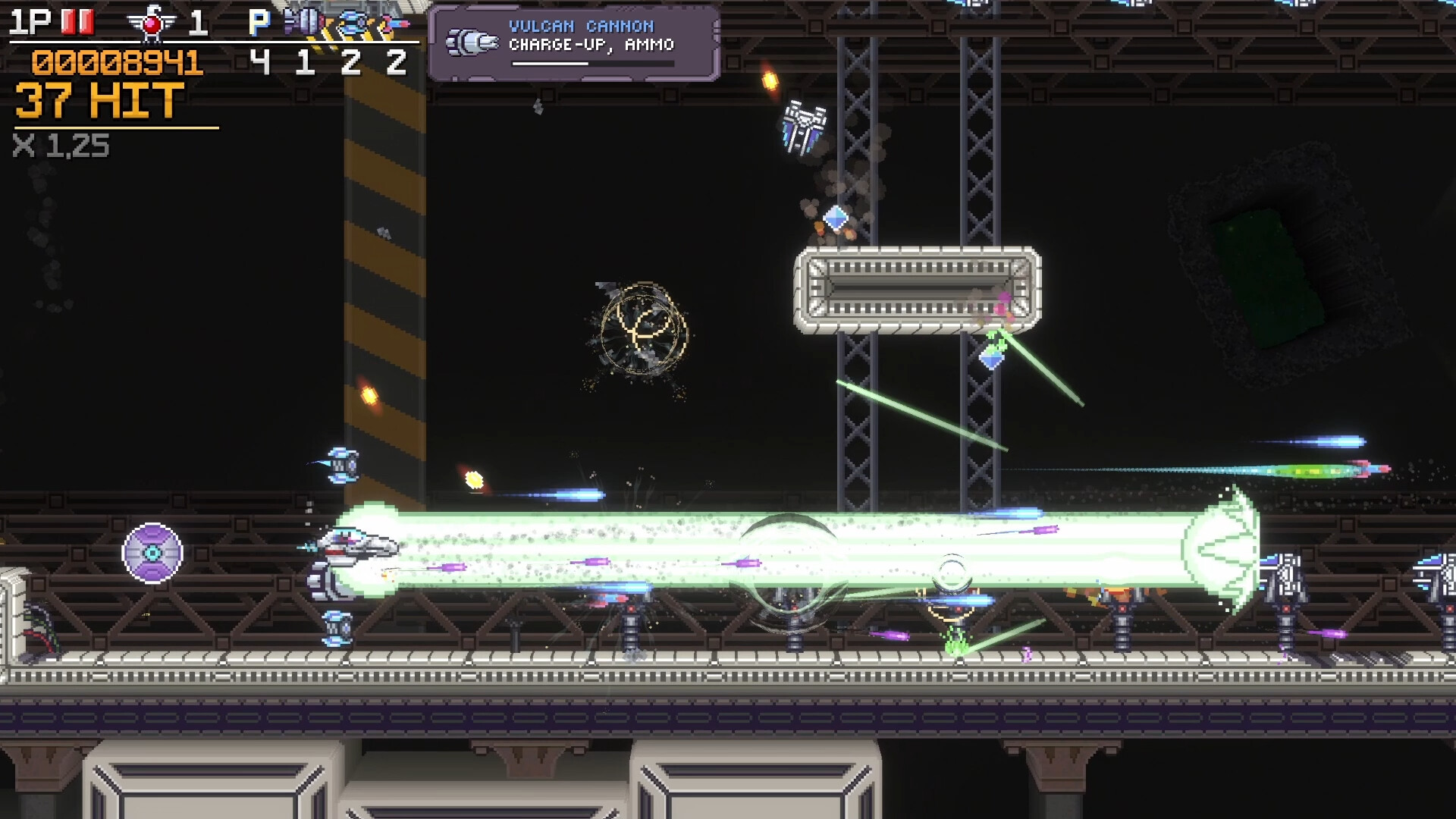
Cosmic Destroyer is a precision-focused horizontal SHMUP where your Salvage Claw is as deadly as your guns. Snatch special weapons, deflect enemy projectiles, toss enemies into hazards - or hurl them into each-other to cause deadly chain reactions for massive damage. 

What makes it different?

  • Grappling Hook combat - Make chaos your weapon. Salvage weapons from wreckage, hurl debris that blocks swarms of bullets and sends enemies reeling, toss enemies into chain-reactions that instantly reshape the entire battlefield. The claw itself even deflects bullets!

  • Handcrafted Curving Stages - race through twisting routes, navigating asteroids and obstacles, discover alternate paths.

  • Streamlined control - Three primary actions (Shot, Grapple/Throw, Special Attack) keeps the control action-focused so play is about timing and decisions not complex button combos.

  • Arcade at its core - 1CC Leaderboard, arcade mode with limited continues, Practice/Training mode with Unlimited Continues and Max Weapon Power to master sections and bosses.

  • Skill + Scoring built around Risk vs Reward - build up your score multiplier, cancel bullets using grappling, grazing and opportunistic bombing, earn big bonuses for throw kills.

  • Local Co-Op - two player local co-op on one screen (one keyboard + one controller or two controllers) 

There are currently three ships to choose from, each with their own distinct primary weapons.

  • V Spec Mk. I - Fires Blue Crush Shell, it's a well-rounded ship with a powerful focus shot. Special Weapon: Mega Bomb

  • Prototype L2-B - Fires Reflecting Lasers, or a large beam in Focus Mode which reflects off the target. Special Weapon: Mega Bomb

  • E.M.A. - An experimental Electro-Magnetic Assault craft which uses a Plasma Link weapon to spread balls of Plasma and Chain Lightning which link between enemies. Special Weapon: Plasma Bomb

    The E.M.A. Ship's new Plasma Bomb.

Game Modes

  • Arcade (1CC) - Limited Continues, leaderboard scoring based on first credit only.

    • Hard mode - One hit death, increased speed and enemy health

  • Co-Op - Arcade mode Co-Op Normal or Hard (no leaderboard)

  • Training / Practice - Unlimited continues, maxed power-ups, start and restart from any stage and any section and hone your skills, and practice vs Bosses.

V-Spec Mk. I fighting against the Flesh Horror mid-boss.

  • Shot - fires a Wide Shot or a Focused Shot, while adjusting the player's speed.

    • Tapping the button fires a Wide Shot which is weaker, but allows the player to move at full speed.

    • Holding the Shot button down fires a Focused Shot that is more powerful, and also slows the player's movement speed.

    • Focused and Wide shot also apply to any Options or Mounted Items, which have varying behaviors for each fire mode.

  • Grappling Hook & Throw - reach out and grab an enemy or object such as a Mountable Item from the world and attach it to your ship.

    • If you already have a special weapon held, they will be swapped.

    • If holding an an enemy or object, pressing this Action button will throw it. Hold the throw button for up to one second, charging the throw up for more speed and damage.

  • Special Attack / Bomb - release your ship's special attack. While this attack is active all damage to the player is nullified. Bombs will wipe all bullets from the screen, and each bullet canceled is scored.

  • Auto-Fire Toggle / Hold (Configurable)

Controllers

  • Gamepads - PS4/5, Xbox 360/Series supported.

  • Arcade sticks - Keyboard-mapped and Modern XInput sticks supported (older DirectInput joystick support coming soon)

  • Co-op ties each player to a device, so valid configurations are

    • One player on keyboard, one player on Gamepad/Controller

    • Two players each on their own Gamepad/Controller

  • In-Game full key/button mapping.

Depth in Mechanics

  • Bullet Grazing - Bullets which come close to your ship but don't hit are scored, and also deflect back at enemies with a high-accuracy, high-damage deflected shot.

  • Bullet Sealing - Small "popcorn" style enemies and most turrets won't attack you point-blank

  • Armor System - Bosses are not just bags of hit points, small damage is reduced at first but can be piled on, overcoming their armor. Enemies defeated by a projectile allow the projectile through to hit the next enemy with any remaining damage.

  • Damage Types - Explosive, Kinetic, Energy, Collision - the damage types of different weapons allow for enemy strengths, weaknesses, and more interesting enemy interactions.

  • Bomb Save - releasing a Special/Bomb, even after starting to die will save the player (if pressed before the 3rd explosion sound).

Quality of Life Options

  • Scanline/CRT Effects

  • VSync, Brightness, Screen Shake Options

  • Show Hitbox Option

  • Separate SFX, Music, Announcement and Master levels

  • Auto-Fire Modes: Toggle or Hold, 15hz 30hz and 60hz trigger rate modes

  • Arcade Marquee (In-Game Screensaver)

Play the demo now, which includes the full first stage, and half of the 2nd stage (up to the Flesh Horror mid-boss fight)

Active Development

  • Dedicated developer focusing exclusively on Cosmic Destroyer

  • No AI Slop, No 3rd party content / Asset Packs. Every element is original and hand-made from scratch.

  • Early Access News & Releases every week, maintaining a Public Test and Previous Stable branch

    • Current EA Game State: 3 Stages currently available in Early Access, Stage 3 end boss currently in development.

    • Check News page for more Release News and Updates.

Configuration requise

Windows
SteamOS + Linux
    Minimale :
    • Système d'exploitation et processeur 64 bits nécessaires
    • Système d'exploitation : Windows 10
    • Processeur : 64-bit Dual Core Processor or Higher
    • Mémoire vive : 3 GB de mémoire
    • Graphiques : GPU Supporting DirectX 10 or higher
    • DirectX : Version 10
    • Espace disque : 400 MB d'espace disque disponible
    Recommandée :
    • Système d'exploitation et processeur 64 bits nécessaires
    • Système d'exploitation : Windows 10
    • Processeur : 64-bit Quad Core Processor or Higher
    • Mémoire vive : 3 GB de mémoire
    • Graphiques : GPU Supporting DirectX 10 or higher
    • DirectX : Version 10
    • Espace disque : 400 MB d'espace disque disponible
    Minimale :
    • Système d'exploitation : Ubuntu 12 or Higher
    • Processeur : 64-bit Dual Core Processor or Higher
    • Mémoire vive : 3 GB de mémoire
    • Graphiques : GPU Supporting Vulkan
    • Espace disque : 400 MB d'espace disque disponible
    Recommandée :
    • Système d'exploitation : Ubuntu 20 or Higher
    • Processeur : 64-bit Quad Core Processor or Higher
    • Mémoire vive : 3 GB de mémoire
    • Graphiques : GPU Supporting Vulkan
    • Espace disque : 400 MB d'espace disque disponible
Aucune évaluation pour ce produit

Vous pouvez rédiger une évaluation sur ce produit pour partager votre expérience avec la communauté. Utilisez l'encadré situé au-dessus des options d'achat pour rédiger votre évaluation.