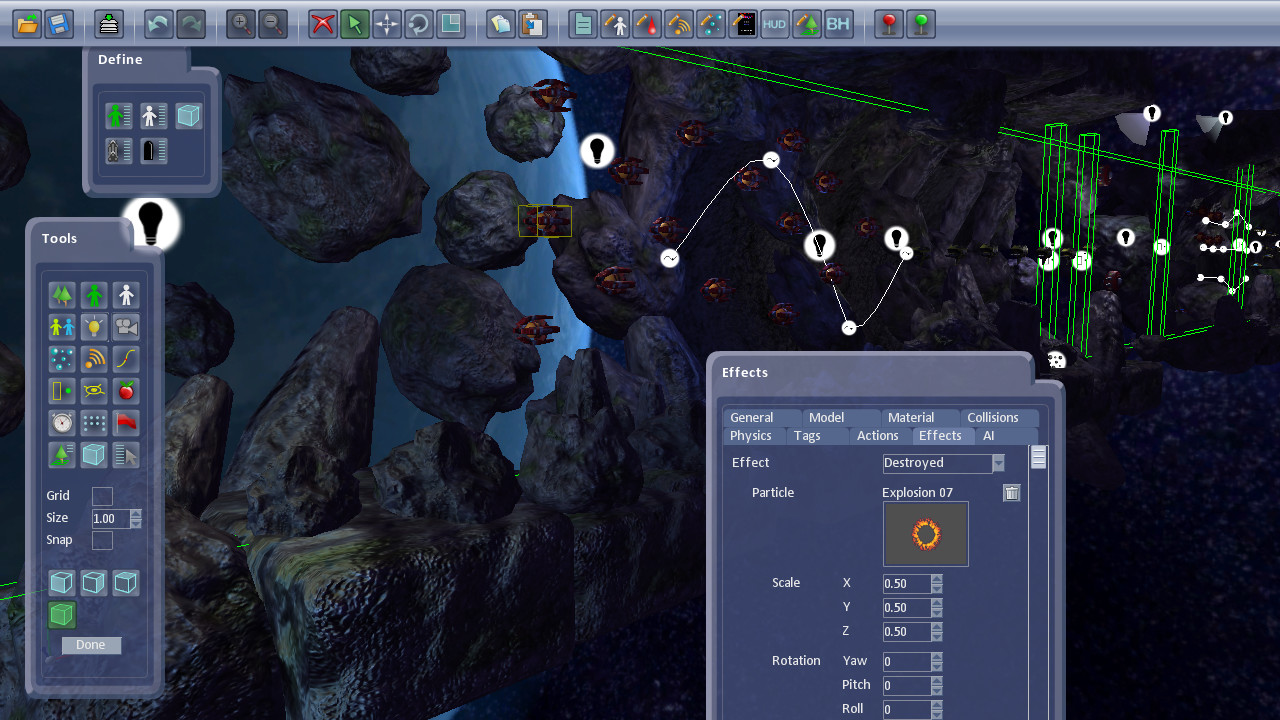
Create your own professional quality videogames without any programming or scripting. Create games using a simple yet powerful drag-and-drop interface and fine-tune items to customise your game. The Shoot 'Em Up Kit provides a wide range of features to create the game you always imagined.

Daftar masuk untuk menambah item ini ke senarai hajat anda, ikuti atau tandakannya sebagai diabaikan

Perisian Akses Awal

Libatkan diri dengan perisian ini seiring pembangunannya.

Nota: Perisian Akses Awal ini belum lengkap dan mungkin akan mengalami perubahan. Jika anda tidak tertarik untuk menggunakan perisian ini dalam versi semasanya, anda seharusnya menunggu untuk melihat jika ia akan terus dibangunkan. Ketahui lebih lanjut

Nota: Kemas kini terakhir oleh pembangun telah dibuat lebih 3 tahun yang lalu. Maklumat dan garis masa yang diterangkan oleh pembangun di sini mungkin bukan maklumat yang terkini.
Kata-kata daripada pembangun:

Kenapa Akses Awal?

“We want to work with the community as we finalise the features and content. The Shoot 'Em Up Kit will keep evolving with new features and assets driven by the feedback from the community. Early Access allows us to get a head-start on this.”

Berapa lama perisian ini dijangka akan berada dalam Akses Awal?

“We expect the Shoot 'Em Up Kit to be in Early Access for 4 weeks.”

Apakah perbezaan yang dirancang antara versi penuh dan versi Akses Awal?

“We are adding support for Steam Workshop and there will be more assets, sample games and tutorials. Once the Shoot 'Em Up Kit is released we will continue to work on adding more features and assets.”

Bagaimanakah keadaan semasa versi Akses Awal?

“The Shoot 'Em Up Kit is mostly complete. We have been using it for some time to create the sample games and tutorials which come with it.”

Adakah harga perisian ini berbeza semasa dan selepas Akses Awal?

“The Early Access version is nearly complete and so we will keep the price the same.”

Bagaimana anda merancang untuk melibatkan Komuniti dalam proses pembangunan anda?

“We welcome feedback and suggestions. It's a great way to make the Shoot 'Em Up Kit the product people want it to be.”
Baca lagi
Bahasa Bahasa Melayu tidak disokong

Produk ini tidak menyokong bahasa tempatan anda. Sila semak senarai bahasa yang disokong di bawah sebelum membuat pembelian

Beli Shoot 'Em Up Kit

 
Lihat semua perbincangan

Laporkan pepijat dan tinggalkan maklum balas untuk perisian ini di papan perbincangan

Tentang Perisian Ini

Create your own professional quality videogames without any programming or scripting using a simple yet powerful drag-and-drop interface. With the Shoot Em Up Kit a simple game can be created in just a few seconds while lighting, camera views, behaviours, physics settings, shaders, particle effects and AI can be created and modified to fine-tune a complex game. Royalty-free stand-alone executables can be can be created for you to sell or share with the community.

Features

Create your own videogame without programming
Create your own 2D or 3D shoot ‘em up using a powerful graphics and audio engine.
A few seconds and you have a game - creating a game can be as simple as choosing and placing a player model, choosing and placing an enemy model and clicking ‘Play’.
Designed and created by games industry professionals who have worked on titles such as Rainbow Six Vegas, Hydrophobia, Assassins Creed and Far Cry 2.

Use professional graphics tools ... or a pen and paper
Create graphics and sound any way you want, including:
3D Modelling tools such as XSI or Milkshape
Shader Editors to create in-place or post-processing shaders
Pen, paper and a scanner
Modelling clay and a camera
Your favourite painting software
The models and images included

Design your own levels
Build levels using your own models or drawings, or use the ones provided
Set up lighting and camera views and behaviours
Control the Physics settings and watch nVidia’s PhysX simulate your world
Use shaders to create powerful visual effects
Use default settings to create a game quickly or tweak hundreds of settings to make the game exactly as you want it
Choose from many different types of AI, or blend several types together, to bring characters to life
Group enemy into waves and add bonuses.
Add upgrades such as new weapons or multipliers.

Tools
Create eye-catching particle effects
Add music and sound effects to your games
Customise behaviours using an easy-to-use tool which allows you to control events
Build your own Front-End (Menu) screens or HUD (Head’s-Up–Display) to display the score, etc.

Tutorials
Tutorial Games introduce different features
Videos show you step-by-step how to use the tools and features
An extensive manual (100+ pages) can be used for reference

Play and share your own creations
Save games as EXE files
Share your creations on Steam Workshop (Future feature)

Technical Features

Engine
Direct9 engine, using XAudio2 for audio
Support for user-created HLSL shaders; both model and post-process shaders
Default shader supports: diffuse textures, normal mapping, specular mapping, cube mapping, ambient lighting, point lights, spotlights, and directional lights
Users can use their own models (x or obj format), textures, shaders, sound effects or music
Bone based (Skinned) 3D animation

Sprites
Create sprites from images in many formats (bmp, jpeg, png, tga, dds, dib, and more)
Display in 2D or 3D space
Billboard Sprites
Animation

Particles
2D and 3D particles
Control how particles appear over their lifetime - vary speed, colour, or opacity, for example
Particles can use Physics effects, and can collide with other objects

Lights
Point, Directional, Spotlights and Ambient lighting
Unlimited lights can be placed in a scene
Up to 8 active lights

Levels
Multiple levels per game
Many settings for customising Player, NPC, Weapon and Bullet behaviours – including Speed, Inertia, Friction, Maximum ammunition, Rate of Fire, Bullet distance, etc.
Tags can be placed on any entity to identify interesting points, such as thrusters or the position of a gun
Sky boxes (Cubemap or custom model)
Collision: Sphere, Box, Cylinder, Custom model. Pixel-perfect collisions
Camera: Static, Follow Entity, Rotate in place, Move along spline, Transition effects, FOV
Triggers. Link triggers to other items to allow a trigger to activate an enemy, for example; or choose pre-defined events (Kill Player, Game Over or Level Complete)
Timers. Count up or down. Like Triggers, Timers can also be linked to other items, and contain pre-defined effects
Checkpoints. Options to respawn enemy, reset timers, etc, if the player returns to a checkpoint
NPC Generators to control NPC spawning position, frequency, maximum enemy active at once, maximum enemy created by the generator
Formations of NPCs. Formations may have their own AI behaviours
Splines can be placed and used by NPCs or the Camera. Splines can also be drawn as part of the scene
Ground planes can be placed for the Physics system
Multiple Level Complete criteria
Use Gizmos to move, rotate and scale objects
Undo and Redo changes
Copy and Paste items for quick editing

Input
Keyboard, Mouse, DirectInput compatible Joystick, Xbox360 controller
Support for soft-controls for touch-screen devices
Tilt sensors are supported for player controls

AI
Many types of ‘micro-behaviours’ (MoveTo, Chase, Evade, Fire, Wait) which can be combined to produce more sophisticated behaviours
Each micro-behaviour has a number of properties which allow the user to fine tune the behaviour

Physics
Uses nVidia’s PhysX physics simulation software
Compatible with PhysX remote debugger
Set mass, static and dynamic friction, linear and angular damping, and more

Sound
Streamed audio (ogg)
Sound effects (ogg, wma and wav) in stereo or 3D audio
Properties such as Panning, Range, Volume, Pitch variation and Looping
Support for subtitles
Control how often sounds are used or repeated

Behaviour Editor
Create custom events and behaviours using a drag-and-drop interface
Behaviours can be created which will be triggered by many different in-game events
Any properties of the game or an entity can be used or modified
Use an object-oriented approach for ease-of-use

Front End and HUD
Customise many types of Front End pages
Easily link text or graphics to data from the game to create health bars, for example
Select text font, size, style and colour


More details can be found on our website

Keperluan Sistem

    Minimum:
    • OS *: Windows XP, Vista, 7, 8 or 10
    • Pemproses: Intel Dual-Core 2GHz or AMD Dual-Core 2GHz
    • Memori: 4 GB RAM
    • Grafik: Shader Model 3
    • DirectX: Versi 9.0c
    • Storan: 1 GB ruang tersedia
    • Kad Bunyi: DirectX Compatible Sound Card with latest drivers
* Mulai 1 Januari 2024, Steam Client hanya akan menyokong Windows 10 dan versi yang lebih baharu.

Ulasan pelanggan untuk Shoot 'Em Up Kit Tentang ulasan pengguna Pilihan anda

Keseluruhan Ulasan:
Campur (28 ulasan)


Untuk melihat ulasan dalam sesuatu jangka masa tarikh, sila klik dan seret pilihan pada graf di atas atau klik pada bar tertentu.


Tapis ulasan mengikut masa bermain pengguna semasa ulasan ditulis:


Tiada minimum hingga Tiada maksimum

Tunjuk ulasan dalam susunan paparan yang dipilih


Ketahui Lebih Lanjut
Penapis
Tidak termasuk Aktiviti Ulasan di Luar Topik
Masa bermain:
Kerap Dimainkan di Steam Deck
Operating System:
CPU:
GPU:
Device Type:
Penapis Ulasan