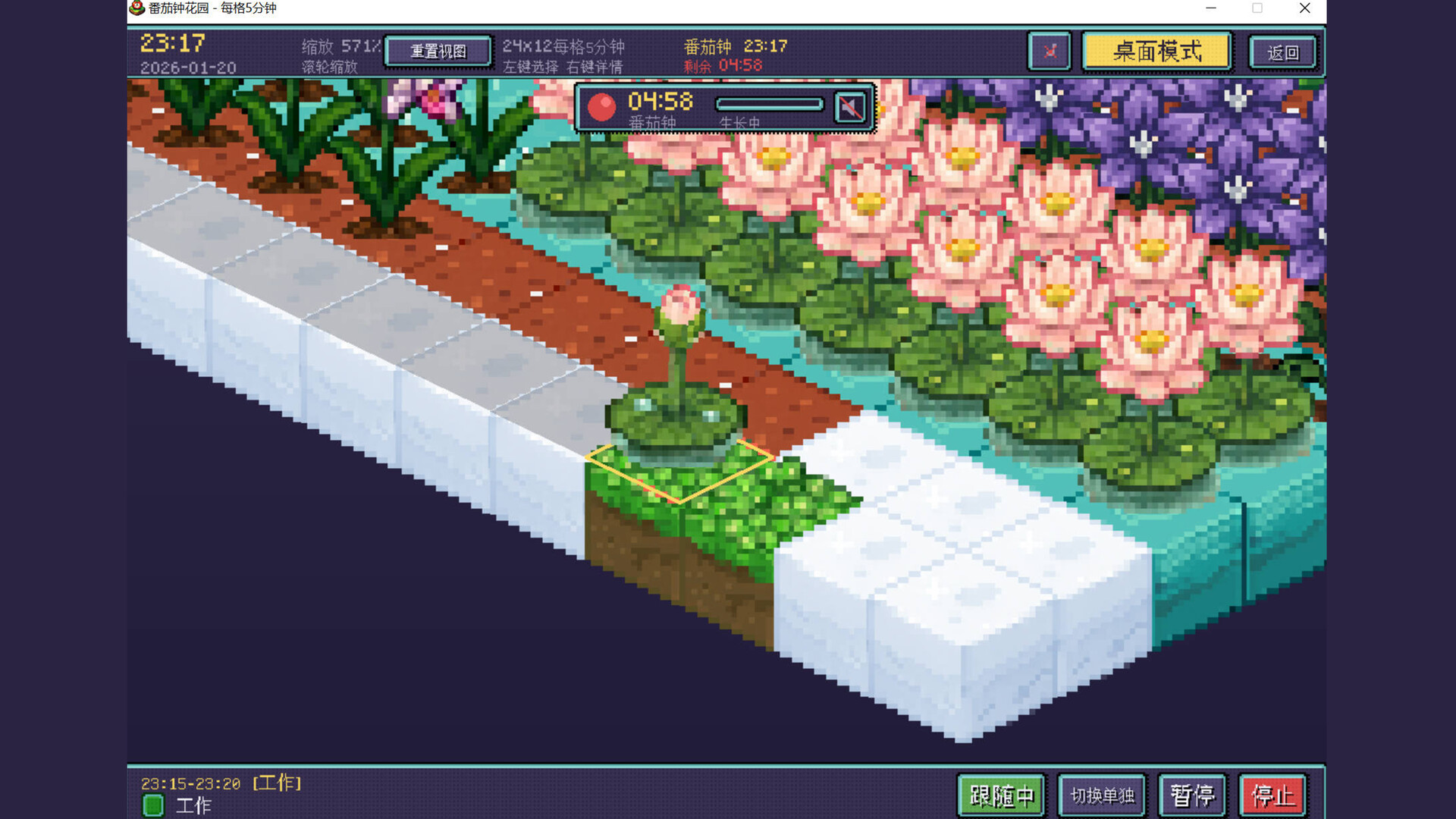
Life Garden turns focus time and daily check-ins into a living isometric pixel garden. Start a Pomodoro session and watch your plant grow upward in real time; keep your habits and records to unlock new flowers that bloom over days.

Zaloguj się, aby dodać tę pozycję do listy życzeń, zacząć ją obserwować lub oznaczyć jako ignorowaną

Polski język nie jest obsługiwany

Ten produkt nie obsługuje twojego lokalnego języka. Przed zakupem zapoznaj się z listą obsługiwanych języków, która znajduje się poniżej.

Kup Life Garden


O tej grze

"Life Garden" turns focus into visible growth. Start a Pomodoro-style session and your plant grows upward as the minutes pass; keep showing up and your garden fills with flowers that gradually bloom over time. It’s a calm companion—not a strict productivity tool—designed to make consistency feel warm and rewarding.

### Your daily loop (how you play)

1. **Start focusing (Pomodoro rhythm)**: start, pause, and end focus and break sessions whenever you need.

2. **See progress in real time**: growth is reflected directly in the garden through clear stage changes and blossoms.

3. **Daily check-ins & habits**: record your day, maintain streaks, and unlock more flower types.

4. **Review records & stats**: check your start date, total days, streaks, and dive into detailed entries.

5. **Stay in flow with Desktop Widget Mode**: keep the garden on your desktop so you don’t have to switch screens to feel progress.

### A deeper look at the systems

**1) Focus timer: simple controls, steady rhythm**

Pomodoro Garden keeps timer controls minimal so you can stay in flow: start, pause, resume, and end sessions cleanly, with the garden handling the “reward loop”.

**2) Garden growth: progress you can see**

Your main plant evolves through distinct stages. Instead of only numbers and charts, the garden itself becomes your progress bar—subtle, visual, and satisfying over weeks of use.

**3) Check-ins & flower collection: small rewards for consistency**

Daily check-ins unlock and display new flowers in your garden. Hover planted flowers to view their details and where they came from in your records.

**4) Records & calendar: understand your streaks**

Review key stats at a glance (start date, total days, streaks), then open details when you want a deeper look at your history.

**5) Desktop Widget Mode: a quiet companion**

Keep the garden on your desktop as a lightweight widget so you can study, write, or code without constantly switching windows—your progress stays present, not disruptive.

**6) Built-in study music player: button-driven mini player**

Inside the Records/Habits screens, a compact button-based player lets you play, switch tracks, and mute without leaving the game—designed for a clean, focused atmosphere.

### Key features (summary)

- Pomodoro focus timer with start/pause/end for focus & breaks

- Clear plant stage progression and blooming flowers as visual feedback

- Daily check-ins, flower collection, and hover-to-view details

- Records & stats: start date, total days, streaks, and detailed entries

- Desktop Widget Mode for always-on companion-style focus

- Built-in study music player with button controls (play/next/mute)

Wymagania systemowe

    Konfiguracja minimalna:
    • Wymaga 64-bitowego procesora i systemu operacyjnego
    • System operacyjny *: Windows 7/8/10/11 (64位)
    • Procesor: Intel Core i3 或 AMD同等级处理器
    • Pamięć: 2 GB RAM
    • Karta graficzna: 支持OpenGL 3.3的显卡
    • DirectX: Wersja 5.2
    • Sieć: Szerokopasmowe połączenie internetowe
    • Miejsce na dysku: 2 GB dostępnej przestrzeni
    • Karta dźwiękowa: DirectX兼容声卡
    Konfiguracja zalecana:
    • Wymaga 64-bitowego procesora i systemu operacyjnego
* Począwszy od 1 stycznia 2024, klient Steam będzie obsługiwał wyłącznie system Windows 10 i jego nowsze wersje.

Recenzje klientów dla produktu Life Garden O recenzjach użytkowników Twoje preferencje

Ogólne recenzje:
Brak recenzji użytkowników


Aby zobaczyć recenzje w wybranym zakresie dat, kliknij i przeciągnij zaznaczenie na powyższym wykresie lub kliknij na wybrany słupek.


Filtruj recenzje według czasu gry użytkownika w momencie publikacji recenzji:


Bez minimum do Bez maksimum

Pokaż recenzje w wybranej kolejności wyświetlania


Dowiedz się więcej
Filtry
Wyłączanie okresów występowania recenzji nie na temat
Czas gry:
Głównie Steam Deck
Brak recenzji pasujących do filtrów ustawionych powyżej
Dostosuj filtry powyżej, by zobaczyć inne recenzje
Wczytywanie recenzji…