Education With this simulator, maritime students can practice Radar sailing and the use of ARPA at home on their own PC. It is assumed that the user is familiar with Radar and Plotting to find other vessels' course and speed, and ARPA theory.

Bu öğeyi istek listenize eklemek, takip etmek veya yok sayıldı olarak işaretlemek için giriş yapın

Türkçe desteklenmemektedir

Bu ürün sizin dilinizi desteklememektedir. Lütfen satın almadan önce aşağıdaki desteklenen diller listesini gözden geçirin.

Arpa Radar Simulator Satın Alın


Bu Yazılım Hakkında

ARPA RADAR SIMULATOR
With this simulator, maritime students can practice Radar sailing and the use of ARPA (Automatic Radar Plotting Aid) at home on their own PC. It is assumed that the user is familiar with Radar and Plotting to find other vessels' course and speed, and interpretation of data provided by the ARPA system.

RADAR
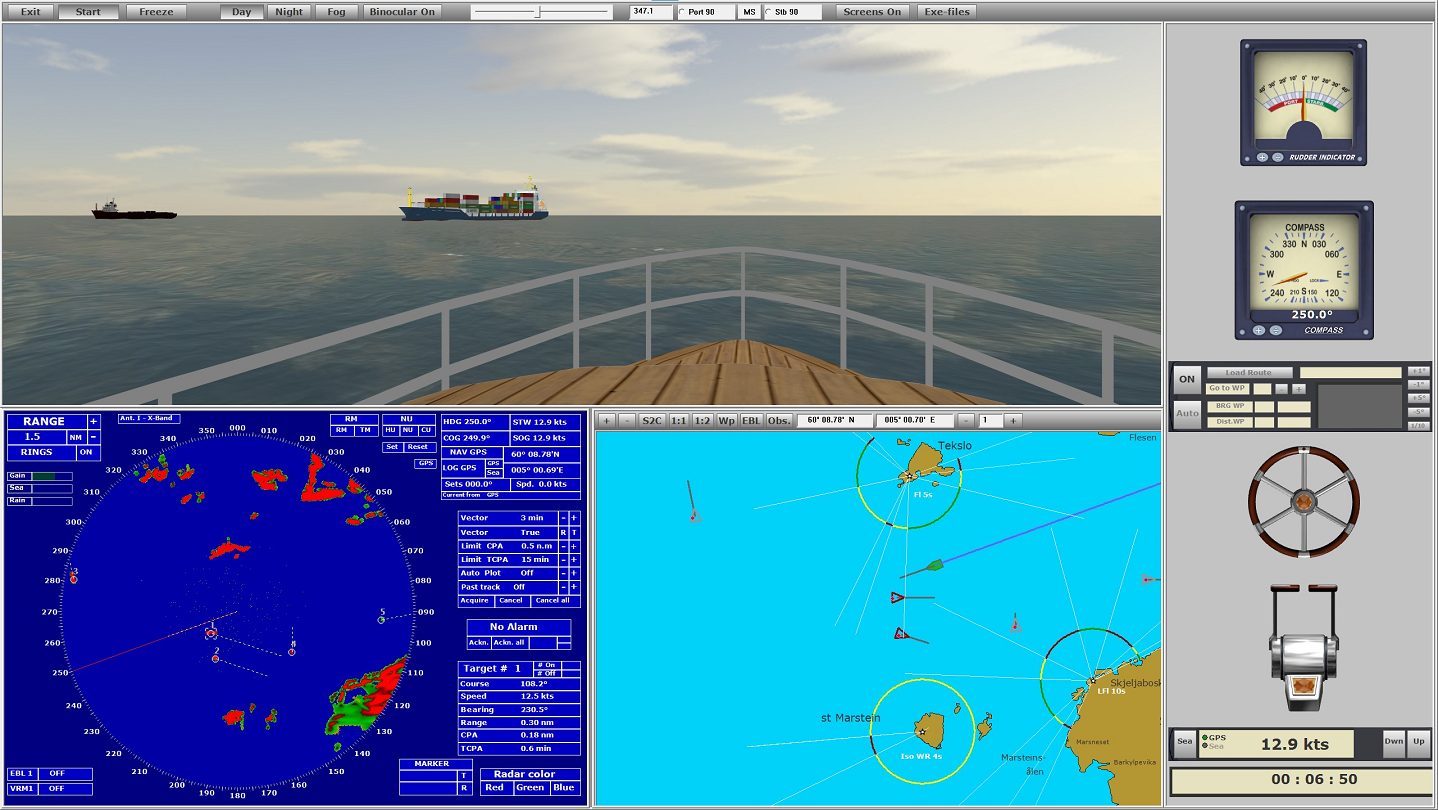
The program simulates a rotating antenna that emits pulses and receives echoes of these pulses if they hits reflective objects in the surroundings the antenna is aimed at. Be it land, boats, buoys etc. Your own boat sails in a 3D map terrain. This means that the radar image becomes very realistic - with radar shadow and effects that varying reflected signal strength produces. The surroundings are displayed in a separate window. Thus, you see what is normal from the wheelhouse of a boat, and you can see the connection between the radar image and the surroundings.

ARPA (Automatic Radar Plotting Aid)
The built-in ARPA module makes it possible to target objects that appear in the radar image in real time - so that the course and speed of these objects can be calculated. This information is displayed as vectors and associated numerical values is displayed in a separate window on the radar screen. This information is particularly important to avoid collisions when sailing in poor visibility and in areas with heavy traffic. The ARPA system assigns each object, which one chooses to target, a search area. This search area follows the object and calculates course and speed and assigns the object a vector that shows the course in direction and the speed in length selected number of minutes. The course can be chosen to be true or relative. You can select an object and see further information that is important. It can be CPA, TCPA, distance and bearing. One can choose to target objects manually or automatically (by placing a visible sector on the screen). If an object comes within set limit values (danger of collision), an alarm is given. Also when new objects enters the sector of automatic target tracking. The same if the target tracking system loses echo of what observed. One can also experience that an object loses its vector to another object that passes close, and which has a stronger echo than its own.

THE SIMULATOR
The program is a simplified navigation simulator modeled after that used in maritime schools. With separate windows for Radar, Map, Steering Console and view from the wheelhouse. You can choose to use 1, 2 or 3 screens. The main emphasis is on Radar and ARPA, but you can sail visually and navigate by beacons, buoys and stakes. One can choose whether it should be day, night or fog. At night one sees light from beacons and buoys with characteristics which corresponds to what is shown on the map for the area in which one is sailing. As you can see, this is a good aid to practice and gain experience with using radar and ARPA.

Sistem Gereksinimleri

    Minimum:
    • 64-bit işlemci ve işletim sistemi gerektirir
    • İşletim Sistemi *: Windows 7 or newer (64 bits)
    • İşlemci: Intel, AMD - Quad core 3 GHz
    • Bellek: 16 MB RAM
    • Ekran Kartı: Monitor-> NVIDIA 660
    • DirectX: Sürüm 11
    • Depolama: 4 GB kullanılabilir alan
    Önerilen:
    • 64-bit işlemci ve işletim sistemi gerektirir
* Steam istemcisi, 1 Ocak 2024'ten itibaren yalnızca Windows 10 ve üstünü destekleyecektir.

ARPA radar Simulator için müşteri incelemeleri Kullanıcı incelemeleri hakkında Tercihleriniz

Toplam İnceleme:
5 kullanıcı incelemesi (5 inceleme)


Belirli bir tarih aralığındaki incelemeleri görebilmek için lütfen yukarıdaki grafikten istediğiniz tarih aralığını sürükleyerek seçin veya bir çubuğa tıklayın.


İncelemeleri, oyuncuların inceleme gönderdiği tarihteki oynama sürelerine göre filtrele:


Minimum yok - Maksimum yok

İncelemeleri seçili görüntüleme sırasına göre göster


Daha Fazlasını Öğrenin
Filtreler
Konu Dışı İnceleme Etkinliği Dahil Edilmiyor
Oynama Süresi:
Çoğunlukla Steam Deck'te Oynayanlar
İşletim Sistemi:
İşlemci:
Ekran Kartı:
Aygıt Türü:
Yukarıdaki seçili filtreler ile eşleşen başka inceleme bulunmuyor
Diğer incelemeleri görmek için yukarıdaki filtreyi ayarlayın
İncelemeler yükleniyor...