Education With this simulator, maritime students can practice Radar sailing and the use of ARPA at home on their own PC. It is assumed that the user is familiar with Radar and Plotting to find other vessels' course and speed, and ARPA theory.

Inicie a sessão para adicionar este item à sua lista de desejos, segui-lo ou ignorá-lo

Indisponível em Português (Brasil)

Este produto não está disponível no seu idioma. Confira a lista de idiomas oferecidos antes de comprar.

Comprar Arpa Radar Simulator


Sobre este software

ARPA RADAR SIMULATOR
With this simulator, maritime students can practice Radar sailing and the use of ARPA (Automatic Radar Plotting Aid) at home on their own PC. It is assumed that the user is familiar with Radar and Plotting to find other vessels' course and speed, and interpretation of data provided by the ARPA system.

RADAR
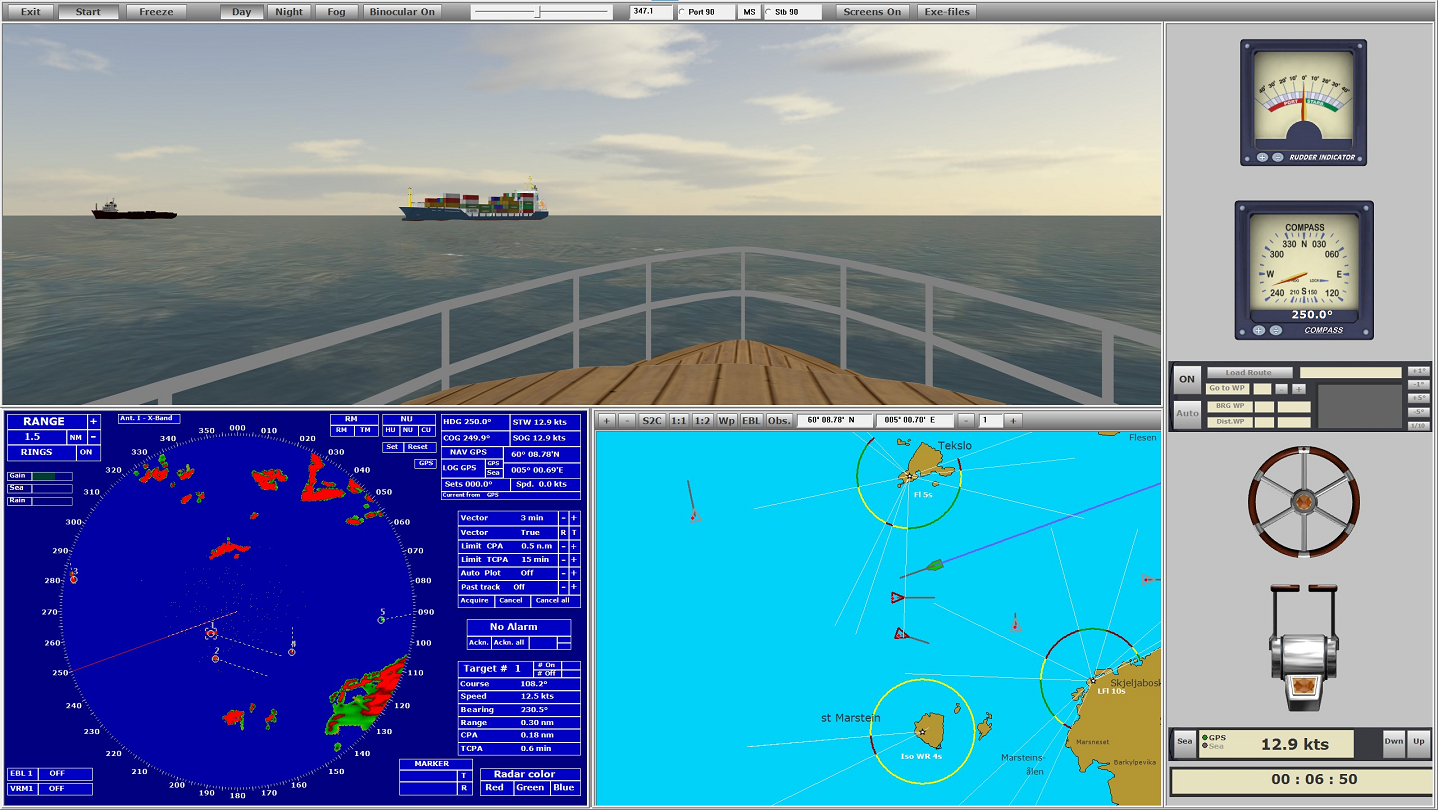
The program simulates a rotating antenna that emits pulses and receives echoes of these pulses if they hits reflective objects in the surroundings the antenna is aimed at. Be it land, boats, buoys etc. Your own boat sails in a 3D map terrain. This means that the radar image becomes very realistic - with radar shadow and effects that varying reflected signal strength produces. The surroundings are displayed in a separate window. Thus, you see what is normal from the wheelhouse of a boat, and you can see the connection between the radar image and the surroundings.

ARPA (Automatic Radar Plotting Aid)
The built-in ARPA module makes it possible to target objects that appear in the radar image in real time - so that the course and speed of these objects can be calculated. This information is displayed as vectors and associated numerical values is displayed in a separate window on the radar screen. This information is particularly important to avoid collisions when sailing in poor visibility and in areas with heavy traffic. The ARPA system assigns each object, which one chooses to target, a search area. This search area follows the object and calculates course and speed and assigns the object a vector that shows the course in direction and the speed in length selected number of minutes. The course can be chosen to be true or relative. You can select an object and see further information that is important. It can be CPA, TCPA, distance and bearing. One can choose to target objects manually or automatically (by placing a visible sector on the screen). If an object comes within set limit values (danger of collision), an alarm is given. Also when new objects enters the sector of automatic target tracking. The same if the target tracking system loses echo of what observed. One can also experience that an object loses its vector to another object that passes close, and which has a stronger echo than its own.

THE SIMULATOR
The program is a simplified navigation simulator modeled after that used in maritime schools. With separate windows for Radar, Map, Steering Console and view from the wheelhouse. You can choose to use 1, 2 or 3 screens. The main emphasis is on Radar and ARPA, but you can sail visually and navigate by beacons, buoys and stakes. One can choose whether it should be day, night or fog. At night one sees light from beacons and buoys with characteristics which corresponds to what is shown on the map for the area in which one is sailing. As you can see, this is a good aid to practice and gain experience with using radar and ARPA.

Requisitos de sistema

    Mínimos:
    • Requer um processador e sistema operacional de 64 bits
    • SO *: Windows 7 or newer (64 bits)
    • Processador: Intel, AMD - Quad core 3 GHz
    • Memória: 16 MB de RAM
    • Placa de vídeo: Monitor-> NVIDIA 660
    • DirectX: Versão 11
    • Armazenamento: 4 GB de espaço disponível
    Recomendados:
    • Requer um processador e sistema operacional de 64 bits
* A partir do dia 1º de janeiro de 2024, o cliente Steam será compatível apenas com o Windows 10 ou posterior.

Análises de usuários para ARPA radar Simulator Sobre as análises de usuários Suas preferências

Análises em geral:
6 análises de usuários (6 análises)


Para ver análises de um período específico, clique e arraste uma seleção no gráfico acima ou clique em uma barra específica.


Filtrar análises de acordo com o tempo de jogo do usuário no momento da publicação:


Sem mínimo até Sem máximo

Exibir as análises na ordem de exibição selecionada.


Saiba mais
Filtros
Ocultando atividade de análises fora de tópico
Tempo de jogo:
Jogado principalmente no Steam Deck
Sistema operacional:
Processador:
Placa de vídeo:
Tipo de dispositivo: