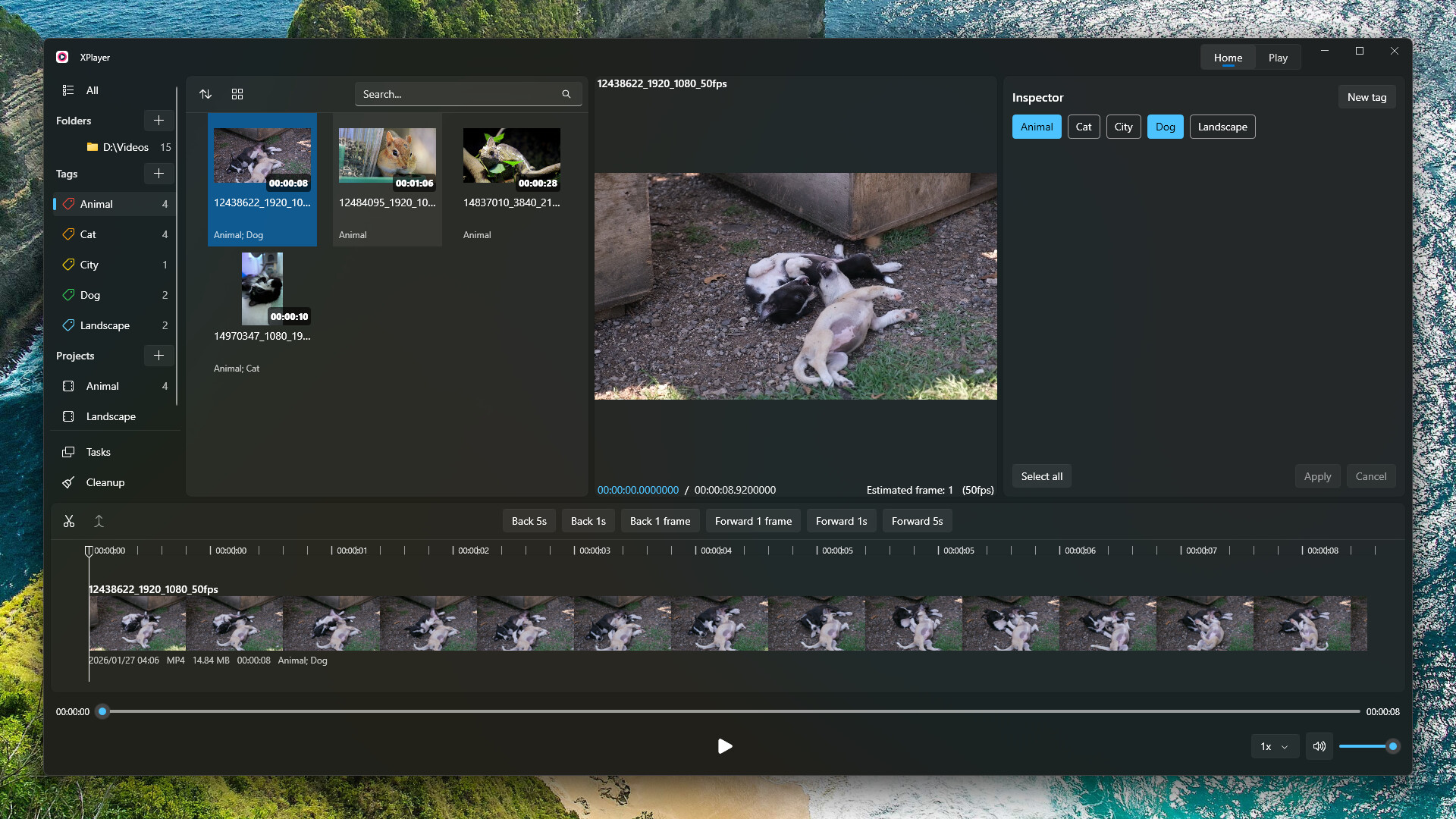
XPlayer allows you to intuitively browse your local videos, cut out your favorite clips, and add tags to them. You can switch to the playback view to watch your favorite clips, or export them as a single video file.
Дата выхода:
12 мая. 2024 г.
Разработчик:
Издатель:
По меткам

Войдите, чтобы добавить этот продукт в список желаемого или скрыть его

Загрузить XPlayer Demo

Купить XPlayer


Об этом ПО

XPlayer allows you to intuitively browse your local videos, cut out your favorite clips, and add tags to them. You can switch to the playback view to watch your favorite clips, or export them as a single video file.

Features

  • Native Windows application, Microsoft Fluent Design, Mica background, and system accent color support.

  • Video folder sync: add a folder and XPlayer will automatically sync all videos in it. Click the Sync button at any time to refresh.

  • One-button switch between Edit view and Playback view.

  • Fast video switching.

  • Hash-based local data storage: all data is associated with the video’s hash instead of the file path, so it won’t be lost after moving or renaming the file.

  • Export selected video clips as a single video file.

Системные требования

    Минимальные:
    • 64-разрядные процессор и операционная система
    • ОС: Windows 10 (64)
    • Процессор: Intel i5 8400, AMD Ryzen 5 2600
    • Оперативная память: 3 GB ОЗУ
    • Видеокарта: Intel UHD Graphics 630, NVIDIA GeForce GTX 1050 Ti, AMD Radeon RX 560
    • Место на диске: 300 MB
    Рекомендованные:
    • 64-разрядные процессор и операционная система
    • ОС: Windows 11 (64 bit)
    • Процессор: Intel i5 13600K, AMD Ryzen 7 7700X
    • Оперативная память: 3 GB ОЗУ
    • Видеокарта: Intel UHD Graphics 630, NVIDIA GeForce GTX 1050 Ti, AMD Radeon RX 560
    • Место на диске: 300 MB
У этого продукта нет обзоров

Вы можете написать обзор этого продукта, чтобы поделиться своим опытом с сообществом. Для этого воспользуйтесь разделом над кнопками покупки.