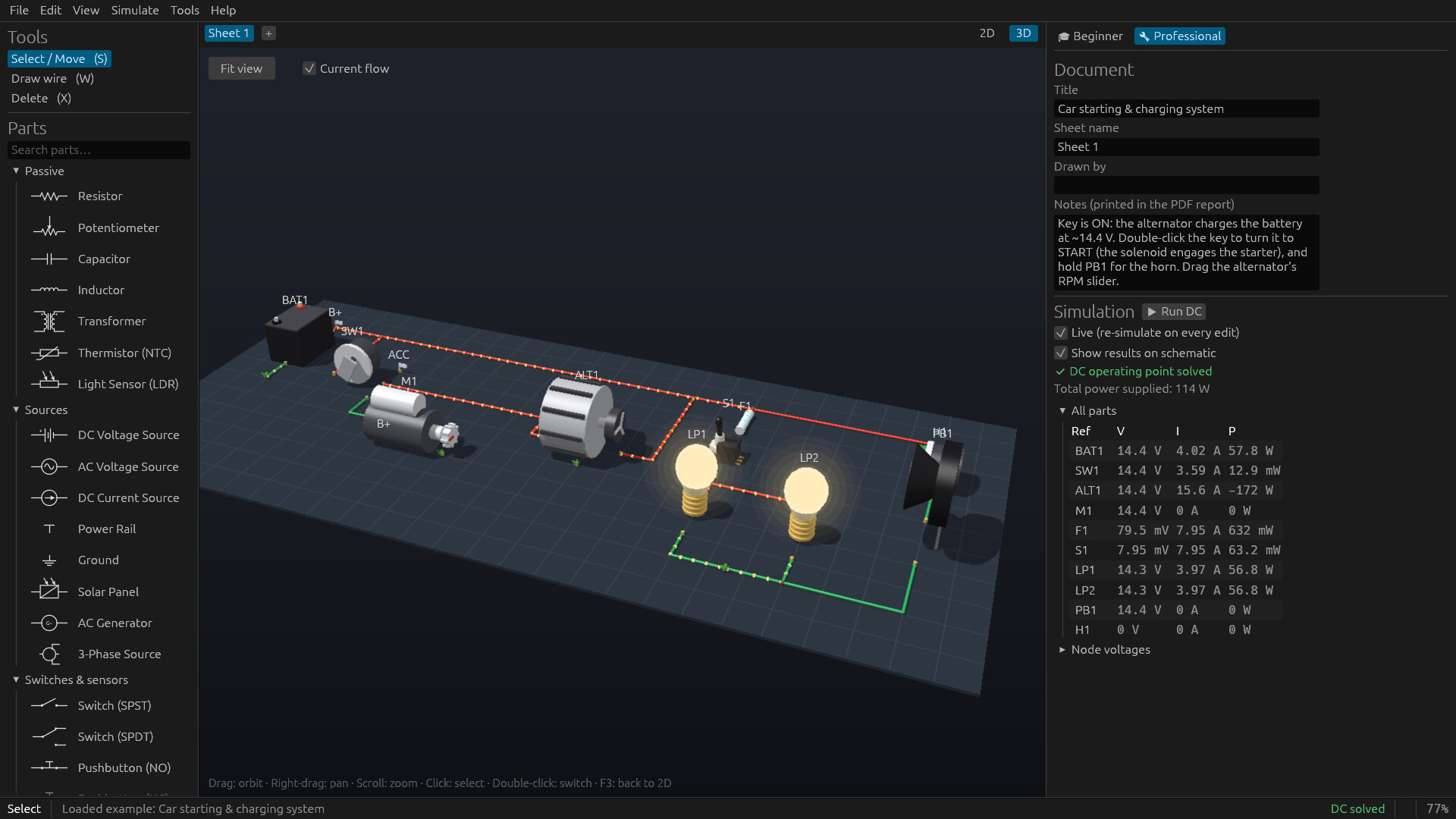
Draw an electrical circuit and watch it work. ElectricWorks simulates everything you wire, from a battery and a bulb to car electrics, home wiring and 3-phase motor starters, with real parts, real wire sizes and a 3D view where you can see the current flow.

Sign in to add this item to your wishlist, follow it, or mark it as ignored

This game is not yet available on Steam

Planned Release Date: To be announced

Interested?
Add to your wishlist and get notified when it becomes available.
 

About This Software

Electric Works is a schematic editor with a circuit simulator built in. Place parts, draw wires, and the circuit runs while you build it. Every wire shows its voltage and every part its current. Lamps glow, motors spin, and fuses and breakers trip when they should.

It's made for anyone who works with electricity: students learning Ohm's law, hobbyists wiring a car, camper or workshop, electricians planning a circuit, and engineers who want a quick answer they can trust.

  • 67 parts in 9 categories: resistors, capacitors, transistors and op-amps; switches, relays, contactors and timers; breakers, fuses, overloads and GFCIs; lamps, LEDs, heaters, motors, pumps and transformers; car batteries, alternators, starters and solar panels.

  • ANSI or IEC symbols, multiple sheets, net labels, notes, copy and paste.

  • Type values the way you write them: 4.7k, 4,7k or 4k7.

  • 16 ready-made examples, from a voltage divider to a car's starting and charging system and a 3-phase motor starter.

Parts behave like the real thing:

  • Breakers, fuses, overloads and GFCIs trip on their real time-current curves.

  • Light bulbs draw an inrush current when they're switched on cold.

  • Motors have back-EMF, slip, starting current and stall.

  • Transformers sag under load, and relay coils kick back when they're switched off.

  • Batteries charge and discharge, with the time to full and the time to empty.

  • Diodes, transistors and op-amps use datasheet models.

Simulate DC, AC steady state, transients (watch a motor start or a capacitor charge, millisecond by millisecond) and AC frequency sweeps. The results are cross-checked against ngspice, the reference open-source SPICE simulator, on every built-in example.

Press F3 and your circuit becomes a 3D scene: parts at their true relative size, cables coloured by voltage, and glowing beads that show the current flowing. Lamps light, motors spin, switches flip and breakers trip, live.

  • Real wires: give any wire a size (AWG or mm²), copper or aluminium, and a length. The simulation then includes its resistance, voltage drop and heat.

  • Electrical rule check: short circuits, wire ratings (NEC 310.16 and IEC 60364-5-52), voltage drop, interrupting ratings and part ratings.

  • Fault-current study: the prospective short-circuit current at every point, checked against each breaker's interrupting rating.

  • Schedules: load (panel) and wire schedules, and a bill of materials, exported as CSV.

  • PDF export on A4 or US Letter, with a title block and report pages.

  • SPICE export: a netlist that reproduces ElectricWorks' results in any SPICE program.

  • Beginner mode explains every part in plain words, updated live: why a lamp is dim, where the voltage went, how hard a wire is working.

  • Mistakes show up on the drawing: short circuits, overloaded wires and blown fuses are marked in red.

  • Calculators for Ohm's law, resistor colour codes, series and parallel, LED resistors and wire size.

  • Professional mode brings the numbers and the pro tools to the front when you're ready.

  • One small program (about 17 MB) for 64-bit Windows 10 and 11.

  • Works offline: no account, no subscription, nothing sent anywhere.

  • Your circuits are files you save wherever you like.

ElectricWorks is a design and learning tool. Always follow your local electrical code, and have mains wiring done or checked by a qualified electrician.

System Requirements

    Minimum:
    • Requires a 64-bit processor and operating system
    • OS: Windows 10 64-bit
    • Processor: 64-bit dual core, 2GHZ
    • Memory: 4096 MB RAM
    • Graphics: Any GPU with DirectX 12, Vulkan or OpenGL 3.3 support (Intel HD Graphics 4400 or newer)
    • Storage: 50 MB available space
    • Additional Notes: Mouse and keyboard. 1280×720 display or larger.
    Recommended:
    • Requires a 64-bit processor and operating system
    • OS: Windows 10 or 11 64-bit
    • Processor: Quad-core, 3 GHz (Intel Core i5-8400 / AMD Ryzen 5 2600 or better)
    • Memory: 8192 MB RAM
    • Graphics: Any DirectX 12 compatible graphics card
    • DirectX: Version 12
    • Storage: 50 MB available space
    • Additional Notes: 1920×1080 display. The 3D view is rendered on the CPU using every core, so more cores give a smoother 3D view at high resolutions.
Review Filters