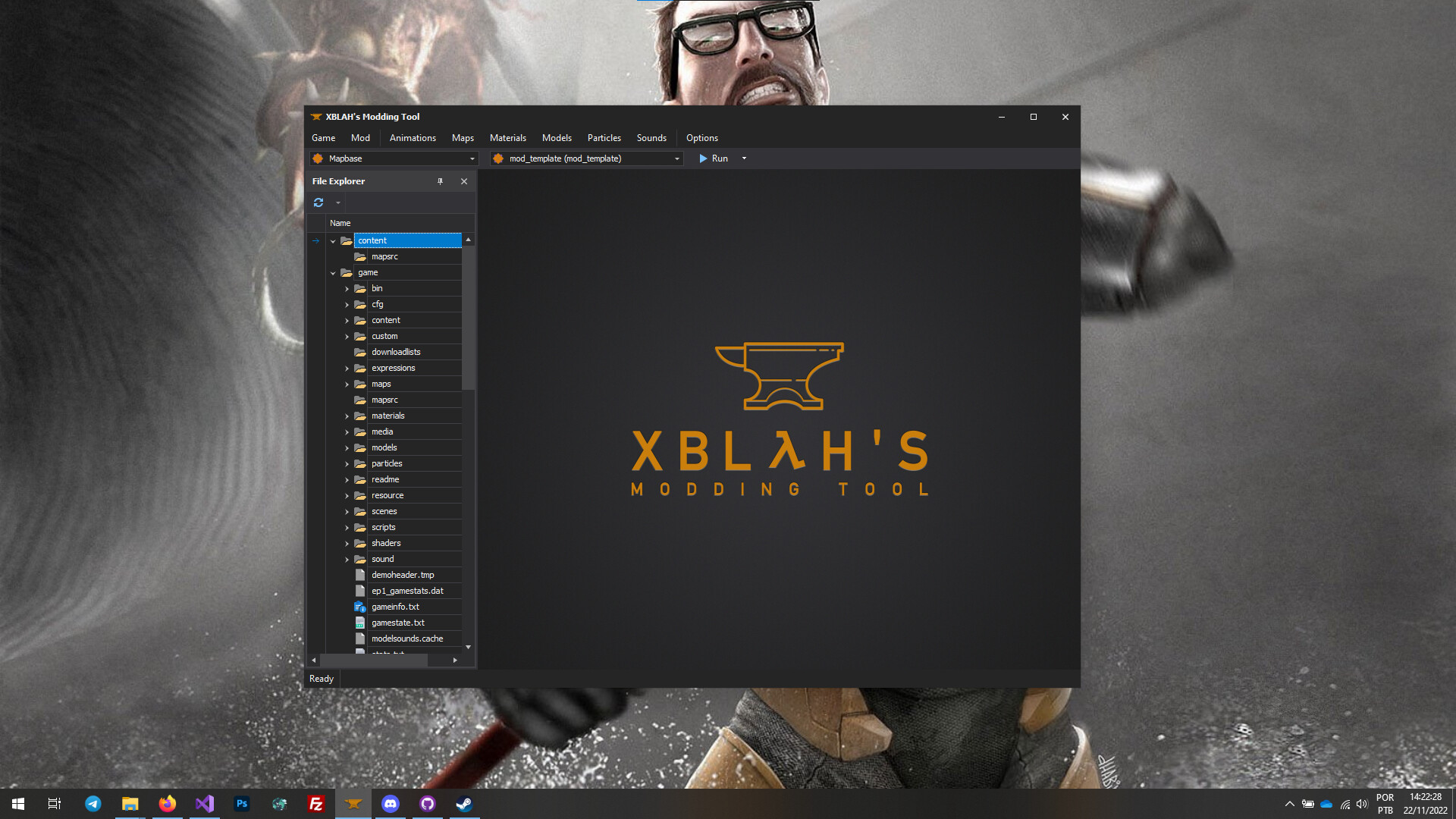
A fantastic tool for creating and running mods. it's an extremely useful tool for all mappers and modders for Goldsrc and Source that puts an emphasis on making several tasks easier and streamlined so that you spend less time with trial and error and more time finishing the project of your dreams.
출시일:
출시 예정
개발자:
배급사:
태그

로그인하셔서 게임을 찜 목록에 추가하거나, 팔로우하거나 또는 제외로 지정하세요.

한국어(을)를 지원하지 않습니다

이 제품은 귀하의 로컬 언어를 지원하지 않습니다. 구매하기 전에 아래에 있는 지원하는 언어 목록을 확인해주세요.

주의: XBLAH's Modding Tool 제품은 더 이상 Steam 상점에서 이용할 수 없습니다.
이 게임은 아직 Steam에 출시되지 않았습니다

출시 예정

관심이 있으신가요?
찜 목록에 추가하고 출시가 되면 알림을 받으세요.
 

소프트웨어 정보

XBLAH's Modding Tool was built to improve Valve games modders' productivity and quality of life.

A fantastic tool for creating and running mods. it's an extremely useful tool for all mappers and modders for Goldsrc and Source that puts an emphasis on making several tasks easier and streamlined so that you spend less time with trial and error and more time finishing the project of your dreams.

Automate the process of creating blank GoldSRC and Source mods. Easily create new chapters, with chapter images and chapter backgrounds, automatically install Hammer++, edit soundscapes, and much more. All of that in a single intuitive tool, with no scripting knowledge required. Create your mod, launch hammer, and that's it.

General features

  • List all the Source and Goldsrc games and mods, play them and edit them.

Modding features

  • Create a mod based on Goldsrc, Source 1 or Source 2 (Alpha) games.
  • Create a mod based on Mapbase with Thexa4's PBR support.
  • Run mods from any game in fullscreen, windowed or VR mode (Source 2) directly from the tool.
  • Create custom launch presets.
  • Link to the mod install folder.
  • Clean the mod folder for release.
  • Edit the game info.
  • Edit the chapters and create images and backgrounds for them. (Source 1)
  • Choose the starting map and the training map (Goldsrc)
  • Edit the game menu. (Goldsrc and Source 1)
  • Manage the content mounted. (Source 1)
  • Explore all the mounted files. (Source 1)
  • Explore the files in the mod folder. (Goldsrc and Source 2)
  • Copy only the assets used by a VMF to a /custom/ folder. (Source 1 - Beta)
  • Delete mods.
  • Automatically installs Mapbase. (Source 1)

Level Design features

  • Run maps directly from the BSP/VPK.
  • Run Jack with auto-generated configuration (Goldsrc)
  • Run Hammer++ with auto-generated configuration. (Source 1)
  • Run Hammer++ with auto-generated configuration for Mapbase.
  • Decompile maps. (Goldsrc and Source 1)
  • Generate buildings procedurally (Source 1)

Modeling features

  • Link to HLMV. (Goldsrc and Source 1)
  • Run Hammer++ with auto-generated configuration for Propper. (Source 1)
  • Convert VMF to MDL using Propper. (Source 1)
  • Link to Crowbar. (Source 1)

Material Design features

  • Create UnlitGeneric, VertexLitGeneric and LightmappedGeneric materials. (Source 1)
  • Create Skyboxes and preview them (Goldsrc and Source 1)
  • Get the ideal colors for light_environments and env_fog_controllers (Goldsrc and Source 1)
  • Materials saved under materials/models will automatically have the parameter 'model 1'

Particles features

  • Auto-generate a particle manifest based on what's used in a VMF. (Source 1)

Animations features

  • Run Faceposer with auto-generated configuration and fixed icons. (Source 1)

Sounds features

  • Create and preview soundscapes (Source 1)
  • Auto-generate a soundscape manifest based on what's mounted in the mod. (Source 1)

시스템 요구 사항

    최소:
    • 운영 체제 *: Windows 7 SP1
    • 프로세서: 1.7 Ghz
    • 메모리: 512 MB RAM
    • DirectX: 버전 9.0
    • 저장 공간: 1 GB 사용 가능 공간
* 2024년 1월 1일부터 Steam 클라이언트는 Windows 10 이상 버전만 지원합니다.
이 제품에는 아직 평가가 없습니다.

이 제품의 평가를 직접 써서 자신의 경험을 커뮤니티와 공유할 수 있습니다. 구매 버튼 위의 기입란을 이용하여 자신만의 평가를 써 보세요.