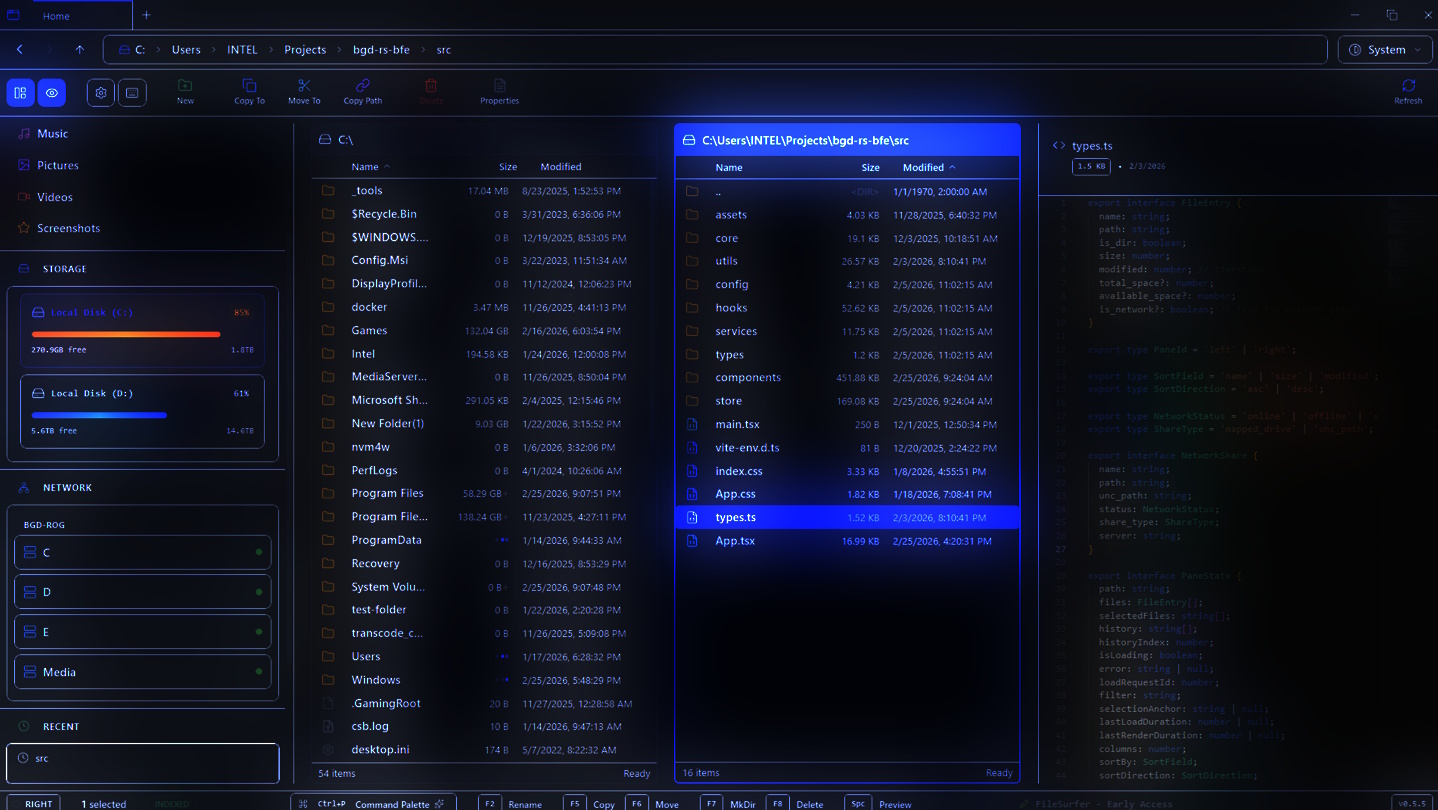
File Surfer is a next-generation file explorer for Windows 10/11, designed to be ultra-lightweight, insanely fast, and feature-rich. It combines the efficiency of dual-pane file managers with a modern, beautiful user experience.

Jelentkezz be, hogy ezt a tételt a kívánságlistádhoz adhasd, követhesd vagy mellőzöttnek jelölhesd.

Korai hozzáférésű szoftver

Légy részese e szoftver fejlődésének.

Megjegyzés: Ez a korai hozzáférésű szoftver nincs készen, és vagy változik a továbbiakban, vagy nem. Ha nem izgat a szoftver használata a jelenlegi állapotában, érdemes lehet várni, míg fejlesztése előrehaladottabbá válik. Tudj meg többet.

Mit mondanak a fejlesztők:

Miért a Korai Hozzáférés?

„File Surfer is built for power users who demand more from their file explorer. That means your feedback is critical. By launching in Early Access, we can put a fast, functional, and feature-rich file explorer directly into your hands while we continue to polish, optimize, and add advanced features. We believe the best file management tool is one shaped by the people who use it every day. Early Access lets us iterate quickly, fix real-world edge cases, and prioritize features based on what matters most to our users, not assumptions.

Körülbelül mennyi ideig lesz ez a szoftver a Korai Hozzáférésben?

„We estimate File Surfer will be in Early Access for approximately 6 to 12 months. Our core functionality: dual-pane navigation, keyboard-centric workflow, file previews, native Windows integration, and custom keybindings. The product is already solid and usable daily. The remaining work focuses on advanced features (plugin support, tabs, cloud drives), further performance tuning on edge-case hardware, and incorporating community feedback into the final release.”

A tervek szerint miben fog különbözni a teljes verzió a korai hozzáférésűtől?

„What we're aiming for in the full version of File Surfer:

- Enhanced Tabbed browsing — open multiple directories in tabs within each pane.
- Plugin/extension system — let users and third parties extend functionality (custom columns, actions, integrations).
- Cloud drive integration — browse OneDrive, Google Drive, and Dropbox alongside local files.
- Advanced batch operations — multi-rename, batch file processing, and queue-based operations.
- Refined theming — more built-in themes and full theme customization (colors, fonts, layouts).
- Localization — multi-language support.
- Comprehensive documentation and onboarding — interactive tutorials and a built-in help system.

The Early Access version already offers a fully usable dual-pane file explorer with keyboard navigation, customizable keybindings, file previews (images, video, audio, code, PDF, markdown), command palette, native Windows context menus, breadcrumb navigation, bookmarks, and persistent settings. You can use it as your daily driver right now.

Milyen állapotban van jelenleg a korai hozzáférésű verzió?

„ File Surfer is stable and usable for daily use as of v0.5.8. Here's what works today:

- Dual-pane file management — split view with resizable panes, copy/move between panes.
- Keyboard-first navigation — fully customizable keybindings with context-aware dispatch.
- Command palette — search files across your entire system with progressive search tiers (local → Windows Search API → filesystem walk). Supports type filters (`type:png`), scope filters (`deep:`, `favorites:`), and more.
- QuickLook-style file previews — images (with zoom/pan), video, audio, code (Monaco editor with syntax highlighting), PDF, and Markdown.
- Native Windows integration — real Windows context menus, Windows Search indexing, drive detection, and thumbnail generation.
- High-performance rendering — virtualized lists handle 10,000+ file directories smoothly. Streaming architecture prevents UI freezing.
- Breadcrumb navigation — clickable path segments with inline editing and autocomplete.
- Bookmarks and persistent settings — theme, keybindings, and bookmarks persist across sessions.
- Network drive support — browse mapped drives and UNC paths.
Known limitations: no tabbed browsing yet, no plugin system, no cloud drive integration, admin-elevated operations require manual restart.”

Eltérően lesz árazva a szoftver a korai hozzáférés alatt és azt követően?

„Yes. During Early Access, File Surfer will be available at an introductory price that is lower than the planned full release price. As we add major features (tabs, plugin system, cloud integration), the price will increase to reflect the expanded feature set. Anyone who purchases during Early Access will receive the full version at no additional cost when it leaves Early Access.
We may also offer optional premium DLC in the future for specialized feature packs (e.g., advanced batch processing tools, premium theme packs, enterprise/team features). These will always be optional add-ons, so the core file explorer experience remains complete without them.

Hogyan tervezitek bevonni a közösséget a fejlesztés folyamatába?

„- Steam Community Hub — we actively monitor discussions, bug reports, and feature requests. Your posts directly influence our development priorities.
- Public roadmap — our planned features and their status are visible so you always know what's coming next.
- Rapid iteration — we push updates frequently (typically bi-weekly) based on user feedback. Every update includes patch notes detailing what changed and why.
- Direct developer engagement — we respond to feedback personally. If you report a bug, you'll hear back from us with a timeline.
- Beta branches — for major updates, we'll offer opt-in beta branches on Steam so adventurous users can test new features before they go live.
Tovább
A Magyar nyelv nem támogatott.

Ez a termék nem támogatja a nálad beállított nyelvet. Kérjük, vásárlás előtt tekintsd át a támogatott nyelvek listáját.

Ez a játék még nem érhető el a Steamen

Hamarosan

Érdekel?
Add a kívánságlistádhoz, és értesítést kapsz, amikor elérhetővé válik.
 
Összes téma megnézése

Jelents hibákat és adj visszajelzést erről a szoftverről az üzenőfalon.

A szoftverről

  • FileSurfer is a revolutionary file explorer designed specifically for Windows 10 and 11, reimagining how you interact with your files, folders, and drives. Built from the ground up with cutting-edge technology, FileSurfer combines the legendary efficiency of classic dual-pane file managers; with a sleek, modern interface that feels right at home in today's Windows ecosystem. Whether you're a power user managing massive directories, a developer navigating complex project structures, or a casual user seeking a faster, more intuitive way to browse files, FileSurfer delivers an experience that's lightning-fast, keyboard-centric, and incredibly lightweight.

    Why Choose FileSurfer?

    In a world of bloated file explorers that slow down your system and drain resources, FileSurfer stands out as the ultimate lightweight alternative. Powered by Tauri v2 -> a modern framework that blends the performance of Rust with the flexibility of web technologies. FileSurfer achieves instant startup times, zero lag during navigation, and a tiny footprint that barely registers on your system's resources. No more waiting for directories to load or dealing with unresponsive interfaces. FileSurfer is engineered for speed, reliability, and efficiency, making file management feel effortless and enjoyable.

    Key Features That Set It Apart

    - Dual-Pane Mastery: Experience the classic split-view layout that lets you compare, copy, move, and organize files between two panes simultaneously. Resize panes on the fly, switch focus with a single keystroke, and manage your workflow like a pro: perfect for batch operations, file comparisons, and advanced organization tasks.
    - Keyboard-First Navigation: Optimized for power users who live by the keyboard. Navigate directories, select files, and execute commands with intuitive shortcuts inspired by legendary file managers. Customizable keybindings let you tailor the experience to your workflow, while context-aware dispatch ensures shortcuts work seamlessly across different UI elements (like the command palette or file previews). Say goodbye to mouse-heavy interfaces! FileSurfer lets you fly through your files with precision and speed.
    - Native Windows Integration: Harness the full power of Windows with native context menus, indexed search, and drive detection. Right-click files for authentic Windows menus, search your entire system using Windows Search API for blazing-fast results, and get real-time updates on drive status. Thumbnail generation and caching ensure quick previews of images, videos, and documents without compromising performance.
    - QuickLook-Style File Previews: Get instant, high-quality previews of files without opening them. View images with zoom and pan controls, play media files with professional playback support, read PDFs inline, and even preview code with syntax highlighting. The preview system stabilizes during searches and filters, preventing interruptions and maintaining a smooth experience even in large directories.
    - High-Performance Rendering: Handle directories with thousands of files without breaking a sweat. Virtualized lists ensure smooth scrolling and instant rendering, while streaming architecture loads files in chunks to prevent UI freezing. Thumbnail caching with an LRU (Least Recently Used) system keeps frequently accessed previews ready, and background processing pauses during scroll for optimal responsiveness.
    - Advanced Search and Filtering: Progressive search tiers let you find files instantly. From quick local searches to deep system-wide queries. Type-to-filter narrows down results in real-time, with smart stabilization that keeps previews intact. Integrated with Windows' indexed search for comprehensive, fast results across drives and network locations.
    - Media Playback and More: Professional media support for videos, audio, and images, with controls that rival dedicated players. Preview Markdown files, code files with Monaco Editor integration, and folders with size displays. Drag-and-drop support, bookmarks for favorite locations, and persistent settings ensure your workflow stays consistent across sessions.
    - Robust State Management and Customization: Built with Zustand for lightning-fast state updates, FileSurfer remembers your preferences, tab layouts, and custom keymaps. Themes, toast notifications, and modal dialogs keep you informed without cluttering the interface. The focus management system ensures accessibility and keyboard navigation work flawlessly.
    - Developer-Friendly Under the Hood: Open-source and extensible, FileSurfer uses React 19 with TypeScript for a maintainable frontend, Vite for rapid development, and Tailwind CSS for beautiful, responsive styling. The Rust backend leverages Windows APIs for native performance, with async commands and file watching for real-time updates. Comprehensive testing with Vitest ensures stability, and the modular architecture makes it easy to extend with new features.

    Performance and Compatibility

    FileSurfer is designed for modern Windows systems, supporting Windows 10 and 11 with minimal hardware requirements. Its tiny binary size means quick downloads and installations, while the streaming file loading and virtualized rendering handle even the largest directories without performance degradation. Whether you're on a high-end workstation or a modest laptop, FileSurfer runs smoothly, consuming far fewer resources than traditional file explorers.

    Perfect for Every User

    - Casual Users: Discover a faster, more intuitive way to browse photos, documents, and downloads with beautiful previews and easy navigation.
    - Power Users: Master advanced file operations with dual panes, custom shortcuts, and native Windows integration.
    - Developers: Navigate project folders, preview code, and manage builds with tools built for productivity.
    - Professionals: Handle large media libraries, network drives, and enterprise file systems with confidence.

    Get Started Today

    Download FileSurfer now and transform the way you manage files on Windows. Experience the future of file exploration: lightweight, fast, and feature-packed. Available exclusively for Windows 10/11, with free updates and a commitment to privacy (no data collection, just pure file management). Join the growing community of users who have discovered that file management can be both powerful and painless.

    FileSurfer – Where Speed Meets Simplicity.

Rendszerkövetelmények

    Minimum:
    • 64 bites processzor és operációs rendszer szükséges
    • Op. rendszer: Windows 10/ 11
    • Processzor: 1.5 GHz
    • Memória: 128 MB RAM
    • Grafika: OpenGL 2.1+ Support, and recommended dedicated graphics card with 128 MB of RAM
    • Tárhely: 10 MB szabad hely
    • Egyéb megjegyzések: Works with APUs
    Ajánlott:
    • 64 bites processzor és operációs rendszer szükséges
    • Op. rendszer: Windows 10/ 11
    • Processzor: 2.0 GHz
    • Memória: 512 MB RAM
    • Grafika: OpenGL 2.1+ Support, and recommended dedicated graphics card with 512 MB of RAM
    • Tárhely: 100 MB szabad hely
Ehhez a termékhez nincsenek értékelések.

Írhatsz saját értékelést ehhez a termékhez, hogy megoszd élményedet a közösséggel. Használd a vásárlás gomb feletti részt ezen az oldalon értékelésed megírásához.

Szűrők áttekintése