Use your iPhone, Android, GearVR, Oculus, Vive Wave, Pico Mobile or Sony Playstation VR/VR2 headset as a Virtual Reality Headset for your PC. Lets you run SteamVR & Oculus Rift PC VR titles without a dedicated PC VR headset.

登入以將此項目新增至您的願望清單、關注它,或標記為已忽略


Demo

This is the DEMO ("Lite") version of the iVRy Driver for SteamVR with Mobile Device, Samsung GearVR or Oculus/Meta Go/Quest, Pico, Vive Wave and Apple Vision Pro headset support. It has all of the features of "Premium" edition, but will start to reduce color saturation after being connected for more than 5 minutes.

To remove this limitation when using the Android or iOS Mobile Device apps, upgrade to the "Premium" version via: 

iVRy Driver for SteamVR (Mobile Device Premium Edition)

To remove this limitation when using the Samsung GearVR, Oculus Go or Meta/Oculus Quest headset app installed from Steam, upgrade to the "GearVR/Oculus Premium" version via:

iVRy Driver for SteamVR (GearVR/Oculus Premium Edition)

To remove this limitation when using the Oculus Quest "Lite" app, installed from Oculus App Lab, upgrade to the "Premium" version via the Oculus App Store.

To remove this limitation when using the Pico headset app installed from Steam, upgrade to the "Pico Premium" version via:

iVRy Driver for SteamVR (Pico Premium Edition)

To remove this limitation when using the Vive Wave headset app installed from Steam, upgrade to the "Vive Wave Premium" version via:

iVRy Driver for SteamVR (Vive Wave Premium Edition)

To remove this limitation when using the Apple VisionPro headset app, upgrade to the "Apple Vision Pro Premium" version via:

iVRy Driver for SteamVR (Apple Vision Pro Premium Edition)

Android/iOS Mobile Device

In order to use the iVRy Driver for SteamVR for Android and iOS Mobile Devices, you will need to download the 'iVRy' app from your Mobile Device's app store OR for Android Mobile Devices from:

iVRy for SteamVR (Android/Daydream App Installer)

GearVR/Oculus Go/Oculus/Meta Quest

In order to use the iVRy Driver for SteamVR for Samsung GearVR or Oculus Go/Quest/Quest 2 headsets, you will need to install the iVRy GearVR/Oculus app from:

iVRy for SteamVR (GearVR/Oculus App Installer)

Pico G2/Neo2/Neo3/Pico4

In order to use the iVRy Driver for SteamVR for Pico headsets, you will need to install the iVRy Pico app from:

iVRy for SteamVR (Pico App Installer)

Vive Wave

In order to use the iVRy Driver for SteamVR for Vive Wave-compatible headsets, you will need to install the iVRy Vive Wave app from:

iVRy for SteamVR (Vive Wave App Installer)

Apple Vision Pro

In order to use the iVRy Driver for SteamVR for Apple Vision Pro headsets, you will need to install the iVRy app from the Apple App Store for Vision Pro. 

Sony PSVR/PSVR2

In order to use the iVRy Driver for SteamVR for Sony Playstation VR (PSVR), you will need to install the iVRy PSVR "Lite" or "Premium" DLC from:

iVRy Driver for SteamVR DEMO (PSVR Lite Edition)

iVRy Driver for SteamVR (PSVR Premium Edition)

In order to use the iVRy Driver for SteamVR for Sony Playstation VR2 (PSVR2), you will need to install the iVRy PSVR2 "Lite" or "Premium" DLC from:

iVRy Driver for SteamVR DEMO (PSVR2 Lite Edition)

iVRy Driver for SteamVR (PSVR2 Premium Edition)

SteamVR

To use the iVRy Driver for SteamVR, you MUST first install SteamVR from the Steam Store:

SteamVR

Before you start

IMPORTANT:

When using the iVRy Driver for SteamVR for the first time, it MUST be started from the "Launch" button, to ensure any additional services and drivers it requires get installed.

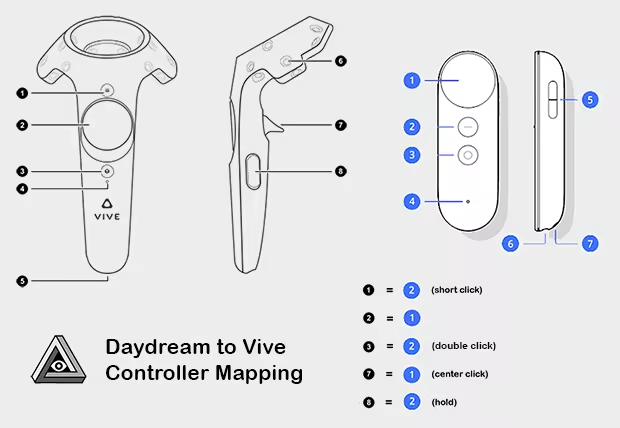
Daydream Controller Mapping

When using the Daydream (Android) version of the iVRy app, with a Daydream controller, the following button mappings will be used:

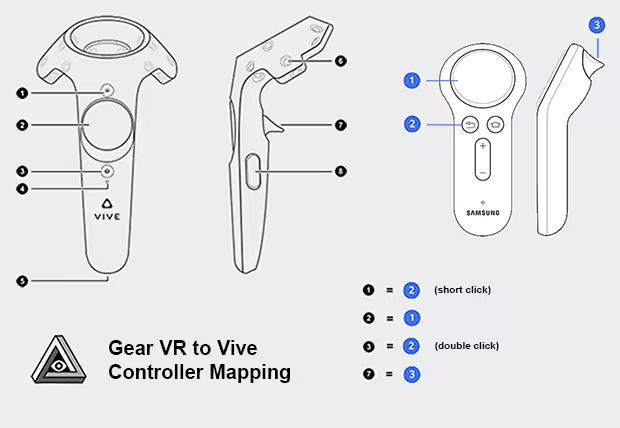
GearVR/Oculus Go Controller Mapping

When using the GearVR or Oculus Go version of the iVRy app, with a GearVR/Oculus Go controller, the following button mappings will be used:

關於此軟體

What is iVRy?

• iVRy is an app for your Mobile Device, Samsung GearVR or Oculus/Meta Go/Quest headset, Pico, Vive Wave, or Apple Vision Pro headset with a Virtual Reality headset driver for SteamVR. The Virtual Reality headset driver for SteamVR also includes Sony Playstation VR/VR2 headset support.

What does that mean?

• Want to play PC VR* (Virtual Reality) titles without having to buy a dedicated VR headset?

• With iVRy, a compatible iOS or Android Mobile Device and VR headset you can!

• Also supports GearVR/Oculus Go/Quest, Lenovo Mirage Solo, Pico, Vive Wave, Apple Vision Pro, and Sony Playstation VR/VR2 headsets.

• Supports Wired (USB) connections for greater visual quality and performance.

• Supports Wireless (Wifi) connections for greater mobility.

• Automatically adjusts quality to maintain optimal frame rates on all connection types.

• User configurable quality and performance options.

• User configurable vignette options.

• Use your VR headset manufacturer's Cardboard QR code for optimal lens distortion correction and field-of-view.

• Integrates with SteamVR, so no 'manager' / 'server' apps or additional configuration required.

• Includes SteamVR Dashboard overlay, to change driver settings in VR.

• Built-in support for NoloVR 6DOF tracking and motion controllers.

• Compatible with most HTC Vive and Oculus Rift** titles.

• This edition has all of the features of the Mobile Device "Premium" edition, but will start to reduce color saturation after being connected for more than 5 minutes. Upgrade to "Premium" edition via Steam DLC or In-App Purchase to remove this limitation.

* Valve OpenVR/SteamVR. Requires Valve Steam & SteamVR on Windows 7 or later.

** Oculus Rift titles require Valve SteamVR, Oculus Home & 3rd party 'LibreVR Revive' software.

系統需求

    最低配備:
    • 需要 64 位元的處理器及作業系統
    • 作業系統 *: Windows 7
    • 處理器: Intel® i5-4590 / AMD FX 8350 equivalent
    • 記憶體: 8 GB 記憶體
    • 顯示卡: NVIDIA GeForce® GTX 970 / AMD Radeon™ R9 290 equivalent
    • DirectX: 版本:11
    • 儲存空間: 40 MB 可用空間
    建議配備:
    • 需要 64 位元的處理器及作業系統
    • 作業系統: Windows 10
    • 處理器: Intel® i5-4590 / AMD FX 8350 equivalent or greater
    • 記憶體: 8 GB 記憶體
    • 顯示卡: NVIDIA GeForce® GTX 970 / AMD Radeon™ R9 290 equivalent or greater
    • DirectX: 版本:11
    • 儲存空間: 40 MB 可用空間
* 自 2024 年 1 月 1 日(PT)起,Steam 用戶端僅支援 Windows 10 及更新版本。

iVRy Driver for SteamVR 的顧客評論 關於使用者評論 您的偏好設定

整體評論:
褒貶不一 (430 篇評論)


如欲檢視特定日期範圍內的評論,請在上方圖表框選一段日期範圍,或點擊直條。


依照使用者撰寫評論當時的遊戲時數篩選:


不限最低時數不限最高時數

以所選顯示順序顯示評論


進一步了解
篩選條件
排除離題評論活動
遊戲時數:
主要在 Steam Deck 上遊玩
作業系統:
CPU:
GPU:
裝置類型: