A program in VR that lets you have as many virtual monitors as you want.

Inicie a sessão para adicionar este item à sua lista de desejos, segui-lo ou ignorá-lo

Software com acesso antecipado

Participe do desenvolvimento do software.

Observação: Este software com acesso antecipado não está completo e pode ou não sofrer alterações no futuro. Caso não esteja com vontade de usá-lo no estado atual, aconselhamos esperar até que o desenvolvimento esteja mais adiantado. Saiba mais

Aviso: a última atualização pelos desenvolvedores foi há mais de 9 anos. As informações e o cronograma descritos pelos desenvolvedores aqui podem estar desatualizados.
O que os desenvolvedores têm a dizer:

Por que acesso antecipado?

"Multiscreens has the basic functionality working so I wanted to get this out so everyone could start using it. It is not as polished as I'd like/is missing some features I would like to add (such as curved screens or moving windows with your mouse), but I figured the best way to do this would be to get community input so I can have a better idea of what things work or don't work."

Por quanto tempo aproximadamente este software estará em acesso antecipado?

"Until it is ready! More seriously, this depends on the number of features that we find essential for a unlimited virtual monitor program to have. Once I can get it to the point where someone can pick it up and say "this is exactly what I wanted" and have things intuitive enough that they can immediately use it."

Como a versão completa será diferente da versão de acesso antecipado?

"It will have curved screens (with an orbit type mode that lets you put screens around you), allow you to move screens with your mouse, and allow you to capture the desktop and almost any window. It will also feel very polished and be very easy to naturally pick up and use. More specifically, in terms of priority:

- Polish to make everything look cleaner and more usable.

- Making a desktop capture that allows you to see your entire desktop similar to other Virtual Monitor programs if you prefer to interact with it that way. This also allows capture of any window as long as it is in the foreground of your monitor, which is guaranteed if you are focused on it. The code here is working, there is just a small dll import error that prevents others from currently using it. Once this is fixed you should have capture mode working well.

- Minor text fixes

- Letting you drag windows around and focus on them with your mouse (instead of a keyboard or gamepad) since this is really the natural way to interact with them

- A "polar mode" - right now all of the screens are rectangular, in the future curved screens will be added and you'll be able to interact with them in a bubble around you if desired

- Various ways of making text more readable

- Vive and touch controller support so you can use them as mice/to drag around windows

- Allowing you to render a window at higher resolution than your current physical monitor (for things like HD videos).

Eventually I'd like to make it so you can share your screens with others over the internet, but this isn't a priority until the important features above are added and polished first alongside any needed bug fixes."

Qual é o estado atual da versão de acesso antecipado?

"You are able to capture most windows at a configurable frame rate (per window). As a baseline test, if you are using the min specs it can reliably capture 6 youtube videos steaming at the same time at a good FPS with minimal/no Judder.

You can move windows around in space (by "grabbing them" and looking around) and make them bigger or smaller. There is no input lag, and right click and other menus will appear as they typically would in a window.

Once you exit out of Multscreens and come back in the windows will "remember" where they were."

O preço do software será alterado após o fim do acesso antecipado?

"The price will go up slightly once we finish early access, however anyone that has purchased Multiscreens during early access will get all the additional features for free."

Como vocês planejam envolver a comunidade durante o processo de desenvolvimento?

"I'm putting this up now so I can get feedback! I think it's functional enough that people could find it useful as it is right now, and I'd like to make this the best product for people as I can, which involves getting their feedback about what is important/what works and what doesn't."
Leia mais
Indisponível em Português (Brasil)

Este produto não está disponível no seu idioma. Confira a lista de idiomas oferecidos antes de comprar.

Exclusivo para RV

Comprar Multiscreens

 
Ver todas as discussões

Relate bugs e deixe feedback sobre este software nos fóruns de discussão

Sobre este software

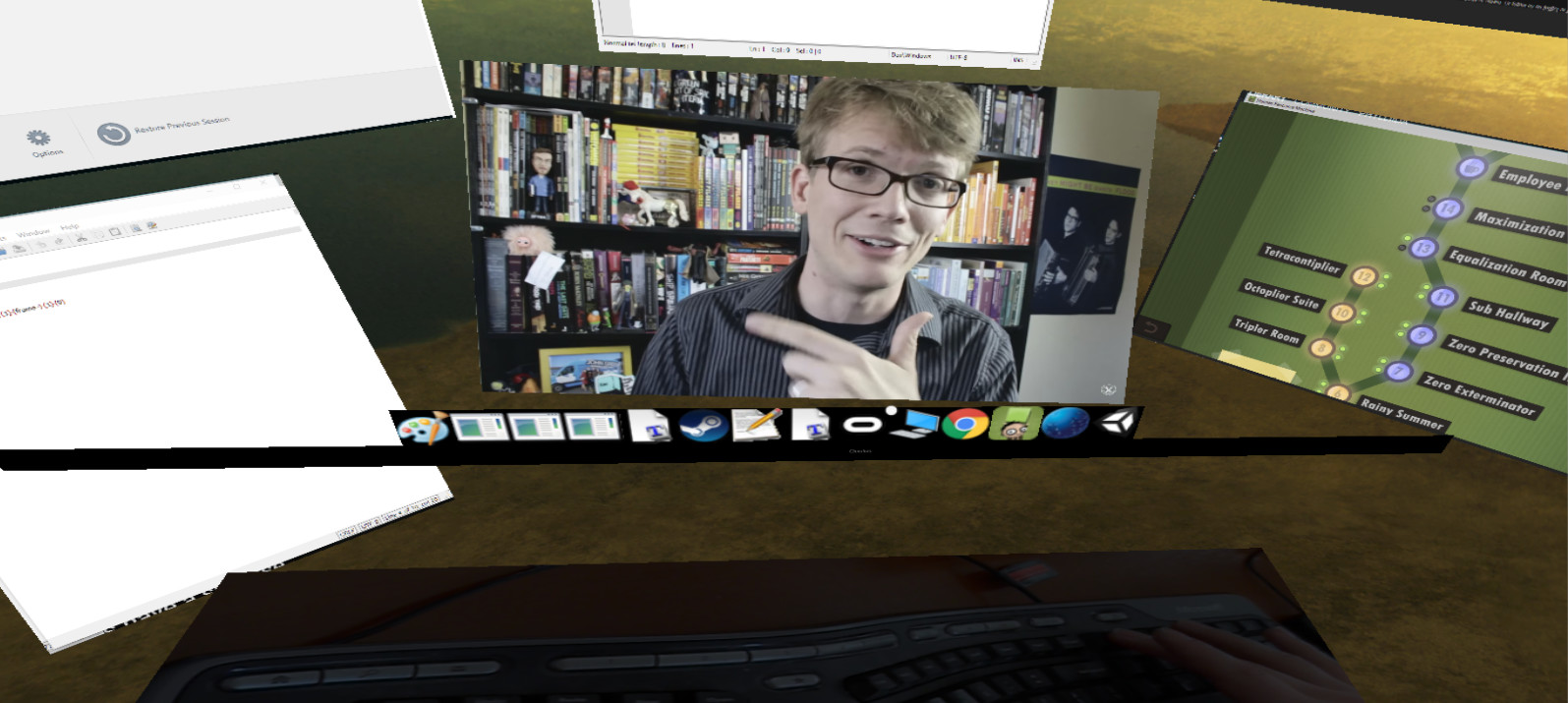
Multiscreens is a early-access program that lets you have as many screens as you want in VR. Specifically, each program is its own screen and can be moved around as desired.

Right now you can:

- Change the target framerate of each window captured
- Play multiple videos simultaneously (just make sure if you are in chrome to disable Hardware Acceleration in advanced settings) while playing a game
- Turn on supersampling
- Control everything with your mouse which leaves your keyboard and controller free for typical use (there is also a mouse sensitivity setting)
- Move windows freely in a 3D space around you and make them bigger or smaller as desired
- Capture right click menus and other context menus
- Capture the mouse on the currently active window
- No Headless Ghosts are required, this program works fine when you simply have a single physical monitor (or headless ghost) plugged in
- Minimize (hide) windows as desired
- Change focus between windows with a single click
- Use a webcam that's displayed below you to see your keyboard while in VR
- Multiscreens can technically capture every window, but some it can only capture while they are currently focused
- There is a "virtual taskbar" that allows you to bring up programs you have opened by clicking on their icons below
- You can change this Taskbar's position
- Reset view

Current limitations (in order of planned feature addition):

- Screens can't be curved yet
- You generally need to open windows before opening Multiscreens, it's difficult to start programs while in Multiscreens (I'm going to add a search bar to open any program you currently have installed and allow you to "pin" programs to your taskbar)
- Can't capture the entire desktop
- Vive controller support doesn't exist yet, everything is currently controlled with your mouse

Enjoy, and let me know what you think! I'm happy to listen to feedback and will try and make this the best product for all of you as possible :)

Requisitos de sistema

    Mínimos:
    • Requer um processador e sistema operacional de 64 bits
    • SO *: Windows 7, Windows 8.1, Windows 10
    • Processador: Intel i5-4590
    • Memória: 8 GB de RAM
    • Placa de vídeo: NVIDIA GTX 970 or AMD 290
    • DirectX: Versão 11
    • Armazenamento: 100 MB de espaço disponível
    • Compatibilidade com RV: SteamVR or Oculus PC. Keyboard or gamepad required
    Recomendados:
    • Requer um processador e sistema operacional de 64 bits
* A partir do dia 1º de janeiro de 2024, o cliente Steam será compatível apenas com o Windows 10 ou posterior.

Análises de usuários para Multiscreens Sobre as análises de usuários Suas preferências

Análises em geral:
Negativas (10 análises)


Para ver análises de um período específico, clique e arraste uma seleção no gráfico acima ou clique em uma barra específica.


Filtrar análises de acordo com o tempo de jogo do usuário no momento da publicação:


Sem mínimo até Sem máximo

Exibir as análises na ordem de exibição selecionada.


Saiba mais
Filtros
Ocultando atividade de análises fora de tópico
Tempo de jogo:
Jogado principalmente no Steam Deck
Não há mais análises que correspondam aos filtros selecionados acima
Ajuste os filtros acima para ver outras análises
Carregando análises...