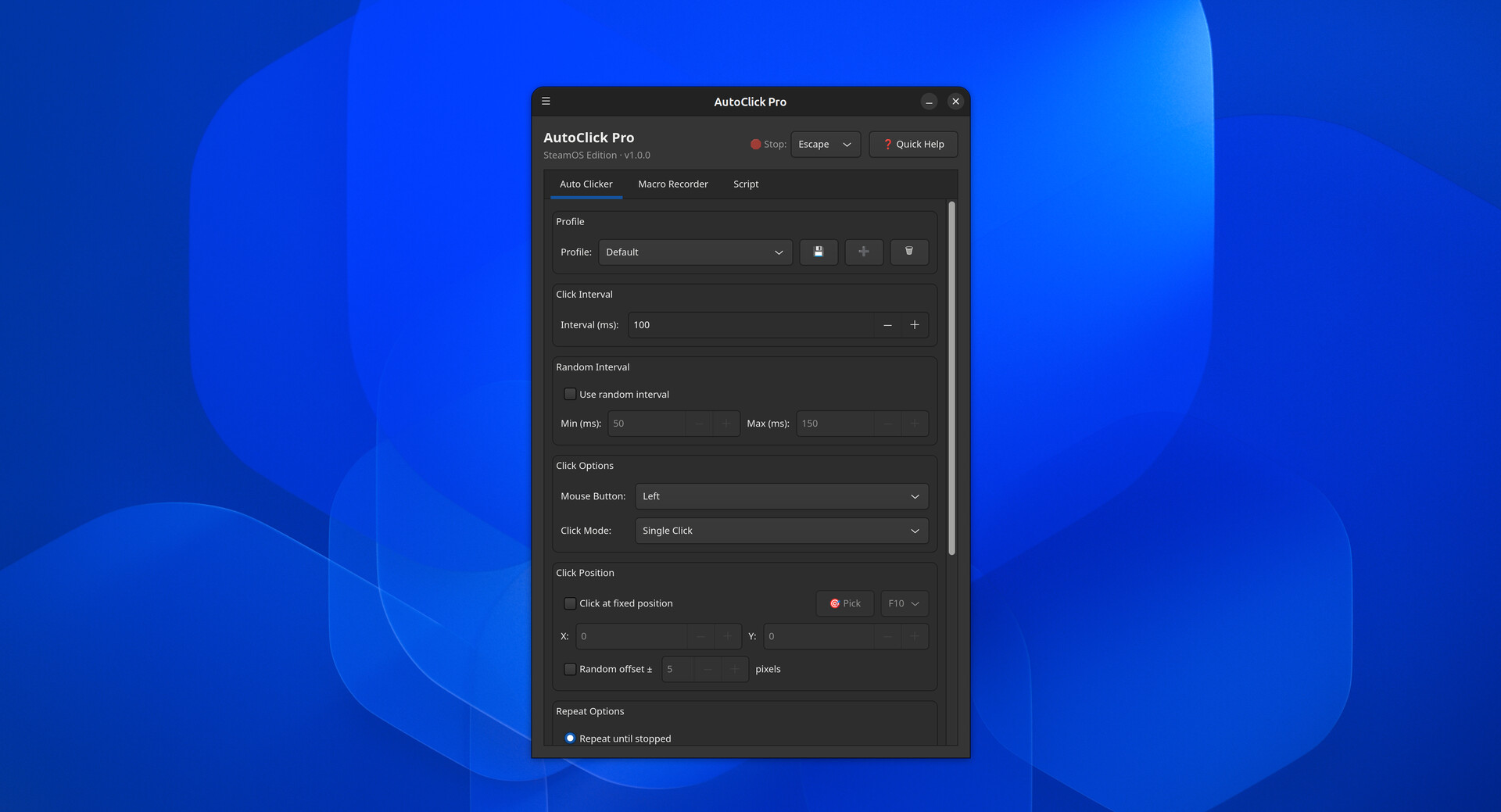
AutoClick Pro is a powerful auto clicker, macro recorder, and scripting tool for SteamOS and other Linux distros. Automate clicks, record mouse and keyboard sequences, and write custom scripts. Native X11 support with experimental Wayland.
Ngày phát hành:
30 Thg06, 2026
Nhà phát triển:
Nhà phát hành:
Theo nhãn

Đăng nhập để thêm sản phẩm này vào danh sách ước, theo dõi, hoặc đánh dấu nó thành "đã phớt lờ"

Không hỗ trợ ngôn ngữ Tiếng Việt

Sản phẩm này không hỗ trợ ngôn ngữ địa phương của bạn. Vui lòng xem lại danh sách ngôn ngữ được hỗ trợ dưới đây trước khi mua.

Trò chơi này chưa có trên Steam

Ngày dự kiến phát hành: 30 Thg06, 2026

Ứng dụng này sẽ được mở khóa sau khoảng 2 tuần

Bạn quan tâm?
Hãy thêm trò chơi vào danh sách ước và nhận thông báo khi nó ra mắt trên Steam.
 

Về phần mềm này

AutoClick Pro is a powerful desktop automation tool built natively for SteamOS and other Linux distributions. Whether you need to automate repetitive clicks, record complex mouse and keyboard sequences, or write custom automation scripts, AutoClick Pro has you covered.

Key Features:

Precision Auto Clicker: Set click intervals from 1 millisecond to 60 seconds. Choose left, right, or middle mouse buttons. Add random intervals and pixel offsets for natural-looking input. Fix click positions or let the cursor move freely.

Macro Recorder: Record your mouse movements, clicks, scrolls, and keyboard input with high precision. Play back recordings at adjustable speeds, loop them infinitely, and save unlimited macros to disk. Perfect for automating complex workflows.

Scripting Engine: Write powerful automation scripts using simple commands like keypress, click, moveto, wait, and more. Built-in command reference and examples make it easy to get started. Scripts support loops, conditionals, and precise timing control.

Click Position Picker: Pick any pixel on your screen with a hotkey. Click at fixed positions or add random pixel offsets to keep automation natural and avoid detection.

Global Hotkeys: Customizable global hotkeys to start, stop, record, and play back — works system-wide across all applications.

Profiles & Presets: Save unlimited profiles for clicker configurations, recorded macros, and scripts. Switch instantly with a dropdown menu.

Native Linux Support: Built with GTK4 for a modern, polished interface. Full X11 support with experimental Wayland compatibility. Works on SteamOS, Ubuntu, Fedora, Arch, and other modern Linux distributions. Supports GNOME, KDE Plasma, Sway, Hyprland, and more.

Why AutoClick Pro?

No ads, no telemetry, no cloud dependencies — everything runs locally

Lightweight and fast — minimal system requirements

Professional-grade features for power users

Simple enough for beginners, powerful enough for advanced automation

Whether you're automating repetitive tasks, testing workflows, or just need a reliable auto clicker, AutoClick Pro is the complete solution for Linux desktop automation.

Yêu cầu hệ thống

    Tối thiểu:
    • HĐH: SteamOS 3.0 / Ubuntu 22.04 / Any modern Linux distribution with X11 or Wayland
    • Bộ xử lý: Any modern x86_64 processor
    • Bộ nhớ: 256 MB RAM
    • Đồ họa: Any GPU with OpenGL 3.3+ support (for GTK4)
    • Lưu trữ: 100 MB chỗ trống khả dụng
    • Ghi chú thêm: For anything outside SteamOS X11 session recommended for full feature support. Wayland support is experimental. On Wayland, user must be in the input group for macro recording and global hotkeys.
    Khuyến nghị:
    • HĐH: SteamOS 3.0 / Ubuntu 24.04 / Fedora 40+
    • Bộ xử lý: Any modern x86_64 processor
    • Bộ nhớ: 512 MB RAM
    • Đồ họa: Any GPU with Vulkan support
    • Lưu trữ: 100 MB chỗ trống khả dụng
    • Ghi chú thêm: For anything outside SteamOS X11 session recommended for full feature support. Wayland support is experimental. On Wayland, user must be in the input group for macro recording and global hotkeys.
Chưa có đánh giá cho sản phẩm này

Bạn có thể chia sẻ trải nghiệm với cộng đồng bằng cách viết bài đánh giá của bản thân đối với sản phẩm. Sử dụng khu vực trên nút thanh toán thuộc trang này để viết đánh giá của mình.

Lọc bài đánh giá