Input4All - Hand / Face Controlled Virtual Gamepad
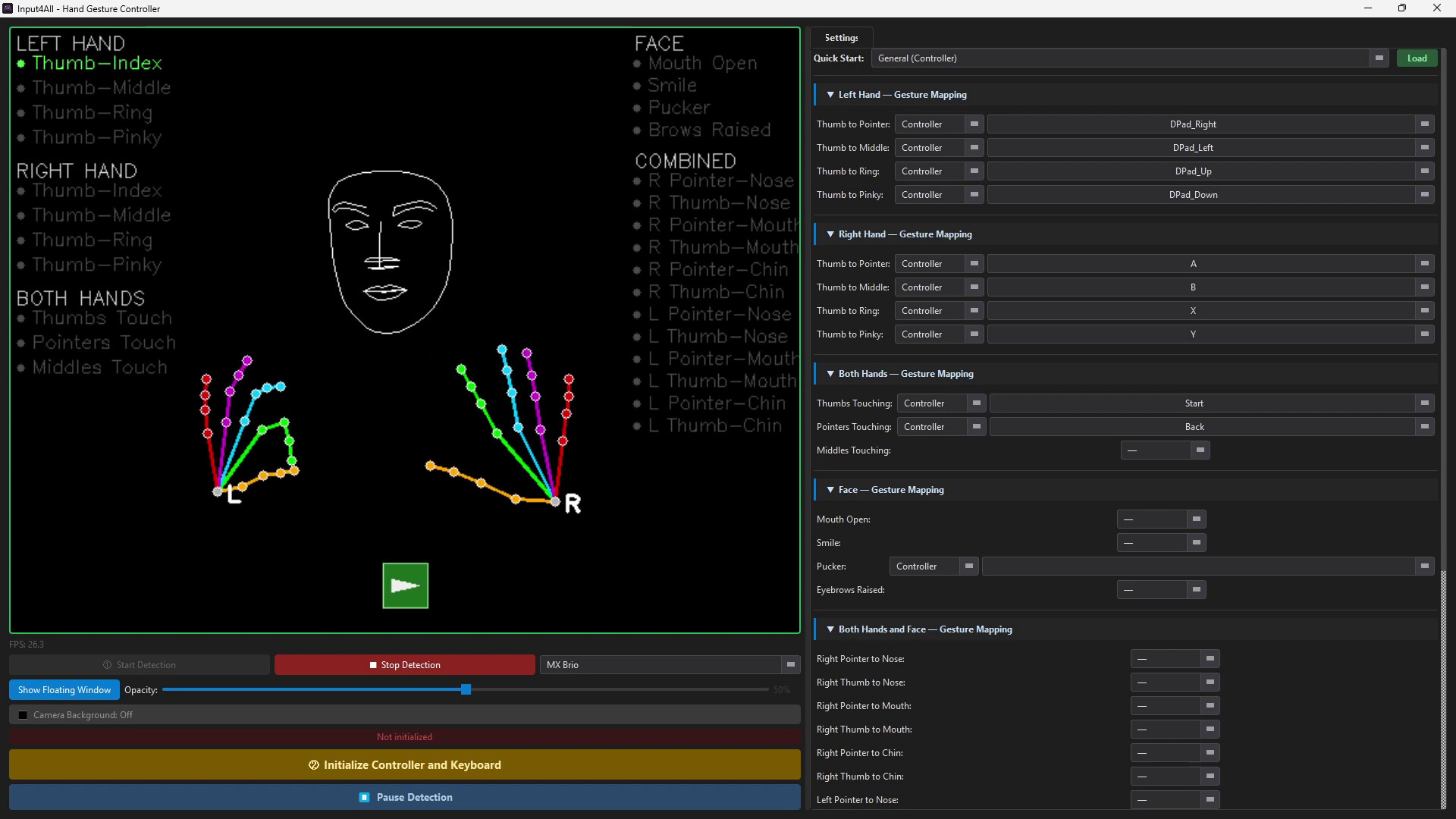
Turn hand gestures into controller buttons or keyboard inputs using any webcam. Load a built-in preset and start playing immediately, or map your own layout. A floating overlay tracks your active inputs over any game in real time.
Tarikh Keluaran:
Akan datang
Pembangun:
Penerbit:
Tag

Daftar masuk untuk menambah item ini ke senarai hajat anda, ikuti atau tandakannya sebagai diabaikan

Bahasa Bahasa Melayu tidak disokong

Produk ini tidak menyokong bahasa tempatan anda. Sila semak senarai bahasa yang disokong di bawah sebelum membuat pembelian

Permainan ini belum tersedia di Steam lagi

Akan datang

Berminat?
Tambah ke senarai hajat anda dan terima pemberitahuan apabila permainan sudah tersedia.
 

Tentang Perisian Ini

---

**The controller was always you.**

Input4All transforms your webcam into a powerful input device — turning hand gestures and facial expressions into real game controller outputs and keyboard strokes in real time. No special hardware. No gloves. No sensors. Just you and a camera.

---

**How It Works**

Point a USB webcam or your computer's built-in camera at yourself, map your gestures to the buttons or keys you want, and start playing. Input4All uses computer vision to track your hands and face live — detecting pinches, presses, and expressions and translating them into virtual controller inputs or keyboard commands that any game or application can read.

---

**Key Features**

🎮 **Virtual Controller Output** — Outputs a fully recognized Xbox controller via the ViGEm Bus Driver. Works with any game that supports a gamepad.

⌨️ **Keyboard Output** — Map gestures to any key or key combination. Works across any application.

✋ **Hand Gesture Detection** — Four pinch gestures per hand, tracked independently for left and right.

😮 **Face Gesture Detection** — Mouth open, smile, pucker, and eyebrows raised — each mappable to any action.

⚡ **Live Action Badges** — See exactly which button or key fires the moment a gesture is detected, overlaid directly on your camera feed.

🖥️ **Floating Overlay Window** — Keep a compact, resizable camera preview on top of your game at all times.

⏸️ **Instant Pause** — Suspend all output with one click, without closing anything.

📷 **Skeleton Mode** — Toggle the camera background off to show only your hand and face wireframe on a clean black canvas.

💾 **Profiles & Quick Start Presets** — Save and load custom mapping profiles. Built-in presets get you playing in seconds.

---

**Built For Everyone**

Input4All was designed with accessibility at its core. Whether you're a streamer looking to add a hands-free input layer, a player with limited hand or movement mobility looking for a more comfortable way to play, or someone working through physical rehabilitation who wants to make prescribed movements more engaging — Input4All meets you where you are.

---

**Requirements**

A USB webcam or built-in camera is required. The ViGEm Bus Driver is included in the installer and installed automatically for virtual controller support.

---

Keperluan Sistem

    Minimum:
    • Memerlukan pemproses 64-bit dan sistem pengendalian
    • OS: Windows 10 64-bit (version 1903 or later)
    • Pemproses: Intel Core i5 (6th Gen) / AMD Ryzen 5 1600 or equivalent quad-core 2.5 GHz+
    • Memori: 4000 MB RAM
    • Grafik: Any — integrated graphics supported
    • Storan: 500 MB ruang tersedia
    • Kad Bunyi: Not Required
    • Sokongan VR: Not Supported
    • Nota Tambahan: USB webcam or built-in camera required. ViGEm Bus Driver required for virtual controller output (installed automatically by setup).
    Dicadangkan:
    • Memerlukan pemproses 64-bit dan sistem pengendalian
    • OS: Windows 10/11 64-bit
    • Pemproses: Intel Core i7 (8th Gen+) / AMD Ryzen 5 3600 or equivalent — for stable 30fps detection with both hand and face tracking active simultaneously
    • Memori: 8000 MB RAM
    • Grafik: Any — integrated graphics supported
    • Storan: 500 MB ruang tersedia
    • Kad Bunyi: Not Required
    • Sokongan VR: Not Supported
    • Nota Tambahan: 1080p webcam recommended for improved gesture detection accuracy. Well-lit environment improves tracking reliability.
Tiada ulasan untuk produk ini

Anda boleh menulis ulasan anda untuk produk ini untuk berkongsi pengalaman anda dengan komuniti. Untuk menulis ulasan anda, gunakan kawasan di atas butang pembelian pada halaman ini.