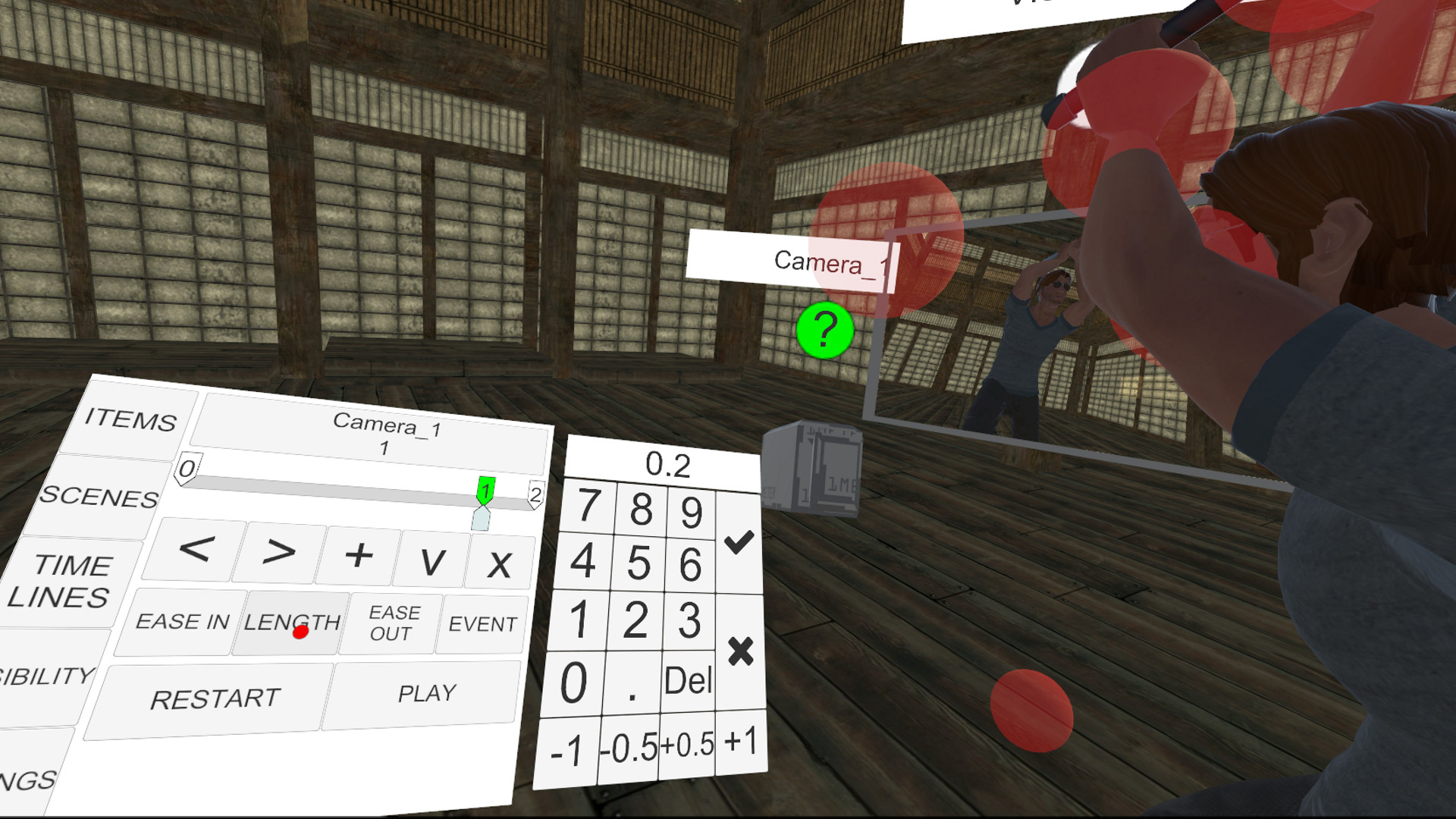
VIRUTAnimator is a fun and easy animation tool for VR. It allows anyone to easily create animated scenes by simply moving objects in virtual space with supported motion controllers. Share your animations, or get more objects to work with from the Steam Workshop!

Daftar masuk untuk menambah item ini ke senarai hajat anda, ikuti atau tandakannya sebagai diabaikan

Perisian Akses Awal

Libatkan diri dengan perisian ini seiring pembangunannya.

Nota: Perisian Akses Awal ini belum lengkap dan mungkin akan mengalami perubahan. Jika anda tidak tertarik untuk menggunakan perisian ini dalam versi semasanya, anda seharusnya menunggu untuk melihat jika ia akan terus dibangunkan. Ketahui lebih lanjut

Nota: Kemas kini terakhir oleh pembangun telah dibuat lebih 10 tahun yang lalu. Maklumat dan garis masa yang diterangkan oleh pembangun di sini mungkin bukan maklumat yang terkini.
Kata-kata daripada pembangun:

Kenapa Akses Awal?

“VIRTUAnimator is a VR-exclusive title. With VR being as new as it is, there are lots of things everyone is still figuring out about how to work in VR and how things like UI should work. Early Access allows the community to provide much-needed feedback on the current state of things, allowing me to polish the game up to it's necessary standards. It also let's me know what is needed, what features get used and why, as well as how to make it accessible to everyone.”

Berapa lama perisian ini dijangka akan berada dalam Akses Awal?

“VIRTUAnimator will remain in Early Access for roughly 6 months, depending on the changes and updates required.”

Apakah perbezaan yang dirancang antara versi penuh dan versi Akses Awal?

“The Early Access version is, for the most part, functionally complete. Just very rough. Some might even go so far as to say ugly. However, you can animate, save/load, render out image sequences, and make use of the Steam Workshop right now!

The Full Version will be the pretty version. All the features in the full version will have been added during the Early Access phase, and will be fully fleshed out and polished over the course. Such features will include mp4 export, keyframe blending/smoothing, and render effects control.”

Bagaimanakah keadaan semasa versi Akses Awal?

“VIRTUAnimator is, more-or-less, 'Functionally Complete'. That means most of the main features are in and working. You can load objects other's have created, animate them, save/load/share your animations, download items and scenes from the Steam Workshop, and more. The UI is not great, but it works.

Since entering Early Access, some major features have been added: DAE Export (export animations into a standard 3D format), Live Recording (record an object's motion in real time), and Pose Blending (smooth curved motion).”

Adakah harga perisian ini berbeza semasa dan selepas Akses Awal?

“The price will be raised after leaving Early Access.”

Bagaimana anda merancang untuk melibatkan Komuniti dalam proses pembangunan anda?

“Community feedback is necessary for improvement, so I'll be active in the Steam Forums/Community Hub to get all the feedback I can, in addition to hosting live development sessions, to get real-time feedback.

Specifically, I need to see just how people are using the app; what kind of things are being animated, uploaded, rendered, etc., and prioritize development around that.”
Baca lagi
Bahasa Bahasa Melayu tidak disokong

Produk ini tidak menyokong bahasa tempatan anda. Sila semak senarai bahasa yang disokong di bawah sebelum membuat pembelian

VR Sahaja

Gunakan VIRTUAnimator

Percuma
 
Lihat semua perbincangan

Laporkan pepijat dan tinggalkan maklum balas untuk perisian ini di papan perbincangan

Steam Workshop

VIRTUAnimator has Steam Workshop support, so you can share your own content!

Tentang Perisian Ini

VIRTUAnimator is a simple, easy-to-use animation tool, made for VR.

Load a scene, spawn some objects, then pose them - create keyframes, and watch it animate between each pose automatically. You can even render out your animation as an image sequence (and an MP4 file soon)!

If you're not too great at animation, you can still pose objects, characters, add particles and lights, and more, and render out cool stills or backgrounds!

With Steam Workshop support, you can even add your own content, whether that be weapons, props, characters, or even entire scenes!

With the addition of Live Recording, Pose Blending, and Collada DAE export, you can even use it as a quick-pose tool for your favorite 3D software!

Video tutorials:
Content Creation tutorial:

Keperluan Sistem

    Minimum:
    • OS *: Windows® 7 SP1, Windows 8.1 or later, Windows 10 (64 bit)
    • Pemproses: Intel® i5-4590/AMD FX 8350 equivalent or better
    • Memori: 4 GB RAM
    • Grafik: NVIDIA® GeForce® GTX 970, AMD Radeon™ R9 290 equivalent or better
    • Sokongan VR: SteamVR. Standing or Room Scale
    • Nota Tambahan: A VR-Ready rig is minimum recommended. You might be able to go lower, but you'll probably lose frames.
* Mulai 1 Januari 2024, Steam Client hanya akan menyokong Windows 10 dan versi yang lebih baharu.

Ulasan pelanggan untuk VIRTUAnimator Tentang ulasan pengguna Pilihan anda

Keseluruhan Ulasan:
Campur (16 ulasan)


Untuk melihat ulasan dalam sesuatu jangka masa tarikh, sila klik dan seret pilihan pada graf di atas atau klik pada bar tertentu.


Tapis ulasan mengikut masa bermain pengguna semasa ulasan ditulis:


Tiada minimum hingga Tiada maksimum

Tunjuk ulasan dalam susunan paparan yang dipilih


Ketahui Lebih Lanjut
Penapis
Tidak termasuk Aktiviti Ulasan di Luar Topik
Masa bermain:
Kerap Dimainkan di Steam Deck
Operating System:
CPU:
GPU:
Device Type:
Penapis Ulasan