Prevent OLED burn-in with adaptive overlays that track static pixels in real time. Works in borderless fullscreen games, multi-monitor setups, and lets you create custom protection presets for work, gaming, or media.
Date de parution :
avril 2026
Développement :
Édition :
Tags

Connectez-vous pour ajouter cet article à votre liste de souhaits, le suivre ou l'ignorer

Logiciel en accès anticipé

Impliquez-vous pendant le développement de ce logiciel.

Remarque : Ce logiciel en Accès anticipé peut changer ou ne pas changer de façon significative. Si vous n'êtes pas enthousiasmé à utiliser ce logiciel dans son état actuel, vous devriez peut-être attendre qu'il se développe davantage. En savoir plus

Ce que l'équipe de développement a à dire :

Pourquoi choisir l'accès anticipé ?

« OLED Guard Pro is a highly technical application that interacts with many different hardware configurations, monitors, GPU drivers, and software environments.

While the core protection system is already fully functional, releasing in Early Access allows us to test the software across a wider range of real-world setups and gather feedback from users with different OLED monitors, multi-monitor configurations, and gaming workflows.

Community feedback will help us improve compatibility, refine protection algorithms, expand customization options, and ensure the app works reliably across a wide variety of systems. »

Combien de temps environ ce logiciel sera-t-il en Accès anticipé ?

« We expect OLED Guard Pro to remain in Early Access for approximately 6 months, though the exact timeline may change depending on development progress and user feedback. »

En quoi la version finale sera-t-elle différente de la version en accès anticipé ?

« The Early Access version already contains the complete core protection system, including real-time burn-in analysis, adaptive overlays, multi-monitor support, and app profiles.

During Early Access we plan to continue improving the application by expanding features and polishing existing systems. Areas we may focus on include:

• additional overlay protection modes
• expanded monitor control capabilities
• more advanced statistics and analytics
• improved visualization and debugging tools
• additional customization options and presets
• broader monitor compatibility and stability improvements
• overall UI polish and usability improvements

The goal is to evolve OLED Guard Pro into the most advanced and reliable OLED protection tool available for PC users. »

Quel est l'état actuel de la version en accès anticipé ?

« The Early Access version already includes the core functionality of OLED Guard Pro and is fully usable for daily protection.

Current features include:

• real-time OLED burn-in detection and protection
• adaptive protection overlays
• multi-monitor support
• edge vignette protection
• application-based profiles
• customizable protection presets
• live statistics and monitoring
• monitor control via DDC/CI
• debug visualizations and heatmaps
• system tray integration and global hotkeys

The software is stable and functional, but Early Access allows us to continue refining performance, compatibility, and usability with the help of community feedback. »

Le logiciel sera-t-il tarifé différemment pendant et après l'Accès anticipé ?

« We plan to offer the application at a discounted price during Early Access as a thank-you to early supporters.

As development progresses and new features are added, the price may increase closer to full release.

Early Access supporters will receive the full version and all future updates included with their purchase. »

Comment comptez-vous impliquer la communauté dans le processus de développement ?

« Community feedback will play an important role during Early Access.

We plan to gather feedback from users regarding:

• hardware compatibility with different OLED monitors
• usability improvements and workflow suggestions
• feature requests and customization ideas
• performance tuning across different systems

Players will be able to share feedback through the Steam Community hub, discussions, and bug reports.

This feedback will help guide development priorities and ensure OLED Guard Pro evolves into a tool that meets the needs of real users with real OLED setups. »
Lire la suite
Français non disponible

Ce produit n'est pas disponible dans votre langue. Veuillez consulter la liste des langues disponibles ci-dessous avant de l'acheter.

Ce jeu n'est pas encore disponible sur Steam

Date de sortie prévue : avril 2026

Ce produit vous intéresse ? Ajoutez-le à votre liste de
souhaits et recevez une notification lors de sa sortie.
 
Voir toutes les discussions

Signalez les bugs et donnez-nous votre avis sur les forums de discussion du logiciel

À propos de ce logiciel

OLED Guard Pro

Smart OLED Burn-In Protection for Work, Gaming, and Multi-Monitor Setups

OLED displays deliver stunning contrast and perfect blacks — but static UI elements like taskbars, HUDs, menus, and status bars can slowly cause permanent burn-in.

OLED Guard Pro continuously analyzes your screen in real time and applies adaptive protection exactly where it’s needed.

Instead of dimming the entire display or running a basic screen saver, the system intelligently protects only the pixels that are at risk — keeping your screen safe while staying almost invisible during normal use.

Works While You Game

Many OLED protection tools stop working when a game launches.

OLED Guard Pro continues protecting your screen even during borderless fullscreen games, making it ideal for modern PC gaming setups.

Long sessions with static HUD elements like minimaps, health bars, or ammo counters can gradually age OLED pixels unevenly — OLED Guard helps prevent that.

Play longer with confidence.

These clips demonstrate the accuracy of our protection engine to detect static huds elements. 

Smart Burn-In Protection

OLED Guard continuously monitors your screen using a real-time GPU analysis pipeline.

It detects:

• bright pixels
• static content
• long exposure time

When risk builds up, the system gently applies protection using subtle overlays and pixel-exercise patterns designed to reduce uneven OLED wear.

Protection strength automatically adapts using a closed-loop feedback system — similar to noise-canceling technology.

Choose from 5 sensitivity levels ranging from Gentle to Maximum protection.

Vignette Edge Protection

Static UI often lives at the edges of the screen.

OLED Guard includes a vignette protection system that focuses protection exactly where burn-in most commonly occurs.

You can independently control:

• left edge
• right edge
• top edge
• bottom edge

Quick presets make setup easy:

• Subtle
• Moderate
• Strong

A live preview with safe-zone indicators helps you fine-tune protection visually.

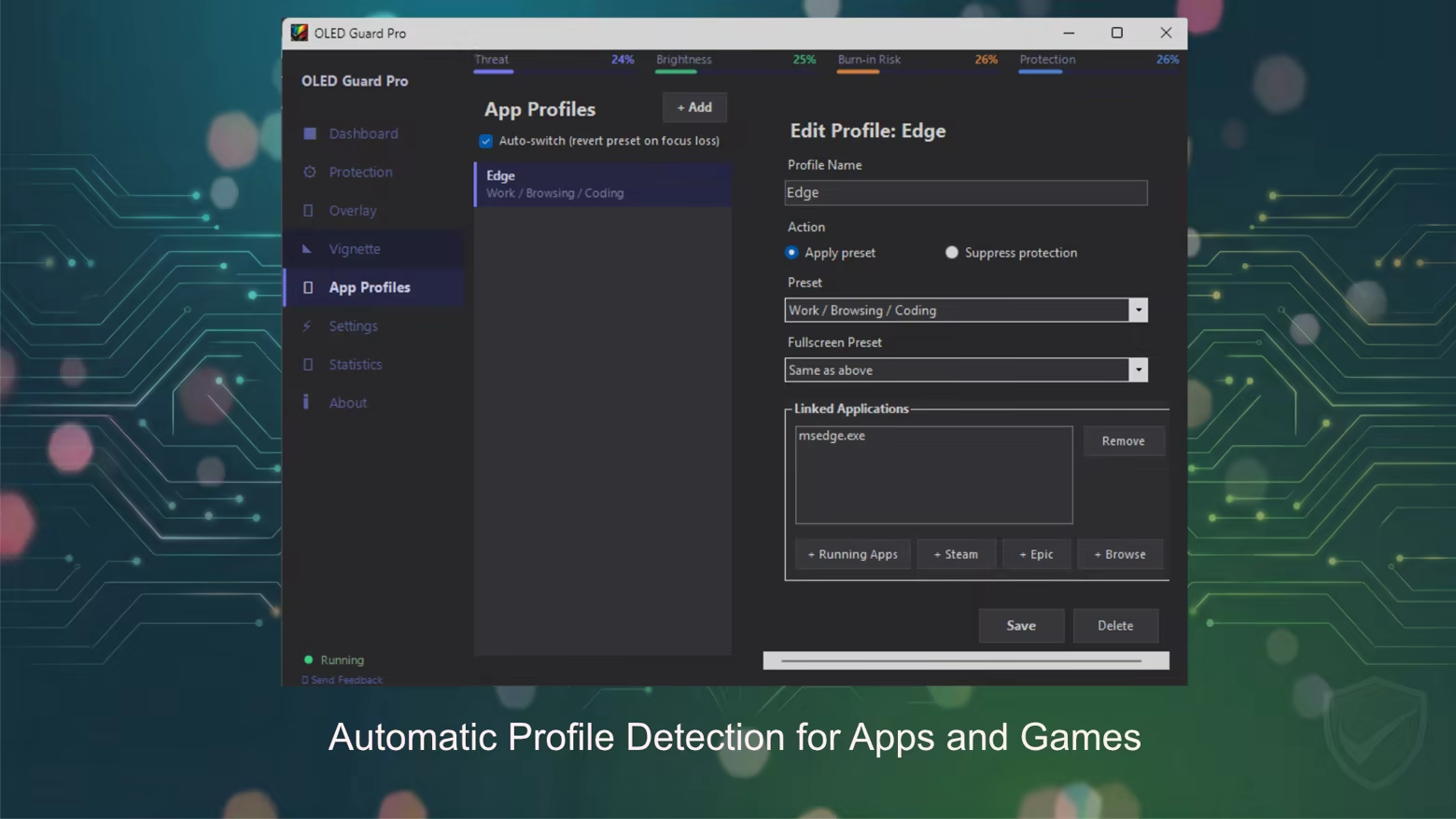
App Profiles

Different apps stress OLED panels in different ways.

OLED Guard can automatically detect running applications and apply custom protection settings for each one.

Examples:

• Stronger protection for productivity apps
• Subtle protection for games
• Completely disable protection for HDR content

Features include:

• separate presets for windowed and fullscreen mode
• built-in Steam Games library browser
• app-specific protection profiles

Multi-Monitor Support

Each monitor gets its own independent protection system.

OLED Guard supports complex setups with:

• per-monitor capture pipelines
• independent overlay rendering
• enable / disable protection per display

Perfect for users with multi-monitor workstations or gaming rigs.

Deep Customization

Advanced users can fine-tune exactly how protection behaves.

Control parameters such as:

• sensitivity
• stability detection
• responsiveness
• exposure accumulation speed
• recovery speed
• maximum dim amount

Quality presets let you match performance to your system:

• Low
• Medium
• High
• Ultra

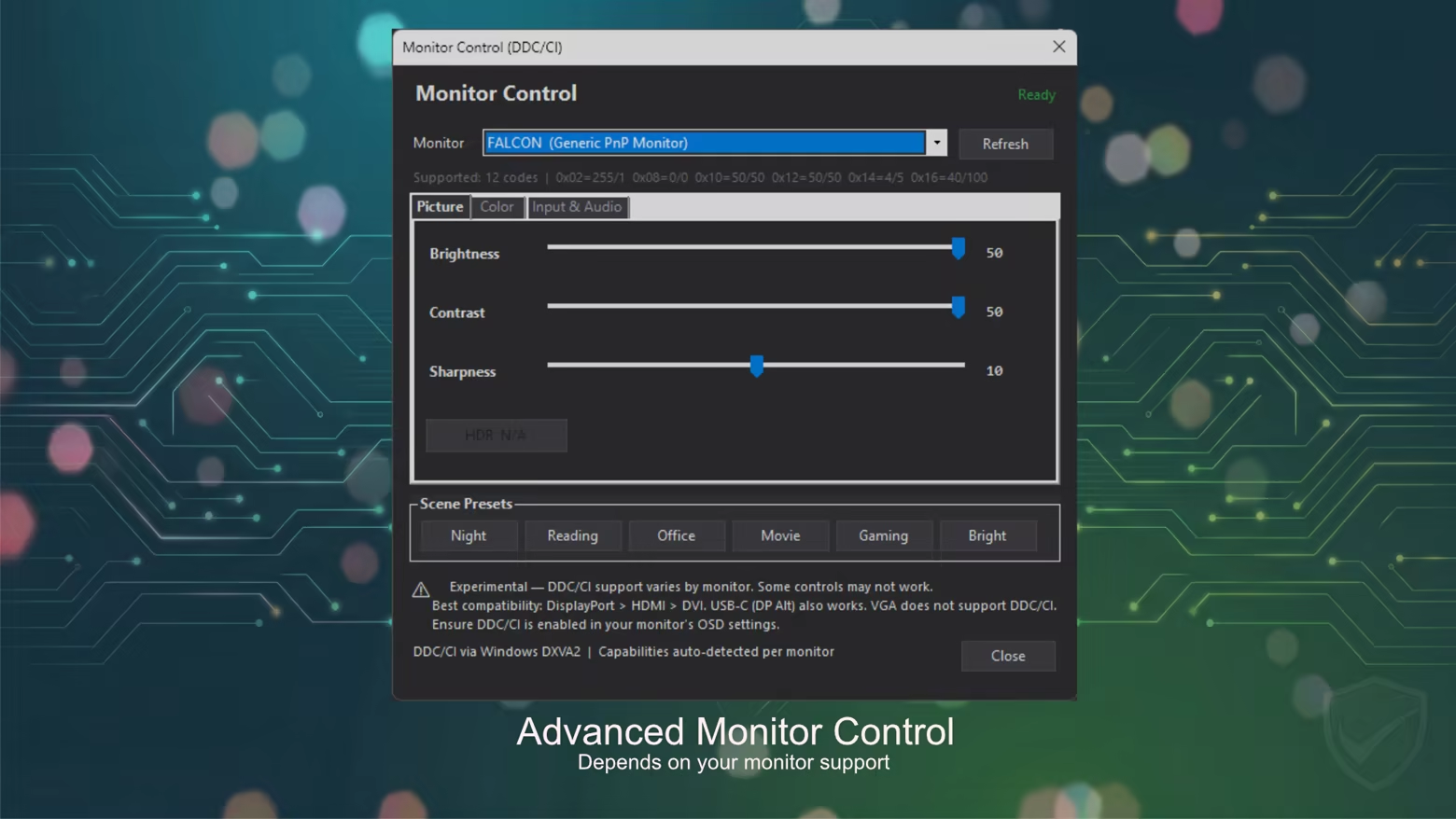
Monitor Control (DDC/CI)

OLED Guard can also control supported monitors directly using DDC/CI.

Adjust:

• brightness
• contrast
• RGB gain

Use built-in color temperature presets from 1900K to 9300K.

Scene presets included:

• Night
• Reading
• Office
• Movie
• Gaming
• Bright

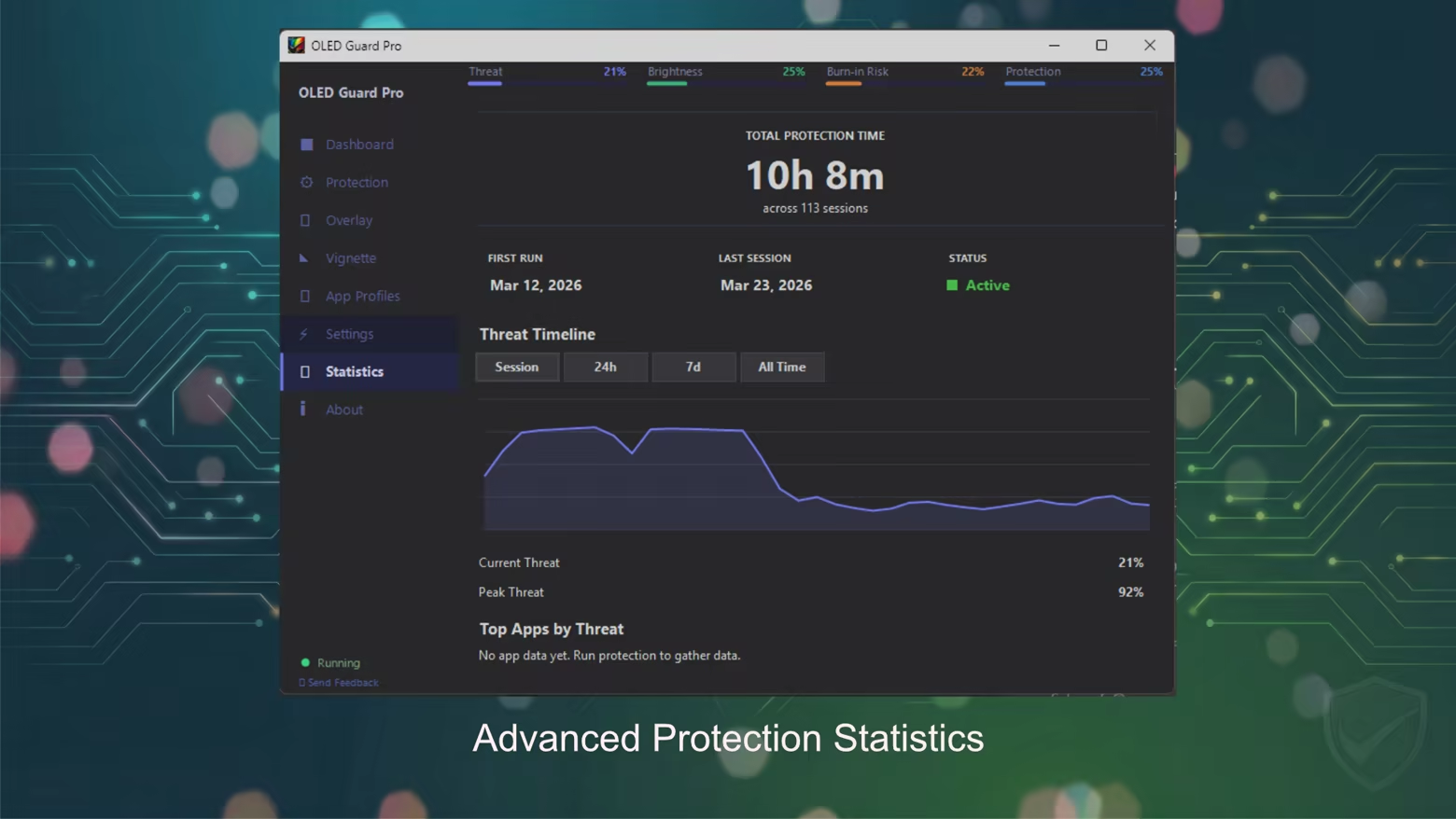
Live Statistics & Monitoring

OLED Guard includes a powerful statistics system that shows how your screen is being used.

Track protection metrics with timeline graphs including:

• session statistics
• 24-hour history
• 7-day trends
• all-time protection data

You can even monitor which apps stress your OLED panel the most.

Additional metrics include:

• total protection time
• peak threat level
• session count

Debug Visualizations

For power users and enthusiasts, OLED Guard includes built-in visualization tools.

Preview exactly how protection works using:

• Preview mode
• Heat Map view
• Coverage Map

These tools reveal where protection is applied and why.

Flexible Overlay System

OLED Guard uses a blue-noise overlay pattern designed to gently exercise OLED pixels without producing obvious visual artifacts.

Options include:

• adjustable noise speed
• noise scale control
• gap filtering modes
• multiple overlay colors

Available colors:

• Black
• Red
• Green
• Blue
• White

Designed for Daily Use

OLED Guard integrates smoothly into your system so protection runs quietly in the background.

Features include:

• global hotkey to start/pause protection instantly
• system tray integration
• quick access to statistics and controls
• burn-in risk notifications
• automatic launch on Windows startup

Simply set it once and let it run.

Clean OLED-Friendly Interface

The app features a modern dark theme UI optimized for OLED displays.

The interface includes a simple sidebar layout with 8 dedicated pages, making navigation quick and intuitive.

Key Features

• Real-time OLED burn-in protection
• Works in borderless fullscreen games
• App-specific protection profiles
• Multi-monitor support
• Edge vignette protection
• Deep customization and presets
• Monitor control via DDC/CI
• Live statistics and threat monitoring
• Debug visualization tools
• GPU-accelerated processing

Protect your OLED display — while you work, create, and game.

Configuration requise

    Minimale :
    • Système d'exploitation et processeur 64 bits nécessaires
    • Système d'exploitation : 10
    • Processeur : dual core x64
    • Mémoire vive : 2 GB de mémoire
    • DirectX : Version 11
    • Espace disque : 50 MB d'espace disque disponible
    Recommandée :
    • Système d'exploitation et processeur 64 bits nécessaires
    • Système d'exploitation : 11
    • Processeur : quad core x64
    • Mémoire vive : 4 GB de mémoire
    • DirectX : Version 12
    • Espace disque : 300 MB d'espace disque disponible
Aucune évaluation pour ce produit

Vous pouvez rédiger une évaluation sur ce produit pour partager votre expérience avec la communauté. Utilisez l'encadré situé au-dessus des options d'achat pour rédiger votre évaluation.