Acest conținut necesită aplicația de bază RPG Maker MZ pe Steam pentru a rula.

Conectează-te pentru a adăuga acest articol în lista ta de dorințe, a-l urmări sau a-l marca drept ignorat.

Nu este disponibil în limba: Română

Acest produs nu este disponibil în limba ta locală. Te rugăm să consulți lista de mai jos cu limbile în care jocul este disponibil înainte de achiziționare

Conținut descărcabil

Acest conținut necesită aplicația de bază RPG Maker MZ pe Steam pentru a rula.

Cumpără RPG Maker MZ - Light and Shadow Plugin


Despre acest conținut

Add Shadows to Standard RPG Maker MZ Maps!

“Light and Shadow Plugin for RPG Maker MZ” is a shader plugin that calculates wall shadows, object shadows, character shadows, and shading in real time, allowing you to freely control lighting according to time of day and weather.

Includes an easy-to-understand sample project!

🔥 Key Features

Real-Time Shadow Generation

Automatically draws step-style shadows up to 6 tiles high from tiles marked with terrain tags.
Fully compatible with zoom and camera shake.

Surface Shading

Darkens the top surfaces of shaded objects and enhances depth based on the light direction.
Shadow intensity can be changed instantly using a single variable.

Character Shadow Support

Supports large character sprites up to 512 px (1 tile).
Shadow shapes change dynamically with bush effects and character animations.

Full Lighting Control

Control angle, color, intensity, blur, and brightness using game variables.
Lighting can be changed through event commands to represent day/night cycles, weather, and special effects.

Lightweight Design

Shadow textures cache only the two most recent maps.
Returning to a map loads extremely quickly, and an OFF command completely releases memory.

Easy Setup

Only three steps required:

  • Set terrain tags

  • Prepare game variables

  • Use the ON command

Can be added to existing projects immediately.

🚀 Quick Start Guide

  • Specify the terrain tags and variables used by the plugin in the plugin parameters.

  • Prepare 8 game variables:

    • Angle

    • Brightness

    • RGB color

    • Shadow intensity

    • Blur

    • Shading intensity

  • Assign terrain tags:

  • Terrain Tag 1
    Walls and objects that should cast shadows

  • Terrain Tag 2
    Surfaces where shadows should be removed (roofs, ceilings, etc.)

  • Call the plugin command “Filter ON” at map start or during events.

  • Shadows will appear automatically.

Disable Shadows for Specific Events

Add the following to the event note field:

<noShadow>

Changing variables will update lighting instantly during gameplay.

🔧 Adjustable Parameters (All Controlled by Game Variables)

Shadow Angle
0 – 359°

Opacity
0 (transparent) – 255 (opaque)

Shadow Color (R/G/B)
–255 to +255
Positive values strengthen the color, negative values weaken it.

Shadow Density
Overall strength of the shadow

Shadow Darkness
How dark the shadow appears

Shadow Blur
Blur strength of the shadow edges

Shade Density
Darkness of object shading

⚠️ Limitations / Unsupported Cases

The following are currently not supported:

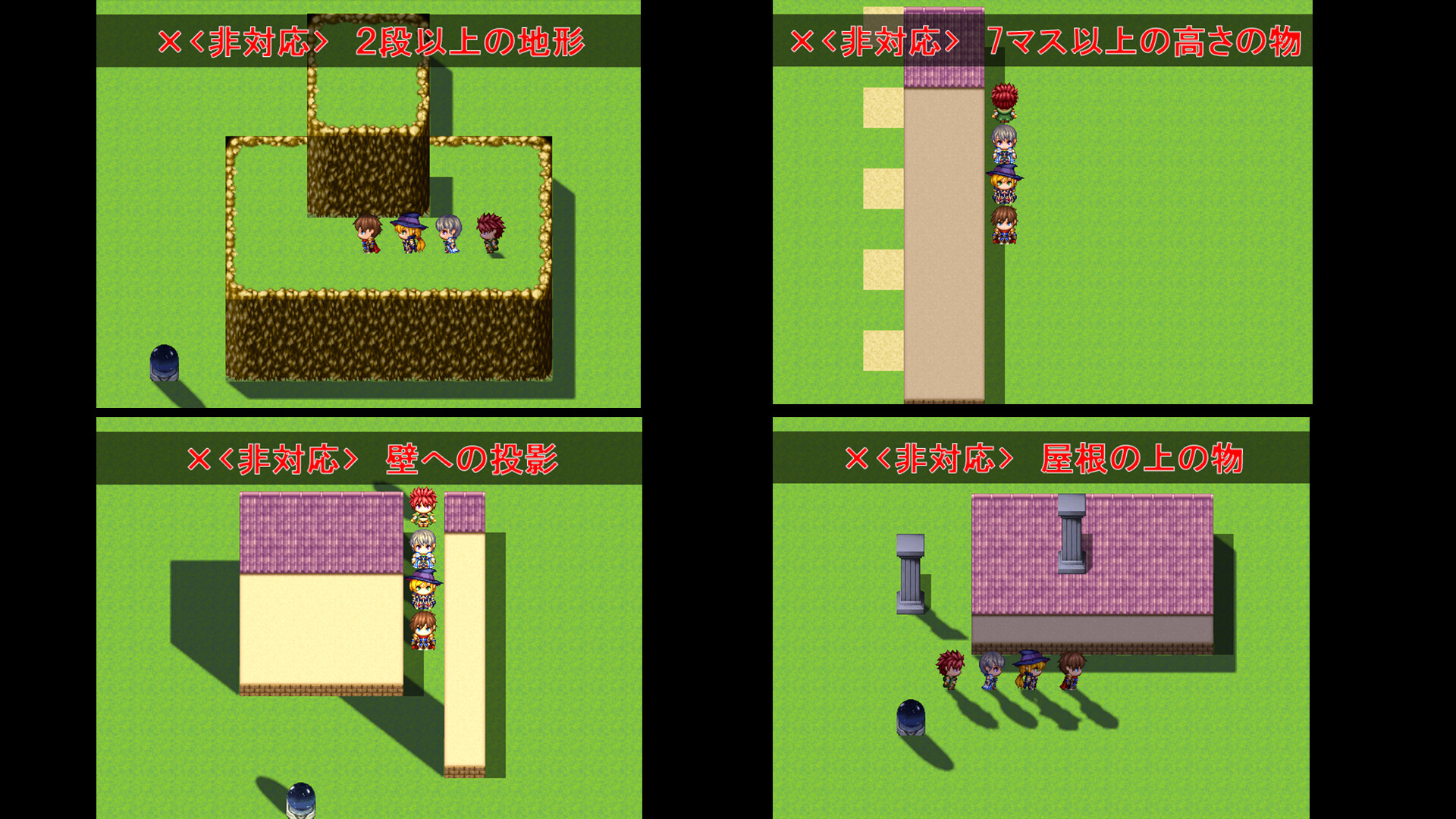
  • Buildings 7 tiles or taller

  • Multi-level terrain (two or more elevation steps)

  • Shadows projected onto walls

  • Objects placed on roofs

  • Complex terrain such as arches or hollow structures

  • Objects using walls as pedestals

  • Slopes or diagonal staircases

  • Vertical A2 fence shadow connections

  • Map scaling below 1.0

  • Plugins that dynamically change map size

  • Light angles fixed to 0 / 90 / 180 / 270 degrees

Q&A

Q. I want to add a shadow to a chimney next to a roof.

A. Create a tile that includes the empty space around it and place it on the building’s side wall.

Q. I want shadows on an arch-shaped building.

A. Place the entire structure as a single tile using the BCDE tileset.

Q. I want shadows inside a skeleton-style structure with visible interiors.

A. Place black tiles with over 50% transparency inside the structure to create realistic shading.

Q. Shadows are missing when using layered tiles.

A. If a tile spans multiple layers, combine it into one tile before placing it.

-----

・This pack is for use in RPG Maker Series or the engine of your choice.

・OK to be used in Commercial projects made in RPG Maker

The modification, redistribution, or resale of this plugin bundle and any individual plugins is strictly prohibited.

Cerințe de sistem

Windows
macOS
    Minim:
    • Observații suplimentare: System supporting RPG Maker MZ
    Recomandat:
    • Observații suplimentare: System supporting RPG Maker MZ
    Minim:
    • Observații suplimentare: System supporting RPG Maker MZ
    Recomandat:
    • Observații suplimentare: System supporting RPG Maker MZ
* Începând cu 15 februarie 2024, clientul Steam nu va mai oferi compatibilitate pentru jocurile pe 32 de biți sau macOS 10.14 și versiunile anterioare.

Recenziile clienților pentru RPG Maker MZ - Light and Shadow Plugin Despre recenziile utilizatorilor Preferințele tale

Recenzii generale:
2 recenzii ale utilizatorilor (2 recenzii)


Pentru a vedea recenziile dintr-un anumit interval calendaristic, te rugăm să faci clic și să tragi o selecție pe un grafic de mai sus sau apasă pe o bară specifică.


Arată recenziile în ordinea de afișare selectată


Află mai multe
Filtre
Se exclude activitatea cu recenzii irelevante
Timp petrecut:
Jucat în principal pe Steam Deck
Sistem de operare:
Procesor:
Placă video:
Tipul dispozitivului: