Turn your virtual reality headset into a multi-monitor system! Breakroom brings the Windows operating system into the 3D virtual world.

登入以將此項目新增至您的願望清單、關注它,或標記為已忽略

搶先體驗軟體

立即開始使用,並參與軟體開發過程。

備註:這款搶先體驗軟體尚未開發完成,且內容可能會有所變動。如果目前的開發進度未使您產生興趣,建議您等待本軟體開發至下一階段再決定是否購買。了解更多

注意:開發者所做的最後一次更新是在 9 年之前。 開發者在此處說明的資訊與時程可能不再是最新內容。
開發者的話:

為何採用搶先體驗模式?

「We are bringing Windows from 2D to 3D and we need help from the community to make this transition as smooth as possible. We don't know what the users will find comfortable or usable and which features are a must have and which are just in the way of a good experience. We want to get as much feedback as possible and believe that the Steam Early Access is the way to go.」

這款軟體的搶先體驗時間大約會持續多久?

「Until January 2017 is the current plan.」

正式版預計會與搶先體驗版有何不同?

「We already have the features we believe to make for a good experience, but to make it even better we'll add:
  • Vive controller and Oculus touch support
  • Curved screens with an adjustable curve
  • Customizable environment with shortcuts and application setup
  • More environments
  • Keyboard shortcuts for window management, depends on what the users want
  • and more based on feedback from the community

搶先體驗版目前的開發進度如何?

「Breakroom already has the possibility to
  • open all Windows 10 applications (as far as we know)
  • move them around the virtual space and arrange them in a dome
  • do your regular work on them
  • it has a good selection of relaxing environments
  • Vive users can enable their front facing camera to see their hands/keyboard/mouse/coffee cup

軟體售價在搶先體驗期間前後會有所變動嗎?

「Breakroom will be on a 20% discount during early access.」

在開發過程中,您打算如何與社群互動?

「We want as much feedback as possible, either via e-mail (breakroom@breakroom.is) or on the Steam forum page, where we hope some interesting discussions about the state and future of Breakroom will form.」
繼續閱讀
不支援繁體中文

本產品尚不支援您的目前所在地的語言。購買前請先確認語言支援清單。

僅有 VR 版

購買 Breakroom

 
查看所有討論

在討論區回報錯誤並留下對於此軟體的意見

關於此軟體

Turn your virtual reality headset into a multi-monitor system!

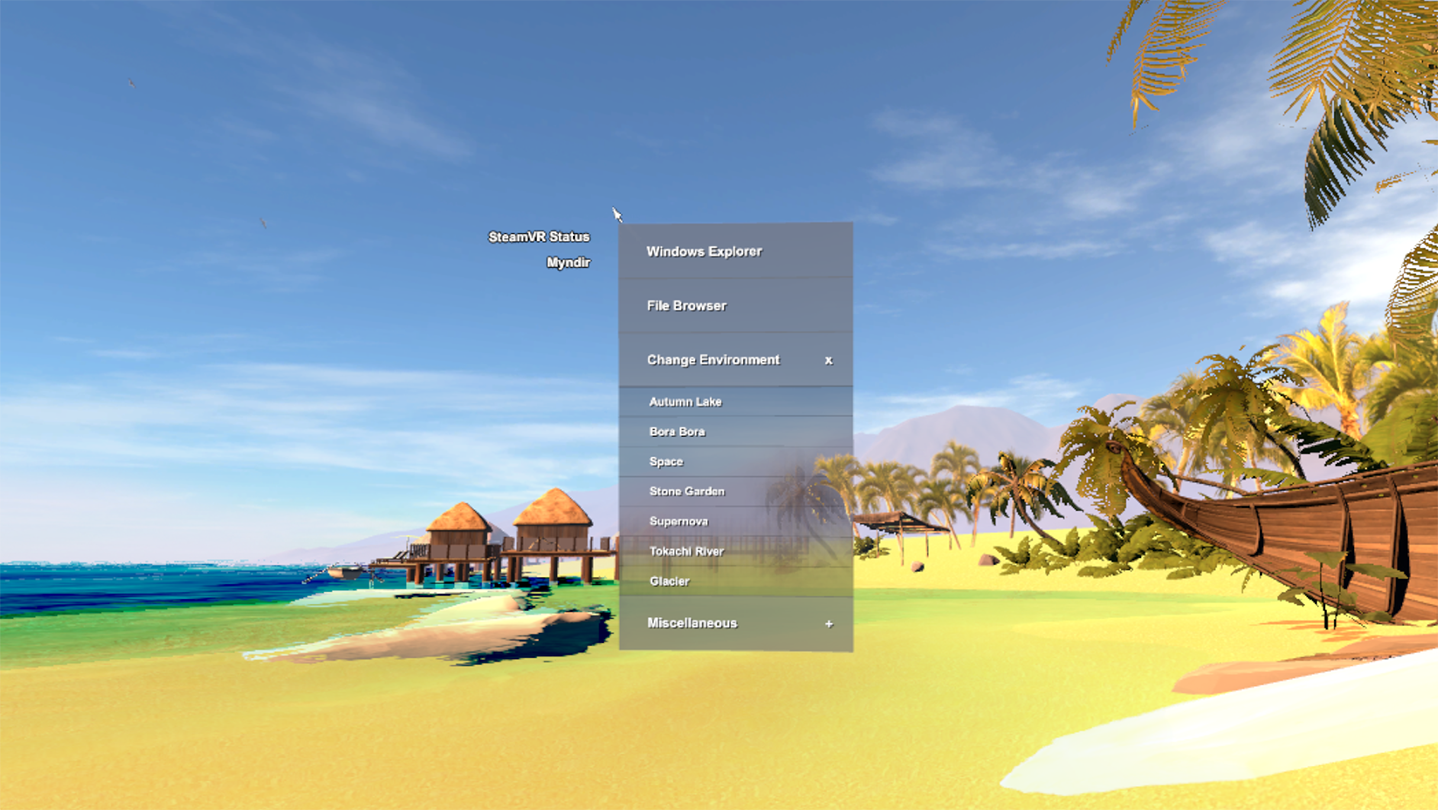
Breakroom lets you use Windows inside VR. You can surround yourself with applications. Work on Photoshop while watching a Youtube tutorial or just watch your favorite movie while playing online poker and browsing Reddit, while sitting on the beach or in a Japanese garden. You can finally use your headset for other things than gaming and free yourself from the limitations of the physical monitor.

In Breakroom you can choose between a range of soothing environments. You can use all your regular Windows 10 applications, move them around your virtual space and create the ultimate personalized work space.

You start your experience with your mouse where you right click anywhere to see a menu. Use the menu to bring your open applications into Breakroom, open Windows Explorer or the Start Menu to open new applications. You can change backgrounds and skyboxes, rearrange your applications within Breakroom or open the tutorial.

系統需求

    最低配備:
    • 需要 64 位元的處理器及作業系統
    • 作業系統: Windows 10
    • 處理器: Intel Core i5 4590 or greater
    • 記憶體: 8 GB 記憶體
    • 顯示卡: GeForce GTX 970 or AMD Radeon R9 290 or better
    • 儲存空間: 1 GB 可用空間
    • VR 支援: SteamVR or Oculus PC. Keyboard and mouse required
    建議配備:
    • 需要 64 位元的處理器及作業系統

Breakroom 的顧客評論 關於使用者評論 您的偏好設定

整體評論:
8 篇使用者評論 (8 篇評論)


如欲檢視特定日期範圍內的評論,請在上方圖表框選一段日期範圍,或點擊直條。


依照使用者撰寫評論當時的遊戲時數篩選:


不限最低時數不限最高時數

以所選顯示順序顯示評論


進一步了解
篩選條件
排除離題評論活動
遊戲時數:
主要在 Steam Deck 上遊玩
無其它評論符合上述篩選條件
調整上方的篩選條件以檢視其它評論
評論讀取中…