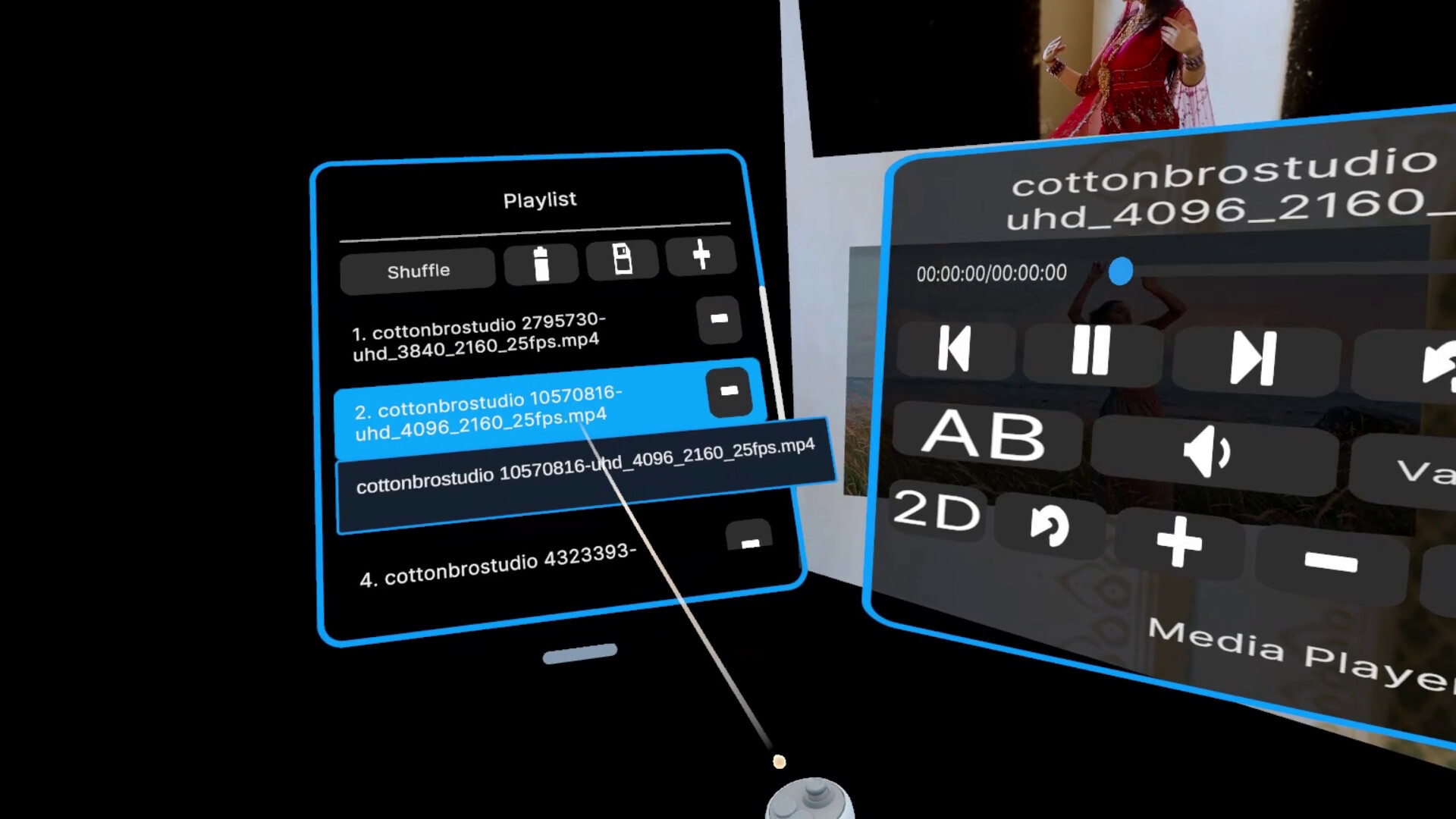
LucidVR is a privacy-first 2D/3D VR media player powerhouse. Layer multiple videos and images into mind-bending, hyper-immersive scenes. Watch two or more 3D VR videos at once and experience VR with no limits and no clutter, just pure immersive control.

Sign in to add this item to your wishlist, follow it, or mark it as ignored

VR Only
Free Demo

Play LucidVR Video Player Demo

Check out the full game


About This Demo

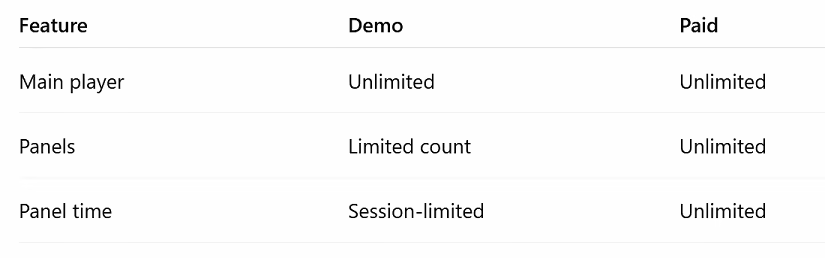
The LucidVR demo can be used indefinitely, and includes:

  • A completely free, fully functional 2D / 3D image and video player.

  • Limited access to the multi-playback feature (simultaneous image and video playback).

The full version unlocks unrestricted access to all features.

Feature comparison

About LucidVR

LucidVR is a privacy-first 2D/3D VR media player powerhouse, built for users who want total control over how media is experienced.

A deceptively simple, no-nonsense interface empowers you to layer, arrange, and play multiple videos and images simultaneously to create bespoke, fully-customizable, hyper-immersive scenes unlike anything you've ever experienced before. Watch two or more 3D VR videos at the same time, build multi-screen environments, overlap content for creative effects, or design entirely new ways to experience immersive media.

As a paid app, there’s no bloat and no hidden tracking of your media library or content viewed. LucidVR focuses on pure immersive control, giving you the tools to create jaw-dropping, hyper-realistic VR scenes without getting in your way. Whether you’re experimenting, curating personalized environments, or pushing the limits of VR media playback, LucidVR is designed to scale with your imagination.

Feature Support

  • Supports common video codecs such as H.264

  • Supports common image formats: JPEG, PNG

  • NOT SUPPORTED - AV1 and H.265 are not yet supported (coming soon)

  • Supports standard 180° VR equirectangular videos. Pitch controls via thumbstick. Yaw via [A], [D] keys. Roll via [Q], [E] keys.

    • Side-by-Side (SBS)

    • Top-Bottom (TB)

Application Details

LucidVR is actively evolving and not yet fully polished, but the core functionality is stable and fully usable. Features are continuously added and refined, with ongoing UI and UX improvements. Please expect occasional bugs and unfinished features. We would love for you to join us on this journey! Your feedback and support helps shape the future of LucidVR.

Features

  • Simultaneous media playback

    View multiple videos and images at once in any spatial configuration you choose. Stack, overlap, or surround yourself with content for truly unique experiences. Play multiple 2D and 3D videos simultaneously, including two or more 3D VR videos at the same time.

  • Immersive main player + floating media players

    Supporting both 2D and 3D image and video content.

  • Built-in file browser

    Supports local drives and networked storage, making it easy to access large media libraries.

  • Privacy-first by design

    No media library or media playback telemetry.

  • Desktop mirroring toggle

    Share your headset view to the desktop when needed. Toggle with [F9] key.

  • Boss Mode

    Instantly hide content with a button press.

AI Generated Content Disclosure

The developers describe how their game uses AI Generated Content like this:

The application icon was generated with AI. Sorry.

System Requirements

    Minimum:
    • Requires a 64-bit processor and operating system
    • OS: Windows 10
    • Processor: Intel i5-4590 equivalent or greater
    • Memory: 4 GB RAM
    • Graphics: NVIDIA GTX 970 / AMD 290 equivalent or greater
    • Storage: 150 MB available space
    • VR Support: SteamVR
    Recommended:
    • Requires a 64-bit processor and operating system
    • OS: Windows 10
    • Processor: Intel i5-4590 equivalent or greater
    • Memory: 8 GB RAM
    • Graphics: NVIDIA 10xx/20xx
    • Storage: 150 MB available space
    • VR Support: SteamVR
There are no reviews for this product

You can write your own review for this product to share your experience with the community. Use the area above the purchase buttons on this page to write your review.