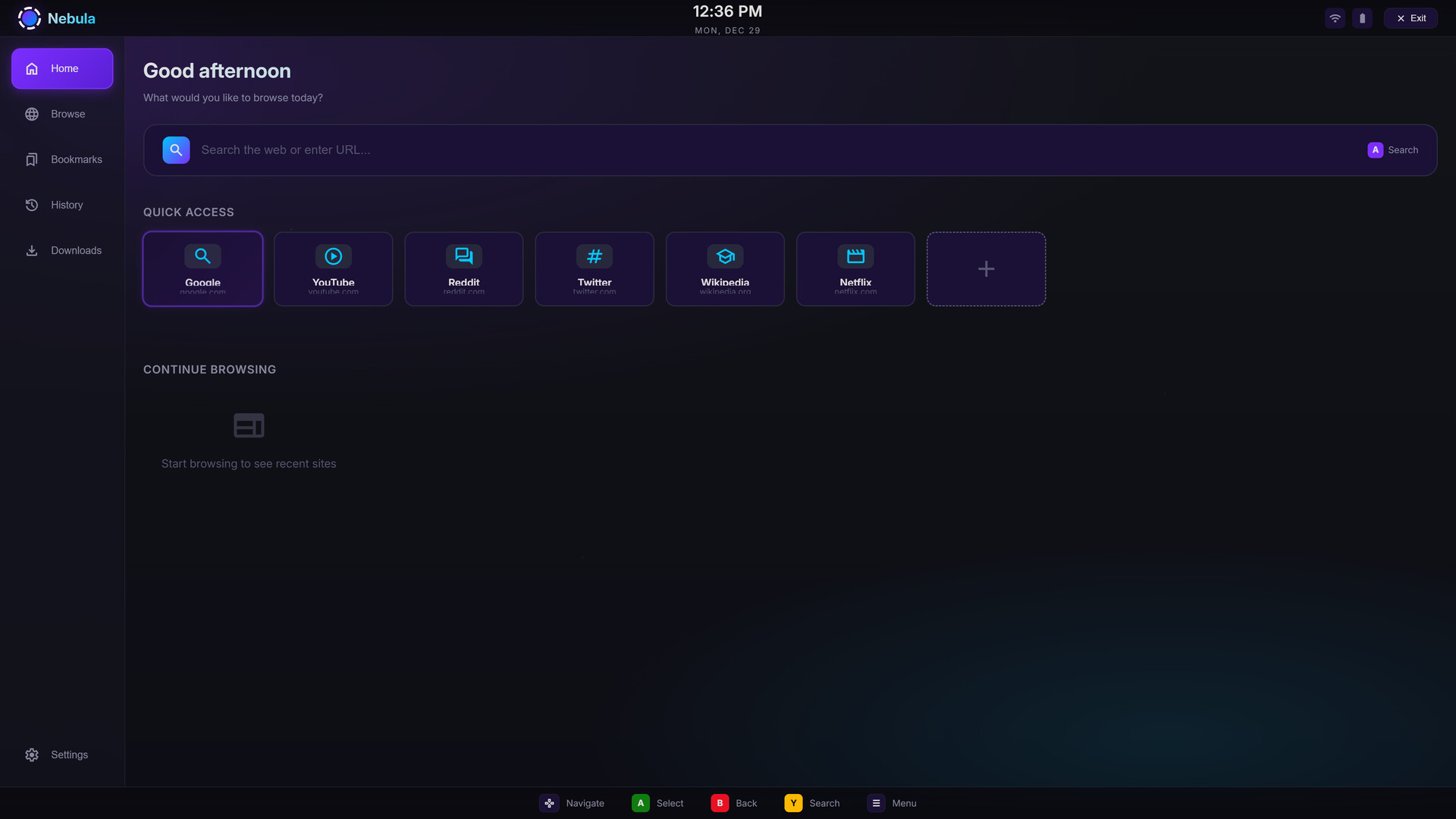
Nebula Browser is a cross-platform web browser designed for both desktop PCs and the Steam Deck. It offers a clean interface, modern web support, and controller friendly navigation on SteamOS, while remaining a capable and lightweight browser for everyday desktop use.
วันวางจำหน่าย:
29 ม.ค. 2026
ผู้พัฒนา:
ผู้จัดจำหน่าย:
แท็ก

เข้าสู่ระบบ เพื่อเพิ่มผลิตภัณฑ์นี้ลงในสิ่งที่อยากได้ของคุณ ติดตาม หรือทำเครื่องหมายเป็นถูกละเว้น

ไม่รองรับภาษาไทย

ผลิตภัณฑ์นี้ไม่รองรับภาษาท้องถิ่นของคุณ โปรดตรวจสอบรายชื่อภาษาที่รองรับก่อนทำการสั่งซื้อ

เกมนี้ยังไม่พร้อมใช้งานบน Steam

วันวางจำหน่ายที่วางแผนไว้: 29 ม.ค. 2026

แอปพลิเคชันนี้จะปลดล็อกในอีกประมาณ 12 วัน

น่าสนใจ?
เพิ่มในสิ่งที่คุณอยากได้ และรับการแจ้งเตือนเมื่อผลิตภัณฑ์พร้อมใช้งาน
เพิ่มลงในสิ่งที่อยากได้ของคุณ
 

เกี่ยวกับซอฟต์แวร์นี้

Nebula Browser is a modern desktop web browser designed to work equally well on traditional computers and on the Steam Deck. It is built to bridge the gap between handheld and desktop browsing, offering a smooth experience whether you are using a keyboard and mouse or navigating with a controller.

On desktop systems, Nebula Browser provides a clean, focused interface with support for modern web standards, tab management, and productivity focused workflows. On the Steam Deck and SteamOS, the browser is optimised for smaller screens, controller input, and couch style usage, making it well suited for browsing, documentation, media, and web apps directly from the Deck.

Nebula Browser is cross-platform and runs on Windows, macOS, and Linux. It supports hardware acceleration where available and is actively developed with an emphasis on performance, stability, and usability across both desktop and handheld environments.

Whether you are using it as your primary desktop browser, a dedicated Steam Deck browser, or a lightweight web tool alongside your games and development work, Nebula Browser is designed to feel natural on every platform it runs on.

ความต้องการระบบ

Windows
macOS
SteamOS + Linux
    ขั้นต่ำ:
    • ต้องการโปรเซสเซอร์และระบบปฏิบัติการแบบ 64 บิต
    • ระบบปฏิบัติการ: Windows 10 (64-bit)
    • โปรเซสเซอร์: Intel Core i3 (2nd gen) or AMD FX-4100
    • หน่วยความจำ: แรม 4 GB
    • กราฟิกส์: Intel HD 4000
    • พื้นที่จัดเก็บข้อมูล: พื้นที่ว่างที่พร้อมใช้งาน 500 MB
    แนะนำ:
    • ต้องการโปรเซสเซอร์และระบบปฏิบัติการแบบ 64 บิต
    • ระบบปฏิบัติการ: Windows 11 (64-bit)
    • โปรเซสเซอร์: Intel Core i5 (6th gen) or AMD Ryzen 3 2200G
    • หน่วยความจำ: แรม 8 GB
    • กราฟิกส์: AMD RX 560
    • พื้นที่จัดเก็บข้อมูล: พื้นที่ว่างที่พร้อมใช้งาน 1 GB
    ขั้นต่ำ:
    • ระบบปฏิบัติการ: macOS 10.14 (Mojave)
    • โปรเซสเซอร์: Apple Silicon (M1, or newer) or Intel Core processor
    • หน่วยความจำ: แรม 4 GB
    • กราฟิกส์: Metal-capable GPU or OpenGL 3.3 compatible GPU
    • พื้นที่จัดเก็บข้อมูล: พื้นที่ว่างที่พร้อมใช้งาน 500 MB
    แนะนำ:
    • ระบบปฏิบัติการ: macOS 10.15 or newer
    • โปรเซสเซอร์: Apple Silicon (M1, or newer) or Intel Core processor
    • หน่วยความจำ: แรม 8 GB
    • กราฟิกส์: Metal-capable GPU or OpenGL 3.3 compatible GPU
    • พื้นที่จัดเก็บข้อมูล: พื้นที่ว่างที่พร้อมใช้งาน 1 GB
    ขั้นต่ำ:
    • ระบบปฏิบัติการ: Ubuntu 18.04 (64-bit) or equivalent distribution
    • โปรเซสเซอร์: Intel Core i3 (2nd gen) or AMD FX-4100
    • หน่วยความจำ: แรม 4 GB
    • กราฟิกส์: Intel integrated GPU or equivalent with OpenGL 3.3 support
    • พื้นที่จัดเก็บข้อมูล: พื้นที่ว่างที่พร้อมใช้งาน 500 MB
    แนะนำ:
    • ระบบปฏิบัติการ: Ubuntu 20.04 (64-bit) or newer
    • โปรเซสเซอร์: Intel Core i5 (6th gen) or AMD Ryzen 3 2200G
    • หน่วยความจำ: แรม 8 GB
    • กราฟิกส์: Dedicated GPU with Vulkan support or modern OpenGL drivers
    • พื้นที่จัดเก็บข้อมูล: พื้นที่ว่างที่พร้อมใช้งาน 1 GB
ไม่พบบทวิจารณ์สำหรับผลิตภัณฑ์นี้

คุณสามารถเขียนบทวิจารณ์ของคุณเองสำหรับผลิตภัณฑ์นี้เพื่อแบ่งปันประสบการณ์ของคุณให้กับชุมชน ใช้พื้นที่ด้านบนของปุ่มซื้อในหน้านี้เพื่อเขียนบทวิจารณ์ของคุณ