Vector Approach is a minimalist ATC Radar trainer. Use mouse and keyboard commands to identify traffic (“Roger”), vector, sequence arrivals, manage departures with runway timing. Check 5-NM separation, capture the ILS or issue go-arounds. Fast to start, hard to master.

Sign in to add this item to your wishlist, follow it, or mark it as ignored

Buy Vector Approach


About This Game

APP Radar Sim is a minimalist real-time approach air traffic control simulator focused on realistic radar-based ATC operations.

You take the role of an approach controller, responsible for managing arriving and departing aircraft around a single airport. Aircraft appear on the radar scope inbound toward the runway or waiting for departure. Your task is to safely guide traffic, maintain separation, and keep the flow of aircraft moving efficiently.

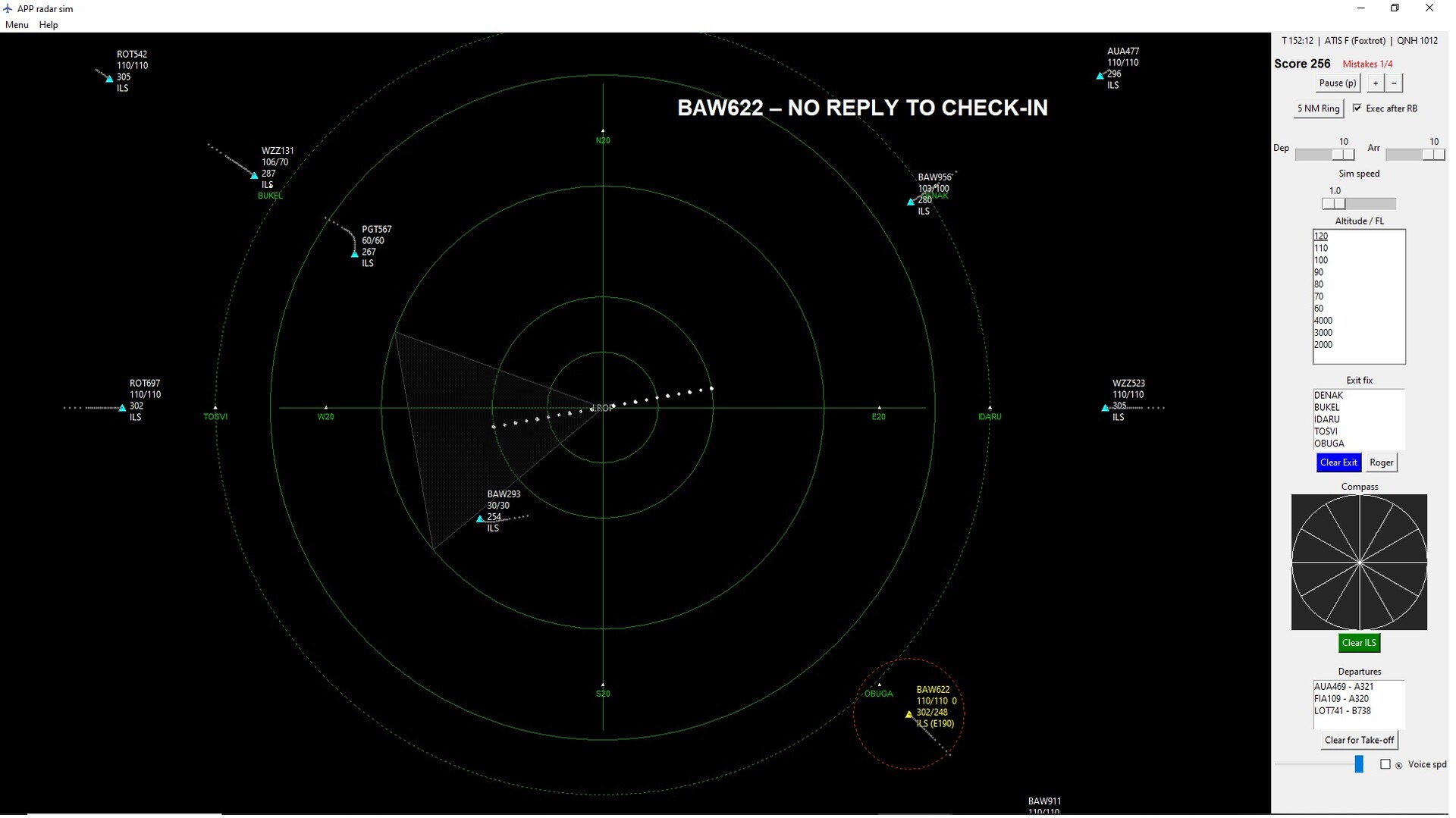
Using the radar interface, you issue commands through a control panel. You can assign headings, altitudes, speed instructions, and approach clearances such as Cleared ILS, Report runway in sight, and Contact Tower. Every command you give is transmitted to the aircraft with simulated radio audio, recreating the feel of real ATC communication.

Arriving aircraft must be sequenced and vectored onto the ILS approach. You guide them using radar vectors until they intercept the localizer with proper geometry. Once established, they continue to land and are handed over to the tower.

At the same time, departing aircraft request takeoff. You must watch the arrival flow and wait for a safe gap before clearing them for departure. After takeoff the aircraft climbs through 2000 ft and enters your radar control area, where you guide it toward the exit fix before handing it over to area control.

Aircraft behavior varies depending on type. The simulator includes turboprop aircraft and medium jet aircraft, each with different speeds and climb performance, requiring different spacing and sequencing strategies.

Traffic intensity can be adjusted from the interface panel. Higher traffic levels increase workload and require careful planning to maintain standard 5 NM radar separation.

The simulation includes transition altitude and flight levels, meaning altitude instructions automatically change between feet and flight levels depending on the aircraft’s altitude.

Your performance is measured through a scoring system. Points are awarded for:

  • successful ILS arrivals

  • correct tower handovers

  • proper departures handed to ACC

Mistakes such as incorrect clearances or missed handovers reduce your score. Four mistakes end the session, while loss of separation between aircraft results in immediate game over.

Game progression and scores can be saved, allowing you to continue sessions and improve your performance over time.

Typical Gameplay Session

A session begins with several aircraft already inbound toward the airport. You start by issuing radar vectors to organize them into a landing sequence. One aircraft may be turned downwind while another is cleared to intercept the ILS.

As the first aircraft approaches the runway, you clear it for the ILS and monitor spacing to maintain the required 5 NM separation. Once established on the approach, it is handed over to the tower.

Meanwhile, a departing aircraft requests takeoff. You wait for a safe gap in the arrival flow before clearing it for departure. After takeoff it climbs through 2000 ft and enters your radar control area, where you assign headings and altitudes toward its exit fix before handing it over to area control.

As traffic increases, you must continuously balance arrivals and departures, anticipate conflicts, and make quick decisions to maintain safe separation and efficient traffic flow.

Radar Interface

The simulation takes place on a clean radar scope showing aircraft positions, headings, speed, altitude, and assigned exit fixes. Each aircraft has a radar label displaying its current instructions and status. The interface is designed for clarity and fast decision-making, allowing the player to monitor multiple aircraft simultaneously and anticipate potential conflicts.

Aircraft movement, turns, climbs, and descents are simulated in real time, allowing the player to see the immediate results of issued instructions directly on the radar display.

Command System

All aircraft instructions are issued through a command panel. The player selects commands such as heading changes, altitude clearances, approach clearances, and handovers. Once selected, the command is transmitted to the aircraft and played through simulated ATC radio audio, reproducing the communication style of real air traffic control.

This system allows commands to be issued quickly while keeping the focus on traffic management and sequencing rather than complex menus.

✈️ Key Features

  • Real-time radar approach control gameplay

  • Vector aircraft using heading, altitude, and approach clearances

  • Sequence arrivals onto the ILS

  • Manage departures and find safe gaps in arrival traffic

  • Simulated ATC radio commands with audio playback

  • Two aircraft performance types (turboprops and jets)

  • Realistic 5 NM radar separation rules

  • Adjustable traffic intensity and workload

  • Transition altitude and flight level system

  • Score system with mistakes and game-over conditions

  • Minimalist radar interface focused on decision making

AI Generated Content Disclosure

The developers describe how their game uses AI Generated Content like this:

- code debugging
- programming
- descriptions
- marketing

System Requirements

    Minimum:
    • OS: 10
    • Processor: Dual-core 2.0 GHz (Intel i3-2xxx / AMD equivalent)
    • Memory: 512 MB RAM
    • Graphics: Integrated graphics (Intel HD 4000 or better)
    • Network: Broadband Internet connection
    • Storage: 100 MB available space
There are no reviews for this product

You can write your own review for this product to share your experience with the community. Use the area above the purchase buttons on this page to write your review.