Custom Curve - the definitive software for complete control over mouse sensitivity
Theo nhãn

Đăng nhập để thêm sản phẩm này vào danh sách ước, theo dõi, hoặc đánh dấu nó thành "đã phớt lờ"

Không hỗ trợ ngôn ngữ Tiếng Việt

Sản phẩm này không hỗ trợ ngôn ngữ địa phương của bạn. Vui lòng xem lại danh sách ngôn ngữ được hỗ trợ dưới đây trước khi mua.

Sắp ra mắt

Vật phẩm này chưa ra mắt

Bạn quan tâm?
Hãy thêm trò chơi vào danh sách ước và nhận thông báo khi nó ra mắt trên Steam.
Thêm vào danh sách ước
 

Về phần mềm này

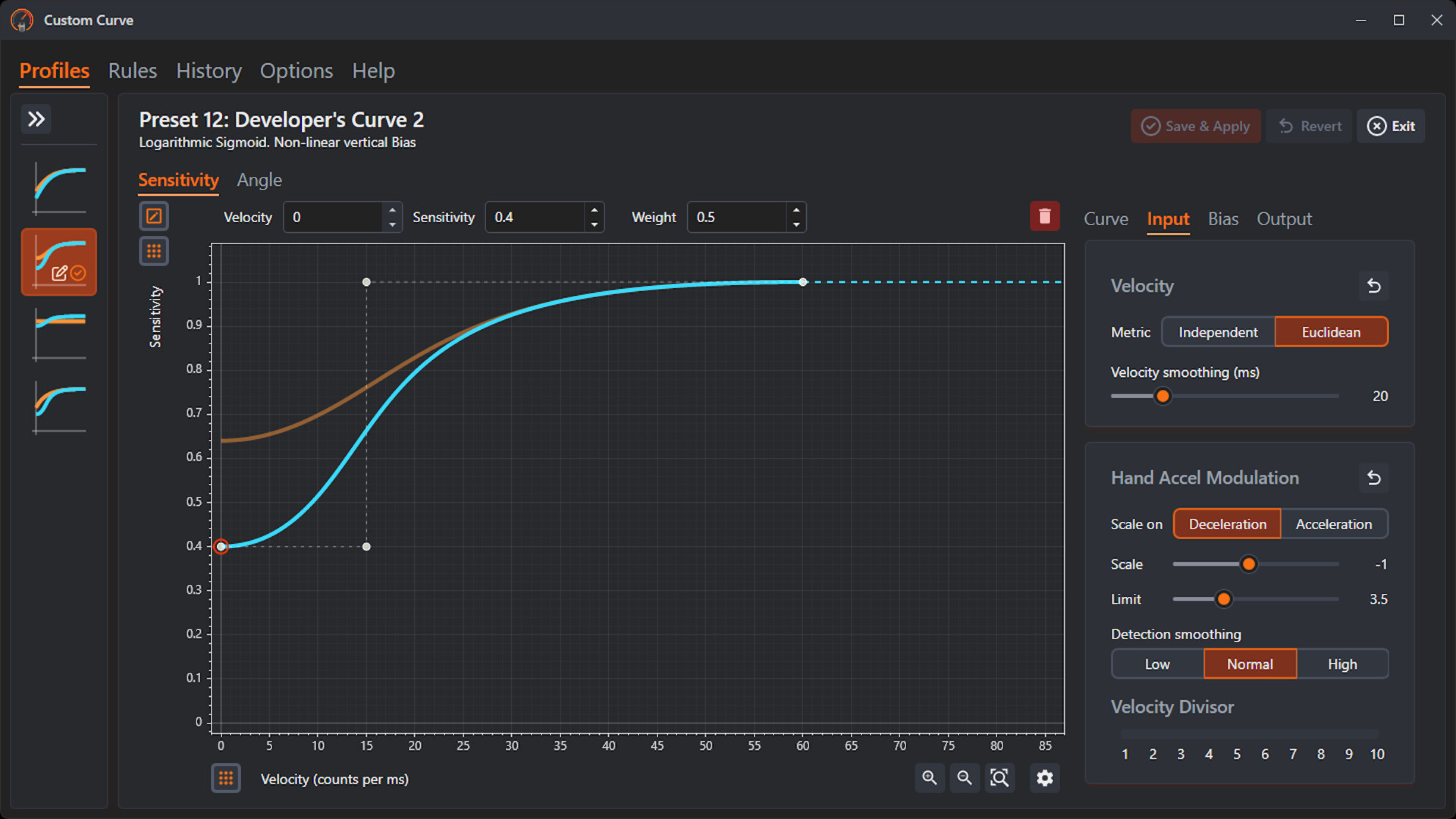
Custom Curve enables you to create a fully personalized mouse acceleration curve that applies system-wide. With extensive customization, it’s the complete mouse sensitivity tool for gaming.

Fully custom accel curves

Powerful sensitivity and acceleration tuning lets you combine the advantages of low and high sensitivity. Lower sensitivity enables increased precision, while higher sensitivity allows comfortable navigation. Custom Curve provides complete control over this process.

Easy to begin

Custom Curve includes expert-designed presets that serve as solid starting points to help you find perfect settings. Create or modify any curve shape freely by hand, with accurate visual feedback on the interface. Just click and drag, no complex formulas or math.

Settings apply system-wide

Settings are always applied persistently at boot across the entire operating system with every mouse and in every game and program. Custom Curve also maintains settings per user account on your PC.

The Custom Curve driver works in real-time with no added latency. It is compatible with all polling rates and mouse DPI settings, and is unaffected by in-game frame rates or performance.

Innovative angle correction

Apply sensor Rotation targeted to a specific axis only - correct for your grip for horizontal flicks without affecting your fingertip recoil control, or vice versa. The built-in angle detector can help you configure settings.

Our exclusive Soft Angle Snapping system is designed for gaming with no loss of angular resolution - just the additional directional stability for horizontal flicks or vertical recoil control.

Automatically apply settings when you need them

Custom Curve provides automatic profile switching per application - you will always have the right settings for the right game or program. You can create up to 10 profiles for various contexts.

Additionally, you can specify hotkey or mouse button shortcuts for real-time, manual profile switching.

Advanced settings

Custom Curve includes advanced optional features for both power users and accessibility: 

  • A unique smoothing algorithm designed specifically for mouse input to reduce cursor jitter without motion delay.

  • Our proprietary Bias method applies independent horizontal and vertical sensitivities with full control over diagonal angle shift. This allows the ergonomic advantages of separate sensitivities without compromising directional accuracy.

  • A modulation feature allows your mouse hand’s physical acceleration, not just its speed, to initiate additional cursor acceleration or deceleration.

  • A History tool to record, analyze & export mouse movement speeds.

  • Dedicated control over the sensitivity of diagonal & curved mouse movements without affecting horizontal or vertical sensitivity.

Anti-cheat friendly design

Custom Curve uses a proprietary, signed driver designed to be anti-cheat friendly - it is not capable of any input injection / synthesis and there is a delay when writing settings to the driver, preventing any abuse.

Công bố về nội dung tạo bởi AI

Nhà phát triển mô tả cách trò chơi của họ dùng nội dung sáng tạo bởi AI như sau:

Some artwork was created with AI‑assisted tools. The software itself does not use AI.

Yêu cầu hệ thống

    Tối thiểu:
    • Yêu cầu vi xử lý và hệ điều hành đều chạy 64-bit
    • HĐH: Windows® 10
    • Bộ xử lý: 1 GHz or faster CPU
    • Bộ nhớ: 2 GB RAM
    • Đồ họa: DirectX 9–compatible GPU with WDDM 1.0 driver
    • DirectX: Phiên bản 9.0
    • Lưu trữ: 200 MB chỗ trống khả dụng
    • Ghi chú thêm: Installation includes a kernel driver and requires a one-time system restart to complete setup. A mouse input device is also required.
    Khuyến nghị:
    • Yêu cầu vi xử lý và hệ điều hành đều chạy 64-bit
    • HĐH: Windows® 11
    • Bộ xử lý: 1 GHz or faster CPU
    • Bộ nhớ: 4 GB RAM
    • Đồ họa: DirectX 12–compatible GPU with WDDM 2.0 driver
    • DirectX: Phiên bản 12
    • Lưu trữ: 200 MB chỗ trống khả dụng
    • Ghi chú thêm: Installation includes a kernel driver and requires a one-time system restart to complete setup. A mouse input device is also required.
Chưa có đánh giá cho sản phẩm này

Bạn có thể chia sẻ trải nghiệm với cộng đồng bằng cách viết bài đánh giá của bản thân đối với sản phẩm. Sử dụng khu vực trên nút thanh toán thuộc trang này để viết đánh giá của mình.