A virtual theater experience for Desktop PC with VR support - capable of playing Standard and 3D Video files. Supports Keyboard/Mouse, Gamepad, and XR Controllers.

Connectez-vous pour ajouter cet article à votre liste de souhaits, le suivre ou l'ignorer

Français non disponible

Ce produit n'est pas disponible dans votre langue. Veuillez consulter la liste des langues disponibles ci-dessous avant de l'acheter.

VR prise en charge

Jouer à Stereoscopy

Free-to-play
 

À propos de ce jeu

The Ultimate Immersive Home Theater for Desktop and VR

Step into your own private cinema where every movie feels larger than life. Stereoscopy plays ordinary video and 3D-formatted video files in an immersive 3D experience - whether you’re seated at your desk with classic anaglyph glasses or fully immersed inside a virtual reality headset.

Stereoscopy isn’t just a player – it’s the private, jaw-dropping cinema you’ve always wanted. Turn any video into an unforgettable 3D spectacle, tonight.

Overview

  • Native playback up to 8K resolution with 4K texture sampling

  • Real-time ray tracing, global illumination, dynamic shadows, volumetric fog, god-rays, particle streams and screen-space reflections

  • Free roam and theater seating

  • Eight powerful 3D modes: Anaglyph, Half/Full Side-By-Side → Anaglyph, Top-Bottom → Anaglyph, Half/Full Side-by-Side, Top-Bottom, and Standard 2D

  • In VR: perfect left/right-eye separation for flawless stereoscopic 3D with zero crosstalk

  • On desktop: real-time anaglyph rendering (red-cyan, amber-blue, green-magenta and more)

Cinema-Quality Audio

  • Supports up to 10.2-channel surround sound (including 7.2, 5.1, 2.1, stereo)

  • Dolby, DTS and THX pass-through decoding

  • Up to 192-bit depth for pristine clarity

  • Audio modes:
    • Direct – faithful passthrough of the original audio tracks
    • World Spatial Audio – true 3D positional sound placed throughout the virtual theater with intelligent downmixing across low, mid and full-range virtual speakers

A Living, Breathing Theater

Walk, jump, sit or stand inside stunning virtual environments that react to your movie.

  • Realtime Lighting and Volume level controls

  • Projection screen and projector emit realistic light that spills into the room

  • Auto-dim/restore theater lighting when you hit play or pause (fully configurable)

  • Optional projector beam with visible particle rays and cinematic god-rays

  • Seat beacons to help you find the perfect spot to watch – just walk in or teleport (VR) and your view instantly snaps to the screen

  • Door beacons to exit the Theater - – just walk in or teleport (VR) to a door and you are prompted to exit

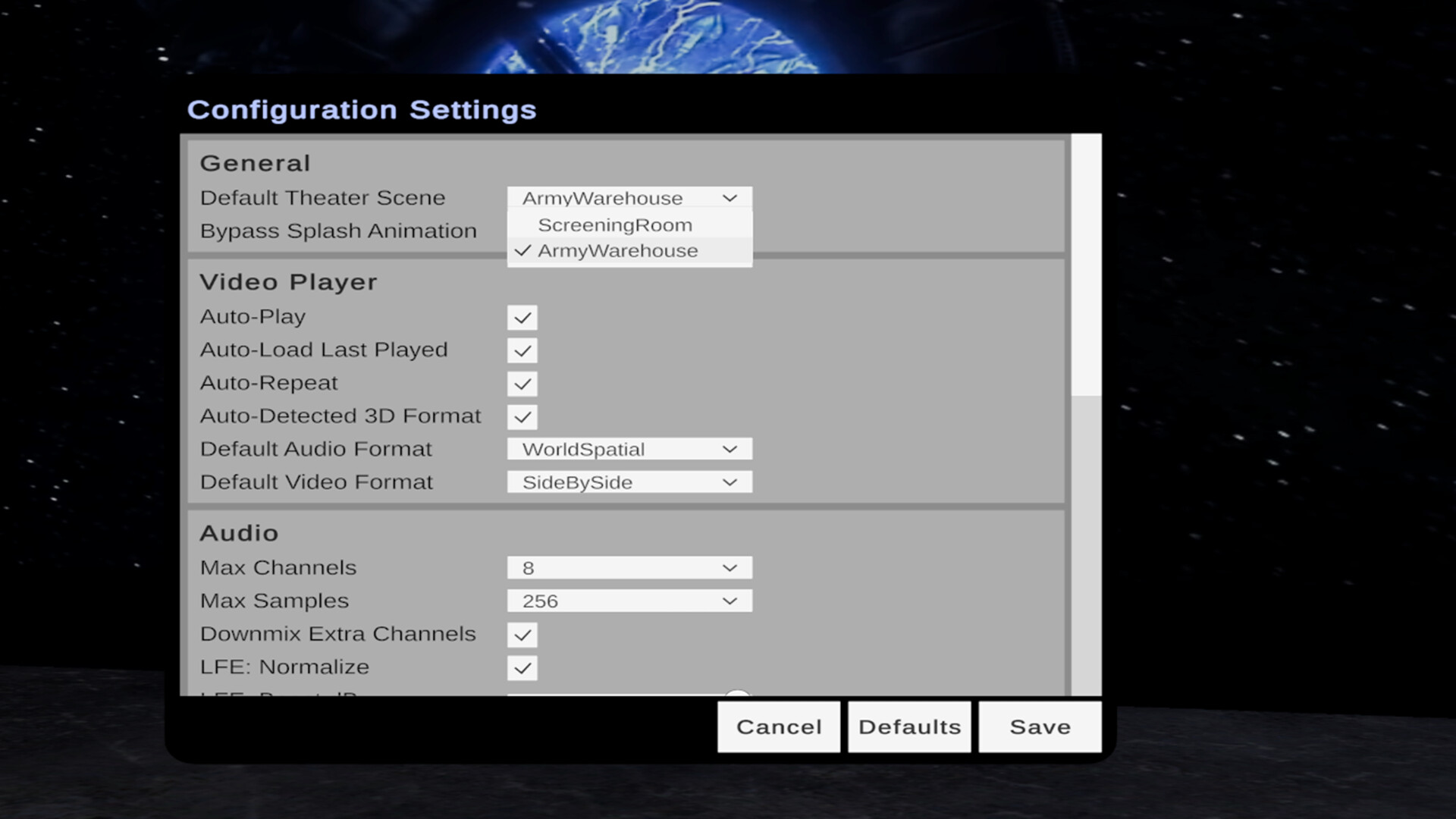
  • Two beautifully detailed theaters included: an intimate Screening Room and a massive, atmospheric Army Warehouse

  • Change your theater on the fly using the Theater Browser

Designed for Comfort and Control

  • Compatibility: Windows 11, desktop monitors, and OpenXR compatible XR/VR/AR headsets (with or without controllers)

  • Partial input support: keyboard + mouse, gamepads, and VR motion controllers

  • Intuitive Video Remote (desktop or VR) for play/pause, seek, restart, volume, 3D mode, audio mode and repeat

  • Built-in file browser

  • Theater selector

  • Auto-Play resumes your last video exactly where you left off

  • Auto-Repeat for endless loops

Configuration requise

    Minimale :
    • Système d'exploitation et processeur 64 bits nécessaires
    • Système d'exploitation : Windows 11 64-bit
    • Processeur : Intel Core i5-4590 / AMD FX 8350
    • Mémoire vive : 4 GB de mémoire
    • Graphiques : NVIDIA GTX 970 / AMD Radeon R9 290
    • DirectX : Version 12
    • Espace disque : 1 GB d'espace disque disponible
    • Carte son : Required
    • Prise en charge VR: OpenXR Compatible XR/VR/AR
    Recommandée :
    • Système d'exploitation et processeur 64 bits nécessaires

Évaluations pour Stereoscopy À propos des évaluations Vos préférences

Évaluations globales :
5 évaluations (5 évaluation(s))


Pour consulter les évaluations publiées lors d'une période spécifique, cliquez et faites glisser votre sélection sur un graphique ci-dessus ou cliquez sur une barre.


Filtrer les évaluations en fonction du temps de jeu des utilisateurs au moment de leur publication :


Pas de minimum à pas de maximum

Afficher les évaluations dans l'ordre sélectionné


En savoir plus
Filtres
Activité d'évaluation hors sujet exclue
Temps de jeu : 
A joué surtout sur Steam Deck
Plus aucune évaluation ne correspond aux filtres définis ci-dessus
Ajustez les filtres ci-dessus pour voir d'autres évaluations
Chargement des évaluations...