A rhythm game with a hexagonal twist. Notes flow from the center to the edges of one of the six segments. Play on your controller, touchscreen or keyboard!

Sign in to add this item to your wishlist, follow it, or mark it as ignored

Free Demo

Play Oradea Demo

Check out the full game


About This Demo

The hexagonal rhythm game

ORADEA is a remix of how rhythm games work.

In this demo...

We have included a few songs for you to play!

  • BOARDING - SEE

  • MIMAMA - NAKISO

  • NEURODIVERGENCE - ROMALOID

  • The Taste of Cockroach - MARETU

  • Unfortunate Hero - meltrisu

  • Unfortunate Hero (Instrumental) - meltrisu

  • Wonderland Syndrome - ki-you

To start...

We split your judgement bar into six smaller segments. Those segments were stuck together, each one at an angle, forming a hexagon.

A hexagon?

Yeah - a hexagon. And so was created the hexagonal playfield.

Notes come in from the center to the outside, meaning your sight-reading abilities are being properly tested with that hexagon. We did think of the newbies and we did add four different difficulties for each song: Easy, Medium, Hard, Expert.

Okay.. okay... cool. But what's special about it?

Well, we didn't just stick a geometrical shape in the middle of the screen without coming up with a solution to make it fun. We implemented gimmicks and customizations.

Gimmicks?

They're tricky to explain. Gimmicks can apply to both a hexagon and the notes and they're mostly visual.

→ Hexagon gimmicks: Some songs morph the hexagon or apply effects to it to make it feel like it's part of the music. Depending on the chart, the hexagon can pulse, become blurry, move/wiggle, hide and a lot more.

→ Note gimmicks: Some charts can also apply effects to their notes. They can either apply visual modifiers to the note or change its pathway midway through the song.

Great! So how do I play this?

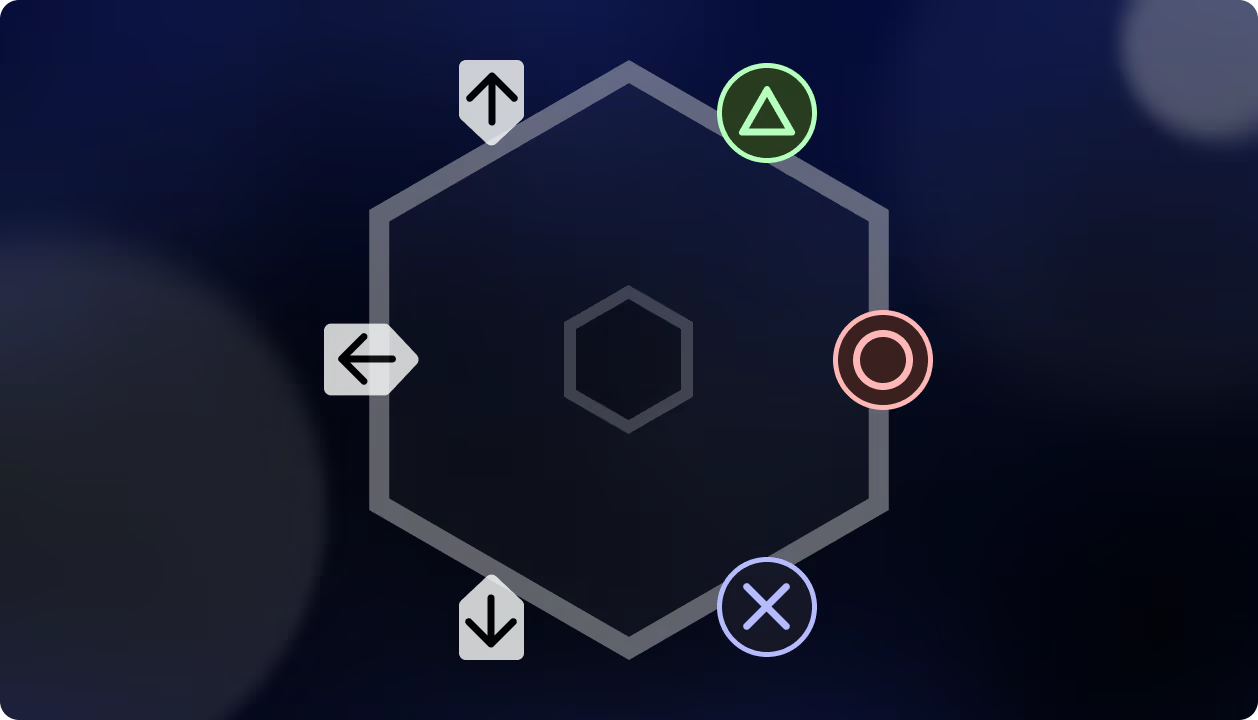
Our preferred methods are either using a controller and its face buttons or a touch screen

That aside, we do also let you play with your keyboard if the chart allows for it (if the chart doesn't have swipe notes). Denote that your experience on keyboard will be suboptimal.

System Requirements

Windows
SteamOS + Linux
    Minimum:
    • OS: Windows 10
    • Processor: AMD Athlon 3000G or i5-2300
    • Memory: 900 MB RAM
    • Graphics: Integrated Graphics
    • Storage: 1000 MB available space
    • Sound Card: None
    • Additional Notes: Controller required for playing Normal or higher difficulty songs
    Recommended:
    • OS: Windows 10
    • Processor: AMD Ryzen 5 5500 or Intel Core i5-12500
    • Memory: 900 MB RAM
    • Graphics: Radeon RX560 or NVIDIA GTX 1050
    • Storage: 1000 MB available space
    • Sound Card: None
    • Additional Notes: Controller required for playing Normal or higher difficulty songs
    Minimum:
    • OS: Ubuntu 22.04 LTS
    • Processor: AMD Athlon 3000G or i5-2300
    • Graphics: Integrated Graphics
    • Storage: 1000 MB available space
    • Sound Card: None
    • Additional Notes: AppImage Support Required • Controller or touchscreen required for playing Normal or higher difficulty songs
    Recommended:
    • OS: Ubuntu 22.04 LTS
    • Processor: AMD Ryzen 5 5500 or Intel Core i5-12500
    • Graphics: Radeon RX550 or NVIDIA GTX 1030
    • Storage: 1000 MB available space
    • Sound Card: None
    • Additional Notes: AppImage Support Required • Controller or touchscreen required for playing Normal or higher difficulty songs
There are no reviews for this product

You can write your own review for this product to share your experience with the community. Use the area above the purchase buttons on this page to write your review.