您必須在 Steam 上擁有軟體主程式 Driver Booster 3 for STEAM 才能執行該內容。

標籤

登入以將此項目新增至您的願望清單、關注它,或標記為已忽略

注意: 「Driver Booster 3 Upgrade to Pro (Lifetime)」已不再於 Steam 商店中提供。

可下載的內容

您必須在 Steam 上擁有軟體主程式 Driver Booster 3 for STEAM 才能執行該內容。


關於此內容

NOTICE: This version does not currently support sales, please click the following link to move to Driver Booster 10.

About


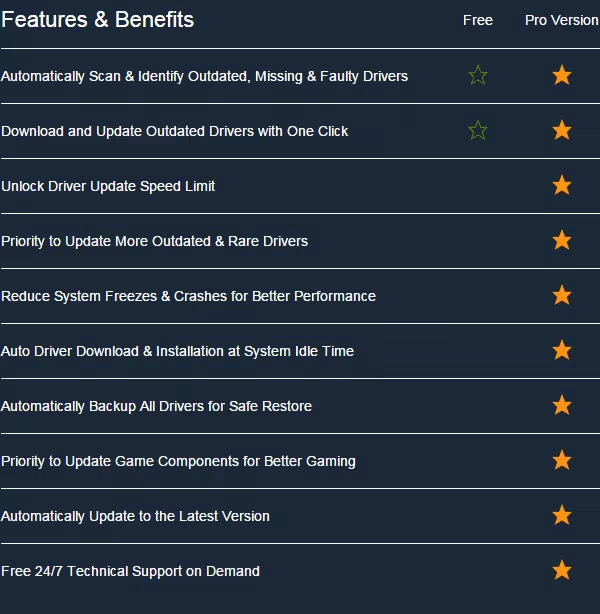
Driver Booster 3 for STEAM, as a powerful and easy-to-use driver updater, provides 1-click solution to rapidly & securely update drivers including the outdated, missing and faulty ones. It aims to fix computer problems, such as system crash, BSOD, device connection error, audio crackling, no sound issues, slow network, etc. With online database, this tool updates drivers in real time to make sure your devices always have the best drivers matched. Your hardware will get optimized and your computer will run at its best with the up-to-date drivers. What’s more, in order to enhance gaming experience, Driver Booster also supports game-related graphic & audio drivers with performance improved specially for hot games. And game components are also covered to offer necessary game support and get rid of various lock-in issues of game run times. In short, Driver Booster is a driver updater to increase system compatibility, stability and performance.

Features

Powerful Database


Driver Booster 3 for STEAM adopts online database to update drivers in real time. At present, over 200,000 device drivers are included and the number continues to rise. Rare drivers and newly released drivers like Graphics Driver, Audio Driver, Network Driver, Chipset Driver, Printer Driver, etc can be detected in this beefy database to ensure that your devices match the best drivers. Thus, your hardware performance boosts and your computer reaches its optimal state.

Game Boost


Driver Booster 3 for STEAM collects game-related graphic & audio drivers which are optimized specially for hot games. These driver updates can fix flickering or blurred screen and no sound or sound crackling problems to improve game fluency for better experience. At the same time, game components like PhysX, DirectX and OpenAL are also taken in to eliminate all sorts of dependency problems. Plus, without suffering from manually searching & installing components, you will concentrate more on games.

Easy to Use


As an easy-to-use driver updater, Driver Booster can automatically scan drivers and rapidly locate the outdated ones. And drivers are downloaded and installed by itself with only one click. With the function of rebooting or shutting down PC enabled, you will find drivers are updated already while you're away from the computer.

Smart Installation


To not disturb you, Driver Booster can intelligently decide to pause driver updating when you are playing games or staying in full screen. After you finish what you focused on just now, you can determine whether to continue updating.

Auto Download


Driver download is a very tedious and time-consuming task. Driver Booster can automatically detect outdated drivers and download them when your system is idle to save half of the driver update time. Or you can disable this function if you think it's unnecessary.

Missing & Faulty Drivers Detection


Driver Booster does not only update outdate drivers but also fix missing & faulty drivers, especially after upgrading your operating system or using your PC for long period time.

Simple & Safe Update


Driver Booster only installs drivers passed WHQL by default to guarantee security of driver resource. And more technology solutions, such as System Restore, Driver Backups, Driver Roll Back and Device Uninstall features, will keep your computer safe to the hilt. Once anything unexpected happens, you can recover the previous good drivers. Moreover, the Feedback window make it easy for you to send anything to the 24/7 technical support team.

Others


Driver Booster, of course, does more than above. Functions like program version auto-update, real-time detection of peripheral drivers, scheduled scanning and reminding, UI customization, network proxy support, and more are to be discovered by you.

About License

The license codes of Driver Booster 3 for STEAM are Lifetime/3PC. You pay for the program only the first time and enjoy all updates & supports within version 3.X for FREE and for lifetime on any 3 PCs.

系統需求

    最低配備:
    • 作業系統 *: Windows 10, Windows 8/8.1, Windows 7, Windows XP, Vista
    • 處理器: 1 GHz processor or faster
    • 記憶體: 512 MB 記憶體
    • 網路: 寬頻網際網路連線
    • 儲存空間: 500 MB 可用空間
    建議配備:
    • 作業系統 *: Windows 10, Windows 8/8.1, Windows 7, Windows XP, Vista
    • 處理器: 2 GHz processor or faster
    • 記憶體: 1024 MB 記憶體
    • 儲存空間: 10 GB 可用空間
* 自 2024 年 1 月 1 日(PT)起,Steam 用戶端僅支援 Windows 10 及更新版本。

Driver Booster 3 Upgrade to Pro (Lifetime) 的顧客評論 關於使用者評論 您的偏好設定

整體評論:
負評 (22 篇評論)


如欲檢視特定日期範圍內的評論,請在上方圖表框選一段日期範圍,或點擊直條。


以所選顯示順序顯示評論


進一步了解
篩選條件
排除離題評論活動
遊戲時數:
主要在 Steam Deck 上遊玩
作業系統:
CPU:
GPU:
裝置類型: