Free adaptive gaming software that uses your webcam and microphone to turn face gestures, head movements, and voice commands into in-game controls – play any game your way

Sign in to add this item to your wishlist, follow it, or mark it as ignored

This game is not yet available on Steam

Planned Release Date: February 2026

Interested?
Add to your wishlist and get notified when it becomes available.
Add to your wishlist
 

About This Software

PlayAbility Adaptive Software is a Windows-based accessibility tool that lets you add the controls you’re missing and build your perfect controller setup. With just a webcam and (optional) microphone, PlayAbility Adaptive Software extends your existing gear (keyboard, mouse, gamepads, adaptive devices) with new ways to play, so you can fully control any game the way you want.

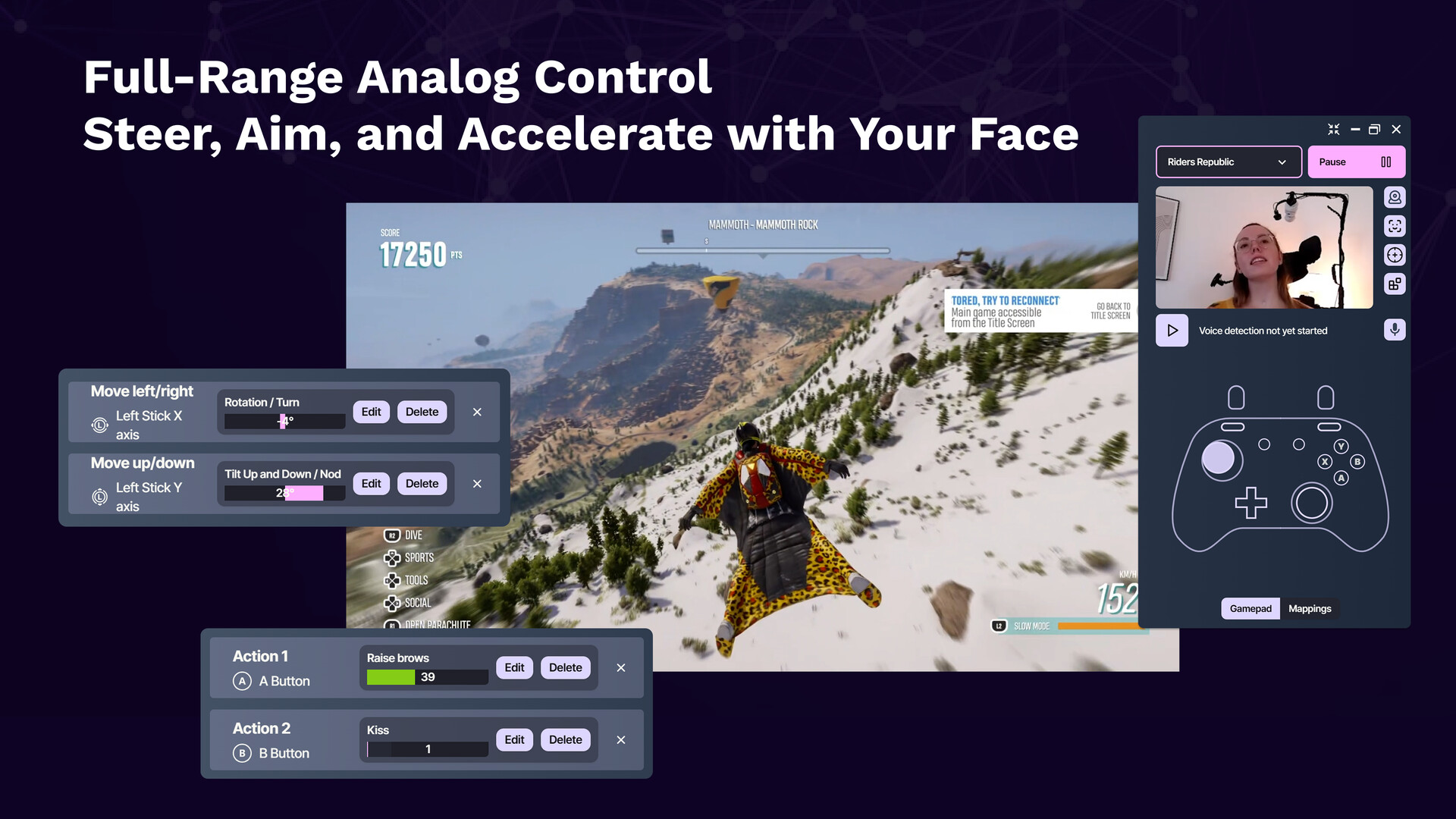
Designed for gamers of all abilities, PlayAbility Adaptive Software makes gaming more inclusive, configurable, and fun. It translates your facial expressions, head movements, and voice into seamless game inputs. Ever wanted to steer with your head, or use a smile as a button press? Now you can! The software creates a virtual controller behind the scenes, so every game thinks you’re using a standard gamepad or keyboard/mouse – meaning it works with 100% of PC games, and even on consoles via streaming or adapters. No special hardware is required beyond a simple webcam; you can even combine multiple devices and assistive tech into one unified control scheme.

Who is it for? PlayAbility Adaptive Software is built for disabled gamers who need alternative inputs, for streamers who want creative control setups (there’s even a Twitch chat integration!), and for tinkerers who love customizing their gaming experience. If you enjoy tweaking controls or require a unique setup to play comfortably, PlayAbility Adaptive Software gives you a friendly toolbox to play on your terms. Choose from included profile templates or create your own from scratch – every input and output is fully configurable to match your needs. Our goal is to empower every gamer to play their favorite games, their way with a smile (literally!). 🎮🙂

Feature List

  • Face & Head Tracking: Use over 50 different facial expressions and head movements as game inputs. For example, turn your head to steer or aim, and use a smile or eyebrow raise as button presses. (PlayAbility Adaptive Software lets these act as analog controls – not just on/off – for precise steering and aiming!)

  • Voice Commands: Integrated voice recognition (24 languages) lets you trigger any action with spoken words or phrases. Just say a command (e.g. "reload" or "jump") and PlayAbility Adaptive Software can press the key or button for you.

  • Complete Remapping: Map any input to any output. Reassign keyboard keys, mouse clicks/movement, voice commands, or face/head gestures to any gamepad button, analog stick, or trigger – or even to other keyboard/mouse actions. This means you can fully customize your control scheme for each game.

  • Hands-Free Mouse Control: Control your PC outside of games as well – move the mouse cursor with head movement and use facial gestures (or assigned keys) to click, drag, and scroll. It’s great for both gaming and everyday computer use when using a physical mouse is difficult.

  • Unified Virtual Controller: Merge inputs from all your devices into one seamless output. PlayAbility Adaptive Software can combine your adaptive controllers, joysticks, pedals, and its face/voice inputs into a single virtual controller recognized by games. In other words, mix and match multiple devices and still have the game see one controller – perfect for complex setups.

  • Custom Profiles & Templates: Save your configurations as profiles and switch between setups for different games or users. PlayAbility Adaptive Software comes with built-in profile templates (e.g. basic 1-stick arcade, racing setup, full gamepad, mouse control, etc.) to help you get started, all of which you can tweak or you can create a profile from scratch for complete control.

  • Console Compatibility: Play on more than just PC. With Remote Play or adapter support, you can use PlayAbility Adaptive Software on PlayStation 5 and Xbox consoles via Remote Play, and even on Nintendo Switch (with a compatible adapter). This extends your custom controls to console games, so you can enjoy accessible play on virtually any platform.

  • Twitch Integration: Streamers, have your chat join the fun! PlayAbility Adaptive Software offers Twitch chat integration, allowing viewers to trigger inputs through chat commands (using the Twitchat system). It’s a unique way to crowd-play or let your community assist you in-game, adding a new interactive layer to streaming.

About the Developer

PlayAbility Adaptive Software is created by Valentin Squirelo, an indie maker and developer from France with a passion for adaptive gaming tech. Valentin has been building playful inventions and accessibility projects since 2013 – from a Nerf blaster prosthetic arm to the infamous Nosulus Rift fart-smelling VR headset he made for a South Park game promo. He brings the same creativity and heart to PlayAbility.

This project didn’t start as a business venture, but as a personal mission to make gaming more accessible. Valentin began developing PlayAbility Adaptive Software in 2023 with help from his Twitch community, focusing on non-commercial, community-driven origins. He’s committed to keeping the software as open and available as possible – that’s why all features are unlocked for free with the base app. PlayAbility’s growing community (230+ members on Discord and counting) has shaped its development through feedback and testing. Valentin’s mission is simple: enable more gamers to play the games they love. He’s dedicated to accessibility and is continuously adding features and improvements based on user requests. By supporting PlayAbility Adaptive Software, you’re not just getting a cool piece of software – you’re helping a passionate creator continue his work to make gaming better for everyone.

Pricing Model

We believe in a friendly, transparent approach to pricing. PlayAbility Adaptive Software is completely free to download and use, with unlimited access to all features out of the box. The free base app includes one profile slot so you can create and save one custom control profile at a time. There are no time limits, no feature paywalls, and no subscriptions required – we want everyone to have a chance to play without barriers.

For power users who need more than one profile or who want to support the project, we offer an optional PlayAbility Pro upgrade as a one-time DLC purchase. This upgrade unlocks unlimited profile creation and saves. It’s a lifetime unlock, meaning you pay once and own it forever. By purchasing the Pro DLC, you not only gain the convenience of managing many profiles (for different games or setups), but you also directly support the continued development of PlayAbility Adaptive Software (and Valentin’s dream of keeping this mission going). ❤️

In summary: the core software is free for everyone with one profile, and the Pro DLC is a completely optional, one-time upgrade for unlimited profiles. No hidden costs, no microtransactions – just a sincere effort to balance accessibility with sustainability. We’re upfront about this model because we value your trust. Whether you choose to buy the upgrade or not, you’ll always have a fully functional experience with PlayAbility’s free version. Enjoy it, and happy gaming!

System Requirements

    Minimum:
    • OS: Windows 10
    • Processor: Dual-Core 2.0 GHz (or equivalent)
    • Memory: 2 GB RAM
    • Graphics: Integrated graphics (no dedicated GPU required)
    • Network: Broadband Internet connection
    • Storage: 1 GB available space
    • Additional Notes: Quality webcam and microphone for best results. For optimal face tracking, use good lighting and keep the webcam at eye level with a stable head position
    Recommended:
    • OS: Windows 10 or Windows 11
    • Processor: Quad-Core 3.0 GHz (or better)
    • Memory: 4 GB RAM
    • Graphics: Any (no special GPU needed)
    • Network: Broadband Internet connection
    • Storage: 1 GB available space
    • Additional Notes: Quality webcam and microphone for best results. For optimal face tracking, use good lighting and keep the webcam at eye level with a stable head position
There are no reviews for this product

You can write your own review for this product to share your experience with the community. Use the area above the purchase buttons on this page to write your review.