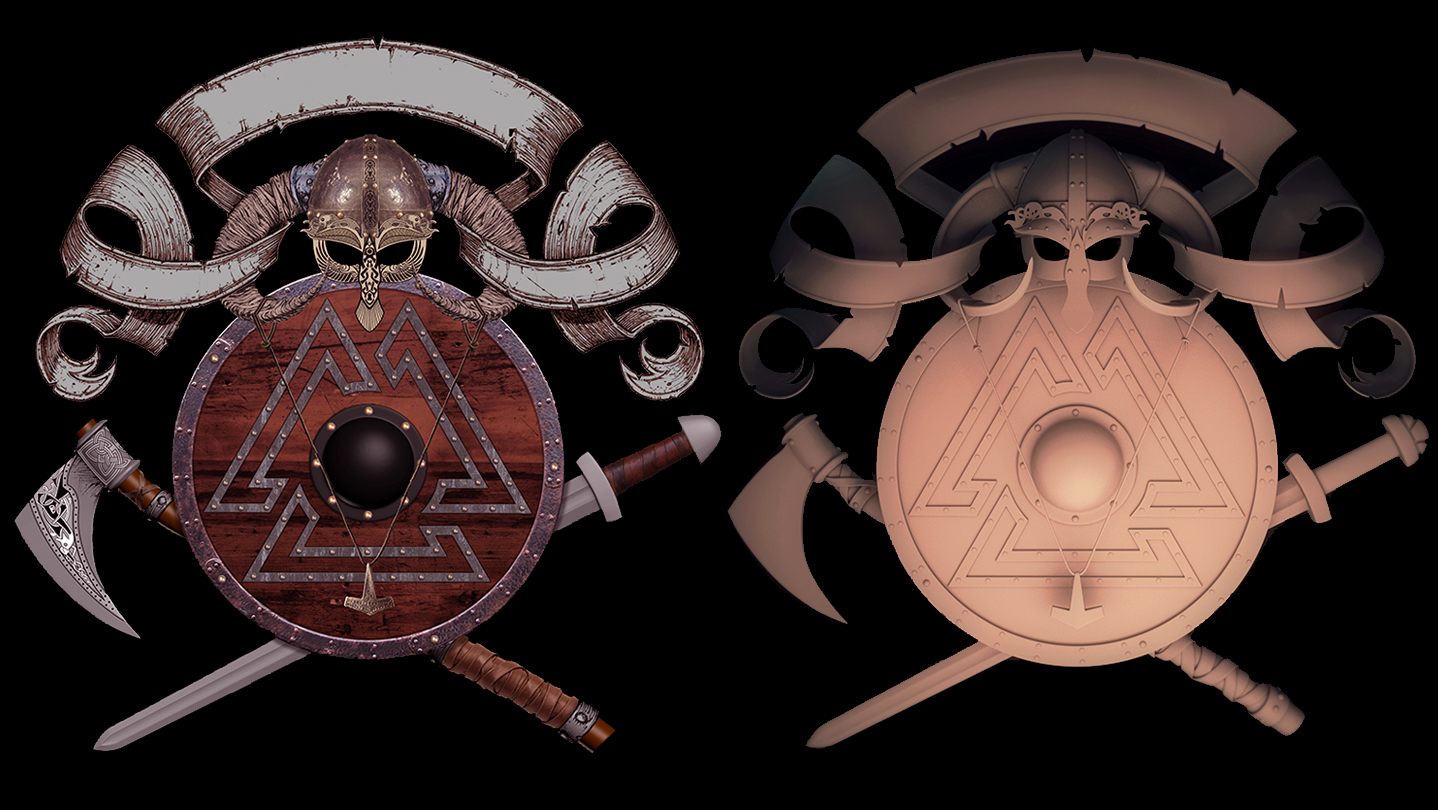
In 26 detailed videos you will get a fantastic introduction to prop modeling with 3D Studio Max. Additionally you will learn valuable techniques within Adobe Photoshop for concept creation and image compositing. Also covered are retopology techniques with ZBrush, and lighting setup and rendering with VRay 3.0 for 3DsMax.

このアイテムをウィッシュリストへの追加、フォロー、スルーとチェックするには、サインインしてください。

日本語 はサポートされていません

この製品はあなたの言語をサポートしていません。ご購入される前に、対応言語のリストをご確認ください。

お知らせ: 注意:Introduction to 3D Prop Modeling and Design - Viking Armor and WeaponsはSteamストアで利用できなくなりました。
 

Steam 動画

このコンテンツはオンラインストリーミング形式でのみご覧になれます。動画ストリーミングについての詳細は、Steam FAQ の動画ストリーミング を参照してください。

この動画について

With over 9 hours of video tutorials broken into 26 different chapters “Introduction to 3D Prop Modeling and Design – Viking Armor and Weapons” is a great learning resource for new or veteran digital artists. With over 15 years of professional experience in games and film, author Seth Thompson, showcases here how he concepts and models in 3DsMax, Adobe Photoshop, ZBrush and VRay.

Demonstrated in these videos Seth will take you step by step through his entire 3D prop creation process from initial concept to final model. Not only will you be introduced to countless powerful tools and techniques that can be added to your design and modeling skill set, but viewers will also be treated to other beneficial topics such as the importance of reference images, composition, time management and project organization.

Author Seth Thompson currently lives and works in Southern California where he supervises and creates digital environments and props for high quality video game cinematics. Seth’s credits include cinematic work for Warcraft III: Reign of Chaos, StarCraft II: Wings of Liberty, Diablo III, Overwatch, Final Fantasy XII and Final Fantasy: Advent Children.

Downloadable Bonus Content:

When you purchase this tutorial you will also receive the final UVW mapped, production ready model files created for this class. For your convenience, 3DsMax, Maya, and OBJ files of the weapons and armor have been provided to suit your modeling workflow. These are free to use on your own personal and professional projects.

Additionally, you will receive a collection of final render and reference images created for the class. Also included are several detailed Adobe Photoshop PSD files showcasing the various stages of asset development, including the final photoshop “Photo-bashing” concept PSD.

Although the included material can be used on your personal and professional projects, it cannot be repackaged, or resold in any format per copyright restrictions.

Be sure to watch the video tour of the downloadable content available with your purchase.

Video Contents:

Chapter 01 - Introduction to Concept Modeling - 26 mins
Chapter 02 - Refining the Shield Model with New Details - 11 mins
Chapter 03 - Modeling the Viking Sword - 36 mins
Chapter 04 - Reviewing the Final Concept in Photoshop - 26 mins
Chapter 05 - Photoshop Concept Techniques, Tips and Tutorials - 21 mins
Chapter 06 - VRay Light and Camera setup - 20 mins
Chapter 07 - Modeling the Helmet and Protective Cheek and Nose Guards - 18 mins
Chapter 08 - Modeling the Helmet Horns - 28 mins
Chapter 09 - Modeling the Helmet Brow Ornaments - 31 mins
Chapter 10 - Adding a Brow Crest and Shape Modification with Deformers - 22 mins
Chapter 11 - Modeling a Helmet Interior and Adding Bolts to the Helmet - 25 mins
Chapter 12 - Final Sword Model Revisions and UVW Mapping - 33 mins
Chapter 13 - Necklace and Pendant Modeling and UVW Mapping - 18 mins
Chapter 14 - Cloth Banner Design and Modeling - 25 min
Chapter 15 - Modeling Cuts and Tears into the Banner - 18 mins
Chapter 16 - Modeling Ridges on the Banner Trim - 17 mins
Chapter 17 - UVW Mapping the Banner - 14 mins
Chapter 18 - Project Organization and Execution - 11 mins
Chapter 19 - Mesh Preparation for Sculpting and the Importance of Edge Creasing - 13 mins
Chapter 20 - Shield Finalization with Bolts, Handles and Supports - 22 mins
Chapter 21 - Leather Strap Modeling for the Axe Handle - 19 mins
Chapter 22 - Leather Strap Modeling for the Axe Shaft - 16 mins
Chapter 23 - UVW Mapping the Axe - 12 mins
Chapter 24 - UVW Mapping the Shield - 23 mins
Chapter 25 - UVW Mapping the Helmet - 27 mins
Chapter 26 - Final Compositing with Photoshop and Magic Looks Builder - 15 mins

Software Demonstrated:

3DsMax 2015
Adobe Photoshop CS6
ZBrush 4r7
VRay 3.0
Magic Looks Builder
init_data: 0.0211, render: 0.0211

システム要件

Windows
macOS
SteamOS + Linux
    最低:
    • OS *: Windows 7
    • プロセッサー: Intel Core 2 もしくは同等のAMD 製CPU
    • メモリー: 1 GB RAM
    • ネットワーク: ブロードバンドインターネット接続
    • ストレージ: 200 MB の空き容量
    • 追記事項: 360p での表示は3Mbps 、540p での表示は5Mbps のネットワーク帯域幅。
    推奨:
    • OS: Windows 10
    • プロセッサー: HD 1080p の再生には Intel Core I3 以上 、同等の AMD 製 CPU を推奨します
    • メモリー: 2 GB RAM
    • ネットワーク: ブロードバンドインターネット接続
    • ストレージ: 500 MB の空き容量
    • 追記事項: 720p での表示は8Mbps 、1080p での表示は12Mbps のネットワーク帯域幅。
* 2024年1月1日(PT)以降、SteamクライアントはWindows 10以降のバージョンのみをサポートします。
    最低:
    • OS: Mac OSX 10.7
    • プロセッサー: Intel Core 2 もしくは同等のAMD 製CPU
    • メモリー: 1 GB RAM
    • ネットワーク: ブロードバンドインターネット接続
    • ストレージ: 200 MB の空き容量
    • 追記事項: 360p での表示は3Mbps 、540p での表示は5Mbps のネットワーク帯域幅。
    推奨:
    • OS: Mac OSX 10.10+
    • プロセッサー: HD 1080p の再生には Intel Core I3 以上 、同等の AMD 製 CPU を推奨します
    • メモリー: 2 GB RAM
    • ネットワーク: ブロードバンドインターネット接続
    • ストレージ: 500 MB の空き容量
    • 追記事項: 720p での表示は8Mbps 、1080p での表示は12Mbps のネットワーク帯域幅。
* 2024年2月15日(PT)に、Steamクライアントは32ビットゲームまたはmacOS 10.14以前のバージョンのサポートを終了します。
    最低:
    • OS: Linux Ubuntu 12.04 またはそれ以降、SteamOS 2.20 またはそれ以降
    • プロセッサー: Intel Core 2 もしくは同等のAMD 製CPU
    • メモリー: 1 GB RAM
    • ネットワーク: ブロードバンドインターネット接続
    • ストレージ: 200 MB の空き容量
    • 追記事項: 360p での表示は3Mbps 、540p での表示は5Mbps のネットワーク帯域幅。
    推奨:
    • OS: Linux Ubuntu 12.04 またはそれ以降、SteamOS 2.20 またはそれ以降
    • プロセッサー: HD 1080p の再生には Intel Core I3 以上 、同等の AMD 製 CPU を推奨します
    • メモリー: 2 GB RAM
    • ネットワーク: ブロードバンドインターネット接続
    • ストレージ: 500 MB の空き容量
    • 追記事項: 720p での表示は8Mbps 、1080p での表示は12Mbps のネットワーク帯域幅。

『Introduction to 3D Prop Modeling and Design - Viking Armor and Weapons』のカスタマーレビュー ユーザーレビューについて 個人設定

総合レビュー:
7件のユーザーレビュー (7件のレビュー)


特定期間内のレビューを表示するには上のグラフをクリック&ドラッグするか、棒グラフをクリックしてください。


ユーザーがレビューを書いた時のプレイ時間でレビューをフィルター:


最小時間なし最大時間なし

選択した表示順序でレビューを表示


詳細
フィルター
トピずれのレビュー荒らしを除外
プレイ時間:
主にSteam Deckでプレイ
オペレーティングシステム:
CPU:
GPU:
デバイスタイプ: