Daftar masuk untuk menambah item ini ke senarai hajat anda, ikuti atau tandakannya sebagai diabaikan

Bahasa Bahasa Melayu tidak disokong

Produk ini tidak menyokong bahasa tempatan anda. Sila semak senarai bahasa yang disokong di bawah sebelum membuat pembelian

Main Study Arcade


Tentang Permainan Ini

When you open Study Arcade, you're presented with an extremely simple interface to set a timer and get going. Hit Start, leave it open in the background, and get to work. It'll alert you  automatically when it's time to take a break.

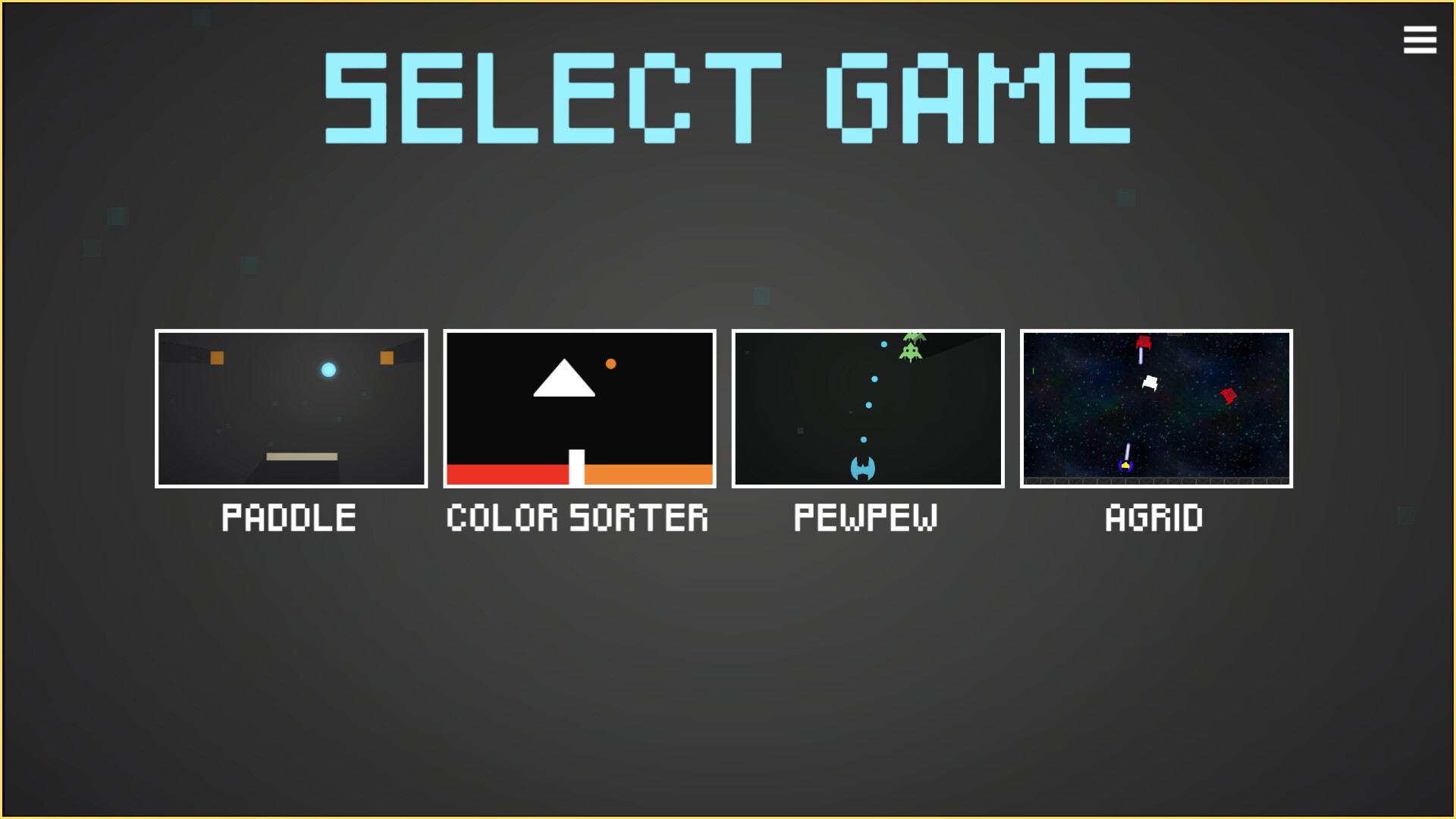
Come back after studying, hit Play, and it'll give you a list of arcade minigame for you to play, giving you a break when you need one! I've made 3 minigames so far, from block-breaking to retro shooter (okay, there may or may not be a 4th bonus game). Crucially, though, it only lets you play after you've already been productive, and all of the games are designed to give you a quick brain break and then help you get back to work. Study more to get a chance to play all of them and try to beat the highscore. Escape the doomscrolling, get stuff done, and most importantly, have fun while doing it. Simple as that!

The Pomodoro Technique (25 minutes of intense focus followed by 5 minutes of rest) is extremely helpful for more productive studying and working, but let's be honest, we all get distracted pretty easily. My attempts to use the technique looked something like this: set a timer, timer goes off, start scrolling social media or playing a game designed to keep me on for as long as possible, get distracted, and never get back to work. The problem is that most entertainment is designed to monetize your time, the most important resource you have! This free tool helps you solve that problem. It's what I wish I had when I was in school (especially during college), and so I'm putting it out there for free.

Keperluan Sistem

Windows
macOS
    Minimum:
    • Memerlukan pemproses 64-bit dan sistem pengendalian
    • OS: Windows 10 (64-bit)
    • Pemproses: Intel Core i3-2100 or AMD FX-6300
    • Memori: 2 GB RAM
    • Grafik: Intel HD Graphics 4000 or equivalent
    • Storan: 250 MB ruang tersedia
    • Kad Bunyi: DirectX-compatible
    Dicadangkan:
    • Memerlukan pemproses 64-bit dan sistem pengendalian
    • OS: Windows 10 (64-bit)
    • Pemproses: Intel Core i5 or better
    • Memori: 4 GB RAM
    • Grafik: NVIDIA GTX 750 / AMD R7 250 or equivalent
    • Storan: 250 MB ruang tersedia
    • Kad Bunyi: DirectX-compatible
    Minimum:
    • OS: macOS Catalina 10.15 or later
    • Pemproses: Apple M1 or Intel Core i5 (Dual-Core)
    • Memori: 2 GB RAM
    • Grafik: Intel HD Graphics 4000 or equivalent
    • Storan: 250 MB ruang tersedia
    • Kad Bunyi: Integrated sound card
    Dicadangkan:
    • OS: macOS Monterey 12 or later
    • Pemproses: Apple M1 or newer
    • Memori: 4 GB RAM
    • Grafik: Apple Silicon GPU / equivalent
    • Storan: 250 MB ruang tersedia
    • Kad Bunyi: Integrated sound card

Ulasan pelanggan untuk Study Arcade Tentang ulasan pengguna Pilihan anda

Keseluruhan Ulasan:
Kebanyakan Positif (19 ulasan)


Untuk melihat ulasan dalam sesuatu jangka masa tarikh, sila klik dan seret pilihan pada graf di atas atau klik pada bar tertentu.


Tapis ulasan mengikut masa bermain pengguna semasa ulasan ditulis:


Tiada minimum hingga Tiada maksimum

Tunjuk ulasan dalam susunan paparan yang dipilih


Ketahui Lebih Lanjut
Penapis
Tidak termasuk Aktiviti Ulasan di Luar Topik
Masa bermain:
Kerap Dimainkan di Steam Deck
Operating System:
CPU:
GPU:
Device Type:
Penapis Ulasan