Dieses Produkt benötigt zum Spielen die Steam-Version des Basisspiels Sunshine Love Chapter 1.

Dieses Spiel ist als "Nur für Erwachsene" markiert. Sie sehen dieses Spiel, weil Sie diese Inhalte in Ihren Einstellungen erlaubt haben.

Einstellungen bearbeiten

Melden Sie sich an, um dieses Produkt zu Ihrer Wunschliste hinzuzufügen, zu abonnieren oder als „Ignoriert“ zu markieren.

Zusatzinhalte

Dieses Produkt benötigt zum Spielen die Steam-Version des Basisspiels Sunshine Love Chapter 1.

Sunshine Love CH3 Walkthrough kaufen


Beschreibung nicht jugendfreier Inhalte

Der Entwickler beschreibt die Inhalte wie folgt:

Sunshine Love is a game intended for adults only and includes explicit, sexual content that some viewers may find offensive. The characters, story, and actions are all fictitious.
All characters are depicted as 18 and over. Contains incest, nudity, consensual sex, alternative lifestyles, usage of alcohol, graphic depictions of oral, vaginal, anal, and non-penetrative sexual acts, bodily fluids.

This content can be disabled in the game.

Über dieses Produkt

We have included four Walkthrough’s to help you along with your game progress.

With these guides, you can get help with:

  • Finding every collectible

  • Unlocking every bonus image

  • Unlock every alternate image

  • Collect points for the female characters you are interested in - gaining enough points unlocks

  • various game endings with them and other characters

  • Finding out how your choices will affect different scenes in the game

Game Walkthrough - this tells you the effect each choice you make has, where to collect

points for each character love interest, and which character paths you are on for each scene

Doughnut Walkhrough - this tells you where you can find all the donuts we have hidden within the game.

When you find them, it unlocks bonus images of various characters that you can view in the “Rewards Gallery”.

Peeping Tom Walkhrough - this tells you where and when the Pepping Tom icon appears during your playthrough.

Clicking on it unlocks an alternate image of what you can see on the screen. You can view these images again in the “Rewards Gallery”.

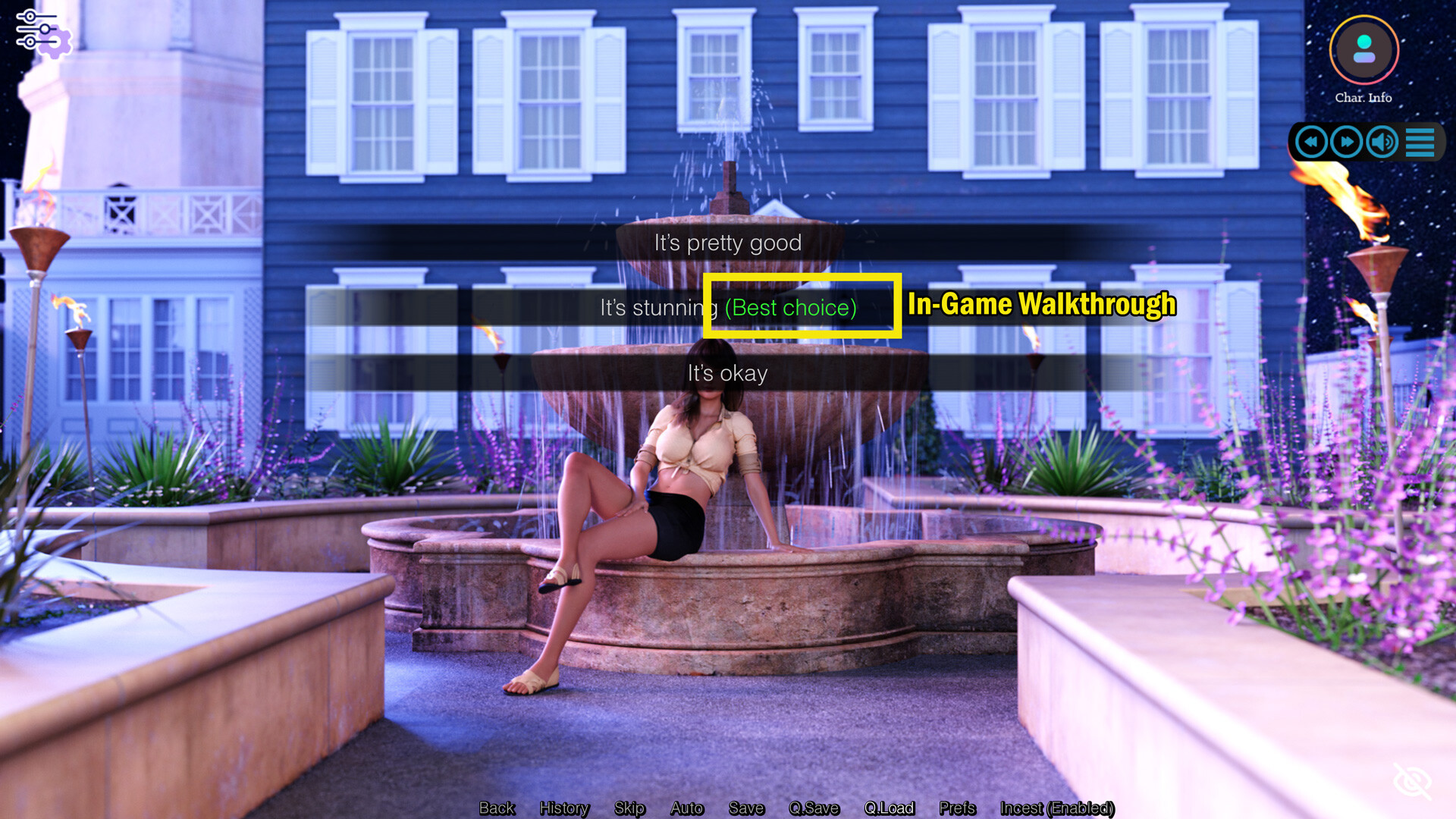
In-Game Walkthrough - enabling this walkthrough means that when the various choices come up during the many scenes in the game, this will give you hint for the best option to choose. It will be highlighted in GREEN.

Where to find these Walkthroughs

You'll find the walkthroughs (PDF Files) in the Steam game's directory under the folder "Walkthroughs/CH3".

As for the in-game Walkthrough, once the game has launched and you are on the main menu, you need to go to "Options", "Extra Preferences" and Activate the "in-game Walkthrough" feature. You don't need to restart the game for this feature to work.

Systemanforderungen

Windows
macOS
SteamOS + Linux
    Mindestanforderungen:
    • Setzt 64-Bit-Prozessor und -Betriebssystem voraus
    • Betriebssystem *: Windows 7 or higher
    • Prozessor: 2.0 GHz Core 2 Duo
    • Arbeitsspeicher: 2 GB RAM
    • Grafik: OpenGL 2.0 or DirectX 9.0c compatible
    • Speicherplatz: 4 GB verfügbarer Speicherplatz
    Empfohlen:
    • Setzt 64-Bit-Prozessor und -Betriebssystem voraus
* Ab dem 1. Januar 2024 unterstützt der Steam-Client nur noch Windows 10 und neuere Versionen.
    Mindestanforderungen:
    • Betriebssystem: Version: 10.10+
    • Prozessor: 2.0 Ghz 64-bit Intel-compatible (Apple silicon supported through Rosetta 2)
    • Arbeitsspeicher: 2 GB RAM
    • Grafik: OpenGL 3.0
    • Speicherplatz: 4 GB verfügbarer Speicherplatz
    Empfohlen:
      Mindestanforderungen:
      • Betriebssystem: Ubuntu 12.04+ or Kernel 3.x+ based distributions
      • Prozessor: 2.0 GHz Core 2 Duo
      • Arbeitsspeicher: 2 GB RAM
      • Grafik: OpenGL 2.0 compatible
      • Speicherplatz: 4 GB verfügbarer Speicherplatz
      Empfohlen:

      Nutzerrezensionen für Sunshine Love CH3 Walkthrough Über Nutzerrezensionen Ihre Einstellungen

      Alle Rezensionen:
      1 Nutzerrezensionen (1 Rezensionen)


      Zum Anzeigen von Rezensionen in einem bestimmten Zeitraum, markieren Sie diesen bitte in einem der obigen Graphen oder klicken Sie auf einen einzelnen Balken.


      Rezensionen in ausgewählter Reihenfolge anzeigen


      Weitere Informationen
      Filter
      Rezensionen ohne Themenbezug ausschließen
      Spielzeit:
      Zumeist auf dem Steam Deck gespielt
      Rezensionen werden geladen …