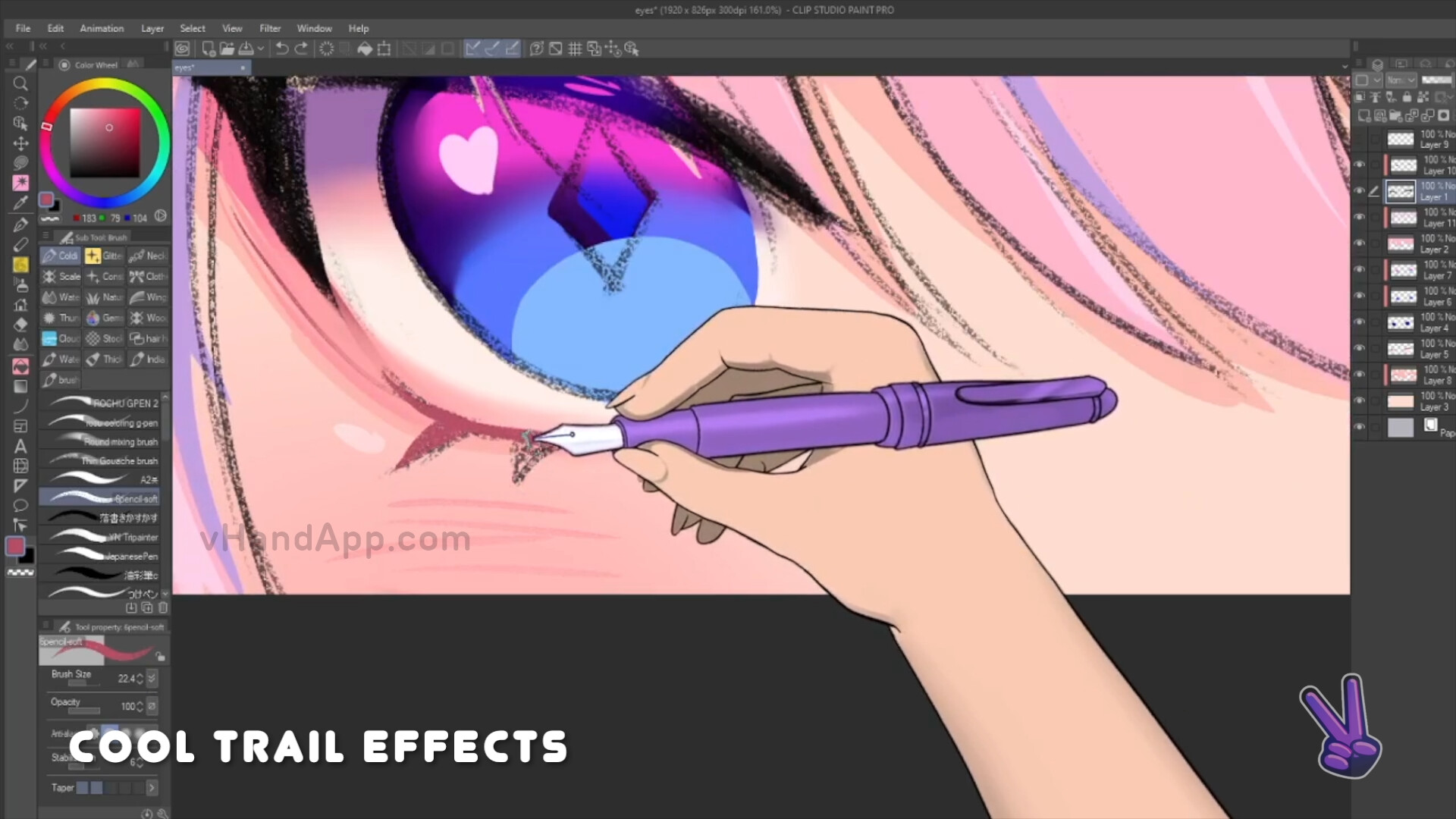
vHand is an app that realistically simulates your hand drawing motion, as well as, provides dynamic sketching sounds for ASMR lovers. vHand allows you to customize multiple hand presets which include pen, effects and colors. Use with your favorite streaming/capturing tool.

Login untuk menambahkan item ini ke wishlist-mu, mengikutinya, atau mengabaikannya

Bhs. Indonesia tidak didukung

Produk ini tidak didukung dalam bahasamu. Silakan tinjau daftar bahasa yang didukung di bawah ini sebelum melakukan pembelian.

Beli vHand


Tentang Software Ini

Enhance your drawing experience with vHand!

Made and designed by artists for artists, in collaboration with @ColdiArt!

Whether you’re a streamer or content creator, vHand offers an experience that combines realistic hand drawing motion simulations with dynamic sketching sounds.

Key Features:

  • Realistic Hand Drawing Simulation

  • Mods support! You can access all the textures, edit any of the pens, accessories, hands, sleeves, etc... with your own custom design and your edits will show up on the app once restarted. 

  • Dynamic Sketching Sounds

  • Customizable Hand Presets

  • Seamless overlay capture with transparent background support

  • Runs and captures mouse and pen presses in the background

Development:

Our main goal is to continue adding updates and features based on the community feedback.

Please Join our growing community of artists and creators and let us know what would you like to see implemented in future updates!

FAQ:

Q: I'm having trouble using the app in the background on Mac

A: Make sure to give proper permissions on your Mac right after installation when prompted. Go to Privacy & Security > Accessibility > Add VHand and enable it.

Q: How do I add the vHand app in OBS?

A: For Windows users : Add Game Capture Source > Under Mode : Select Capture Specific Window, Under Window: Select vHand, Under Window Match Priority: Select Window title must match > Enable Allow Transparency. For Mac users : Add MacOS Screen Capture > Under Method: Select Window Capture, Under Window: Select vHand > Add Chroma Key Filter to your Capture and set the key colour Type to Green.

Tip : In order to make the pen tip match with your PC cursor : First create a Group in OBS, then add your vHand source + your drawing program source inside the same group. Finally, change the size of the group or move it around to keep both cursors aligned in your streams.

Q: How do I customize my hand?

A: After hitting Start and selecting your Preset, hit ESC on your keyboard to make the customization overlay appear, hit ESC again to hide it.

Q: Where can I add my own art into the app?

A: In future updates, we will add mod support to the app and we will share more information on how to do that.

Persyaratan Sistem

Windows
macOS
    Minimum:
    • OS: Windows 10 version 21H1 (build 19043)
    • Prosesor: x86, x64 architecture with SSE2 instruction set support, ARM, ARM64
    • Memori: 2 GB RAM
    • Grafis: DX10, DX11, DX12 capable GPUs
    • Penyimpanan: 1 GB ruang tersedia
    Direkomendasikan:
    • OS: Windows 10 version 21H1 (build 19043)
    • Prosesor: x86, x64 architecture with SSE2 instruction set support, ARM, ARM64
    • Memori: 4 GB RAM
    • Grafis: DX10, DX11, DX12 capable GPUs
    • Penyimpanan: 2 GB ruang tersedia
    Minimum:
    • OS: Big Sur 11.0+
    • Prosesor: Apple Silicon, x64 architecture with SSE2
    • Memori: 2 GB RAM
    • Grafis: Metal capable Intel and AMD GPUs
    • Penyimpanan: 1 GB ruang tersedia
    Direkomendasikan:
    • OS: Big Sur 11.0+
    • Prosesor: Apple Silicon, x64 architecture with SSE2
    • Memori: 4 GB RAM
    • Grafis: Metal capable Intel and AMD GPUs
    • Penyimpanan: 2 GB ruang tersedia

Ulasan pelanggan untuk vHand Tentang ulasan pengguna Preferensimu

Ulasan Umum:
Positif (39 ulasan)


Untuk melihat ulasan dalam rentang tanggal tertentu, klik dan seret pilihan pada grafik di atas atau klik bilah spesifik.


Ulasan filter berdasarkan waktu bermain pengguna saat ulasan ditulis:


Tidak ada minimum sampai Tidak ada maksimum

Tampilkan ulasan dalam urutan tampilan yang dipilih


Pelajari Lebih Lanjut
Filter
Tidak Termasuk Aktivitas Ulasan Keluar Topik
Waktu bermain:
Seringnya Dimainkan di Steam Deck
Tidak ada ulasan lainnya yang cocok dengan filter di atas
Sesuaikan filter di atas untuk melihat ulasan lainnya
Memuat ulasan...