Kandungan ini memerlukan aplikasi asas AppGameKit Studio di Steam untuk berfungsi.

Daftar masuk untuk menambah item ini ke senarai hajat anda, ikuti atau tandakannya sebagai diabaikan

Bahasa Bahasa Melayu tidak disokong

Produk ini tidak menyokong bahasa tempatan anda. Sila semak senarai bahasa yang disokong di bawah sebelum membuat pembelian

Kandungan Boleh Muat Turun

Kandungan ini memerlukan aplikasi asas AppGameKit Studio di Steam untuk berfungsi.

Beli AppGameKit Studio - The Animation Sheet Editor

TAWARAN SEPANJANG MINGGU! Tawaran berakhir pada 8 Jun

-25%
$14.99
$11.24
 

Tentang Kandungan Ini

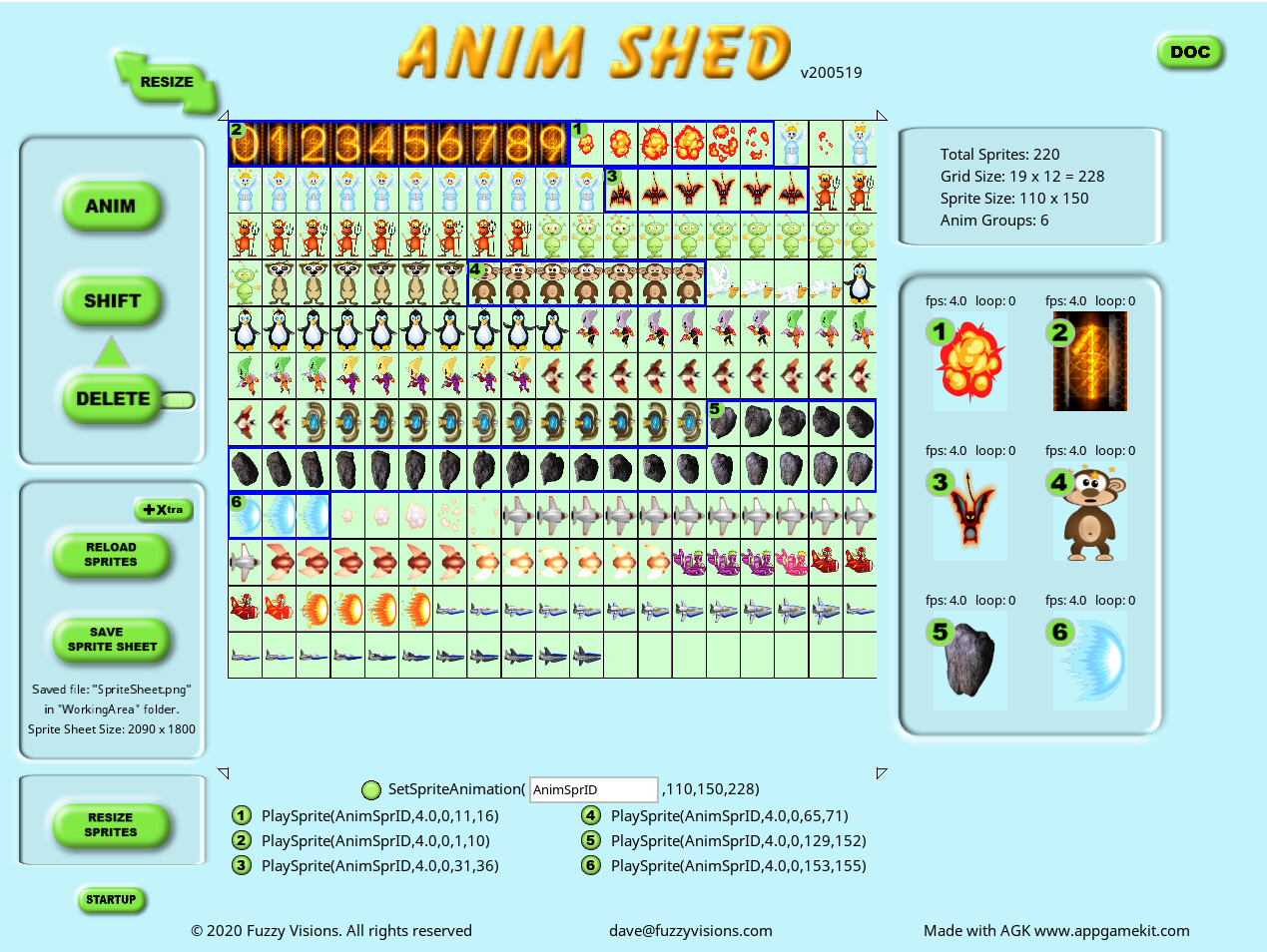
The Animation Sheet Editor ( AnimShed ) is a dedicated, easy to use and powerful sprite sheet packer, allowing you to quickly compress a number of single images into one sprite sheet.

AnimShed is for anyone developing 2D animated games and is geared towards developing with both AppGameKit Classic and AppGameKit Studio by TheGameCreators. AnimShed has specific copy and paste functions so you can insert the code directly into your AppGameKit software proejcts. This doesn't stop you using the simple and quick interface to create Sprite sheets for other game creating software. Automation, ease of use and time saving features are the top features of AnimShed as many of the features that you would usually have to manually do with other packages are automated or very easy to implement. You can very easily adjust the size of the sprite sheet at any stage to take into account the size of sprites, adding/deleting and moving sprites, as well as other actions.

FEATURES

  • Load up to 500 2D sprites from any folder via the built-in browser
  • Create up to 200 animations for your game code
  • Extract up to 500 sprites easily from a sprite sheet file for use in AnimShed in seconds
  • AnimShed comes supplied (from 'The Game Company' ) with 66 sprites to help you familiarise yourself with AnimShed
  • Uses mainly mouse-only controls, so no typing in column numbers and so on
  • AnimShed adjusts the Sprite Sheet size automatically on most actions
  • Arrange your sprites within AnimShed just by dragging
  • Select groups of animations just by drawing on screen with the mouse
  • Embedded help documentation with interactive search system
  • Automatically adjusts animation groups when editing groups
  • Saves sprite sheet and animation details for 5 folder locations
  • Delete sprites from the sprite sheet and still leaves the original file intact
  • Create any size of transparent or solid border on all your sprites
  • Displays constant sprite and group info for reference

Keperluan Sistem

    Minimum:
    • OS *: Windows XP SP2
    • Pemproses: Intel Celeron / Athlon Sempron
    • Memori: 1 GB RAM
    • Grafik: Open GL 2.0 compatible
    • DirectX: Versi 9.0c
    • Storan: 2 GB ruang tersedia
    • Kad Bunyi: N/A
    Dicadangkan:
    • OS *: Windows 7 or Newer
    • Pemproses: Intel Core i3 / Athlon FX series or better
    • Memori: 2 GB RAM
    • Grafik: Nvidia Geforce 500 series / ATI Radeon HD 6000 series or better
    • DirectX: Versi 9.0c
    • Storan: 2 GB ruang tersedia
    • Kad Bunyi: N/A
* Mulai 1 Januari 2024, Steam Client hanya akan menyokong Windows 10 dan versi yang lebih baharu.

Ulasan pelanggan untuk AppGameKit Studio - The Animation Sheet Editor Tentang ulasan pengguna Pilihan anda

Keseluruhan Ulasan:
1 ulasan pengguna (1 ulasan)


Untuk melihat ulasan dalam sesuatu jangka masa tarikh, sila klik dan seret pilihan pada graf di atas atau klik pada bar tertentu.


Tunjuk ulasan dalam susunan paparan yang dipilih


Ketahui Lebih Lanjut
Penapis
Tidak termasuk Aktiviti Ulasan di Luar Topik
Masa bermain:
Kerap Dimainkan di Steam Deck
Operating System:
CPU:
GPU:
Device Type:
Penapis Ulasan