This "Re-Imagined" Klondike doesn't change any of the rules of standard 3-card draw Klondike. It just provides you the tools that you need to play the game intelligently. If you are a lover of puzzles, you will really like the result of this re-imagining.

想要将此项目添加至您的愿望单、关注它或标记为已忽略,请先登录

不支持简体中文

本产品尚未对您目前所在的地区语言提供支持。在购买请先行确认目前所支持的语言。

购买 Klondike Re-Imagined


关于此游戏

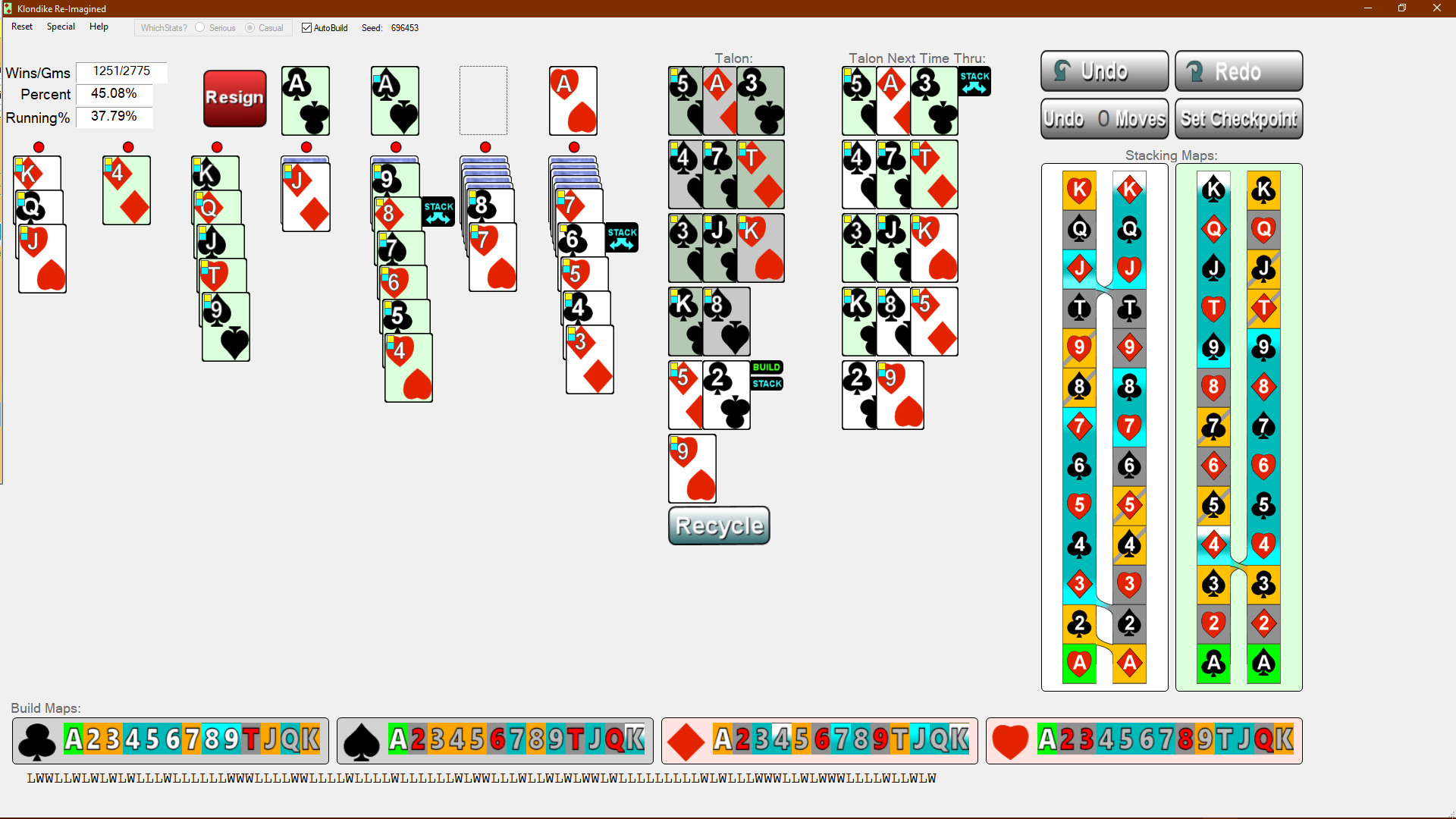
I started working on this app over twenty years ago. (They weren’t called “apps” back then.) I wanted a Klondike that displayed all the possible moves (without having to hit a hint key). So, I designed a Klondike app where all possible moves are shown as little flags attached to the moveable cards. To make the move, you just click on the flag.

Then I was on to my other pet peeve. All Klondike programs made you go through the talon three cards at a time. If you are a serious player, you need to see them all. Why not display them all in a nice 3-by-x array. With the possible-move-flags attached! Easily done.

I was happy. My program was way more enjoyable to play. But after a while I was bothered by how troublesome it sometimes was to find where a given card (the one you need) might be. So off to the side, I added a Card-Map showing icons for all the cards, color coded by location: grey for face-down cards, blue for face-up cards in the tableau, green for cards built to the foundation and orange for cards in the Talon. Additionally, if you click on the Card Map icon, the corresponding card gets highlighted (well, not the face-down cards, of course).

Years later, I wondered if it was possible for the Card Map to let me know when a build situation occurs where it was possible to flip a face-down card. After much work, I had the algorithm. When the possibility arises, the Card Map highlights the needed builds. Cool.

Would it be possible to do the same thing for stacking moves - if pulling certain cards out of the talon could facilitate flipping a down card, could I highlight them? This needed a pair of new card maps, Stacking Maps, showing all cards’ icons in stacking order (color coded as in the Build Maps). After months of work, I had the algorithm. This was really nice. Stacking Maps quickly became the center for strategy formulation.

One day in the shower, I had a brainstorm. I could display the Talon twice, once as it is and then again as it will be the next time through, with the possible-move-flags attached to both versions. So, when you make a set-up move in the talon, the move you really want to make instantly appears (in the second Talon) for you to select. This makes the Recycle Talon button essentially superfluous.

But there was still one very troublesome aspect of playing Klondike – continuing to play when it was impossible to win. Could I come up with a totally accurate algorithm to let you know when continuing was futile. And make it fast enough to execute it in the background, in between moves? Okay, this one took three years of thinking about and then months of programming it. But it works brilliantly. This is really, really nice! No wasting time on doomed games.

I really like Klondike. (I have over 20,000 games played.) And this Re-imagined Klondike improves the play drastically. This allows one to concentrate on Klondike strategy (which is very interesting and deep, by the way). I have improved my winning average to 43%. (On other apps, I can only manage 33%.) And the playing is fun and hassle-free.

If you are of a similar mind-set, give this program a try. I’ve spent twenty plus years building it.

系统需求

    最低配置:
    • 处理器: 3.0 GHz
    • 显卡: at least 1024x 768 resolution
    推荐配置:
    • 操作系统: Windows 10
    • 处理器: 2 .0 GHz
    • 显卡: at least 1024x 768 resolution

Klondike Re-Imagined 的顾客评测 关于用户评测 您的偏好

总体评测:
1 篇用户评测 (1 篇评测)


要查看某个日期范围内的评测,请在上方图表中点击并拖动选定的范围或是点击某特定时间柱。


按用户的游戏时间筛选此评测撰写时的评测:


无最低限制无最高限制

按选择的显示顺序显示评测


了解更多
筛选条件
排除跑题评测活动
游戏时间:
大部分在 Steam Deck 上
Operating System:
CPU:
GPU:
Device Type:
无其他评测符合上述筛选条件
调整上方筛选条件以查看其它评测
加载评测中…