Kandungan ini memerlukan aplikasi asas iVRy Driver for SteamVR di Steam untuk berfungsi.

Daftar masuk untuk menambah item ini ke senarai hajat anda, ikuti atau tandakannya sebagai diabaikan

Bahasa Bahasa Melayu tidak disokong

Produk ini tidak menyokong bahasa tempatan anda. Sila semak senarai bahasa yang disokong di bawah sebelum membuat pembelian

Kandungan Boleh Muat Turun

Kandungan ini memerlukan aplikasi asas iVRy Driver for SteamVR di Steam untuk berfungsi.

Muat turun iVRy for SteamVR (GearVR/Oculus App Installer)

Main Percuma
 

SteamVR

To use the iVRy Driver for SteamVR, you MUST first install SteamVR from the Steam Store.

Before you start

IMPORTANT:

Before using the iVRy Driver for SteamVR, the iVRy GearVR/Oculus app MUST be installed on the Mobile Device. To do so, enable USB Debugging on the device, connect it via a USB cable to the PC and select the "Install GearVR/Oculus Mobile App" Launch option of the iVRy Driver for SteamVR.

To start the app on GearVR, tap the icon in the Android launch screen and insert the device into the GearVR headset when prompted. Device must be mounted in GearVR before starting SteamVR.

To start the app on Oculus Go/Quest/Quest 2/Quest 3, use the link in the "Unknown Sources" section of the "Apps" menu.

On startup the app will display "Waiting for Connection", while it waits for the iVRy Driver for SteamVR to connect. SteamVR can be launched from the iVRy "Launch" button, or by launching SteamVR or a SteamVR/OpenVR VR title.

When using the iVRy Driver for SteamVR for the first time, it MUST be started from the "Launch" button, to ensure any additional services and drivers it requires get installed.

GearVR

IMPORTANT:

If the GearVR device is stuck in an update loop, or if the GearVR system files need to be (re)installed, use the iVRy GearVR System Files Installer DLC.

For GearVR, the "Allow VR API without OSIG" option MUST be enabled in the Gear VR Service "Developer options" on the Mobile Device.

To enable "Developer options" for Samsung Gear VR devices:

- Open Android "Settings"

- Select "Apps"

- Select "Gear VR Service"

- Select "Storage"

- Select "Manage Storage"

- Tap on "VR Service Version" several times

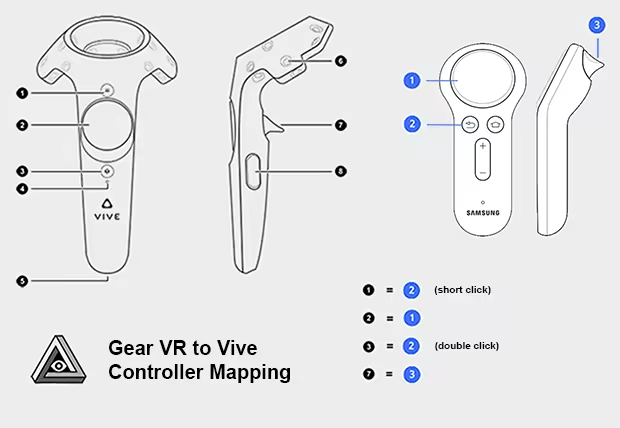
When using the GearVR or Oculus Go version of the iVRy app, with a GearVR/Oculus Go controller, the following button mappings will be used:

Tentang Kandungan Ini

What is the iVRy for SteamVR (GearVR/Oculus App Installer) DLC?


• It is the installer for the iVRy app for Samsung GearVR or Oculus Go/Quest/Quest 2 headsets.

What is iVRy (GearVR/Oculus Edition)?


• iVRy is an app for your Samsung GearVR or Oculus Go/Quest/Quest 2 headset with a Virtual Reality headset driver for SteamVR.

What does that mean?


• Want to play PC VR* (Virtual Reality) titles without having to buy another VR headset?
• With iVRy and a Samsung GearVR or Oculus Go/Quest/Quest 2 headset you can!
• Supports Wired (USB) connections for greater visual quality and performance.
• Supports Wireless (Wifi) connections for greater mobility.
• Automatically adjusts quality to maintain optimal frame rates on all connection types.
• User configurable quality and performance options.
• Integrates with SteamVR, so no 'manager' / 'server' apps or additional configuration required.
• Includes SteamVR Dashboard overlay, to change driver settings in VR.
• Built-in support for NoloVR 6DOF tracking and motion controllers.
• Compatible with most HTC Vive and Oculus Rift** titles.
• "Lite" edition has all of the features of "Premium" edition, but will start to reduce color saturation after being connected for more than 5 minutes. Upgrade to "Premium" edition via Steam DLC to remove this limitation.

* Valve OpenVR/SteamVR. Requires Valve Steam & SteamVR on Windows 7 or later.
** Oculus Rift titles require Valve SteamVR, Oculus Home & 3rd party 'LibreVR Revive' software.

Keperluan Sistem

    Minimum:
    • Memerlukan pemproses 64-bit dan sistem pengendalian
    • OS *: Windows 7
    • Pemproses: Intel® i5-4590 / AMD FX 8350 equivalent
    • Memori: 8 GB RAM
    • Grafik: NVIDIA GeForce® GTX 970 / AMD Radeon™ R9 290 equivalent
    • DirectX: Versi 11
    • Storan: 40 MB ruang tersedia
    Dicadangkan:
    • Memerlukan pemproses 64-bit dan sistem pengendalian
    • OS: Windows 10
    • Pemproses: Intel® i5-4590 / AMD FX 8350 equivalent or greater
    • Memori: 8 GB RAM
    • Grafik: NVIDIA GeForce® GTX 970 / AMD Radeon™ R9 290 equivalent
    • DirectX: Versi 11
    • Storan: 40 MB ruang tersedia
* Mulai 1 Januari 2024, Steam Client hanya akan menyokong Windows 10 dan versi yang lebih baharu.

Ulasan pelanggan untuk iVRy for SteamVR (GearVR/Oculus App Installer) Tentang ulasan pengguna Pilihan anda

Keseluruhan Ulasan:
Campur (20 ulasan)


Untuk melihat ulasan dalam sesuatu jangka masa tarikh, sila klik dan seret pilihan pada graf di atas atau klik pada bar tertentu.


Tapis ulasan mengikut masa bermain pengguna semasa ulasan ditulis:


Tiada minimum hingga Tiada maksimum

Tunjuk ulasan dalam susunan paparan yang dipilih


Ketahui Lebih Lanjut
Penapis
Tidak termasuk Aktiviti Ulasan di Luar Topik
Masa bermain:
Kerap Dimainkan di Steam Deck
Operating System:
CPU:
GPU:
Device Type:
Penapis Ulasan