Zaloguj się, aby dodać tę pozycję do listy życzeń, zacząć ją obserwować lub oznaczyć jako ignorowaną

Polski język nie jest obsługiwany

Ten produkt nie obsługuje twojego lokalnego języka. Przed zakupem zapoznaj się z listą obsługiwanych języków, która znajduje się poniżej.

Kup FMVMachine


O tym programie

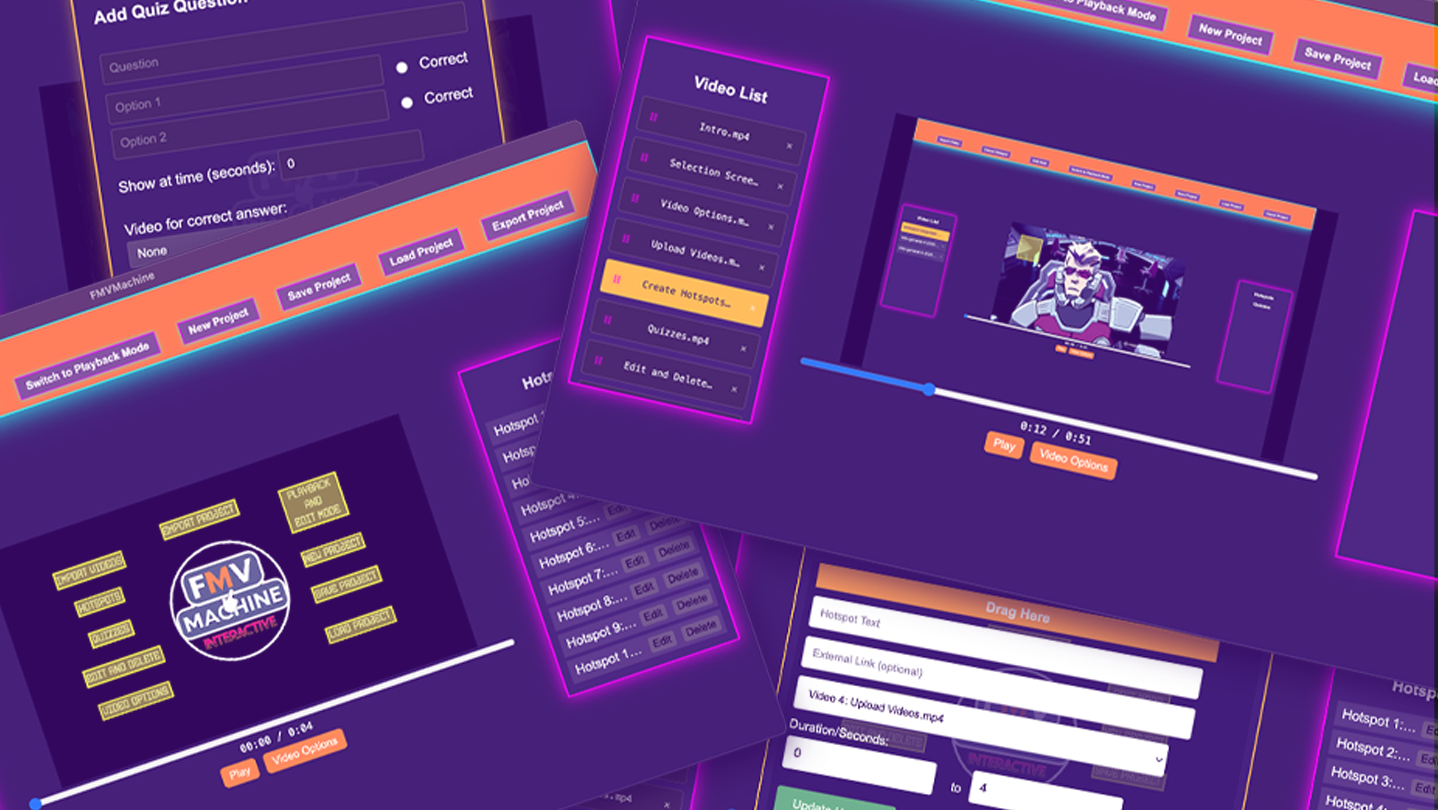
FMVMachine makes it easy to build branching narratives, pitches, and marketing videos with interactive hotspots, quizzes, and seamless video transitions. This no-code tool makes it easy to create and self-host your own interactive video and educational experiences.

All the projects you create are fully responsive across most resolution sizes and devices.

You own and control everything you create. Build locally and privately on your computer or laptop. No cloud servers or subscriptions. 

Use for any use case including commercial use.

The following are the key features of FMVMachine:

  • Import and work with multiple videos within the same project

  • Create, edit, and delete multiple responsive and interactive hotspots across multiple videos within the same project. When clicked, you can choose to display text, open a link, or link to and play another video from the imported videos. You can also choose the time interval of when the hotspot will be visible during the video playback.

  • Create, edit, or delete multiple responsive and interactive quizzes across multiple videos in your project. You can create a question along with multiple choice questions. You can also link to and play a video based on a right or wrong choice. You can even choose when during your video playback the quiz will appear.

  • You have an edit and playback mode that you can switch between. The edit mode is where you will edit, add, or delete from your existing project. The playback mode allows you to test everything that you've created.

  • The video options allow you to either loop the current video at the end of playback or play another video.

  • You can save your project, including all videos and options, into a simple .proj file that you can open across any device using FMVMachine. Keep in mind that your saved project file will be as large as the video files you use.

  • The new project button allows you to erase everything and start with a blank slate.

  • You can load ANY FMVMachine .proj save file into FMVMachine using the load project button.

  • The export button exports your project. When exported, everything required for your project to be distributed online will be pre-created and pre-packaged into a zip file. Simply unzip the file and inside the folder you will find everything already structured and ready to go. You can send the zip file to share with friends, family, or clients. You can also upload the entire folder to your own web host or wherever you choose to share online that hosts HTML.

Oświadczenie w sprawie treści generowanych przez SI

Producenci opisują, jak ich gra korzysta z treści generowanych przez SI, w następujący sposób:

The sample videos you see loaded in the app for the purposes of creating screenshots, a trailer, and a tutorial were generated with Ai.

Wymagania systemowe

Windows
macOS
    Konfiguracja minimalna:
    • System operacyjny: Windows 10/11
    • Procesor: Intel Core i3-3220 or AMD FX-4300
    • Pamięć: 4 GB RAM
    • Karta graficzna: Intel HD Graphics 4000 or NVIDIA GeForce GT 730 or AMD Radeon R5 240
    • DirectX: Wersja 11
    • Miejsce na dysku: 2 GB dostępnej przestrzeni
    Konfiguracja zalecana:
    • DirectX: Wersja 11
    Konfiguracja minimalna:
    • System operacyjny: macOS 11 or later
    • Procesor: Intel Core i3-3220 or Apple M1
    • Pamięć: 4 GB RAM
    • Karta graficzna: Intel HD Graphics 4000
    • Miejsce na dysku: 2 GB dostępnej przestrzeni

Recenzje klientów dla produktu FMVMachine O recenzjach użytkowników Twoje preferencje

Ogólne recenzje:
Recenzje użytkowników: 1 (1)


Aby zobaczyć recenzje w wybranym zakresie dat, kliknij i przeciągnij zaznaczenie na powyższym wykresie lub kliknij na wybrany słupek.


Filtruj recenzje według czasu gry użytkownika w momencie publikacji recenzji:


Bez minimum do Bez maksimum

Pokaż recenzje w wybranej kolejności wyświetlania


Dowiedz się więcej
Filtry
Wyłączanie okresów występowania recenzji nie na temat
Czas gry:
Głównie Steam Deck
System operacyjny:
CPU:
GPU:
Typ urządzenia:
Brak recenzji pasujących do filtrów ustawionych powyżej
Dostosuj filtry powyżej, by zobaczyć inne recenzje
Wczytywanie recenzji…