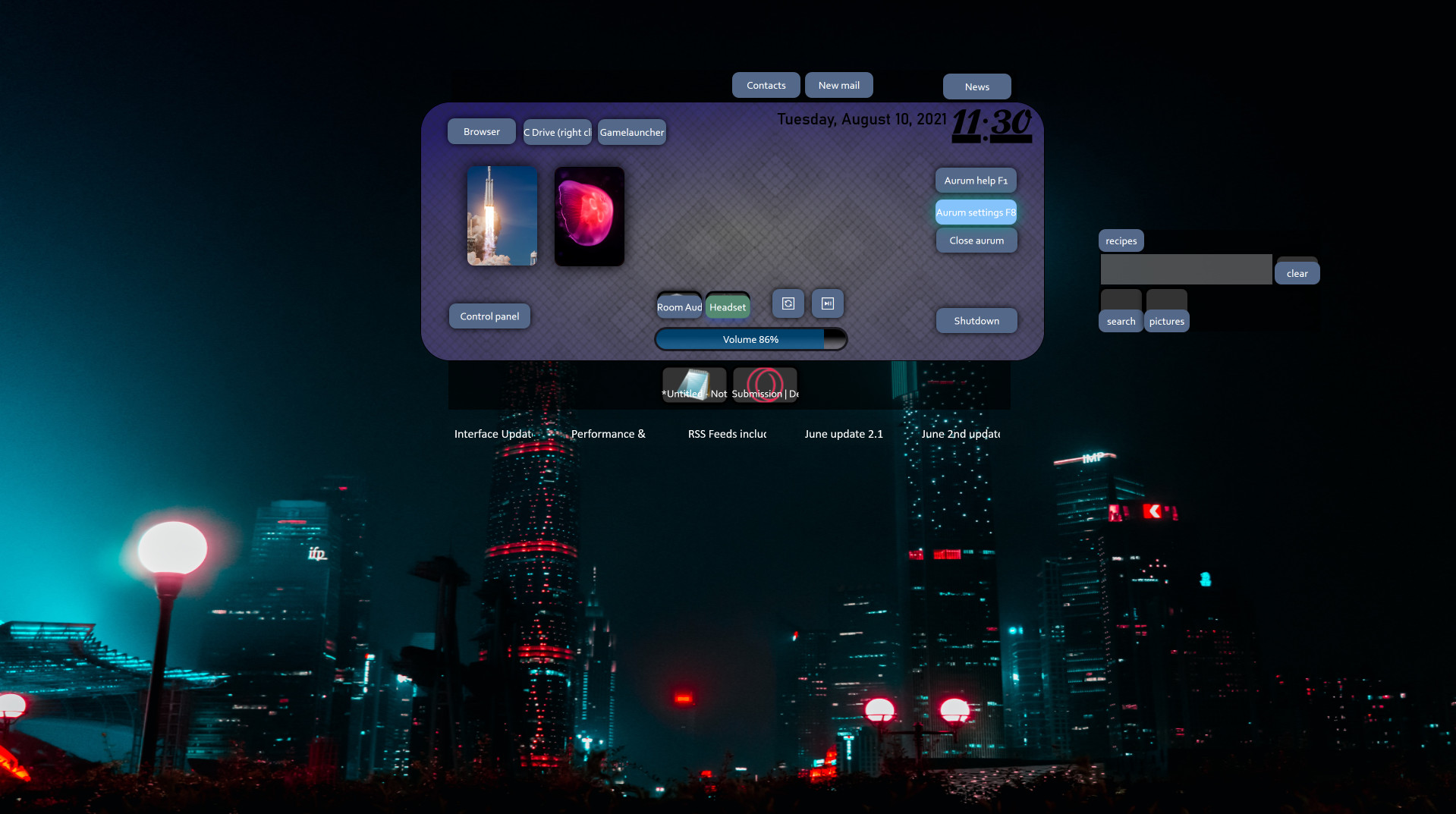
Aurum let's you create your own OS frontend. Drop some folders, links, games, widgets, windows commands on layers, apply pictures, colors and skins. Made for quick and easy creation and customization with a visual editor and a user content gallery.

로그인하셔서 게임을 찜 목록에 추가하거나, 팔로우하거나 또는 제외로 지정하세요.

한국어(을)를 지원하지 않습니다

이 제품은 귀하의 로컬 언어를 지원하지 않습니다. 구매하기 전에 아래에 있는 지원하는 언어 목록을 확인해주세요.

Aurum 구매


소프트웨어 정보

Welcome to Aurum!

Aurum is a powerful but comfortable "custom OS flyout menu" designer. It's first of it's kind and slighly experimental.
You can create your own overlaying panels, and combine OS commands and links as well as easily to reach widgets like a volume slider, to have a better and more seamless work and gaming experience.
It shines when mapped to an extra mouse button, making it possible to reach all your settings and anything with one hand.

Convenient creating
Aurum makes modifications easy with a visual editor that offers simply dropping anything. While using images you can drop them directly from your browser.
OS commands can be selected from a built in presets list. Simply drag and drop game shortcuts from any launcher to Aurum to add the game.

Skinning
Aurum uses hierarchical skinning, cascading colors and textures from the overlay, to layers and single elements.
The same way you can also apply mouse over effects.

Use
If you want to have a better experience while gaming, an instant audio device switch, volume bar and custom search presets profile as well as links to the games main website's might enhance and ease up your PC experience.
If you have a project or resources you often use together you can create a custom visual representation panel. With custom menus you might speed up and make the work you do more personalized and overviewable.


FEATURES
  • A visual drag and drop editor
  • Overlaying windows with layers
  • Widgets with settings and system controls, RSS, switch audio device, etc.
  • Hierarchical skinning
  • OS comannd presets to map to buttons
  • Screen edge and hotkey triggers
  • Animated slide-ins and button mouse effects
  • A Build-in sharing library to rate and comment
  • Module for binding global hotkeys to any command
  • Extendable with Addons


FAQ
Aurum and gaming
Aurum greatly improves the feeling while gaming with custom functions to control your PC settings etc.
In background, it takes a minimum of your system resrouces, an impact on games was never found.
The memory usage is at around 100MB with one overlay, mostly dependent on the images used.
Note: For best experience, borderless-windowed game display mode is required.

Does Aurum require Steam running?
As from January 2022 Aurum also runs without Steam, for a week then you have to start Steam once to refresh.

Extending
Aurum addons to extend widgets and commands (like audio volume +15) can be easily created. The development is with WPF and C#.


Aurum is a project to make handling your PC as struggle-free and customizable as possible. If you are interested visit the forums or get in touch!

시스템 요구 사항

    최소:
    • 운영 체제 *: Microsoft® Windows® 8/8.1/10 (32bit/64bit)
    권장:
    • 운영 체제: Microsoft® Windows® 10 (64bit)
* 2024년 1월 1일부터 Steam 클라이언트는 Windows 10 이상 버전만 지원합니다.
이 제품에는 아직 평가가 없습니다.

이 제품의 평가를 직접 써서 자신의 경험을 커뮤니티와 공유할 수 있습니다. 구매 버튼 위의 기입란을 이용하여 자신만의 평가를 써 보세요.