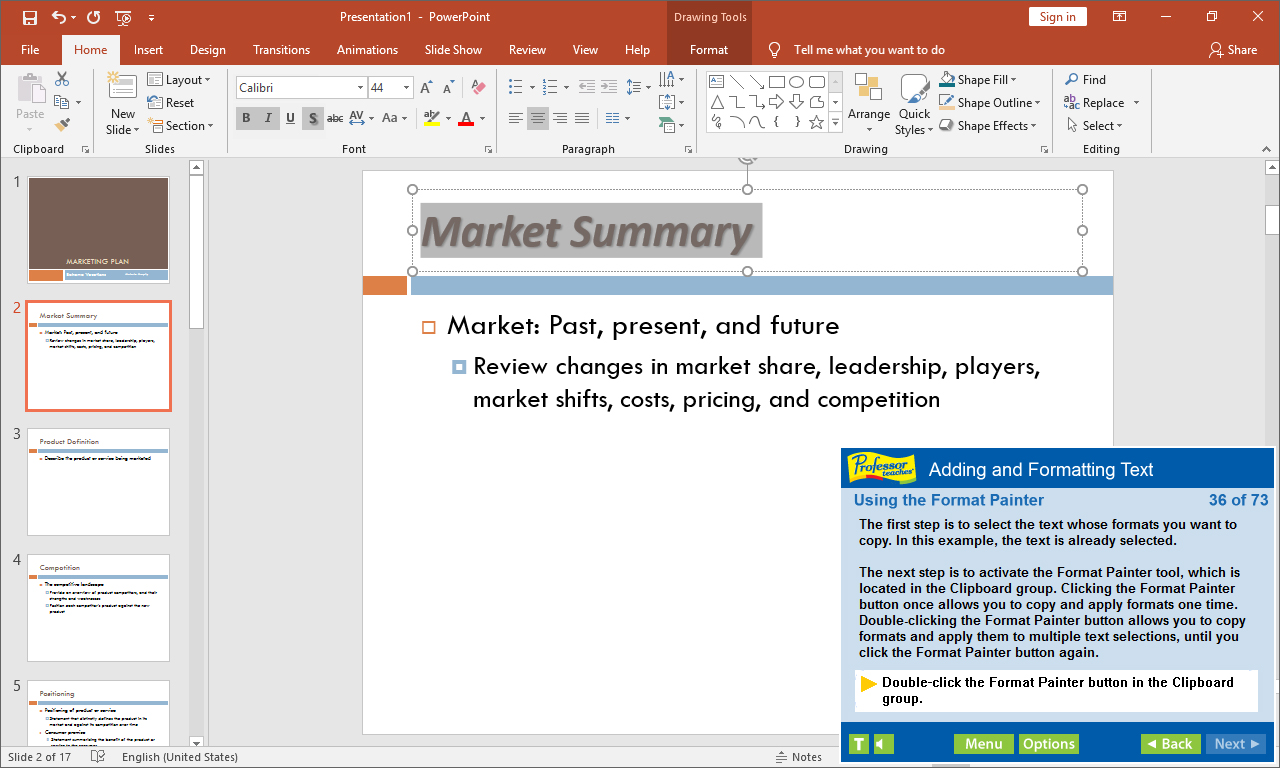
Professor Teaches PowerPoint 2019 is a computer training program designed by experts to teach you everything you need to know to about Microsoft PowerPoint. Learn how to create visually stunning presentations for work or school.

登入以將此項目新增至您的願望清單、關注它,或標記為已忽略

不支援繁體中文

本產品尚不支援您的目前所在地的語言。購買前請先確認語言支援清單。

購買 Professor Teaches PowerPoint 2019


關於此軟體

Professor Teaches PowerPoint 2019 is a computer training program designed by experts to teach you everything you need to know to about Microsoft PowerPoint. Learn how to create visually stunning presentations for work or school. Professor Teaches provides hours of course material and hands-on training in a realistic simulation of the actual software.

PowerPoint 2019 is software developed by Microsoft to help you create quality presentations. PowerPoint is used for business and academic applications as a fast and effective way to present information and ideas. PowerPoint 2019 is the latest version of the program and provides better collaboration tools and editing capabilities.

The Benefits of Learning Microsoft PowerPoint 2019
• Discover new ways to create professional-looking presentations quickly
• Learn how to publish to the web
• Learn how to create dynamic presentations using animation effects

PowerPoint 2019 – Over 60 Lessons!
Our extensive computer training course will cover the following topics:
• How to apply PowerPoint views
• How to use templates
• Using drawing tools
• Adding tables and charts
• How to apply selecting and grouping
• Adding images
• Using Grids and Guides
• Saving and Closing a Presentation
• Creating a New Presentation
• Using the Format Painter
• Working with Tabs
• Using Templates
• Changing a Slide Layout
• Customizing Templates
• Adding Headers and Footers
• Adding Speaker Notes
• Introduction to Drawing Tools
• And more!

Key Benefits
• Accurate screen presentations, menus, and buttons provide an easy transition to the real application
• Step-by-step interactive exercises help you achieve high retention rates
• Practical exercises and examples make learning easy
• Professional voice narration assists retention
• The most realistic, interactive & complete training

Features of Professor Teaches
Practice in a Realistic Simulation of the Software
Hundreds of Learning Topics
4 to 8 Hours of Training per Course
Realistic Simulations
Beginner to Advanced Topics
Self-Paced Learning Objectives
Introductions and Summaries
Interactive Exercises
Professional Voice Narration
End-of-Chapter Quiz Questions
Check marks for Completed Topics
Glossary, Index, and Search
Professor Answers for Instant Training

系統需求

    最低配備:
    • 作業系統: 10, 8, 7
    • 處理器: Intel
    • 記憶體: 150 MB 記憶體
    • 儲存空間: 150 MB 可用空間
    • 音效卡: Recommended

Professor Teaches PowerPoint 2019 的顧客評論 關於使用者評論 您的偏好設定

整體評論:
2 篇使用者評論 (2 篇評論)


如欲檢視特定日期範圍內的評論,請在上方圖表框選一段日期範圍,或點擊直條。


依照使用者撰寫評論當時的遊戲時數篩選:


不限最低時數不限最高時數

以所選顯示順序顯示評論


進一步了解
篩選條件
排除離題評論活動
遊戲時數:
主要在 Steam Deck 上遊玩
Operating System:
CPU:
GPU:
Device Type:
無其它評論符合上述篩選條件
調整上方的篩選條件以檢視其它評論
評論讀取中…