Lucky Tower Ultimate Early Access now coming in September
We know you're excited for Lucky Tower Ultimate, and we want to deliver the best possible version on day one of Early Access. In order to do so, we need to take a few extra weeks to add the finishing touches to the Early Access build, and finish translating all our puns into multiple languages (we wrote a lot of great new stuff for the Village, oops!). The release will now be in September.
Stay tuned for the exact release date of Lucky Tower Ultimate, which we’ll share in the coming weeks!
Thanks for your patience!
In other news, here's some updates for what the team has been working on this month:
Updated Tavern
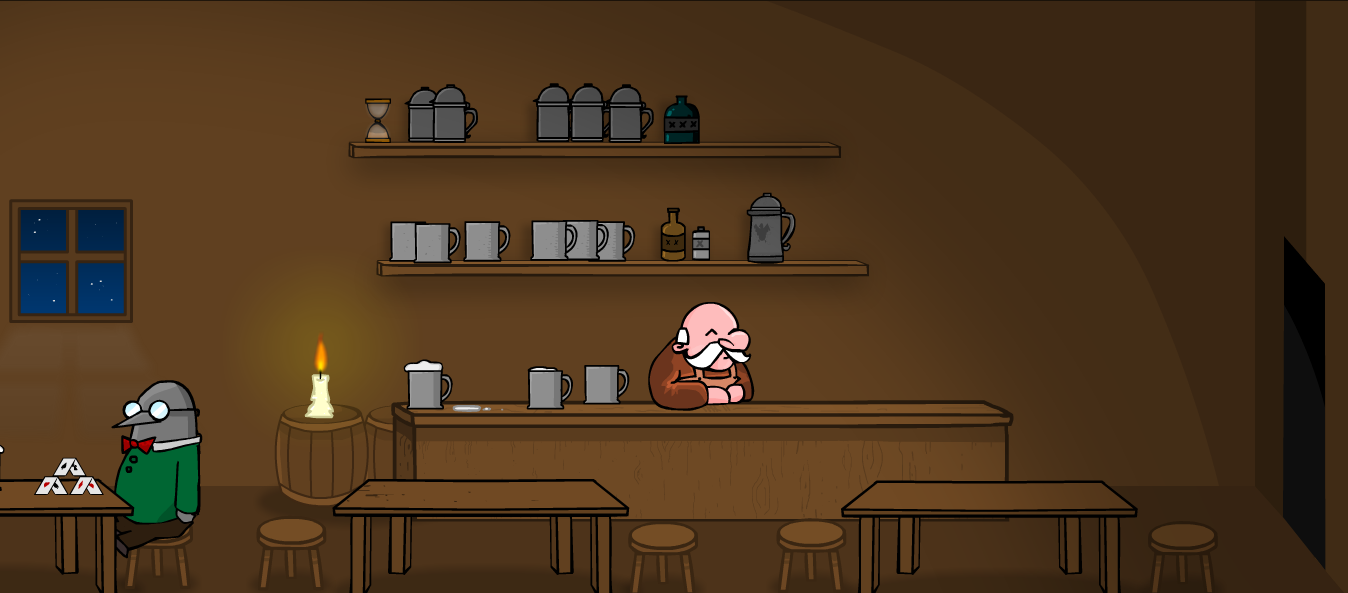
The original tavern from Lucky Tower 1, drawn by Anselm in 2010 (with a mouse!)
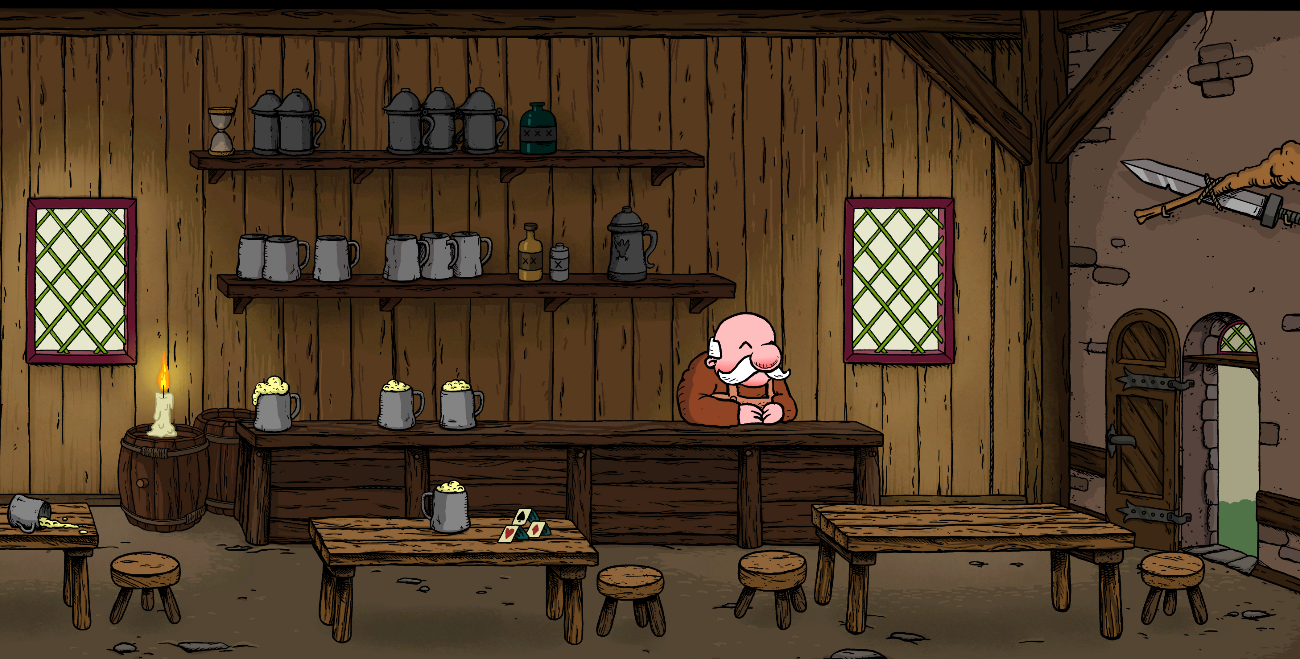
The new and improved tavern for Lucky Tower Ultimate!
Monsters in Different Colors!
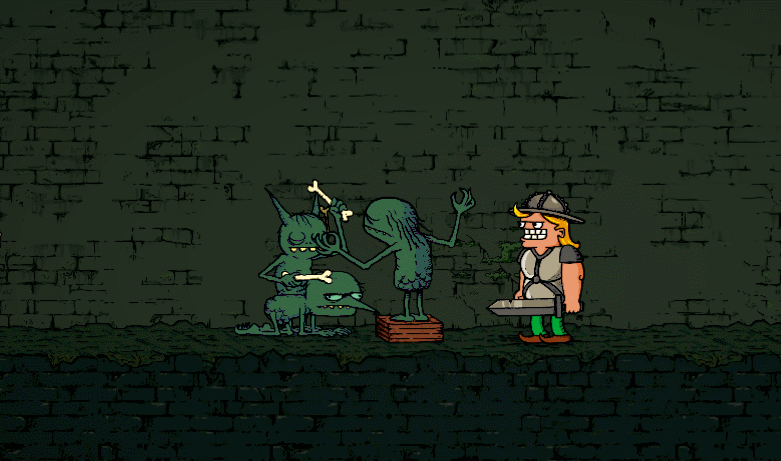
Different segments of the tower have their color own monster! Check out the Green band playing their latest hit track!
Slime Monsters!
There's a new monster coming to the tower for Early Access... the Slime!
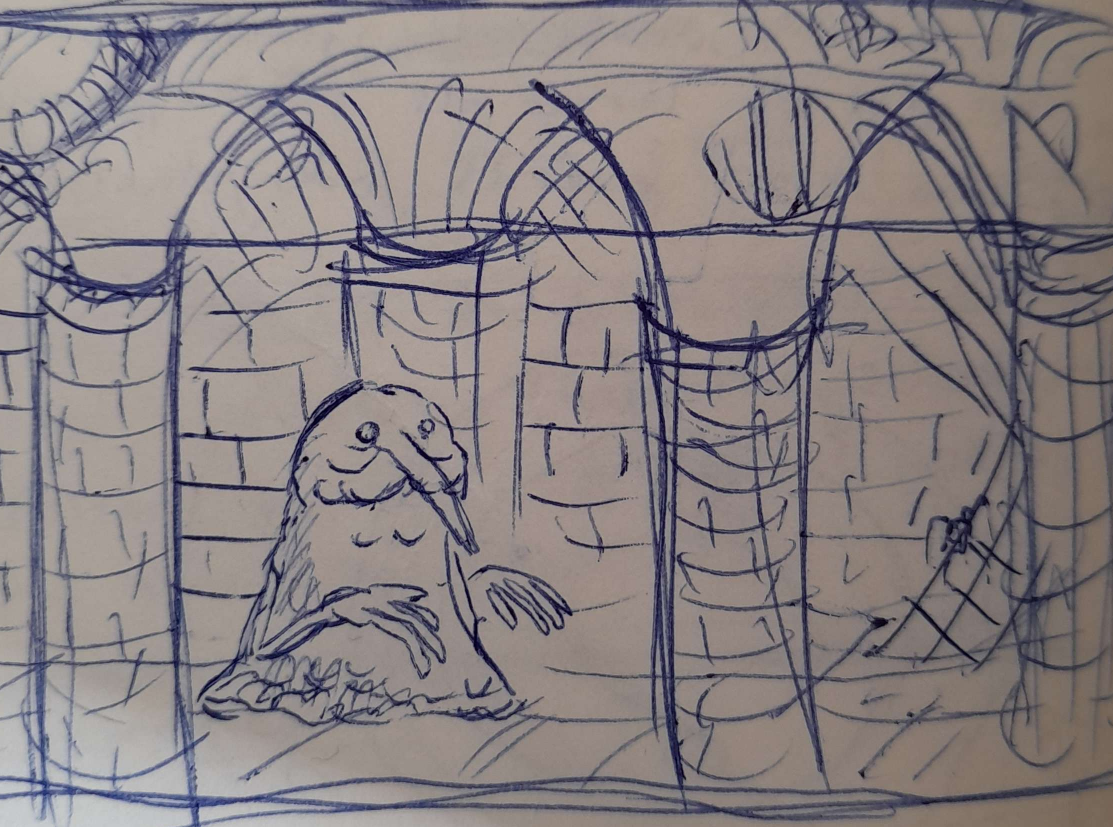
Original concept art of the Slime, drawn by Anselm with pen

- Adjusted the color of the Post-Game Void Lore hints in Map for better contrast. - Adjusted some stray checkpoints to safer positions. - Adjusted the behavior of dialog based timed doors when loading into your save to ignore said timers if already saw these dialogs.
PLEASE NOTE: If you haven’t updated your game yet, get the latest in the App Store!
PATCH HIGHLIGHTS
Alliances, assemble! Alliances will enhance the social experience, allowing players to create or join communities within the game while working together to complete Bounties and earn rewards.
FEATURES
Alliances have arrived!
Create or join an Alliance of up to 30 players and work together to complete Bounties and earn more rewards!
Work on up to three Bounties at once to complete while playing.
Earn points for your Alliance by winning Cubes and completing Bounties!
At the end of the week, earn both individual and Alliance-wide rewards.
August 8th-10th is the global launch of our first Leagues event!
Leagues are limited-time events where you’ll be matched into groups of 30 similar players to compete on a short-term leaderboard for prizes.
Players will join a Standard League with no cost of entry. There will be no Premium League for this iteration of Deadpool League.
During the event, just play games as normal and your League Points will adjust based on your game outcomes.
More cubes means more Points! At the end of the League, everyone gets rewards… but, the top spots on the leaderboard will receive the best rewards!
GAMEPLAY
The FREE Credits offering in the Shop is increasing to 75 Credits per day in 25 Credit increments refreshing every 8 hours.
ART, VISUAL EFFECTS, AND AUDIO
Moon Knight has VFX and SFX to complement his updated ability. Spoiler alert.
BALANCE UPDATES
Uatu
[Old] 1/2 - At the start of the game, shows the right location to you.
[New] 1/2 - At the start of the game, shows unrevealed locations to you.
We were reluctant to limit Uatu's vision when we first changed the effect to work from the deck, but it felt needlessly risky to remove a lot of the tension and mystery from locations for players earning Uatu early on. However, we've grown comfortable with the idea and hope fans enjoy Watching the whole field on turn 1 in the future.
Shadow King
No text change; setting no longer considered raising or lowering Power.
The interaction of Luke Cage “stopping” Shadow King and various other corner cases which result in Shadow King adding negative or positive modifiers have proven confusing for players. We’ve decided to adjust Shadow King because this effect specifically feels like it should be “cleansing” modifiers, not adding more to counterbalance what’s already there.We’re keeping this distinct from Valkyrie because that effect does specifically add a modifier to other cards, and feels like fair game for Luke Cage to prevent it.
Moon Knight
[Old] 3/3 - On Reveal: Discard a card from each player’s hand.
[New] 3/3 - On Reveal: Discard a card with an even Cost from each player's hand.
Moon Knight's a great character, but has struggled to find a good home even when discard is popular. We've kept "improve Moon Knight" on the whiteboard for a while, and today we're crossing that off. We did debate redesigning the card, but we've also heard your feedback when we do that in a way that fundamentally changes the card for fans it already has, as we did with Adam Warlock. This tweak aims to make the card a more suitable pairing with Stature, one of the most popular ways to play Moon Knight already, as well as Swarm and Apocalypse. It may also make Moon Knight a useful threat against decks that rely on single 6-Cost threats, like Red Hulk.
Blink
[Old] 5/7 - On Reveal: Swap the last card you played with a higher-Cost card from your deck.
[New] 5/7 - On Reveal: Swap the last card you played with a card that costs more from your deck.
We've made two changes to Blink. The first is functional: we've adjusted the ability to check the cards in your deck based on what they currently cost, not their original Cost. This means that she'll see cards the same way that Jane Foster sees them. It's not an inconsistency that came up much in gameplay, but it didn't make sense that Jane and Blink could both grab a Negative Iron Man that's a 0/5. However, like all cards already do, Blink will still care about the original Cost of the card in play to determine the one from the deck. The second change is just how we're handling the card text, and is detailed more generally below:
Text Change: cost vs. CostWe currently use "Cost" as a shorthand within the game to identify the "printed Energy Cost" of a card, as opposed to whatever it might currently cost. For example, Silver Surfer buffs 3-Cost cards, but won't buff Mockingbird while there are three Squirrels out and will buff an Ironheart that's been flipped by Mister Negative.However, some of our text was using "Cost" in places where the card's mechanical function actually was paying attention to the modified cost. It didn't come up much, but it's the sort of thing we like to correct as we run into it. Perhaps the most prominent place this occurred was Jane Foster, where she was often used to grab cards that cost 0 thanks to a modifier even though her text said "Cost." Below, you'll find a list of the cards and locations impacted by this text adjustment. Again, this is not a functional change to any of these–they all work today the same way they worked yesterday, they just line up a little better to communicate how they see a card's Cost.
Yondu
[Old] 1/2 - On Reveal: Destroy the lowest-Cost card in your opponent's deck.
[New] 1/2 - On Reveal: Destroy the card that costs the least in your opponent's deck.
Colleen Wing
[Old] 2/4 - On Reveal: Discard the lowest-cost card from your hand.
[New] 2/4 - On Reveal: Discard the card that costs the least from your hand.
Black Bolt
[Old] 5/7 - On Reveal: Discard the lowest-cost card from your opponent's hand.
[New] 5/7 - On Reveal: Discard the card that costs the least from your opponent's hand.
Lady Sif
[Old] 3/5 - On Reveal: Discard the highest-cost card from your hand.
[New] 3/5 - On Reveal: Discard the card that costs the most from your hand.
White Queen
[Old] 4/6 - On Reveal: Copy the highest-Cost card in your opponent's hand into your hand.
[New] 4/6 - On Reveal: Copy the card that costs the most from your opponent's hand into your hand.
Jane Foster
[Old] 5/9 - On Reveal: Draw all cards that Cost 0 from your deck.
[New] 5/9 - On Reveal: Draw all cards that cost 0 from your deck.
Mirage
[Old] 2/2 - On Reveal: Copy the lowest-Cost card in your opponent's hand into your hand. Give it +2 Power.
[New] 2/2 - On Reveal: Copy the card that costs the least from your opponent's hand into your hand. Give it +2 Power.
Note: We are aware that our Moon Knight change uses the capitalized "Cost" in a way that's not consistent with the above–Moon Knight will be able to discard cards with a modified Cost, like copies of Swarm. This inconsistency was a result of the changes flying separately through localization, and we'll correct it in a future update.
Text Change: Throne Room
[Old] Card(s) here with the highest Power have their Power doubled.
[New] The highest-Power card(s) here have their Power doubled.
One of our excellent interns for the summer pointed out that the grammar on Throne Room was odd, so we fixed it. This is just a minor change for readability and has no functional impact.
Bug Fixes
Card and Location Logic Fixes in 30.x
Fixed an issue that was occasionally causing copies of Jean Grey to have their ability text disabled
Cleaned up an interaction between Asteroid M and Quantum Tunnel that could result in moved cards snapping back to Quantum Tunnel after being swapped
Castle Zemo
Playing Spider-Man on Castle Zemo no longer causes the location’s current power to display incorrectly
Cleaned up an interaction between Multiple Man, Iron Fist, Castle Zemo, and the displayed power of the location
Cleaned up an interaction between Deadpool, Nico Minoru, and Castle Zemo
Cleaned up an interaction between Doctor Octopus, Shang-Chi, and Castle Zemo
Fixed an issue that would prevent a location’s winning power from being highlighted if it was swapped from Cancun
Evolved Abomination’s cost is now restored upon Shadow King reverting reduced power cards back to their base
Titania now properly swaps sides on Altar of Death when X-23 is played at the location
Cleaned up an interaction between Juggernaut moving cards merged with Hulkbuster
Card Art Fixes in 30.x
Fixed an issue with some cards that was causing them to appear blurry at higher rarity levels
Other Fixes in 30.x
Blue Cosmic Border re-added to the shop
Fixed an edge case that could result in two of the same avatars becoming available in the Cosmetic Shop
Resolved an issue that could cause claimed inbox rewards to appear as if they’re unclaimed
Adjusted the timer of Vibranium Offers to no longer be pushed off-screen on some devices
Clicking on a different album right as an Album Completion animation plays no longer plays the wrong animation
Fixed an issue with Main Menu UI elements appearing during the transition sequence post-match
English characters displayed while the client is set to Japanese should no longer display in an incorrect, weird font style
Fixed an issue where Conquest and Friendly Battle health bars were visible in a Ranked match
In cases where a player disconnects or is disconnected from a match, it no longer appears as if they can change their deck prior to reconnecting to the match
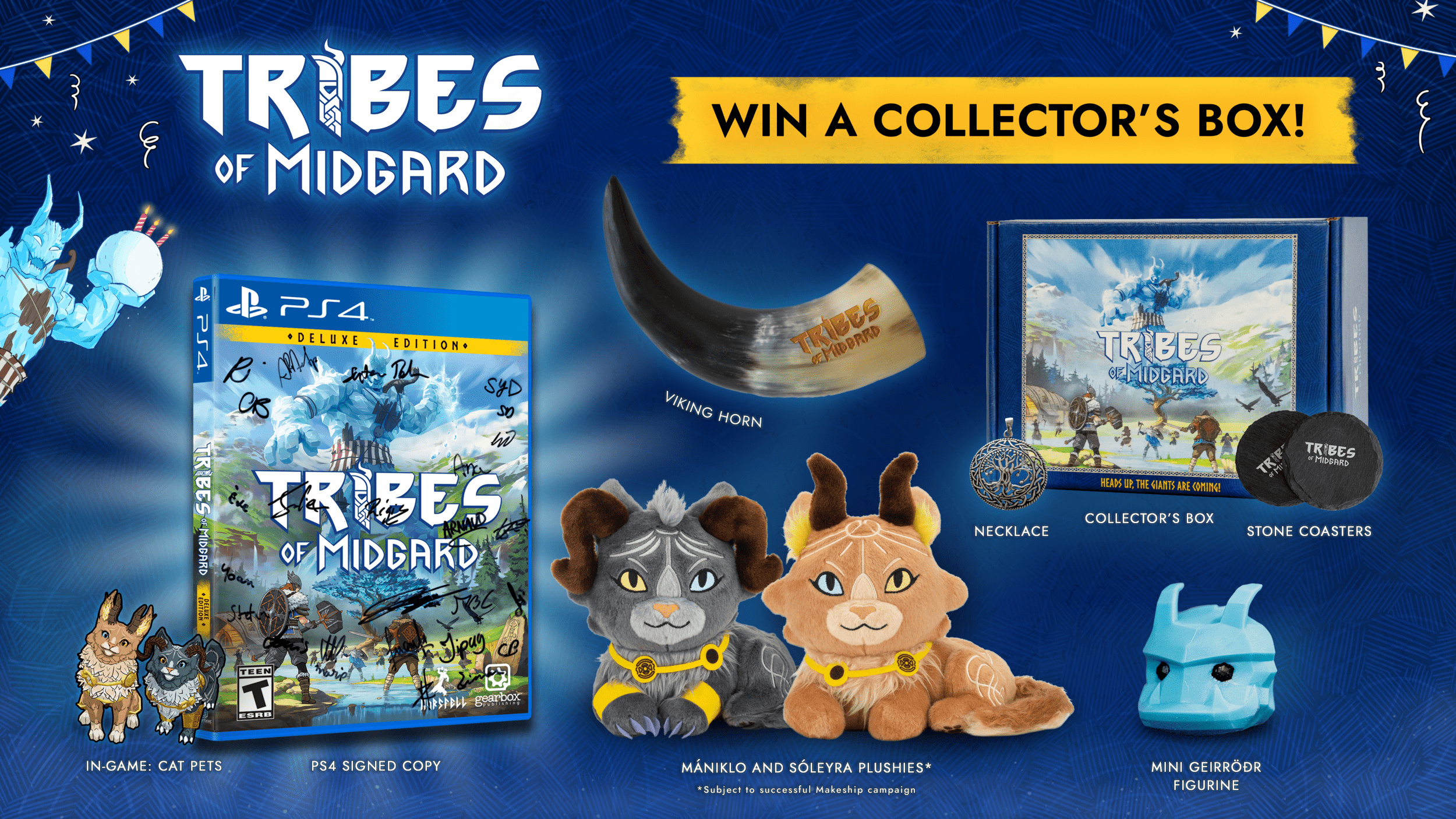
It’s giveaway time! 🎉 Tribes of Midgard's 3 Year Anniversary celebration continues with a chance for you to win a one-of-a-kind Collector’s Box! (Yes, it's our birthday but we can give away presents because you're the greatest gift of ours, okay??)
A signed Deluxe Edition copy!? A Viking horn? Plushies? Yes - all this and more!
One lucky winner (you?) could win all of the following:
Signed Deluxe Edition Tribes of Midgard PlayStation 4 copy
Yes, we too still reminisce on the days where physical PC games were a thing. But take the next-best and be one of only a few to own a Norsfell-signed physical copy!
Sóleyra and Mániklo Plushies*
These fluffy, mystical matching companions will adorn your home and bring a new level of cozy.
Viking Horn
If we were to all gather in Valhalla, I'm sure this is what we'd be drinking from.
Mini Geirrödr figurine
This frosty fellow is the coolest decoration for your desk.
Two Stone Coasters
A valiant resting place for your hydration.
Yggdrasil Necklace
The sacred tree, now close to your heart!
Collector's Box
Because you need a place to keep it all in, right?
Good morrow, knights! A minor hotfix (2.11.1) has been released with Regicide at Trayan Citadel balance changes, bug fixes, and more!
Balance Changes - Regicide at Trayan Citadel
Fuse Stage
Fuse Timer decreased from 30 seconds down to 25 seconds
Reduced delay in Agathian spawn positioning change during the second phase of placing powder kegs
VIP vs VIP Stage
Increased the possible final timer by 3 minutes
Fixed bug that caused Argon's health to be slightly less than intended
Reduced the spawn delay for Agathian troops by 1 second
Dev Notes: We’ve loved hearing all the reception and feedback towards Trayan Citadel! We’re so glad our community has been enjoying the spectacle of the new map. Although we love that Argon's final push to avenge his father was reflected in this difficulty for attackers, after monitoring matches and feedback since the release, we believe Argon and his troops need a little assistance, particularly in the later half of the map. Do not worry, defenders, as plenty of opportunities remain to hold back the Agathians and protect Malric from these unjust invaders.
General
Updated Server and Client backend
Made improvements to help prevent the “Party Creation failed” error
Fixed a bug that incorrectly showed the amount of XP earned during boosted XP times
Fixed a bug that would time out party members if the party host switched matches too quickly
Fixed a bug that removed platform icons on the scoreboard after the first match
Fixed a bug that could cause occasional client physics hitching
Updated EOS protections
Implemented multiple crash fixes for Servers and Clients
Combat
Fixed a bug that allowed the spoon item stab attack, found on Trayan Citadel, to be used repeatedly too quickly
Customization
Fixed a bug that played Mason voice lines when using the Rebel Voice as an Agathian
Although they are a "Rebel" we believe praising the enemy commander would have been going just a little too far
Fixed the name on the previous “Templar Visorless Helmet,” as it did indeed include a visor
Fixed a bug showing the “Painted Maiden Helmet Featherless” as a purchasable cosmetic with gold, where it should only be earnable through the Regicide Campaign Pass
Map
Fixed an issue that could allow a player to access the enemy VIP spawn on Citadel earlier than intended
Fixed a rare bug that could prevent a VIP from spawning on Citadel
Fixed a bug that prevented the spikes on Duel Yard from dealing damage to players
Fixed a potential crash that could occur on Duel Yard
Unofficial Servers
Improved server command protections
Fixed a bug that could kick players out of the match when traveling between maps
Added visual ban list on Nitrado interface
Fixed a case where XP and gold weren’t being correctly awarded on unofficial servers
Console/Gamepad
Fixed a bug that prevented a ballista from being fired again if the Arrow Cam was used in the previous shot
Additional Notes: Due to the nature of this Hotfix, PC Players will experience a larger-than-average download size when prompted to re-download the game for proper Hotfix installation.
In addition to today's Hotfix notes, we've released a new blog about the future of Chivalry 2.
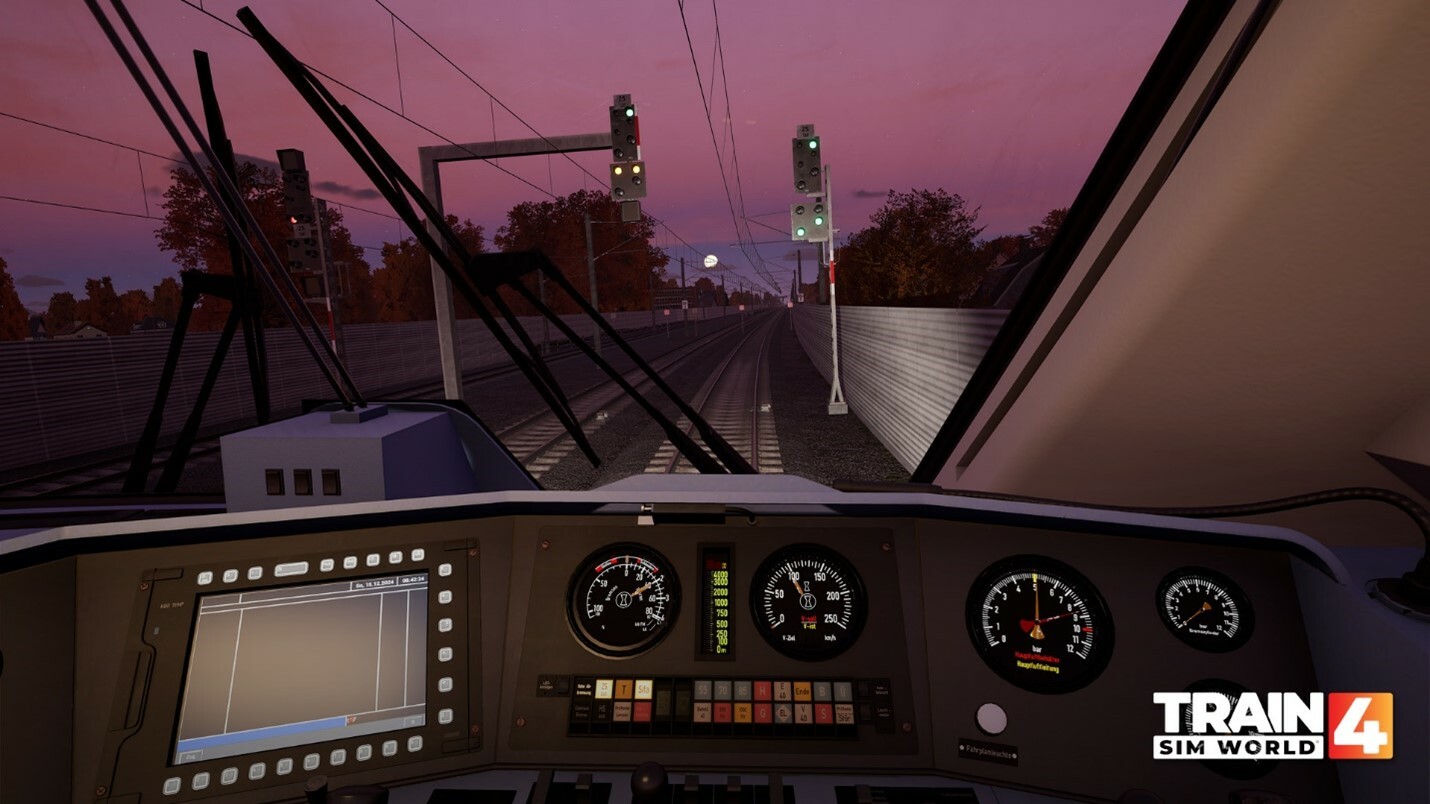
Regular players of German Train Sim World content may already be familiar with the DB BR 101 locomotive, which released as an Add-on in 2021 for the Hauptstrecke Rhein-Ruhr and has been layers / substituted into many German route Add-ons since then.
These large, powerful electric locomotives arrived on the German network in the late 1990s to replace older express passenger locomotives like the DB BR 103. Its unique design is well known across the country hauling InterCity services between many of Germany’s major cities and destinations.
An Add-on for true Train Sim World Experts
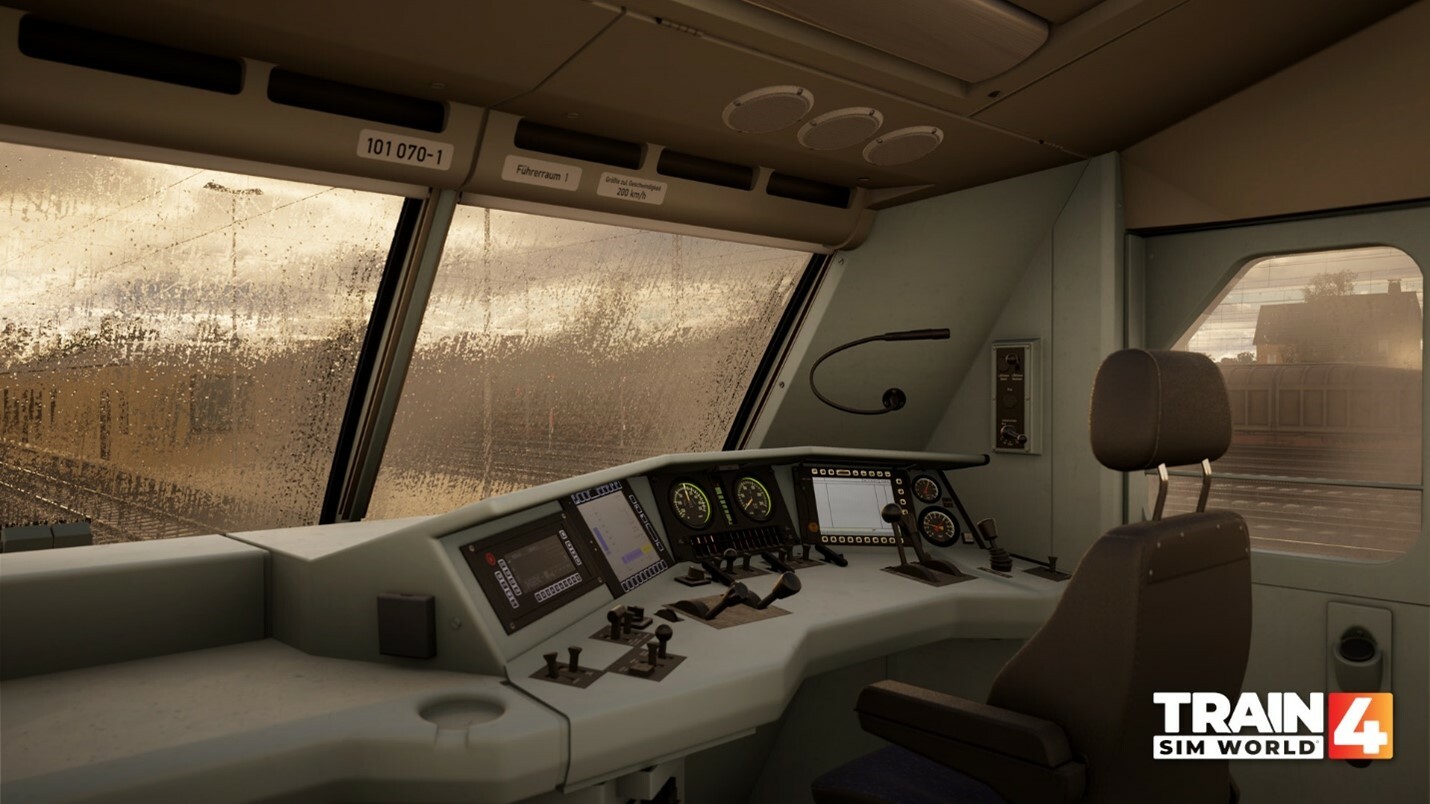
For this release, TSG team have dialled up realism and accuracy to the maximum along with the challenge of operating this locomotive in very fine detail. The cab comes in two variants: MFD and MFA, and features fully operational interactive screens to control and alter a myriad of options and settings for different aspects of operation. All of the screens and subscreens display information as they would in reality.
Additional tasks that the player can undertake go well beyond those available in a standard Train Sim World locomotive. These include:
An extensive fault simulation, with fault clearing required in order to keep the train moving.
Realistic door operation with TB0 and SSTF door control systems
Real train data input (PZB / LZB Data entry)
GSM-R simulation, down to individual cell towers
A Machine Room (Engine Room) modelled which players can enter
The Machine Room includes all breakers and valves that players can interact with and is important for both start-up procedures and fault finding, so you may find yourself spending quite a bit of time here preparing and maintaining the locomotive in operation!
Fault Finding
The fault-finding aspect to this release is unique among Train Sim World content. Quite often, faults are included in pre-prepared Scenarios, where players are required to act around them, using a set of instructions in game.
A series of Scenarios and Tutorials will be able to guide the player through the fault-finding process, which includes having to read and use the interactive fault-finding screens, that correctly display the faulty component. This can range from traction motors failing, to PZB failures or even a cascade of failures if certain systems start to blow out others.
A Manual will also be provided to assist players with this process and certain elements will require reading before embarking on services.
LZB / PZB Input
Developer and member of the TSG team Lukas explained this feature in our June Roadmap:
“This feature requires entering Max Speed and Brake Rate values to simulate PZB/LZB on a higher level. The Brake Rate is calculated through the train’s maximum weight and describes its braking performance in the current configuration, considering current available systems. The ZDE Panel then sets the PZB mode from these values. There is no switch as in the previous BR 101”.
The result of all of these additional features and complexities is that this locomotive will be an exciting, but rigorous challenge even for those who are very experienced with Train Sim World content and German locomotives currently in the game.
This idea of an ‘Expert’ loco may be familiar to those who participated in our TSW Player Survey earlier this year. Currently we don’t have any others planned, but we’re excited to hear your thoughts and feedback, so please let us know if this is something you’d like to see more of!
Locomotive Improvements
In addition to the work done to make the locomotive super realistic to operate, many other improvements have been made over the initial BR 101 release. These include:
Sound improvements, utilising new sound recordings and upgrading older capture
Newly refined physics
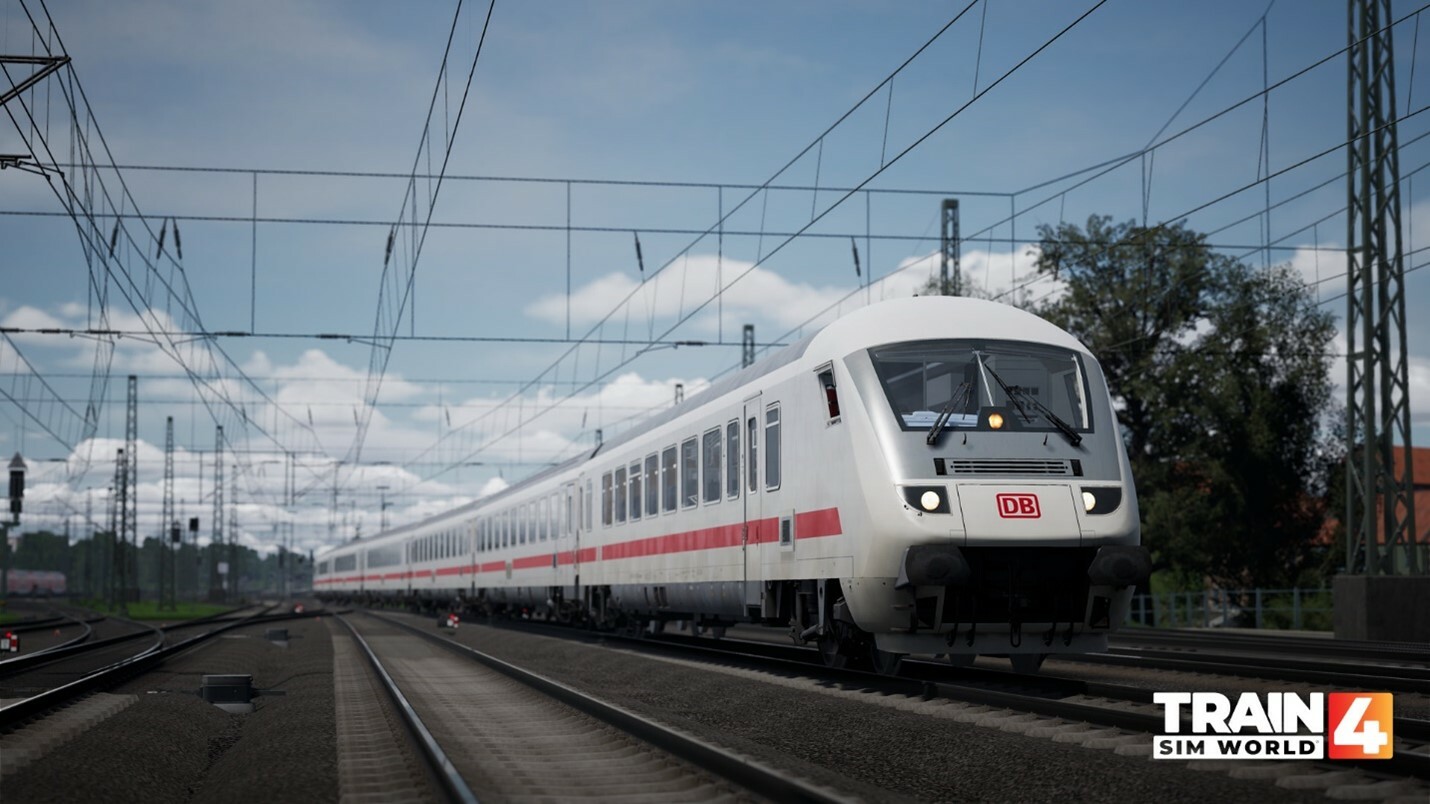
The DB BR 101 ‘Expert’ comes in two liveries for this release:
DB Red
DB IC
For players wanting a more casual driving experience, an accessible driving mode will be available in the main menu setting, which reverts functionality to a level typical of other Train Sim World locomotives and enables players to experience the improvements made to this locomotive without hitting the higher difficulty level.
Players that just want to experience the IC Steuerwagen can also use this feature.
The original DB BR 101 loco Add-on will remain on sale (but requires the Hauptstrecke Rhein-Ruhr route Add-on in order to operate).
Also Included: IC Steuerwagen / Cab Car
Included in this release is the much requested and eagerly awaited IC Steuerwagen, Bpmmbdzf 286.1 Cab Car and updated Bpmmz and Avmmz coaches.
Cab cars are commonplace on passenger trains throughout Europe, with the earliest designs even dating back to the late 1800s. The concept was primarily used on regional or urban traffic, where top speeds were 140 km/h and quick turnaround times for trains were a necessity.
It wasn't until the 1990s that cab cars were trialled for higher-speed, long-distance traffic. Tested up to 14cars and speeds up to 200 km/h, if successful, would allow for much greater flexibility of inter-city services throughout Germany. The tests were promising enough, that several batches of existing, but relatively new coaches were converted to have a cab retrofitted onto one end, and ballast added to increase their weight.
With their cab equipment reflecting the controls indicative of locomotives at the time, cab cars would allow for IC trains to dwell for less time at major terminals, the only notable difference from a driver's POV being the distinct lack of engine room ambience behind them.
In-game the IC cab car can be operated in as much detail as the DB BR 101, with the option for a more accessible mode which defaults the settings to a correct set up and turns off the safety systems.
The throttle of the cab car is similar in style to that of the BR 111, in that it has a run down, hold, run up segment, and also a manual control segment.
Timetable Layering, Substitution & Scenarios
On release, the DB BR 101 ‘Expert’ will have (copied) timetable services on Nahverkehr Dresden and Bahnstrecke Salzburg – Rosenheim route Add-ons. The latter will also have 3 Scenarios available to play.
Of course, players will also be able to utilise the locomotive on any Germany route Add-on in Free Roam and neither of the above routes are a requirement to do this.
Train Sim World® 4: Expert DB BR 101 & IC Steuerwagen Loco Add-On will be available from 8th August on Xbox One, Xbox Series X|S, PlayStation 4, PlayStation 5, Epic Games Store, and Steam for €35.99/£29.99/$39.99
Preview Stream: July 31st + Special Guest!
Join Lukas, Jan and a special guest... a real-world locomotive driver on both YouTube and Twitch for a preview of the DB BR 101 ‘Expert’ tomorrow, Wednesday 31st July at 6.00pm UTC.
It may be the vacations, but we've still had some notable things happen this month!
A new monster is in the place!
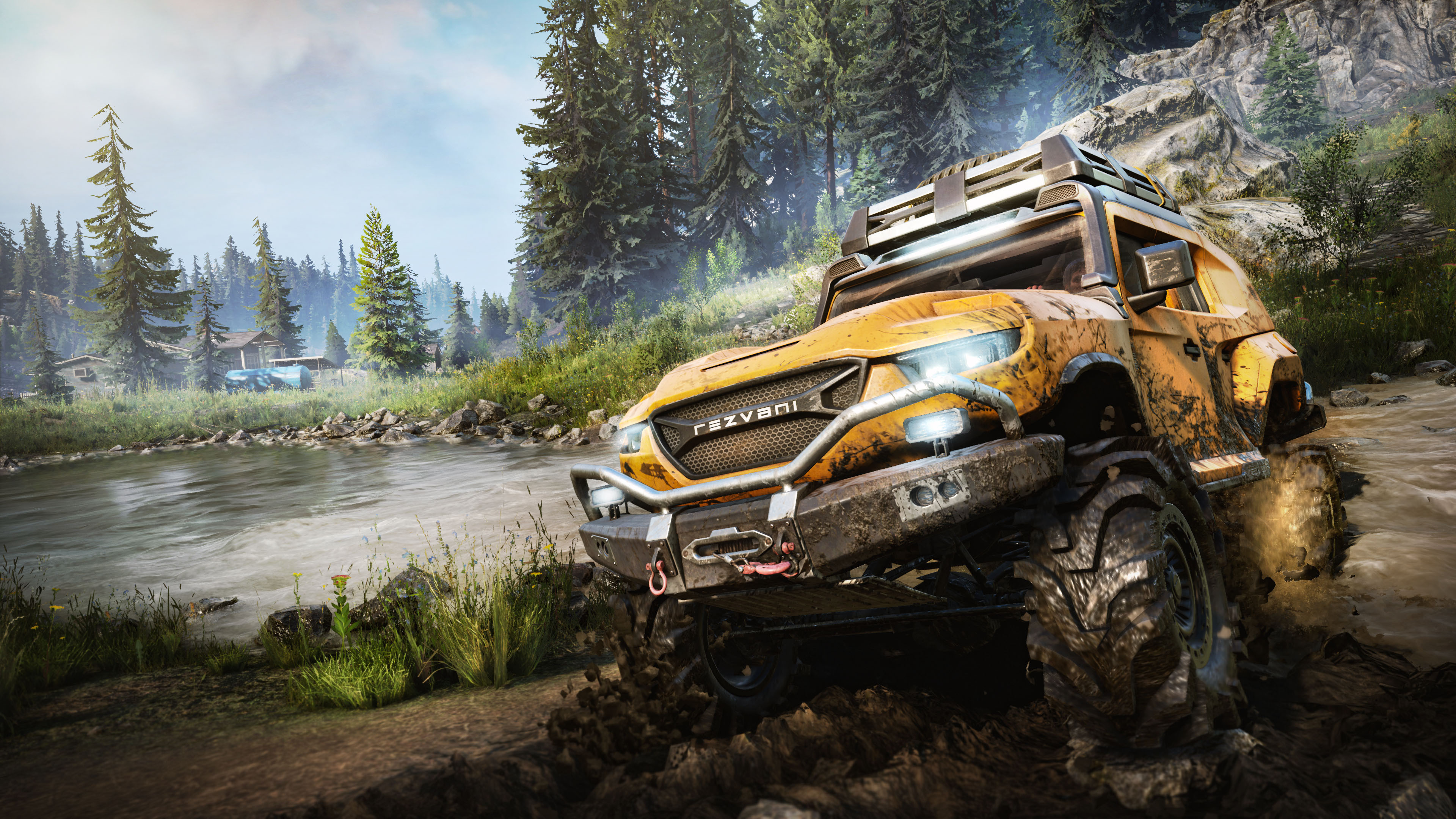
The Rezvani Tank is now available as a Standalone DLC! Fitted with the same engine as the Rezvani Hercules, this scout’s power and agility are truly second-to-none. Look at this beauty:
Coming along this powerful truck is the Update 31.0!The team has worked on a lot of fixes to make the game better, including vehicle improvements, co-op bugs and various other changes, such as collision, crash and localization fixes.
Moreover, on August 1st, there will be an update on the Public Test Server, to accommodate the future arrival of S14, stay tuned for more info!
As always, your support and feedback are very much appreciated, even after all these years.
Stay tuned, and don’t forget to follow our socials to stay informed!
Dear Expeditions players,
On Expeditions, the co-op mode finally arrived on PC earlier this month! For console players, it will be deployed later this year. A few issues spotted with the arrival of the mode were also fixed in the latest hotfix, as well as many other bugs.
Co-op mode allows you to team up with 3 other adventurers to explore the wilds and conduct research. You have access to a lot of options during the preparation phase: you’re allowed to select the region you want, and you can pick up to 4 vehicles and 3 specialists. As the host, you also have the possibility to build base modules. Guests can choose 1 vehicle and use said modules, but they can’t build them.
Co-op mode enables you to engage in any kind of activities, exchange resources, share rewards, track your buddies and use the quick chat system to give each other information through signals.
As a guest, it is worth noting that you can play to every content purchased by the host, even if you did not yourself!
You can find the complete patch notes here, and keep in mind that there has been one hotfix since then.
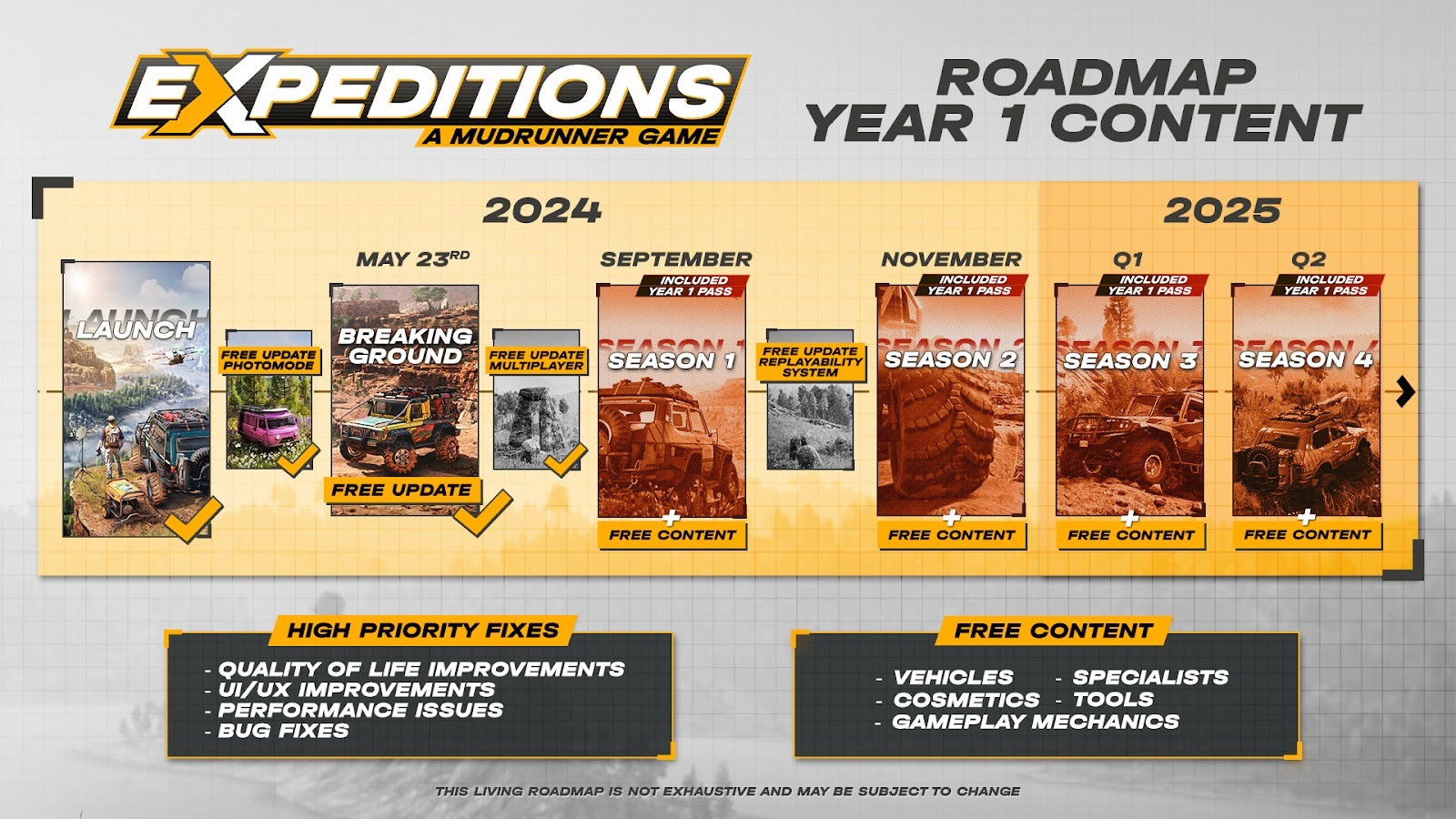
Moreover, the game’s roadmap has been updated, with the release of Season 1 now planned for early September, with free content and numerous changes to improve your overall experience.
Fans’ work appreciation 📷
Your work on the game is always much appreciated, and as a thank you, we wanted to showcase some of the best photos of this month!
@deron77454 (Discord) wanted to enjoy the view and refresh his wheels🌊
@ash_d15 (Discord) captured a magnificent aurora borealis 🌈
@phoenix3_1 (Discord), showing us a tense face-to-face in the snow ❄️
We would like to thank you for your continued support. We are working very hard to provide you with the best possible experience, so stay tuned for future updates, and see you next month!
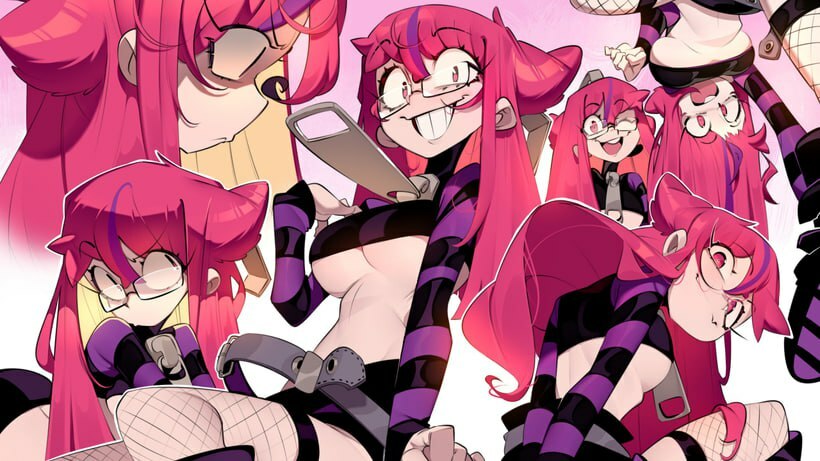
Have you missed us?~ Here’s a pleasant surprise for you as sudden as her chaotic nature. Meet the delightfully unhinged, disgustingly sweet and perpetually energized Ruby!
>ADMIN: unknown_user >OVERRIDE_COMMAND Initialized… [LET ME COOK!!!]
[Not-so-]Quick facts:
EN VA: Sarah Ann Williams JP VA: Uesaka Sumire Age: Ugh, rude! Ruby is older than 21 if you’re sooo interested, perv Height: 173 cm (5'8) Nicknames: Rub, Don’t touch my console, Don’t come close!, @#$%!!! Favorite movies media: dopamine instilled feeds, FYIs, recs, shorts, reels, anything exciting and tickling the nerves, you name it, Ruby’s seen it! Hobbies: Eating, EATING, EATING!!!, punitive cooking, stapling things and people, occasional wrestling, drawing anything on everything, especially Keyla, he-he Favorite drink: Coffee with 8 spoons of sugar, MARSHMALLLOWS!!, crispy doughnut, colored sprinkles, a touch of salt and a few souls of sinners. Just k-k-kidding, no salt~
[O-Oh, Sister June is calling, BYE, NEWBS~]
Alright, well. That was… something! Anyway, Ruby is truly unique. She gets away with things that would otherwise result in severe punishment, exile, or even death. Maybe it’s all because of her mad cooking skillz. No one is as obsessed with anything food as Ruby, she’ll get your soul aching with just a faint smell of her favorite cake, and when you taste it… uhhh boy, you’re in for a trip! Your heart will throb so fast, you’ll think it’s speedrunning all 2.5 billion beats it’s supposed to do in a lifetime. So, usually, she’s the only one who makes it to the last piece.
Lamyoohoo~ 💙🤍 Ruby at her finest: feeding another unsuspecting friend with the cake of sweet death!
The amount of weird happenings ever so present in Freaked Fleapit sky-rocketed with the arrival of Ruby. There’s something mysterious about it. Almost… diaboli ex machina so to speak.
[distant beatboxing noises]
Egh, we mean, it’s totally normal. Like, it is Netherworld after all. So, instead of cracking that riddle, let’s take a better look at what happens at the Freaked Fleapit behind closed doors! Surely, members of Freaked Fleapit do have a touch of dysfunctional family dynamics, but Ruby loves everyone oh so dearly! Bellboy and Fasaria are like sisters to her. Bell is more of an older wise one, always here to protect, support and teach. Fas is a younger one, still finding herself.
Don’t be misled by her constant teasing of little Keyla, she has nothing but a soft spot for her, especially her thick fluffy tail, it’s just… Ruby doesn’t really understand how personal boundaries work. Oh, and Sister June? What a better mother figure than an angelic strict mistress, am I right?~ Aaand after a long day our little ruffian finds great comfort in chatting with Blabbing Betty, though it might look like she talks to herself, Ruby insists she can hear Betty’s thoughts.
Ding-ding-ding! <3
It's Ruby's world and you're living in it!!
Hope you liked our peak into Ruby’s world and persona. Who do you HOPE is gonna be next? We can’t read minds like Ruby does with Betty’s, so leave comments, guests of Fleapit! Aaand don’t you forget to follow our socials (by the way, if you support us on Patreon, you’ll get the devlogs one week earlier than others!).
Our most anticipated feature for MARVEL SNAP is finally here! Both heroes and villains are stronger in numbers, which is why we’ve brought you Alliances. Alliances are here to enhance the social experience, allowing players to create or join communities within the game while working together to complete Bounties and earn rewards. Team up, strategize, chat with friends (new and old, all while earning rewards together.
WHAT ARE ALLIANCES?
Alliances is a new feature designed to help you and your friends connect. It provides a platform for players to strategize, collaborate, and grow together.
Team Up and Strategize: Form or join an Alliance to collaborate with fellow members. Share strategies, discuss tactics, and grow stronger together.
Complete Bounties: Work together to complete Alliance-specific Bounties. These tasks will challenge your team and offer exciting rewards.
Alliance Chat: Communicate seamlessly with other members through the in-game chat feature. Share tips, celebrate victories, and plan your next move.
Earn Rewards: Participate in Alliance activities to earn exclusive rewards. The more active and strategic your Alliance, the greater the rewards you can unlock.
ALLIANCE, ASSEMBLE!
Joining an Alliance
To join an Alliance, players first need to complete the Recruit Season Pass. After that, they can search for Alliances by ID, tag, or name, and use filters to find the right fit based on criteria like minimum Collection Level, highest rank achieved, language, and privacy settings. Players can also view an initial list of recommended Alliances based on their skill level.
Creating an Alliance
For those who prefer to create their own community, the Alliance Creation tab offers customization options including:
Emblem: Choose a unique icon.
Theme: Set the background for your Alliance screen.
Tag: Create a tag visible before player names.
Name: Name your Alliance.
Description: Write a short description for potential recruits.
Requirements: Set minimum Collection Level and Rank.
Privacy: Decide if applications need approval or are auto-accepted.
Language: Select the primary language.
Search Labels: Use labels to improve visibility in search results.
NEW RECRUITS
Now that you’re in, you’ll want to organize. Leadership is key in any organization and Alliances are no different.
Alliance Management
Leaders and Officers have different levels of access and responsibilities:
Leaders can manage descriptions, joining requirements, emblems, themes, chat settings, promotions, demotions, and more.
Officers can kick users, manage new applicants, and report users.
Members can report users and interact in the chat.
Alliance Chat and Feed
The Alliance window features a chat and feed system where members can interact and stay updated on activities. The feed will automatically share major player milestones like winning an 8-cube game, beating an Infinite Conquest, Hitting Infinite Rank, or when players join/leave. Leaders can also post announcements to ensure the entire Alliance is on the same page.
TEAMWORK MAKES THE DREAM WORK
One of the main ways players will interact with Alliances is through bounties. Unlike the weekly missions, players will choose from a list of available Bounties that have various rarities and point values. Players can only select up to three Bounties at a time, but if they see a new Bounty that they would rather do, they will be able to swap up to 3 bounties a week. Completing these Bounties earns points for both personal and Alliance-wide rewards. Points contribute to progress bars for individual and group rewards, and an Alliance Leaderboard tracks top contributors weekly.As players complete Bounties and earn points for rewards, those points will also be used to show Alliance members who have the most points collected during that week. This board resets alongside the Bounty rewards at the end of a week.
JUST THE BEGINNING
We have BIG dreams for Alliances and are committed to expanding this feature over time. The next step on our roadmap is Alliance Competitions. These competitions will pit Alliances against each other in thrilling battles for supremacy and even more rewards!Alliances is a feature designed for YOU, our dedicated players. We will be releasing new features in phases and actively seeking your feedback to shape its future development. Let us know what you think and how we can make Alliances even better.Mark your calendars and prepare to experience a new level of teamwork in MARVEL SNAP. We can’t wait to see the incredible Alliances you will create and the epic adventures that await!Stay tuned for more updates, and as always, thank you for being part of the MARVEL SNAP community!
FAQ
Is there a profanity filter for Alliance Chat?
Yes, we have a profanity filter. As this is our first foray into the world of open user communications, we’ll be looking at how it performs and can adjust the filter as need be.
How many players can be in a single Alliance?
Alliances can be a maximum of 30 total players.
Can different Alliances have the same name?
Yes! However, Alliances must have a unique Name+Tag combo.
Can you be in multiple Alliances at the same time?
No, you can only be in one Alliance at a time. However, you can leave at any time and join a new one.
Is there a way to link one Alliance to another in any way?
Each Alliance is functionally separate, however they can share similar names and tags as long as the Name+Tag combination is unique.
What are the character counts for Alliance names and tags?
Tags are set at 3 characters, and names are limited to no more than 25 characters.
Is there a minimum number of Alliance members needed to acquire all the rewards from Missions?
It will be quite difficult for one person to finish all the bounties! There’s no minimum required, but you will definitely want help.
Will you be able to view who are “active” participating members in your Alliance?
There is a leaderboard within the Alliance that shows how many Points each member has earned.