Hello Lumia Island survivors, Here are 4 coupons you can use right now!
■ Valid thru: From now until January 10th 14:59 (UTC) ■ Coupon Codes & Items
wintervacation2 - 5,000 A-Coin
S2battlemaids - Reseach Center Data Box
Treesmas27 - 200 Event NP (3 Days)
IsedolAnniversary - 1 Skin Data Box
* Event Notes - How to Redeem: Go to [Settings] → [Support] → [Use Coupon] - Coupons are only valid for the timeframe shown on the schedule above. - Only one usage per account is allowed.
New additional performance version, 50% faster than the previous version, and compatible with more devices The difference between the two versions is that the lighting systems are different and the DirectX 12 instruction set is different. The performance version is compatible with more devices, 50% more efficient, and has one less storm scene The HDRP version is compatible with fewer devices, has 50% lower performance, and slightly improved character texture. Please select the executable version according to your device *HDRP is the previous version
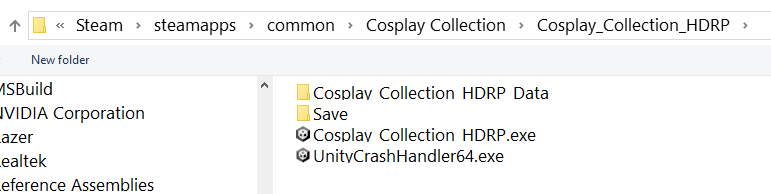
The default version of the Steam game library now is the performance version. The HDRP version can be added to the collection by adding third-party games on Steam 1. After opening the Steam game library, there is a new game in the lower left corner. Select to add a non-Steam game and select Browse. 2. Find the Cosplay_Collection_HDRP folder in Cosplay_Collection, as shown in the figure 3. Select Cosplay_Collection_HDRP.exe inside and the addition is successful.
I hope this message finds you well. I'm writing to provide an important update on the game's development. Regrettably, due to complications with previous backups, I've had to rebuild Echoes of Fear from scratch. Progress stands at about 25%, and I'm working diligently to balance these efforts alongside existing family commitments.
Your unwavering support means everything to me. While I'm targeting a release by the first quarter, I want to convey that there's potential for the game to be ready even sooner. However, please understand that these commitments might affect the timeline.
Rest assured, I'm committed to keeping you informed regularly regarding our progress and any potential adjustments to the release schedule.
Thank you for your continued dedication to the Echoes of Fear community.
I managed to steal some time away from Artificer's Tower over the holidays, but I still made progress for the upcoming Next Fest.
Twitch Integration!
Six years ago, when I first envisioned this game, Twitch integration was one of the initial features I planned. The goal was to enable Twitch streamers to seamlessly incorporate viewer names from chat and allow the chat to instigate some in-game chaos. While I haven't fully realized the latter, you can now integrate Twitch viewer names in a couple of ways.
Firstly, the system can auto-assign names to new mages appearing in various game areas. For greater control, you can manually edit a mage’s name anytime using the Twitch icon, as shown below. This offers three options: select manually, choose randomly, or set up a draw in Twitch chat.
Tweaks and More Tweaks
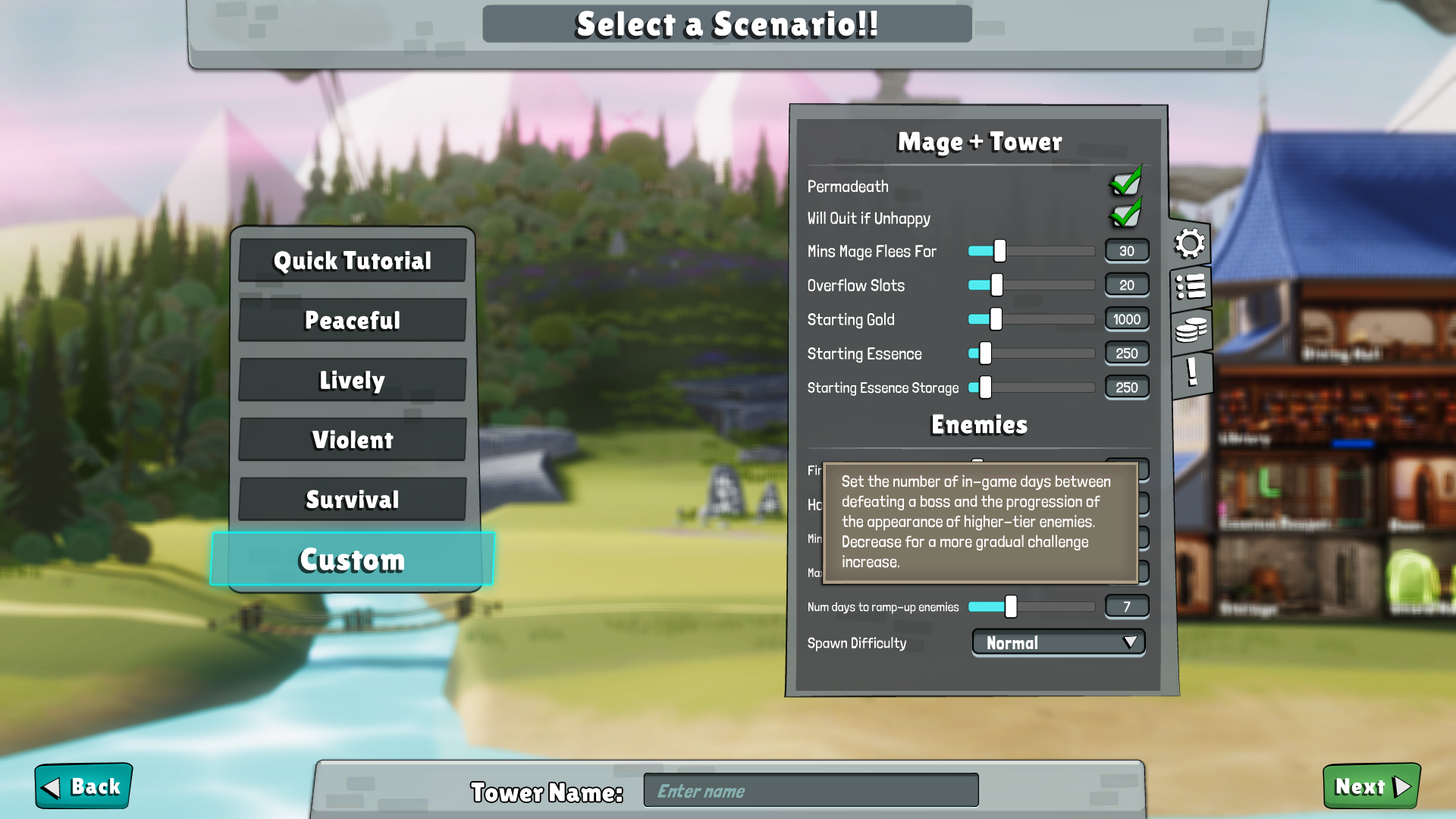
Recently, I received crucial feedback about the steep difficulty spike after defeating a boss. It felt like suddenly shifting from fighting tier one enemies to tier two enemies after the next attack. To address this, I've modified the system to transition more gradually. This adjustment is also implemented in Custom Mode, allowing for complete control.
Honorable mentions:
Added more tooltips for equipment and munitions for quick understanding of their functions.
Introduced an in-stock toggle for the Item Selection window.
Enhanced the munitions Glossary entry with additional details.
Implemented a more efficient sorting system for the game windows.
What's Next?
The next update might be slightly delayed due to the hustle of the upcoming Next Fest and a challenging new feature I'm tackling: Controller support. Integrating controller functionality in a game like Artificer's Tower is no small feat, but it's a step towards making the game fully playable on the Steam Deck! Stay tuned for more updates.
- trying to fix an issue with save files sometimes not loading properly.. hopefully fixed it? Please let me know :)
Thats it for this patch! If you encounter any bugs, feel free to report them in the steam discussions or join me and the others over at discord.
You can see the current game version in the main menu's bottom right corner. If Steam doesn't update the game automatically, just restart Steam and the game should start updating. If you have trouble joining a server, the host probably hasn't updated the game yet.