My Friend Peppa Pig - foley.butler
Imagine traveling the world with Peppa Pig!

In #PeppaPigWorldAdventures there's a whole world to discover. Visit New York, Paris, London, and beyond and bring your family along for the adventure!



Get ready to make a splash all over the world as you play with Peppa and all your favourite characters from the show.
Dec 16, 2022
The Greatest Penguin Heist of All Time - That Fish
This update, most prominently, features a complete rework of the networking for the player characters in the game. Penguin Heist's #1 issue in multiplayer has been the amount of experienced lag amongst clients. So we have spent the last week reworking the networking to begin a journey to eliminate that experienced lag.

This networking overhaul focuses primarily on player character movement and interactions (read: grabbing) physics-based objects.

The improved movement will make using jetpacks, sliding, and just moving in general feel almost like you are playing in Singleplayer mode.

The improved physics will help with the carrying of heist objects and significantly improve the experience in modes such as Pizza Panic.

Here's a list of the fixes and features added in this update
  • Player character network overhaul
  • Fixed heist objects disappearing on low graphics modes (such as the key in Research Station)
  • Fixed an invisible wall that appeared in the temple in The Nile
  • Fixed multiple rock and tree colliders not working correctly in Dark Castle
  • Improved performance for all levels by optimizing the ragdoll physics simulation
  • Improved enemy state synchronization
  • Changed multiple sound effects, primarily for sword-based weapons
  • Decreased likelihood of your penguin getting stuck on objects, such as ramps


In other news, That Fish is hard at work doing the soundtrack for the game and we are going to be balancing the audio levels for the music, as well as expand the audio controls. Furthermore we are in the works of implementing the long-awaited Post Office which will be bringing in 20+ new items to the game. Stay tuned for that!
Kynseed - PixelCount Studios
Hello Seedlings!

Thanks to all of you for your support, whether by sending in bugs, for leaving a review letting us know what you think, for hanging out in the community, or even simply playing the game.

If you are getting any issues, please send them in for us to look at (via discord or mailing bugs@kynseed.com).

Here is today's changelog:

Cʜᴀɴɢᴇʟᴏɢ
🔶 Can only gather one Bumpa milk per day
🔶 Grown moss uses rating conditions
🔶 Reduced shop specialisation costs
🔶 Worker level and xp in shops now properly shown
🔶 Adjusted worker mood icon for neutral face
🔶 Remember the tab for tasks/map for when you access it again
❌ Fix for milk delivery tasks not showing the task gift option
❌ Fix for crash on certain combat loot with exotic cure perk
❌ Fix for apoth tradeins in Candlewych Village not making their way to the counter
❌ Fix for some workers navigation to craft in shops
❌ Fixed Elite Fachen with 1 hp
❌ Fix for some incorrect ages showing on calendar
❌ Fix for banshee crash
❌ Moon summon skill only works in combat rooms
❌ Pott questions don't linger if returning to the title screen
❌ Fix for accessing Family Scheduler when there are overflow items from the larder to pick up

🔷Additionᅠᅠ🔶Improvementᅠᅠ❌Fix
Empires of the Undergrowth - Mike
Occupation 2 is available now in the Extra Levels section!

The first in our Sequel Season of extra levels - this little black ant mission follows many of the same lines as its predecessor, but with a more urgent twist! Many critters will not wait patiently to be unearthed and will take a proactive approach to challenging your colony.


Extra levels take us very little time to develop, so we release them periodically as some nice bonus content for the community whilst we work on the bigger stuff!

We're currently working on large changes to freeplay, upgrading the art assets for the beach levels and creating the tier 5 levels.

We have several more planned for Sequel Season - stay tuned in the new year.
Dec 16, 2022
House Flipper Pets VR - GameFormatic Team
- Pet will now properly go to the bowl when needed - fixed a bug that required players to pick up and throw the bowl twice
- Fixed pet doing nothing after peed/pooped
- Fixed broken wallpapers in the first house
- Small performance update
Dec 16, 2022
♡beAt! -After the Summer- - ougist
To celebrate the upcoming Christmas season, we've got some merch in our online store which is run by BOOTH!


Here's the lineup translated into English:
-sacoche
-Pillow
-can badge
-pin badge
-acrylic figure

All the products are made by Pixiv Factory, so it's gonna ship from Japan but are also available to shipping to the oversea. Check our store to get what you want!

STORE LINK(BOOTH)

You can also access by searching the keyword "♡beAt! After the Summer"!
STORE PAGE
Demolish & Build 2018 - Matt
Demolishers!

Many of you have asked for the addition of full optimization for controllers. Especially for you, we have prepared an update related to these changes. As of now, you can assign any function to a button or axis in our demo - Demolish & Build 3: Excavator Playground.

We took great care to create a system that is both flexible and easy to use. With it you can use any number and any type of controllers. Also, we did our best to allow you to assign whatever button or axis to every important function. In the future we will also add options to calibrate and fine-tune your axes to give you the best experience you can have.

In the instructions below, we show you how to setup custom controls.

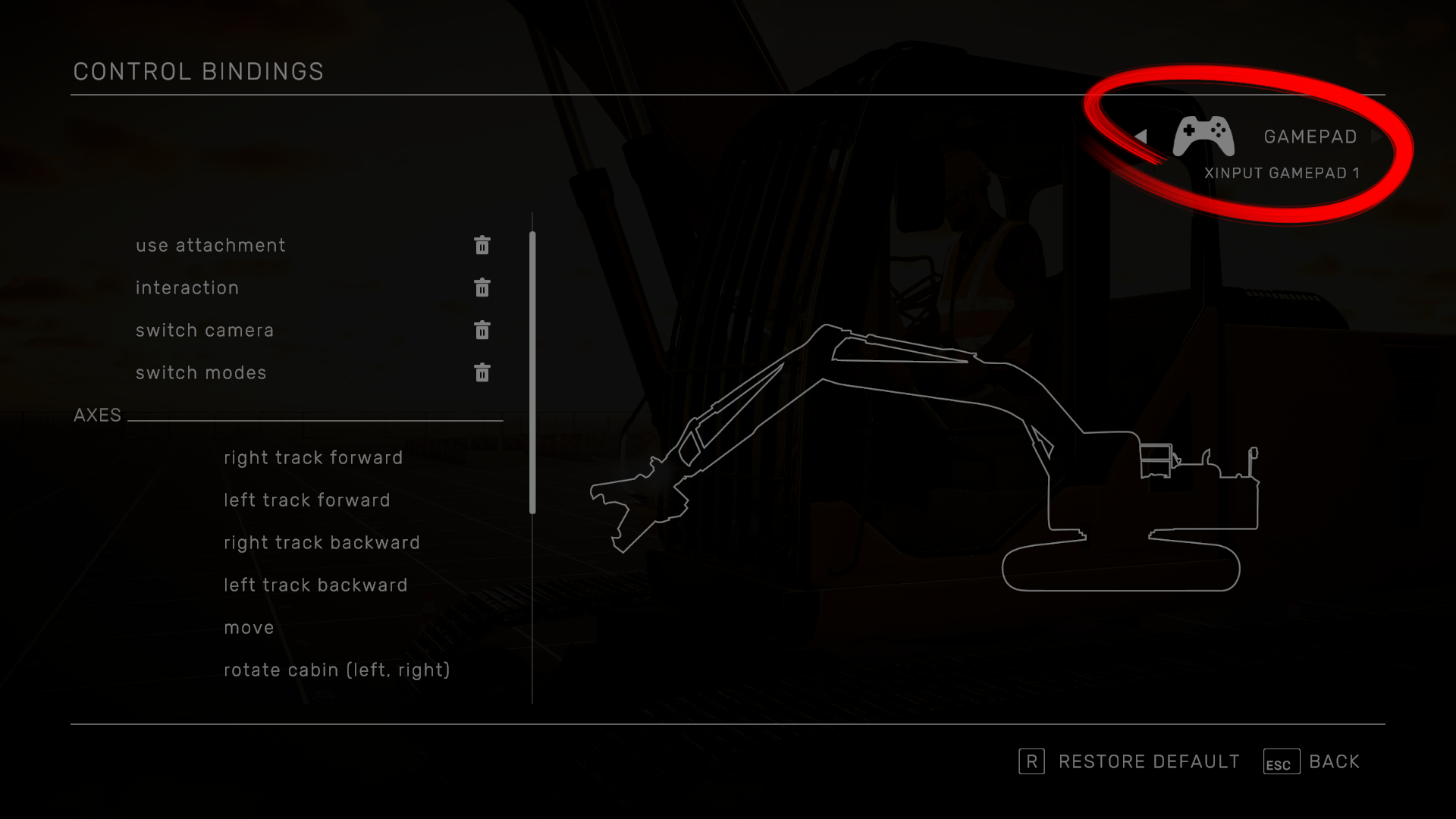
⦁ Select your controller here:


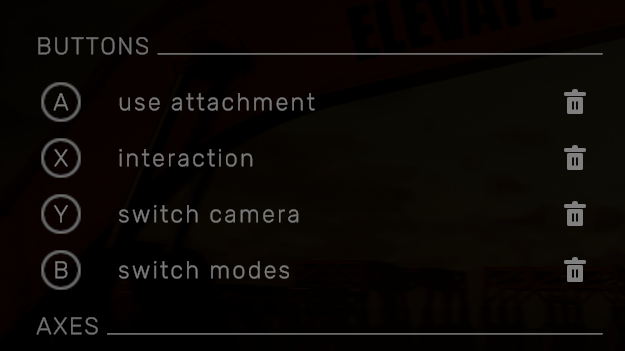
⦁ This button allows you to remove the current assignment.


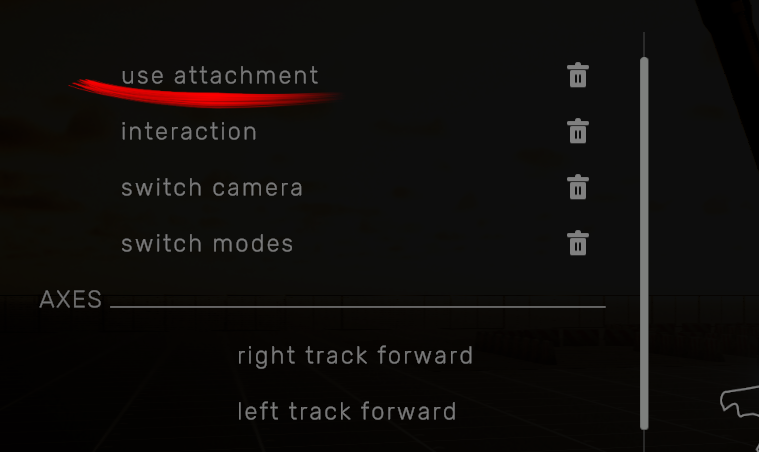
⦁ To assign a button select a function…


… and press the chosen button. Only buttons from the selected controller will be pooled. You can also assign an axis as a button (for ex. LT/RT on a controller).


⦁ To assign an axis, first select chosen function from the list

⦁ There are 4 modes available: Axis, Buttons, Axis with a modifier, Buttons with a modifier

⦁ Axis/Buttons
To assign simply select the function and use chosen axis or button

⦁ Axis/Buttons with Modifier
Axis/Buttons with Modifier is a special function that allows you to use the same controller axis for multiple functions. In practice, the Modifier works like a Shift Key – pressing it will override the default function and use this one instead.

EXAMPLE:

Let’s use this method to setup the Xbox 360 controller to the SAE pattern instead of the default ISO.
For the sake of this presentation, we’ll use an empty layout but you can just as easily modify an existing one.

⦁ Start by assigning button functions:


⦁ Assign the RT/RB to the right track
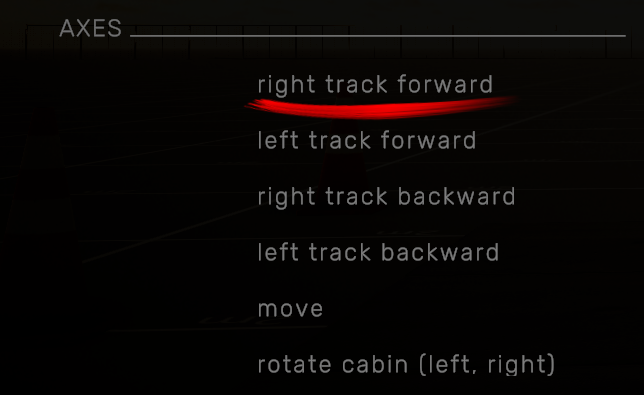
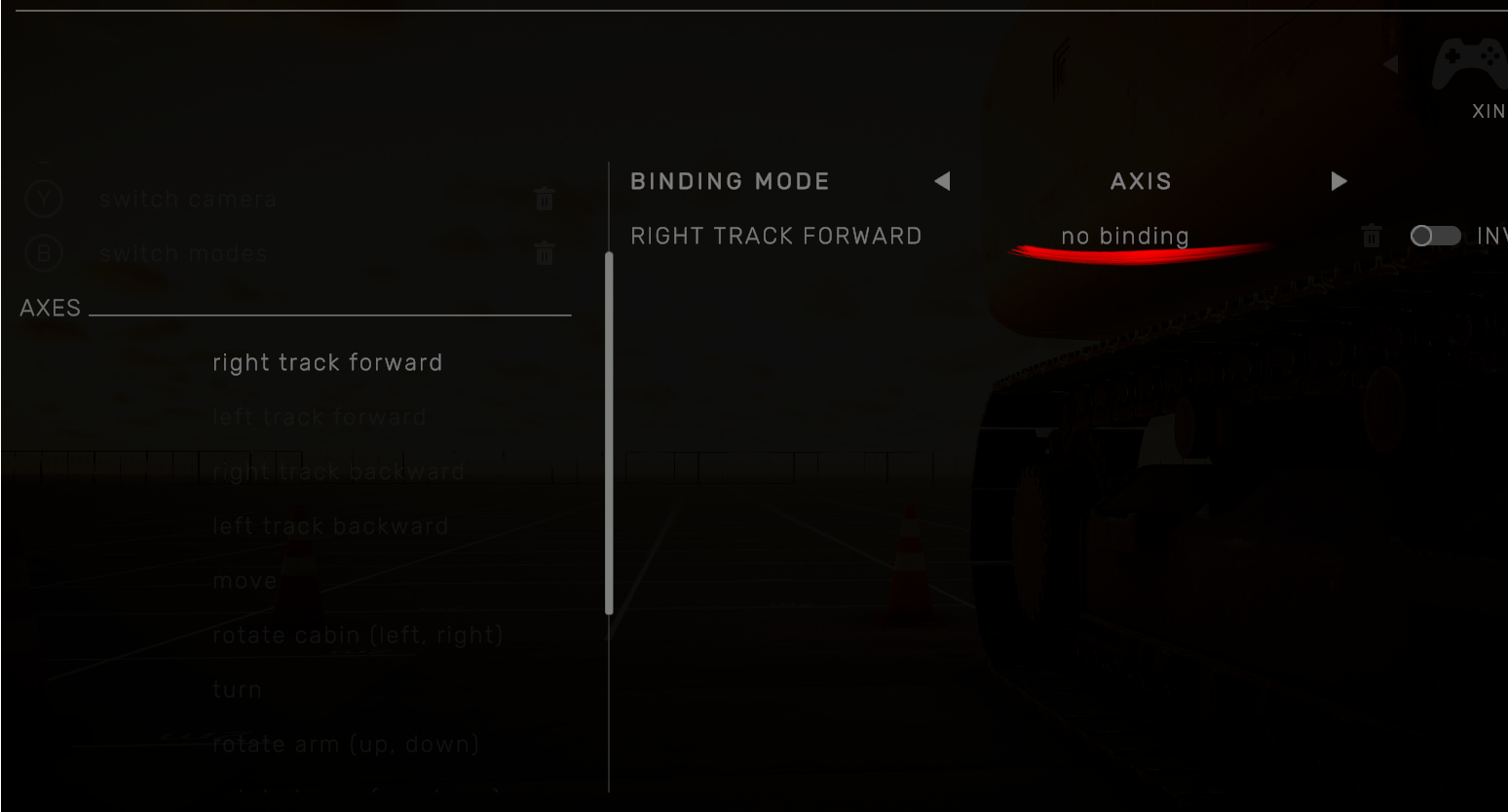
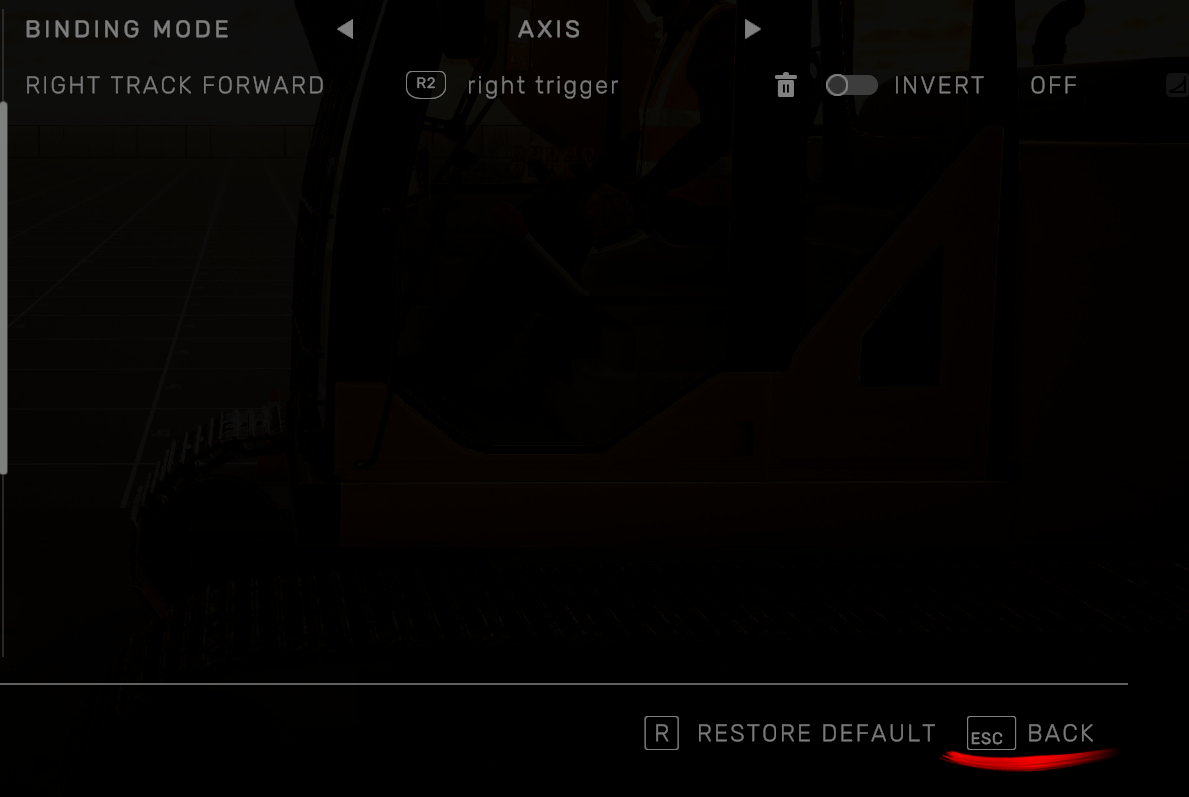
⦁ Select right track forward


⦁ Select no binding and press RT to assign it


⦁ Return to the list


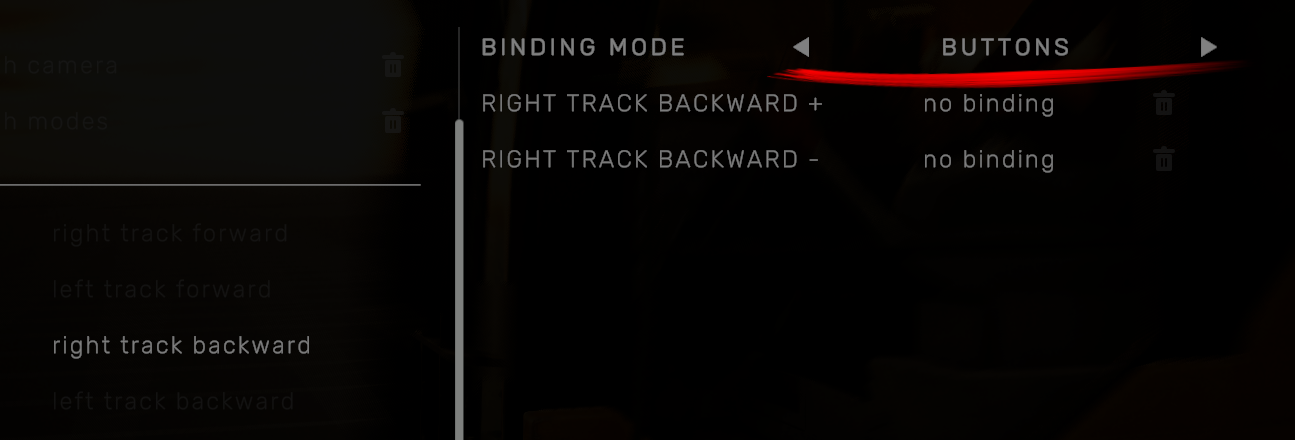
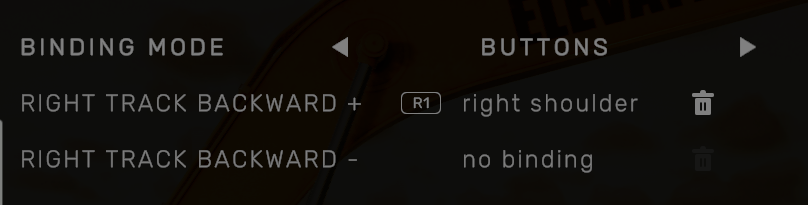
⦁ Select the right track backward


⦁ Choose BUTTONS mode

⦁ Select no binding next to RIGHT TRACK BACKWARD + and assign RB


⦁ Repeat the same for the left track

⦁ Select rotate cabin (left, right), axis mode, and assign left stick X (horizontal) axis.


⦁ Select rotate boom (up, down), axis mode, and assign left stick Y (vertical) axis.


⦁ Now, let’s move on to the right stick. Select extend attachment, axis mode, and assign right stick X axis.


⦁ Select rotate arm (up, down), axis mode, and assign right stick Y axis.


⦁ We also need to rotate the shears

⦁ Select rotate attachment horizontally

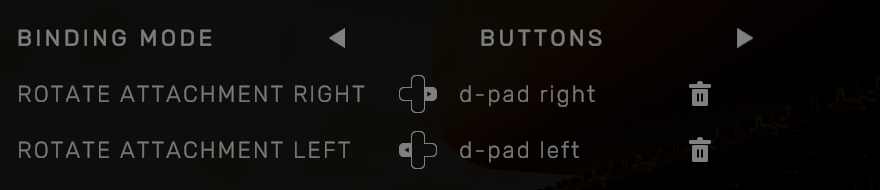
⦁ Change mode to BUTTONS

⦁ Assign D-Pad left/right to the appropriate functions


⦁ That leaves us with camera controls. Since we’ve already assigned all controller axes we’ll use the modifier.

⦁ Select rotate camera

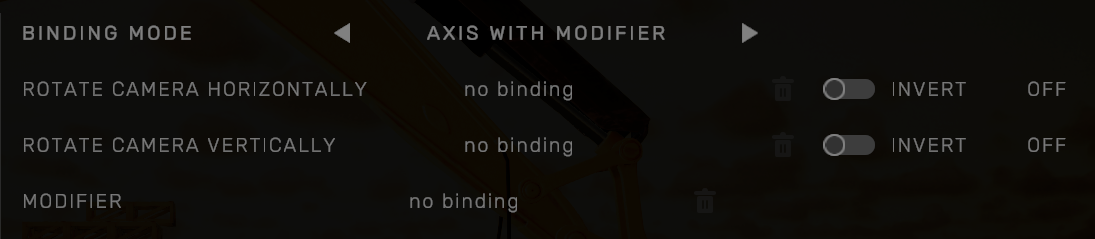
⦁ Choose AXIS WITH MODIFIER mode


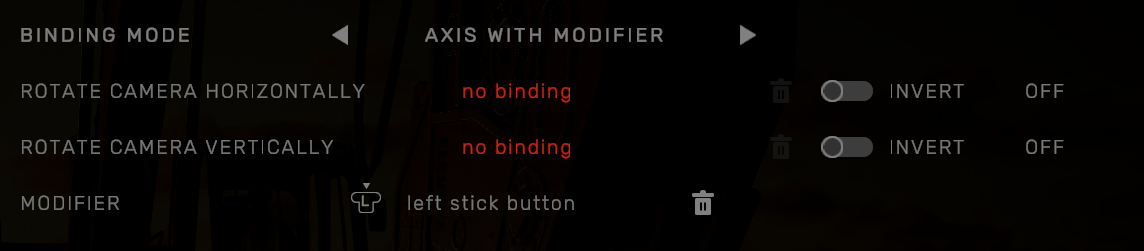
⦁ First assign the left stick button to the MODIFIER


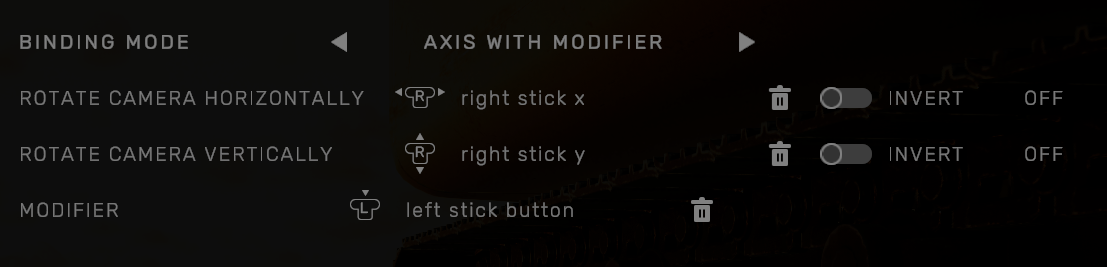
⦁ Now let’s assign the right stick axes to both functions
This means that when we press the right stick button the left stick will control the camera instead of the excavator’s left joystick.


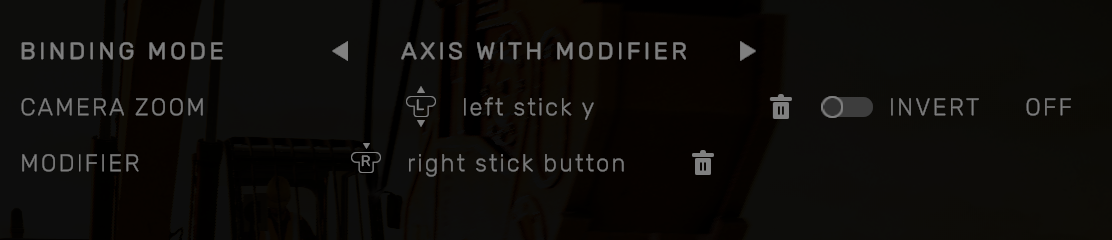
⦁ Repeat the same steps for camera zoom with the right stick button and left stick y.


That’s it. We’ve created working SAE controls for our controller from scratch.


Some additional rules/tips when creating custom control schemes:

⦁ A single axis can be assigned to only one function without modifiers.
⦁ You cannot use the same button for the modifier and a normal function.
⦁ On the other hand, a button can be used as a modifier for multiple functions.
⦁ You do not have to assign every function for a single controller.
⦁ If you want to assign a full axis to one of the tracks, best assign it to the left/right track forward functions.

https://store.steampowered.com/app/1203670

If you have any suggestions, or ideas about the game, please write to us. Join our discord:


Stay safe and happy demolition!
Demolish Games crew
Black Sheep - Yolk
大家好,我们是完蛋了的国王工作室。黑羊已经在今天下午三点正式上线了,非常感谢各位对于我们稚嫩表达的支持。

黑羊这个游戏公布以来,我们有看到有很多人和我们分享的自己被霸凌的经历,每一次都感慨万千,一直很想找机会和大家聊一聊这些,终于在发售之际我们找到了C菌来和大家一起聊聊天。

C菌&黑羊的FM节目将于12月17日(明天)晚八点在b站直播间(房间号:1011)放送!现诚邀各位投稿至邮箱LULU359638782@163.com(投稿形式不限,可以是文字投稿也可以是语音投稿等等),和我们一起分享自己关于学生时代那些快乐或者不快乐的回忆。

我们将会选取部分投稿和直播间的各位一起聊聊,并将为这部分投稿准备好特定的礼物!!希望各位都能生活愉快!
Demolish & Build 3 - Matt
Demolishers!

Many of you have asked for the addition of full optimization for controllers. Especially for you, we have prepared an update related to these changes. As of now, you can assign any function to a button or axis in our demo - Demolish & Build 3: Excavator Playground.

We took great care to create a system that is both flexible and easy to use. With it you can use any number and any type of controllers. Also, we did our best to allow you to assign whatever button or axis to every important function. In the future we will also add options to calibrate and fine-tune your axes to give you the best experience you can have.

In the instructions below, we show you how to setup custom controls.

⦁ Select your controller here:


⦁ This button allows you to remove the current assignment.


⦁ To assign a button select a function…


… and press the chosen button. Only buttons from the selected controller will be pooled. You can also assign an axis as a button (for ex. LT/RT on a controller).


⦁ To assign an axis, first select chosen function from the list

⦁ There are 4 modes available: Axis, Buttons, Axis with a modifier, Buttons with a modifier

⦁ Axis/Buttons
To assign simply select the function and use chosen axis or button

⦁ Axis/Buttons with Modifier
Axis/Buttons with Modifier is a special function that allows you to use the same controller axis for multiple functions. In practice, the Modifier works like a Shift Key – pressing it will override the default function and use this one instead.

EXAMPLE:

Let’s use this method to setup the Xbox 360 controller to the SAE pattern instead of the default ISO.
For the sake of this presentation, we’ll use an empty layout but you can just as easily modify an existing one.

⦁ Start by assigning button functions:


⦁ Assign the RT/RB to the right track
⦁ Select right track forward


⦁ Select no binding and press RT to assign it


⦁ Return to the list


⦁ Select the right track backward


⦁ Choose BUTTONS mode

⦁ Select no binding next to RIGHT TRACK BACKWARD + and assign RB


⦁ Repeat the same for the left track

⦁ Select rotate cabin (left, right), axis mode, and assign left stick X (horizontal) axis.


⦁ Select rotate boom (up, down), axis mode, and assign left stick Y (vertical) axis.


⦁ Now, let’s move on to the right stick. Select extend attachment, axis mode, and assign right stick X axis.


⦁ Select rotate arm (up, down), axis mode, and assign right stick Y axis.


⦁ We also need to rotate the shears

⦁ Select rotate attachment horizontally

⦁ Change mode to BUTTONS

⦁ Assign D-Pad left/right to the appropriate functions


⦁ That leaves us with camera controls. Since we’ve already assigned all controller axes we’ll use the modifier.

⦁ Select rotate camera

⦁ Choose AXIS WITH MODIFIER mode


⦁ First assign the left stick button to the MODIFIER


⦁ Now let’s assign the right stick axes to both functions
This means that when we press the right stick button the left stick will control the camera instead of the excavator’s left joystick.


⦁ Repeat the same steps for camera zoom with the right stick button and left stick y.


That’s it. We’ve created working SAE controls for our controller from scratch.


Some additional rules/tips when creating custom control schemes:

⦁ A single axis can be assigned to only one function without modifiers.
⦁ You cannot use the same button for the modifier and a normal function.
⦁ On the other hand, a button can be used as a modifier for multiple functions.
⦁ You do not have to assign every function for a single controller.
⦁ If you want to assign a full axis to one of the tracks, best assign it to the left/right track forward functions.

https://store.steampowered.com/app/1203670

If you have any suggestions, or ideas about the game, please write to us. Join our discord:


Stay safe and happy demolition!
Demolish Games crew
VR HOT - VR HOT
Hi friends,

due to our small team and the upcoming Holidays, we will only be able to offer limited support services with longer response times in the next couple of weeks.

We’ll be back with fresh minds, recharged batteries and full support on Jan 8.

Happy Holidays and a Happy New Year!

Take care
VR HOT
...