Unnatural Investigations - Mr Quaid
Version 0.5 Update Notes
News

Updates have been made to all the Investigation & Elimination levels. Some were completely redone, while others were polished.

Gameplay Changes
The investigation & Elimination levels start has been updated. Now players will start inside a truck. When ready a player must go to the door and interact with it. Once complete the game mode functions the same as before. This addition was created to prevent being attacked right as spawned in.

Bug Fixes
Fixed bugs related to enemy pathfinding
Tweaks
Bosses and enemies received small tweaks to speed and damage output
Notes
The next update will change some elements of the Investigation & Elimination but retain the same goal.
A new store system will be added, and XP will be removed and replaced with cash. Killing enemies, completing tasks, and completing the mission will yield cash. Cash will be used to upgrade gear, get new gear, and unlock perks. Some items will be one-time use, while others are permanent.


Thanks for playing, please provide as much feedback both good and bad it will help further develop the game.
Momentum Mod - Gocnak
The Momentum Mod Team is returning on the Momentum Mod Twitch channel for another round of Questions, Answers, and miscellaneous discussions!

Just like last time, you may ask us questions to be answered and or discussed live in our Discord server, inside the #qna-live channel! Note that while we may take some questions during the stream, it is better to get your questions in beforehand in the #qna-live channel in the Discord.

We hope to see you there, but just like last time, if you can't make it, we will be uploading the VoD with timestamps to our YouTube channel!

Cheers,
Momentum Mod Team
Start11 - [SD] redskittlesonly
Today, we released an update for Start11 that enables new functionality that is designed to work with retail builds of Windows 11. If you're still a Windows 10 user, don't worry - and Start11 continues to support that OS as well!

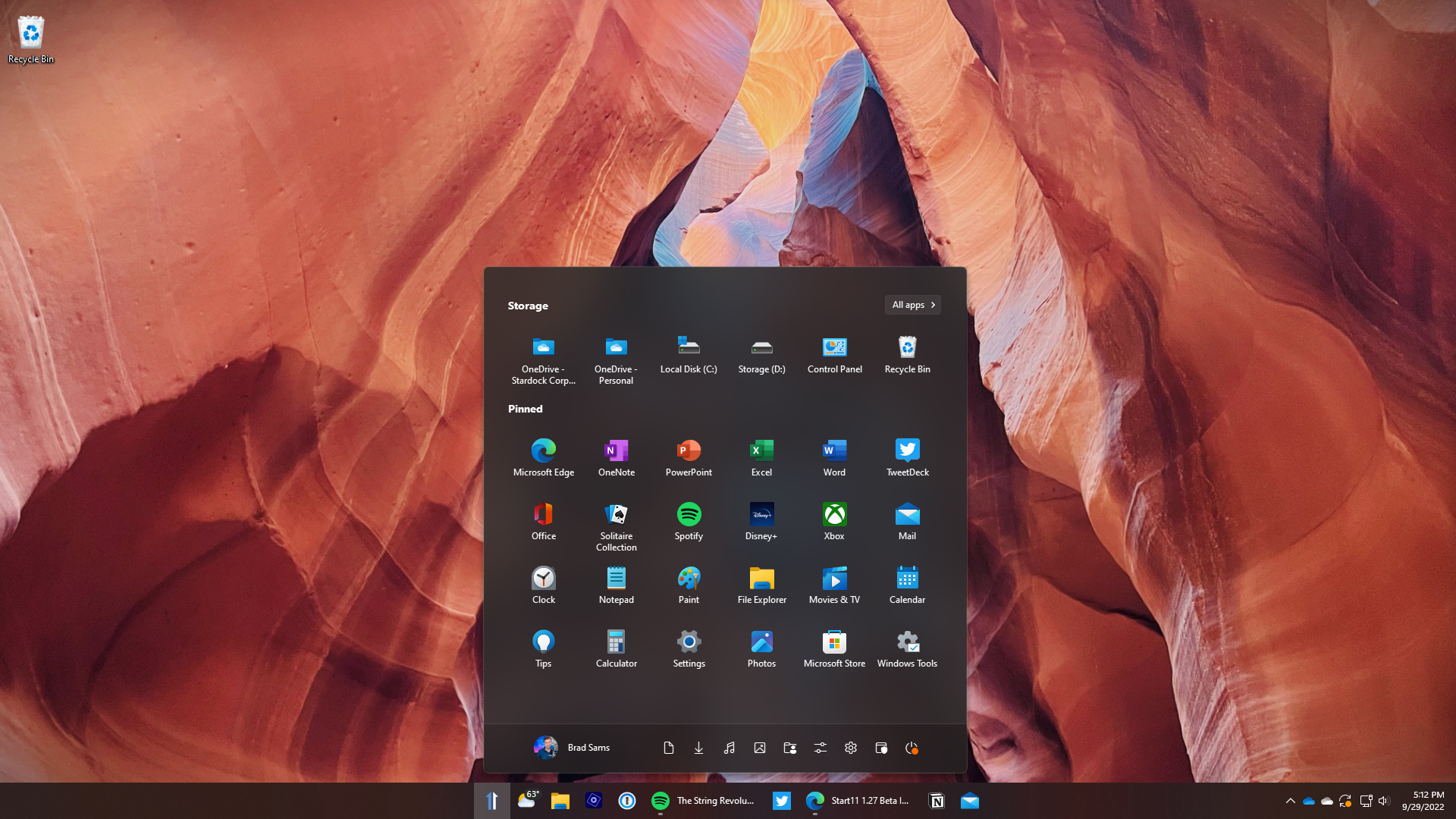
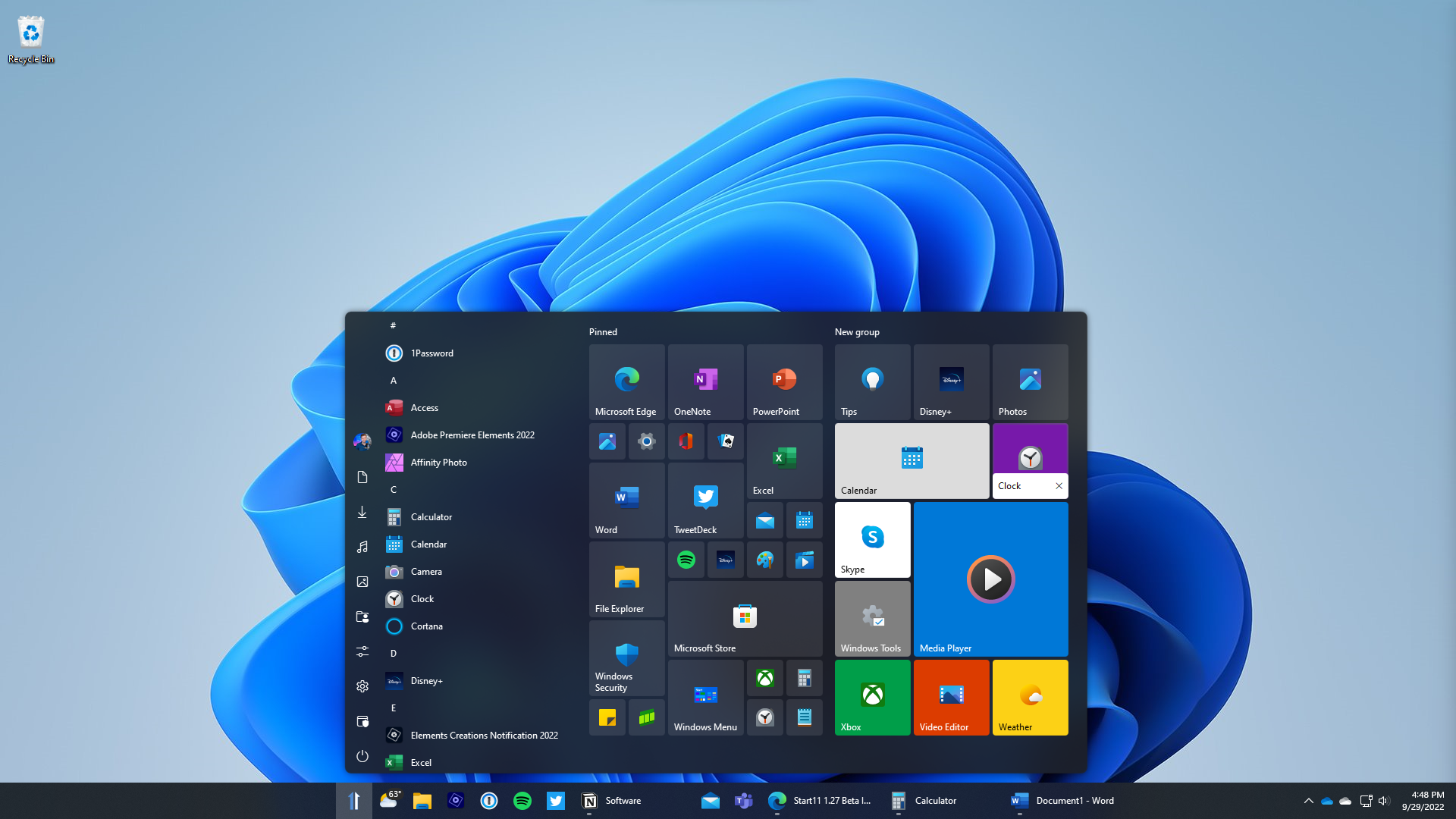
In v1.31, we implemented new functionality for replacing your Start menu icon when centered, as well as an option for ungrouping your icons when centered when you enable the enhanced taskbar option. This means that you can have complete control over your taskbar and ungrouping experience with Start11.


In addition to enabling new taskbar functionality, we also added a new option for renaming shortcuts in the Windows 10 and 11 style Start menus. With this update, you can now rename the tiles or icons to a name besides the application, or leave them blank if that's your preference.

We pay attention to what our users are saying about their experiences with our software. With each new version release for Start11, we focus numerous bug fixes on edge scenarios where the app doesn't operate as expected. We continue to appreciate everyone’s feedback, as it helps shape each update that we ship. It's also important to note that these new features are currently only supported on Windows 11 release builds and not Insider releases.


If you're running Windows 11, Start11 is a must-have application. With a robust set of customization options and the ability to easily change Start menu designs and configure the menu to your exact specifications, Start11 is the industry’s most advanced Start menu.

We continue to see a strong adoption of Start11 across both the consumer segment and - at an increasing rate - the enterprise market as well. With the ability to easily deploy Start11 across multiple devices and to create standardized desktops on both Windows 10 and 11, Start11 is the perfect tool for helping everyone navigate the changes that Windows 11 introduces.
Dead Estate - jack
The update will be OUT of beta on the 25th!
(Instructions on how to access the Beta Branch are at the bottom of this post)

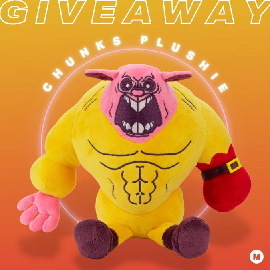
CHUNKS?!
Don't miss out on your chance to win a special Chunks plushie, designed by Makeship!


Follow that link to Twitter, where there are some basic instructions to enter the Giveaway. And keep an eye out in the near future for your opportunity to purchase one of these custom made plushies as well!

Happy one-year anniversary, everyone!

First off: since the update's final version will be out in under a week I'll be saving all the fancy stuff for a later announcement post, so I'll try to avoid doing a big ol' preamble here.

Second: I know this is long overdue (but I'll save the apologies for the previously-mentioned later post).

Third: this is the COMPLETE version of the update and is pretty much the same version that'll be officially released on the 25th give or take a few bug fixes that'll probably happen between now and then. So, finally, here it is!

NEW STUFF
  • Brand-new cutscenes available for every single unlockable character! Check them out from the extras menu!
  • 2 new bosses!
    • Nataleviathan, Earlyborn Destroyer (Floor 3)
    • Cybil, the Cult Chief (Floor 4)
  • 11 new enemies!
    • Wormbo (Floor 1)
    • Meltface (Floor 1)
    • Cageling (Floor 2)
    • Ashley (Floor 2)
    • Masked Cultist (Floor 3)
    • Cultist Brute (Floor 3)
    • Longleg (Floor 3)
    • Healer (Floor 4)
    • Hazmat (Floor 4)
    • Mousetrap (Floor 4)
    • Portrait Demon (???)
  • 33 new items!
    • Sorcery for Dummies
    • Tiny Wallet
    • The Globe
    • I.E.D
    • Eviction Notice
    • Au
    • Shiny Pocketwatch
    • Eggy
    • Handsaw
    • Silver Soul
    • Baby Chunks
    • Heatseeker
    • Dummy
    • Item Refresher
    • Weapon Refresher
    • Insurance Card
    • Yellow Fedora
    • V.I.P Pass
    • Lucky Dice
    • Private Eye
    • Purple Umbrella
    • Monster Snacks
    • Forever Flame
    • Ultra Hot Pepper
    • Tasty Treat
    • Combustophile
    • Toxic Barrel
    • Gas Mask
    • Hourglass
    • Stethoscope
    • Big Heart
    • Brass Knuckle
    • Pinata
  • 25 new weapons!
    • Dragon's Mouth
    • Flame Minigun
    • Drill
    • Radioactive Hammer
    • Rotten Tomato
    • Record
    • Chest Scaffolding
    • Wind Staff
    • Egg Staff
    • Shell Cannon
    • Fireshell Cannon
    • Eliminator
    • Vacuum Cleaner
    • Mr. Friendly
    • Marching Drum
    • Electrical Nodes
    • Thumbtacks
    • Reflector Gun
    • The Glove
    • Gold Gauntlets
    • Iron Gauntlets
    • Fire Punch
    • Bullet Bomber
    • Sex Gun
    • Radiation Sex Gun
  • Cybil, a brand new shopkeeper who can be found on alternate floors 1, 2, and 4!
  • A new post-credits scene for the normal ending!
  • Brand new character-dependent art for the game-over screen!

ACCESSING THE BETA
Accessing the public beta branch is simple as can be and only takes a few steps:
  1. Find the game in your Steam library, right-click it, and select "Properties..."
  2. From the menu on the left of the new window, select "BETAS."
  3. Click the dropdown menu underneath where it says "Select the beta you would like to opt into", select "public_beta - Public beta."
  4. Wait for the game to complete updating.
  5. Launch the game!

The update will be officially released on OCTOBER 25TH! Expect a more prettier, fancier, more elaborate post with some details about the second update in this series then!!

Thanks for all of your support :)

- Jack
Oct 19, 2022
Rikki Kuu - The Anger
  • plasma cannon shoot sound added
  • torpedo targeting indicators added
  • 2 music tracks added
  • heat glow amount halved, drones shouldn't be too bright when overheating anymore
  • overheating isn't immediately fatal anymore and can be utilized strategically
  • drone temperature now has a range
  • explosion force vs drones doubled
  • shield module now works as described, boosting hitpoints & stability at the cost of minimum temperature
Oct 19, 2022
Demolition race - fairworld
Significantly improved riders behavior
Need for Speed™ Heat - Electronic Arts


To get to the top, you gotta take risks. Choose how and when to put it all on the line, pulling huge drifts on the street, outdriving the cops, or placing side bets with your own earnings against rival racers. Time is money, so find the fastest way to earn enough cash to enter the weekly qualifiers and make it to Lakeshore’s ultimate race, The Grand.

Pre-purchase Need for Speed™ Unbound now.

https://store.steampowered.com/app/1846380/Need_for_Speed_Unbound/
Evil Nun: The Broken Mask - Keplerians
[En Español más abajo]

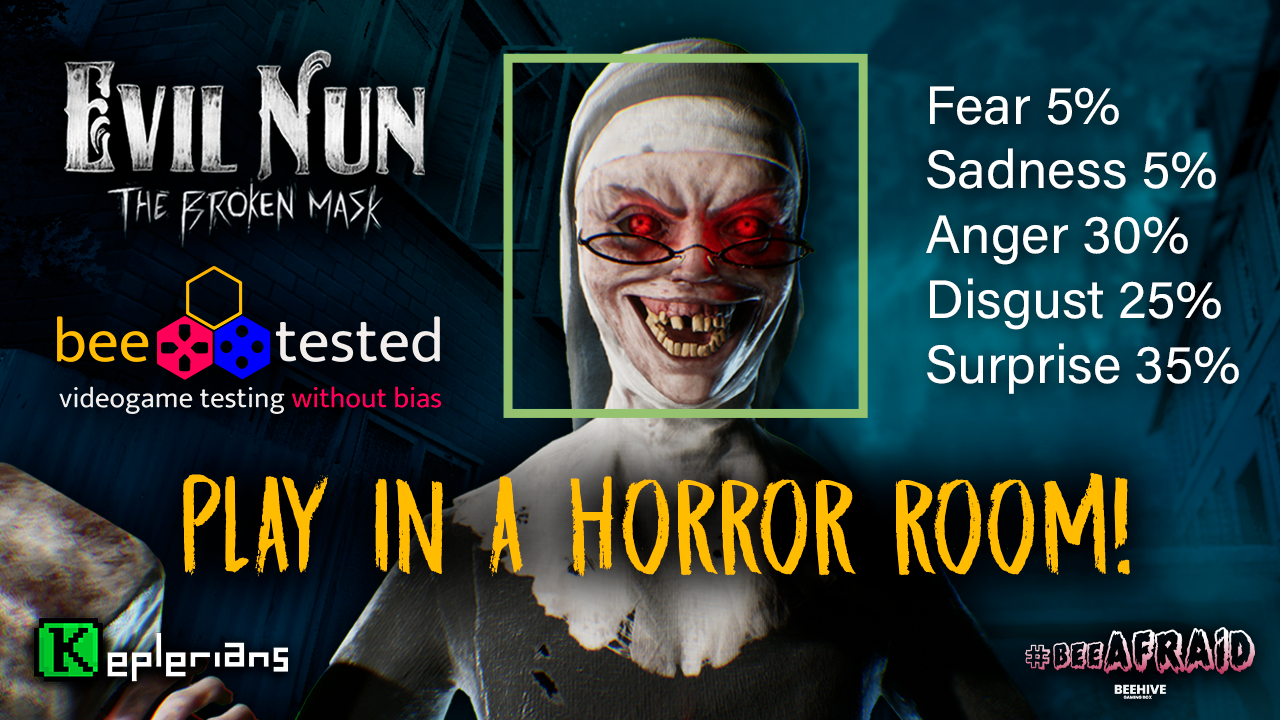
Good news! 🙌 If you are in Madrid or nearby on october 21, 22, 23 you'll be able to play Evil Nun: The Broken Mask before the official release! We will take part in the Bee Afraid festival, so come and visit us! You'll be able to play it in the horror room of Bee Tested, where your reactions will be scanned in real time.

---------------------------------

¡Buenas noticias! Si estás en Madrid o alrededores, estaremos el próximo 21,22 y 23 de octubre en el festival de terror Bee Afraid 🙌 Todos los asistentes podrán jugar a Evil Nun: The Broken Mask antes de su lanzamiento oficial! Además, podréis experimentar la sala de terror de Bee Tested donde se medirán vuestras reacciones en tiempo real.


Oct 19, 2022
Start11 - sean.drohan
Start11 is a culmination of one prior Stardock only release and several prior betas since the Steam 1.25 release.

Start11 1.31
  • Right-click on the left side of centered taskbars when the enhanced taskbar is enabled now correctly shows the menu on secondary monitors
  • Fixed issue with closing one item from the thumbnail popup from the taskbar in enhanced mode making the popup window jump to the far left of the screen sometimes
  • The line on 22H2 taskbars now adjusts with the alpha set on the taskbar by the user and is hidden entirely when the taskbar is on top. You can also create a registry key in the usual location of type string and give it a value of "1" and a name of "HideTaskbarLineEntirely" should you wish to always hide the line entirely.
  • Fixed mouseover pinned item tooltip moving away sometimes when leaving the taskbar
  • Fences items in Win11 menu mode will now save their order. Note that no gaps are saved in Win11-style menus only the order is
  • Tweak to refreshing apps list when new apps are installed as the search did not always refresh correctly for the newly installed application
  • Native Windows 11 will now center exactly vs in line with the start button when Start11 enhances the taskbar and had a centered start button. You can also create a registry key in the usual location of type string and give it a value of "1" and a name of "ForceWin11MenuToOffset" should you wish to line up with the start button as it did in 1.3
  • Fixed an issue with the taskbar on top having a gap at the bottom of the screen that maximized windows did not use when using the enhanced taskbar
  • Fixed issue with taskbar clock on primary monitor not showing up with enhanced taskbar enabled sometimes initially until a resize or click on the more system icons button
  • Fixed issue with the desktop area (that maximized windows use) not being correct after some screen resolution/display config changes
  • Fix for secondary taskbar buttons on occasion overlapping the Win11 widgets/teams/search icons when using center mode with Start11 enhancing the taskbar
  • Adds in the messaging about center mode needing the enhanced taskbar option on to function.
  • Added the two strings to the en and en-us lng files
  • Fixed an issue where some Win10 \ 11 PCs would not show 'sleep' in Start11.
  • Update translation strings

Start11 1.30
  • Versioned to 1.3
  • Fixed an issue with the WinKey fix for insider releases not working right if you wanted it to open the OS menu not S11 always
  • Fixed the issue with not pinning to the start menu when using Pin to Start on desktop shortcuts
  • Prior Beta Changelogs (post 1.25 release)

Start11 1.28
  • Winkey to open the start menu is restored on Insider builds
  • Toggling hide caption on an icon no longer jumps back to the first page
  • Right-clicking to the left of the start button when using the enhanced taskbar in center mode will now show the right-click menu correctly on the primary monitor
  • Config UI detects insider build with new taskbar and indicates which features do not work with that
  • Config UI detects Win11 22H2+ and indicates top align taskbars do not work with autohide enabled
  • Small timing tweak for center taskbar on Win11 with enhanced taskbar turned on for Insider builds
  • Fix for the right-click start button menu not painting right
  • Fix for the background of the taskbar having a color when the WB skin didn't define one
  • Fix for the position of the mini search popup and virtual desktops screen
  • Fix for the position of the native Win11 start menu all when having center taskbar with the enhanced taskbar enabled.

Start11 1.27
  • Version 1.26 was updated to fix a pinning issue, version was updated as a result.
  • NEW (experimental): Users can now center the Start11 button when using the Start11 Enhanced Taskbar. This supports custom start buttons too.
  • New - You can now rename shortcuts on the Win10/11 style start menus via the right-click menu
  • Fixed issue with restart computer when other users are logged in not working correctly after the warning message.
  • Fixed alignment of the new centered start button option to take into account the extra width of the bar
  • Fixed issue with taskbar being sluggish when file copies were taking place when enhanced taskbar was enabled.
  • Added new localization strings for 1.26 for new UI changes
  • Resolved flicker issue when opening the start menu on Win11 insider builds when animations are disabled
  • A code change to potentially resolve an issue with universal app icons loading as solid black in edge cases
  • Change to initialization of taskbar code to possibly help with wrong icons loading from the icon cache for pinned items
  • Fixed issue with only 1 sysicon causing a scrolling arrow to show sometimes
  • Changed Start11 to open the menu on the primary monitor when opened via the Winkey rather than the monitor the mouse is on. If anyone wishes to use the old behavior you can do so by defining "OldWinKeyLogic" as a string value here HKEY_CURRENT_USER/SOFTWARE/Stardock/Start8/Start8.ini/Start8 and giving it a value of "1"
  • Fixed issue with keyboard not opening groups on the menu correctly when enter is pressed. Pressing space now also toggles them.
  • Fixed issue with rapid clicking on taskbar button with no other open windows not always minimizing the window consistently.
  • Resolved problem with some custom scaling factors causing the start menu to not show or show on the wrong screen.
  • Resolved issue where all programs button overlaps shutdown button when in compact mode Win7/modern style with quick launch hidden and search disabled.
  • Resolved issue with right-click on date when taskbar is at the top on Windows 11 providing a menu that did not work correctly when clicked.
  • Internal redesign of some taskbar logic to prevent the possibility of a hang
  • Now supports MS edge website shortcuts on the Win10/11 style start menus (Requires Windows 11)
  • Resolved issue with erroneous rapid clicking on the start button resulting in the menu not being visible but then animating out next time you click.
  • Fixed an issue on Windows 11 native start icon where it would not consistently register clicks, they would appear pent up and flash a bunch in a row.
  • Resolved flicker issue when opening the start menu on Win11 insider builds when animations are disabled
  • A code change to potentially resolve an issue with universal app icons loading as solid black in edge cases
  • Change to init of taskbar code to possibly help with wrong icons loading from the icon cache for pinned items
  • Updated user submitted Japanese translation (credit to user htakado)
  • Netflix when fullscreen (and other universal apps) no longer vanishes from the enhanced taskbar
  • Issues with multi-line system tray icons painting under the clock or leaving too much space etc resolved
  • Search for Windows settings items enhanced slightly
  • Search results for apps now show two lines of text vs one as some apps have quite long names which make it less usable
  • Taskbar shifting down 12 or so pixels (at 100% scaling) hopefully resolved
  • Taskbar shifting along the screen for some users on occasion hopefully resolved
  • Fixed issue with not showing Search/Task view / Widgets / Chat sometimes when toggled on from an off state
  • Fixed issue with Win7 mode where clicking to open the jumplist via keyboard (space key) didn't set the focus correctly to an expanded list
  • Worked around an issue with universal app icons when running caused by using Actual Window Guard
  • Worked around an issue with the menu closing incorrectly sometimes when you want to open it when using Actual Window Guard
  • Resolved issue with an explorer crash in rare circumstances with enhanced taskbar enabled
  • Search results for settings now wrap the text when required in Start11 search mode
  • Fixed issue with Brave browser profiles overlay image appearing bottom right (normal for Win10) rather than top right on the icon on Windows 11
  • Stopped very tall window switcher lists jumping to the top of the screen in error with enhanced taskbar enabled.
  • Resolved an issue with seconds on the clock in US region causing shifting of icons sometimes depending on the date
FRACT OSC - fractgame


phosfiend systems is excited to announce our collaboration with Superbrothers on the expansion for their game JETT: The Far Shore. The initial release of JETT: The Far Shore was one of our favorite games of 2021, as it captures an amazing sense of momentum and flow, while also presenting a captivating sci-fi narrative in a unique and rich far away world.

When the opportunity came up to work with Superbrothers (co-creators of the awesome Sword & Sworcery EP) on the equally ambitious Given Time expansion, we eagerly hopped on board to help the talented JETT Squad to get this thing to the finish line. Our last-mile contribution was largely a mix of design and systems advising and you should read a bit more about it here.


Without going into too much detail we can say that the Given Time expansion delivers on the promise that JETT: The Far Shore established in 2021. The flexibility and openness of its world and systems create something truly special that we think will really resonate with players.

JETT: The Far Shore + Given Time will be launching in early 2023, and we think if you like FRACT OSC, that JETT will resonate with you as well. In fact, the new demo that lets you play the truly epic opening sequence of the game is available now. Be sure to wishlist the game to keep an eye on updates and the release!

Thanks,

phosfiend systems
...