Mossfield Origins - Studio Any Percent
We've teamed up with the wonderful folks at Kitfox Games to publish Mossfield Origins!


Kitfox makes great games like Boyfriend Dungeon and publishes gems like Dwarf Fortress and Pupperazi.

Working with like minded people on the same wavelength is a good thing for us, and we're excited to be able to focus on the game and work with them on crossing the finish line.


We're hanging out in the Kitfox Discord if you want to follow development a little closer, chat with the developers behind the game and get sneak peeks into what we're up to.


Oh and we've got new gameplay and stuff not shown before in a new trailer coming soon đź‘€ If you wanna find out when/where it'll premiere follow:

- Studio Any Percent on twitter
- Kitfox Games on twitter
- Mossfield Origins Newsletter

May 16, 2022
Far Away From Home - farawayfromhomegame
Hey all, these changes aren't in the demo yet, but I just wanted to let you know about some of the stuff I've been working on and feedback that I've incorporated into the game since last update. I am considering all feedback, so if you've got anything at all that you'd like to see improved, feel free to let me know!

Change Log
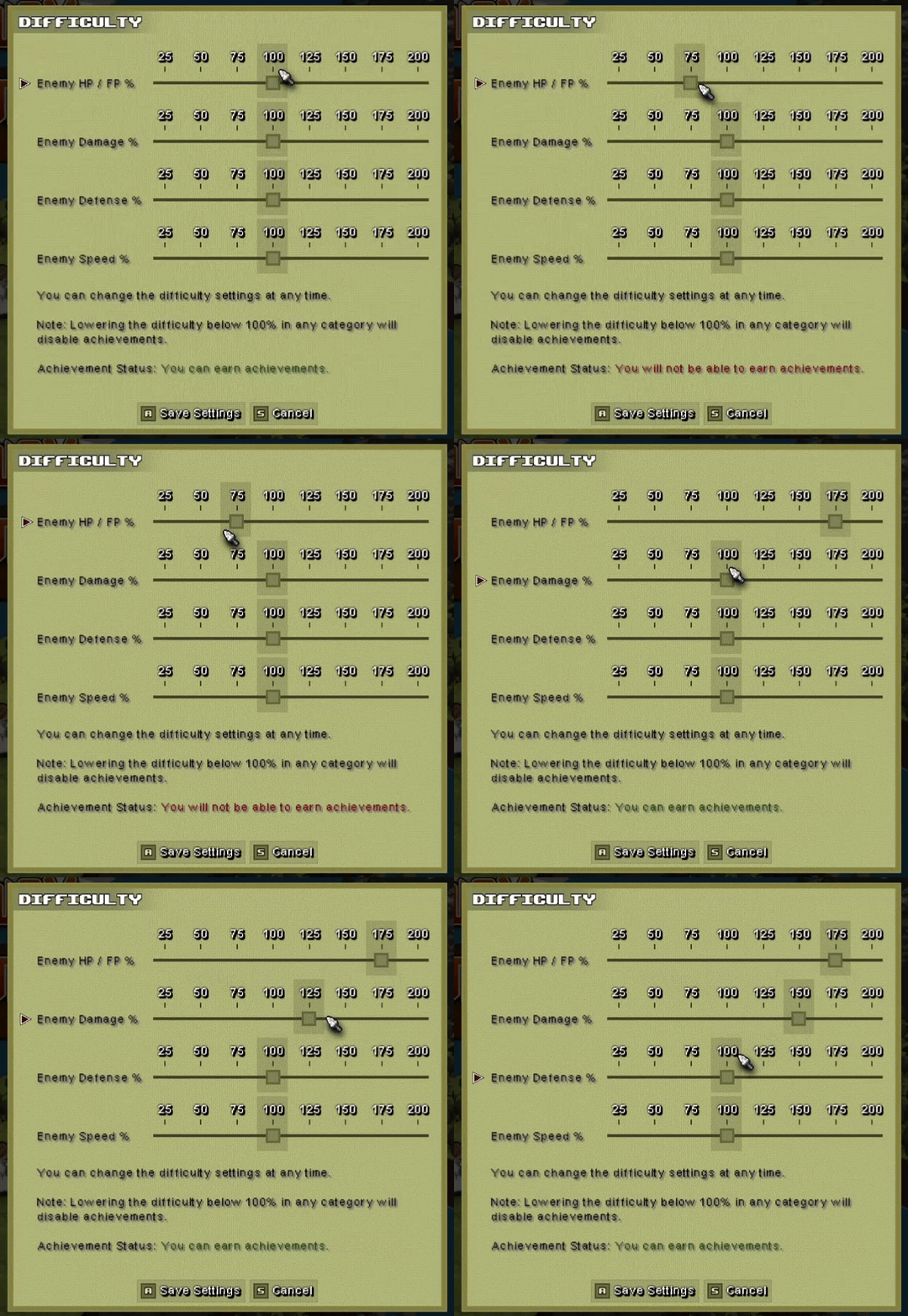
Difficulty Sliders
If you want more pain (or less), there will be difficulty sliders to modify certain aspects of the game. I'm hoping to have something more complex later on, but for now, I've added in some simple options to scale battle difficulty.


Click and Drag Map Movement
Using the middle mouse button, you can now look around the map more easily then clicking on tiles to move the camera.

Better Tile / Unit Visibility
I know there are some issues with being able to see units and tiles when they go behind terrain in some cases, it should be easier to see where everything is now. This is something I continually am trying to improve.

Unit Highlighting in Turn List
To better figure out and plan what you want to do, if you hover over a unit in the turn list with the mouse, it will highlight on the map, which unit it corresponds to. Clicking on the unit will also move your cursor to that unit.

Enemy Balancing
Reduced damage on all enemy units slightly. Rangers and Marksmen had their starting FP slightly lowered.

End of Turn Wait Direction
A couple people were asking about this and I initially didn't allow it for strategical reasons, but I also didn't feel too strongly about it either way and am always up for making changes if people simply find it more enjoyable.

You can now choose your unit facing direction at the end of every turn, whether you explicitly waited or performed an action.

You will still only get wait related bonuses if you explicitly chose to wait.

Claster Riposte
Claster can counter attack all enemies at all distances now at skill levels 1 - 3. There were comments that it felt bad against ranged enemies.
Ryzom - tamarea
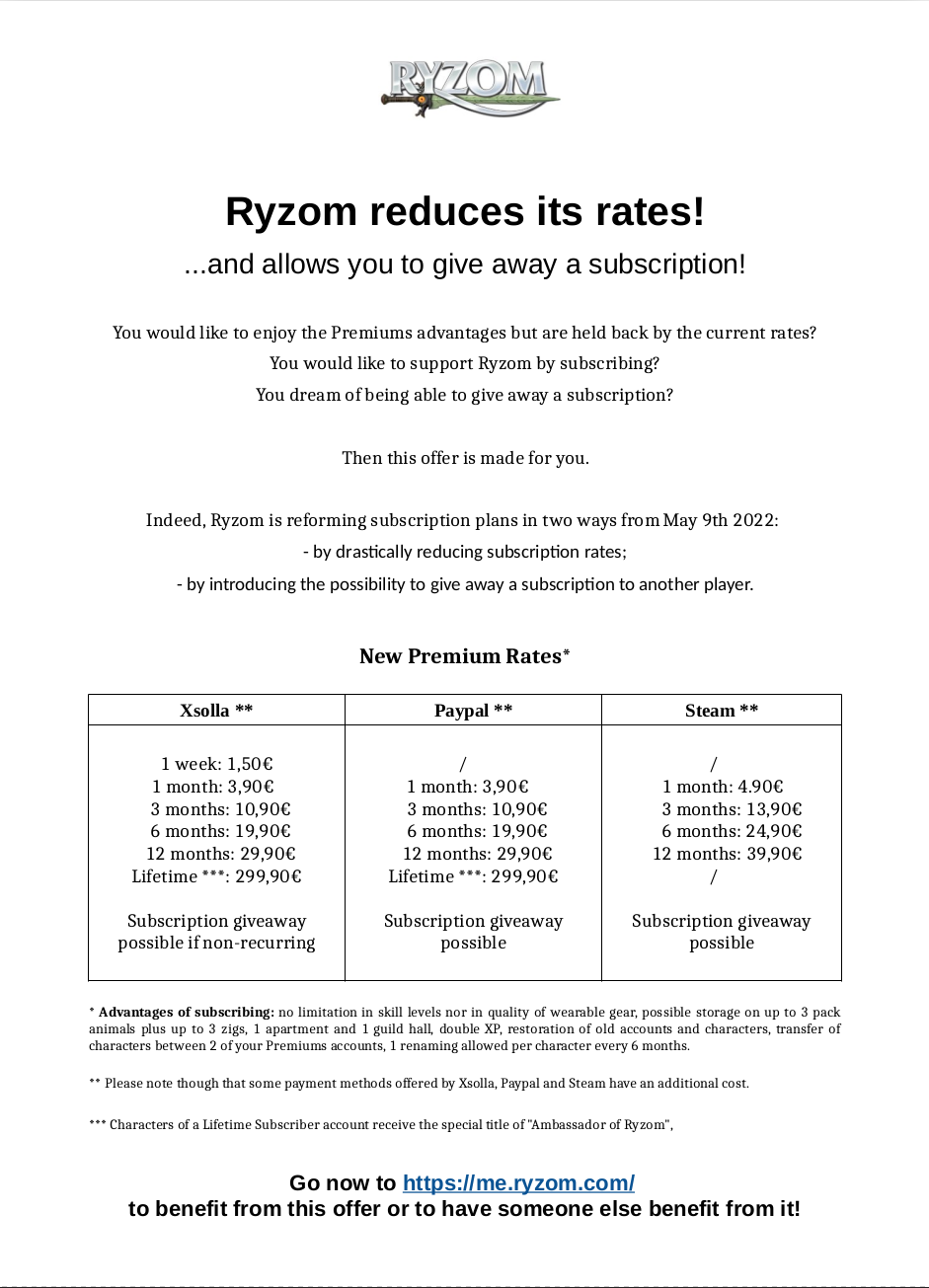
Good news for all those who got an ongoing subscription paid before the rates' reduction!

Indeed, we will offer you Premium days to compensate for the days paid but not used at the date the rates changed.
So, a player who subscribed for 1 year the day before the rates' reduction will be offered 1 year of Premium in compensation. If he or she subscribed for 1 year, 10 months before the rates' reduction, he or she will receive 2 months worth of compensation.
The same applies to shorter subscription periods.

The compensation should be activated within 24 hours. Then, you will be able to activate the Premium days given as compensation from your billing page on https://me.ryzom.com.
The Lattice Grimoire - silverkrishna
We've updated our steam achievements code.
Universe Sandbox - bshapiroalbert

We’re constantly working to make Universe Sandbox even better, and we’ve only scratched the surface. Our plans this year include more materials, rigid body collisions, and more!

But first, what did we do in 2021?

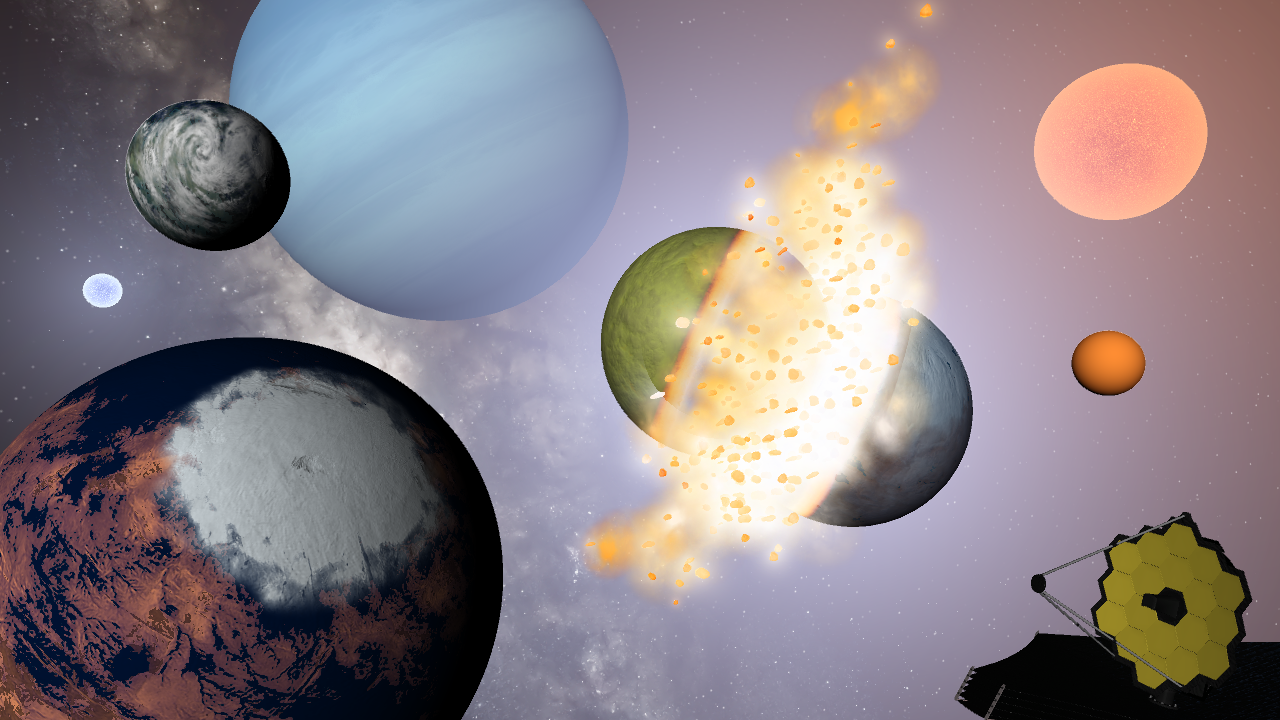
Demonstrating planetscaping, atmosphere opacity, and collision improvements added in 2021.

Over the course of 2021, we had 3 major updates and 5 minor updates.
  • Splish, Splash, Filling a Bath | Update 26.3
    • Oceans fill from lowest to highest elevations (like a bathtub)
  • Fast & Flurrious | Update 27
    • Snow simulation is more realistic for known and random rocky planets
    • Temperature calculations are smoother at high sim speeds
  • Clouds in Motion | Update 27.1
    • Cloud speed is now simulated from an object's temperature and rotational speed
  • Atmospheric Adjustments | Update 27.2
    • Atmosphere Opacity is now simulated (and customization)
  • Codename: Fire Ring | Update 28
    • Object collisions now have shockwave-based impacts
    • Object trails project back in time and show their past trajectory
  • My Eyes, the Space Goggles Do Nothing | Update 28.1
    • Realistic Object Visibility better reflects what the human eye would see
  • Starlite Starbrite | Update 28.2
    • Stars now have Absolute and Apparent Magnitudes, which measure their brightness at different distances
    • Starlight color on nearby objects updates in real-time
  • Planetscaping | Update 29
    • Manipulate object surfaces with the Planetscaping (Surface Editing) tool
    • Collisions are more realistic with updated frictional forces
View our “What’s New” for a chronological list of changes.
And what have we already done in 2022?

Showcasing some of the updates we’ve already made to Universe Sandbox in 2022.

This year has already brought one major and one minor update, both focused on our collision-based goals for the year.
  • Consistent Collisions, James Webb, & Planetscaping Tweaks | Update 29.1
    • Fragments are now longer-lasting, and collisions are more consistent
    • The Planetscaping tool now includes an eyedropper
  • Hit Hard, Spin Fast | Update 30
    • Spin planets apart at high rotational speeds with the new Force Spin tool
    • Similar-size object collisions now symmetrically heat and fragment both objects
What’re we planning to do in 2022?
From simulation improvements to smoothing out our development process, we’re excited about what’s ahead. While we would like to do everything listed here this year, new priorities or unanticipated difficulties might arise and delay our plans.

Stellar Simulation

The constellation Orion viewed from two different angles in Universe Sandbox. The camera is moving while the stars are stationary. Constellations are a work in progress.

We’re planning to add new star-related features and are working to improve our star simulation.
  • Constellations
    • We want you to view and interact with Constellations dynamically. This is one of the oldest things on our to-do list.
    • To simultaneously simulate the 691 stars for constellations, we’ve been improving performance for star glows, object labels, and more.
  • Star Simulation
    • Overhauling our current star simulation code to enable smooth star transitions as their properties change is a large task we’re actively working on.
    • Revamped star simulation will lay the groundwork for improving stellar evolution.
Physics, Physics, Physics

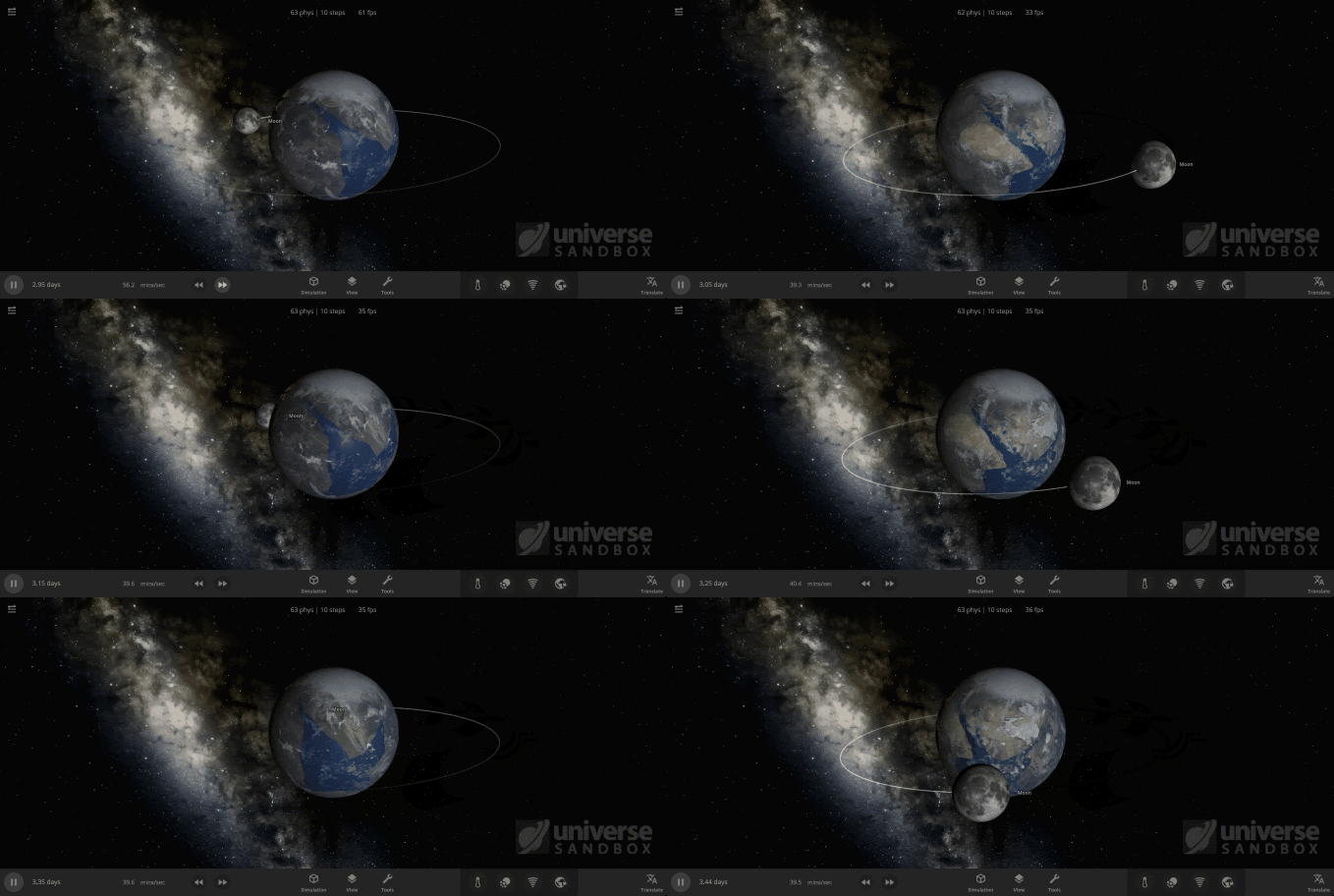
Tidal forces due to the Moon orbiting close to the Earth dramatically change the Earth’s tides. Adding tidal forces to influence water flow in Universe Sandbox is a work in progress.

Collision and physics have been and continue to be a significant focus for us this year.
  • Rigid Body Physics
    • Anybody up for space-bowling? We’re continuing work to add new physics to allow better human-scale interactions (like bowling pins and satellites).
    • This new system will serve as the foundation for spacecraft, thrusters, and megastructures in the future.
  • Core Engine Rewrite
    • As Unity continues to develop their new physics engine based on the Unity Data-Oriented Technology Stack (DOTS) framework, we’ve begun transitioning Universe Sandbox to this new system.
    • This massive undertaking will eventually handle most computations in Universe Sandbox and will improve performance, particularly for physics simulation.
  • Collisions: Physically Accurate & Overall More Awesome
    • Allowing objects in collisions to deform fluidly will create more realistic collisions, including total disintegration.
    • Rock fragments and gas clouds interacting and collecting more material over time will allow a more realistic planet or moon formation simulation.
Cross-Platform Support

Navigating the home menu in Universe Sandbox with a gamepad. Gamepad support is a work in progress.

Our progress on the mobile version of Universe Sandbox (iOS and Android) was slower than expected last year, but we’re ramping it up this year.
  • The Universe in Your Pocket
    • Our two new user interface engineers will help us tackle the remaining challenges of mobile development, like window management on a small screen.
    • Our goal is for the mobile version of Universe Sandbox to match the full desktop experience. Learn more in our Mobile DevLog.
  • The Universe from Your Couch
    • Want to play Universe Sandbox on your couch? Us too! We’ve begun experimenting with gamepad support for the desktop version, which is critical for future console development.
Materials & Beyond

Adding additional materials, like Carbon Dioxide and Helium, in Universe Sandbox. This is a work in progress.

We want you to have access to more of the materials that make up our universe, like sulfur and oxygen, within Universe Sandbox. Adding more materials to our current system will allow better simulation of atmospheres, volatiles, and, eventually, life.
  • Building with Basics
    • Adding basic materials like methane, necessary for simulating the liquid lakes of methane on Titan, will be the first step for this material system.
    • New materials will be included in surface simulation as we track their phase changes and movement across an object’s surface.
  • Volatiles
    • More materials will allow us to create a more realistic volatiles system, which determines both the composition of fragments and if an object is losing material.
Internal Automation & Testing

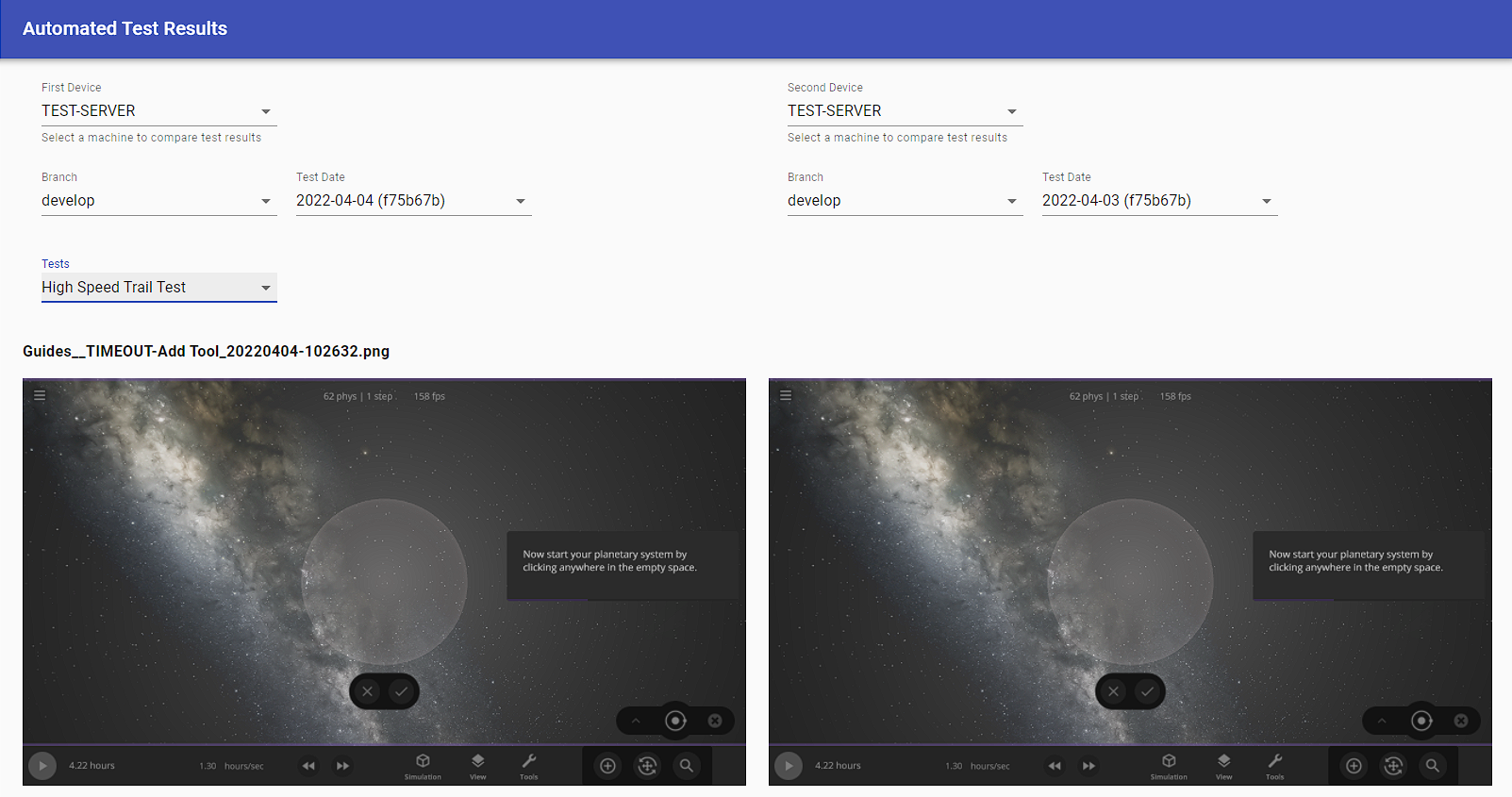
Our internal server allows our team to compare the results of automated tests and easily catch any issues when new features are added. This is a screenshot of our internal tool.

Part of developing Universe Sandbox (or any game) is identifying (and fixing!) bugs as early as possible. To help us with this, we’re creating new internal systems for our team to use to automate our deployment processes and test new and existing features.
  • Build Automation
    • An updated version, or build, of Universe Sandbox is automatically created every time we make a code change so we can easily playtest new changes.
    • Developing tools to build and push new updates to Universe Sandbox automatically lets us get new features and fixes to you faster.
  • Feature Testing
    • We’re creating a suite of automated tests and setting up a system to compare their results so we can easily see simulation changes or issues.
      • These tests can automatically click buttons, record GIFs, and more!
Hiring

The key to creating a great game like Universe Sandbox is having a great team. Hiring the right people for the job takes time, but is always worthwhile.
And More

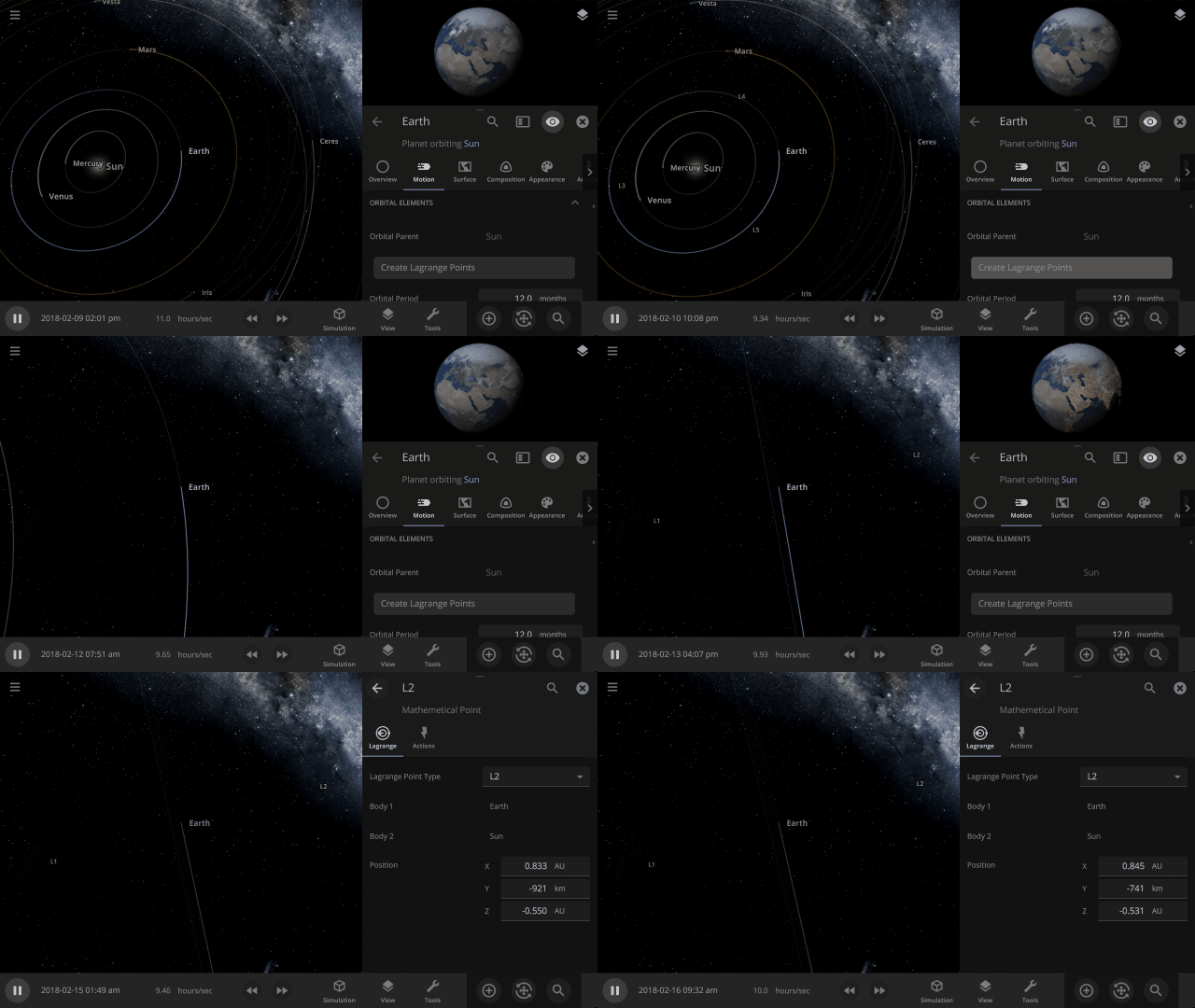
Creating Lagrange Points in Universe Sandbox based on an object and its orbital parent. This is a work in progress.

In addition to all of this, we have already
  • Done some work to add Lagrange Points
  • Started planning an expansion and overhaul of our in-game guide system
  • Begun testing to allow access to even more planet customization options
We can’t wait to share this and more with you this year!
May 16, 2022
To The Rescue! - LittleRockGames
Back again!

Back with another hotfix to address some urgent issues! As always, I want to reiterate that we are committed to making TTR the best it can be! I know that it has been a rough road, but we are getting closer. Thank you all for all of your support.

Bug Fixes
  • Frozen input after loading into the shelter is fixed.
  • Fosters failing to appear in the foster panel is fixed.
  • All Dogs disappearing when loading into the shelter is fixed.
  • The story goal to unlock the foster network should properly clear now.
  • The adoption skip input is now remappable. If your input prompt appears bugged, remap the control in the settings.

Tanner, Olivia and the rest of the TTR team.
May 16, 2022
The Genesis Project - Gurt
If you're observant, you might notice there's now a Workshop tab. You can even subscribe to items, and they'll magically show up in your game! No need to update your game, this was already included in the previous patch :)
This'll give modders a nice, central place to share their work, and everyone else an easy way to use it.
The Iron Oath - sennin
Hello mercenaries!

To ensure quality with our future patches, we've created a new 'Public Test Branch' where you can opt in and help us test and give feedback on new changes before they go live. We'll likely be doing this with every regular patch going forward.

To opt in: Go to your Steam Library, right click The Iron Oath and select Properties. From there, go to the Betas tab and select "Public test branch" from the drop down menu.

You can use your current save on the test branch, but you will need to first copy over the file. Navigate to: "C:\Users\Your Name\AppData\LocalLow\Curious Panda Games\The Iron Oath", and copy your save file from the "saves" folder into the "testBranch_saves" folder.

We plan to push this patch to the live branch a little later this week (if all seems well). Thank you and we hope you enjoy the changes!

Patch Notes for 0.5.146d (Public Test Branch)

New additions
  • You can now repair gear from the management menu by using resources (such as Iron, Scrap, Wood, etc)
  • Additionally, you can repair gear at a city's Market by spending coin (eventually this will be moved to a Blacksmith screen in the city)
  • The Market screen now displays your roster and their gear, allowing you to easily compare gear in the market to what they have equipped
  • Added a new UI element in the overworld to indicate when your next salary payment is due - you can hover this to see a detailed breakdown of all upcoming salary payments for the next year
  • You can now set a frame rate cap in the video settings tab
Fixes
  • The Blighted Hulk will no longer cause a crash if they charge into an ice pit hazard
  • Fixed a typo in the skeleton revive warning - it now will say 'Revives in 1 Round' instead of 'Revives in 1 Turn'
  • Fixed a bug that occurred when opening the customization screen for a character from the party select screen prior to entering a dungeon
  • The Hunger time modifier now works as described and characters lose Morale for every traversed tile, not Loyalty
  • Burn immunity now properly works on units designated with it (like Charions)
  • You can no longer click to attack an enemy with a taunted character (there was a very small window where it was possible to do so in addition to the forced attack from the taunt)
  • While in dungeons, closing the provisions menu while hovering over an ability will no longer make the tooltip get stuck on screen
  • Fixed an issue where resources in towns were not being saved properly
  • Fixed an issue where you could reset an item's durability in a dungeon if you saved/loaded and then re-equipped the item
  • Fixed a visual bug where it appeared that a character was being duplicated when completing the Strength and Numbers quest
  • Fixed a bug where enemy channels weren't properly being interrupted from push/pull effects
  • Culling Blades (spawned by the Spectral Reaper) now have a tooltip
Changes
  • The frame rate during the boot sequence is now capped to prevent certain issues
  • Duplicate resources are now stacked in the Market
  • The tooltips of all City Events have been updated to show all the modifiers associated with it
  • Any City Event that affects the market will trigger an automatic update to prices and goods available
  • With repairing now in place, the 'Forging' upgrade has been reduced to 20%, 35%, 50% (from 50%, 75%, 100%)
  • To make deaths more meaningful, if a character dies their gear will also be lost
  • Added buttons to 'Apply' and 'Undo' when researching company upgrades
  • Added a maximum stack count for items in storage (this won't take effect for existing items)
  • Moved the Deployment Phase graphic at the start of combat so it no longer covers your target's health bar
Balance
  • When a new Time Modifier is applied, your party will now lose 10 Morale instead of 5 (it was too easy to maintain full Morale - we'll likely be making more adjustments to Morale gains/losses in the future)
  • You can no longer ambush, or be ambushed by bosses (ambushing a boss could make a difficult fight trivial, and being ambushed by one was extremely punishing)
Notes
  • Resources and items in cities might be incorrect until the cities refresh (this might take a few months of in-game time)
  • Old gear from previous saves should be updated to reflect new changes (they should also have full durability)
May 16, 2022
7 Days to Die - Hated
​
Hello everyone!
 

Today we give you 20.5 stable with fixes for crashes and also a fix for the drone that caused issues in MP. 

We are aware of the following regarding this build:

  1. We are seeing reports of the Discord overlay potentially crashing the game, please read here. Please scroll to "Overlay Issues".
  2. EOS issue with macOS Monterey, you can still play without EAC until this is fixed by EOS.
  3. Party voice for macOS does not currently work and needs to be fixed by EOS in a future update.
  4. Party voice currently not supported on Linux, waiting for a fix by EOS.
 
If you are not on macOS Monterey and you crash, you can try starting the game without EAC or run the game's 7dLauncher.exe directly from the game folder. If you can play then, great, but please help us by reporting the crash following the link below.
 

If you are still crashing, please take your time to report a bug, after reading this: 
https://community.7daystodie.com/a20-bug-database/bug-pool/before-you-post-a-report-r1/

If you still crash before the game starts, we would need your launcher.log and the anticheatlauncher.log.
Please provide them in a bug report following the link above.

Mods folder

Due to restrictions from Microsoft, FUTURE updates may change the location of the Mods folder.

These restrictions make it so that the Mods folder can longer be in the same installation folder as 7 Days to Die.

You can specify the location of the UserDataFolder in the game launcher. The Mods folder can then be placed in that folder.

 Add the following to the command line:

Format:

-UserDataFolder=<YOUR_DRIVE_LOCATION><YOUR_FOLDER_LOCATION>
 
Example:

-UserDataFolder=C:\MyUserData


The UserDataFolder can also be set in the serverconfig.xml file.

Format:

<property name="UserDataFolder" value="<YOUR_SERVER_DRIVE_LOCATION><YOUR_SERVER_FOLDER_PATH><YOUR_FOLDER_LOCATION>" />

Example:

<property name="UserDataFolder" value="C:\MyServer\Users\TFP\123456\MyDediSaves" />

 
Changelog:


A20.5 b2

Added 
  • Server browser now shows warning when results hit the search limit 
  • Localization files are tested for a valid header line and show appropriate errors 
Changed 
  • Removed EAC compatibility warning on Windows 11
Fixed 
  • Voice comms fail for player who was voiced in multi player party who then leaves game to main menu then rejoins game and party 
  • Voice chat fails to initiate for latest joiner to the party 
  • EAC error after entering server password 
  • Reenabled player reporting 
  • UserDataFolder and SaveGameFolder did not allow gamedir relative paths 
  • PartSpawn in POI Marker doesn't pull parts from mod folders 
  • XUi FilledSprite view not properly updating on position changes 
  • Drone causing excess data in player data .ttp file on dedi 


​
Ryzom - tamarea


...