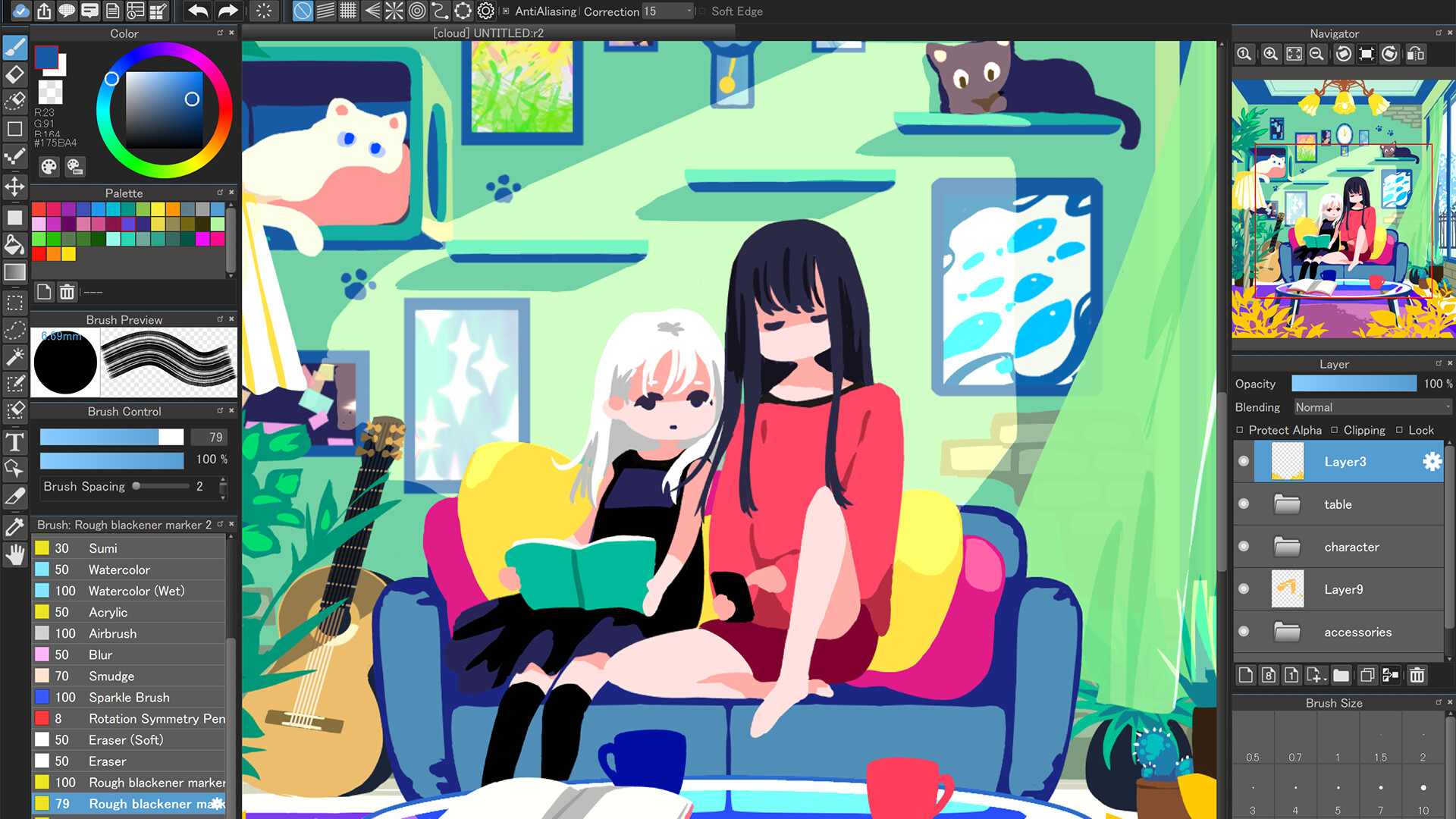
This is the perfect drawing app for those who draw illustrations and pictures. It features a paint and drawing function that can be used for doodling and drawing. It can also be used for sketching, coloring, and even creating digital art.

Conectează-te pentru a adăuga acest articol în lista ta de dorințe, a-l urmări sau a-l marca drept ignorat.

Nu este disponibil în limba: Română

Acest produs nu este disponibil în limba ta locală. Te rugăm să consulți lista de mai jos cu limbile în care jocul este disponibil înainte de achiziționare

Cumpără MediBang Paint for Desktop


Despre acest Software

MediBang Paint is the definitive illustration and painting app.

With over 100 million downloads worldwide, this drawing app is popular with beginners and professionals alike. Its intuitive controls make it easy for anyone to create illustrations and pictures. Enjoy more fun and freedom with this digital painting tool.

It offers a professional drawing environment. From sketching and line art to coloring and finishing, you can complete your work in one app. It also comes with a host of professional-grade features, including over 180 brushes, layers, tones, gradients, and fonts.

The UI is designed for beginners, making it ideal for those who want to get started with drawing or try out a drawing app.

Tutorials, templates, and coloring materials are also available to help even first-time artists feel at ease. The guided drawing process makes it perfect for practice.

Practice coloring with this simple coloring book.

Learn how to draw characters and backgrounds using templates.

Edit and recolor your drawings as many times as you like.

Even if you've always wanted to try drawing illustrations but thought it might be difficult, you can start having fun drawing right away.

With pressure sensitivity, you can create delicate strokes and nuanced lines with ease. The smooth movement of the pen and brush creates a natural drawing experience, just like drawing on paper. Use custom brushes to create your own unique style.

◆ Recommended for

People looking for an easy-to-use drawing app even for beginners

People who want to practice drawing illustrations and pictures using a painting app

People who enjoy coloring in a coloring book style

People who want to create professional line drawings and color illustrations

People who want to create manga or art books using a drawing app

◆New features available only in the Desktop version

◎Gradient Map

  • Change the color tone of your work using over 20 presets

  • Freely customize and create your own presets

  • Repaint monochrome works in full color

◎Onion Skin Mode

  • Convenient features for animation production

  • Display all frames at once to ensure proper animation continuity at any time

  • Select a frame rate and preview before exporting to MP4 format

  • Exporting PNG sequentially is recommended for GIF conversion

◆MediBang Key Features of Paint

◎ A high-performance painting tool for digital art

  • Over 180 brush types included (pencil, pen, brush, airbrush, watercolor, etc.)

  • From line art and rough sketches to coloring and painting, all in one app

  • Advanced features like layers, tones, and gradients are also included

◎Enjoy the same fun as a coloring book! Beginners are welcome

  • Includes guides and templates to make drawing easy, even for beginners

  • An intuitive UI makes painting easy.

  • Edit and recolor your drawings as many times as you like! No need to worry about mistakes!

◎High-quality drawing experience

  • Pressure sensitivity allows you to effortlessly express even delicate lines (when using a compatible pen)

  • Reproduce smooth, natural-feeling strokes

  • Freely customize pen and pencil tools

◎Abundant resources for creative use

  • Over 700 additional brushes (MediBang Premium)

  • Over 1,000 screen tones

  • Over 60 Japanese and English fonts

  • Abundant background materials and textures

◎Convenient cloud and sharing features

  • Sync your work across multiple devices (PC, smartphone, tablet) via the cloud

  • Supports posting to social media. Easily share your work on Instagram or X

  • Smooth integration with other apps

◎Supports real-time collaboration

  • Streamlines team illustration and manga creation

  • Collaborate with fellow artists on group projects

◎Record and share your creative process with time-lapse

  • Automatically record your drawing process and output it as a time-lapse video

  • Perfect for showcasing your work on YouTube and social media

◆Versatile use cases

  • Easy drawing and sketching

  • Practice line art and coloring

  • Illustration creation

  • Create original characters and picture books

  • Create manuscripts for manga and webcomics

  • Digital coloring art practice

  • Drawing and croquis sketches

  • Art book layout and design

◆Reliable features for beginners and professionals alike

  • No lag while painting. Enjoy smooth drawing experience

  • Easy-to-follow tutorials and support

  • Learn how to draw with our official YouTube channel and templates

  • Supports mdp, png, jpg, bmp, gif, psd, tif, and webp formats

◆Full support for commonly searched related keywords

"illustration", "picture", "drawing", "drawing app", "drawing", "drawing", "coloring book", "coloring book", "drawing app", "paint", "painting", "artist", "artist"

Whether you're a beginner illustrator or a professional creator, MediBang Paint is the tool for everyone who draws.

Cerințe de sistem

Windows
macOS
    Minim:
    • Necesită un procesor și sistem de operare pe 64 de biți
    • SO: Windows 10 or Later
    • Memorie: 8 GB RAM
    • Stocare: 150 MB spațiu disponibil
    Recomandat:
    • Necesită un procesor și sistem de operare pe 64 de biți
    Minim:
    • SO: Mac OS 11 or Later
    • Memorie: 8 GB RAM
    • Stocare: 150 MB spațiu disponibil
    Recomandat:

    Recenziile clienților pentru MediBang Paint for Desktop Despre recenziile utilizatorilor Preferințele tale

    Recenzii generale:
    Echilibrate (160 recenzii)


    Pentru a vedea recenziile dintr-un anumit interval calendaristic, te rugăm să faci clic și să tragi o selecție pe un grafic de mai sus sau apasă pe o bară specifică.


    Filtrează recenziile în funcție de timpul petrecut de recenzor în joc până la momentul scrierii acestora:


    Niciun minimNiciun maxim

    Arată recenziile în ordinea de afișare selectată


    Află mai multe
    Filtre
    Se exclude activitatea cu recenzii irelevante
    Timp petrecut:
    Jucat în principal pe Steam Deck
    Nu mai există recenzii care să se potrivească cu filtrele setate mai sus
    Ajustează filtrele de mai sus pentru a vedea alte recenzii
    Se încarcă recenzii...