Easily edit and convert your gaming highlights, live stream moments and Twitch clips into Instagram Reels, TikTok videos, YouTube shorts or to any other social media platform format with only a few clicks!

このアイテムをウィッシュリストへの追加、フォロー、スルーとチェックするには、サインインしてください。

日本語 はサポートされていません

この製品はあなたの言語をサポートしていません。ご購入される前に、対応言語のリストをご確認ください。

お知らせ: 注意:Special Agent Squeaky's Simple Video ConverterはSteamストアで利用できなくなりました。
 

Download the Demo for a Free version

What's the difference between the Demo version and the Paid version?

Absolutely none!

You can download the Demo for free with all features! However if you feel like the software is useful, please consider supporting by purchasing the Paid version!

Your feedback is important!

This software is constantly being improved and polished, so any feedback is appreciated (good or bad) in order to improve the software! Giving comments and writing reviews helps a lot!

このソフトウェアについて

Easily edit and convert your gaming highlights, live stream moments and Twitch clips into Instagram Reels, TikTok videos, YouTube shorts or to any other social media platform format with only a few clicks!

The goal of the software is to help gaming content creators to transform their gaming highlights and live stream moments or their own original content into different formats that is suitable for various social media platforms, such as TikTok, Instagram, YouTube, Discord, etc, in order to increase their exposure and growth as a content creator.

This software is a command line server application that uses your local browser as its user interface. It allows you to specify either a video clip located online (such as a Twitch clip) or a video clip on your computer, perform basic edits and transformations and then export it to your desired format.

There are a lot of similar tools out there that transform clips, however most of them are online web services that require monthly online subscription or pay per video. The software is specifically developed to work locally on your computer, as a one time download. Download it once and you can use it as many times as you want and whenever you want without additional fees.

What's the difference between the Demo version and the Paid version?


Absolutely none!

You can download the Demo for free with all features! However if you feel like the software is useful, please consider supporting by purchasing the Paid version!

Your feedback is important!


This software is constantly being improved and polished, so any feedback is appreciated (good or bad) in order to improve the software! Giving comments and writing reviews helps a lot!

Key software features

  • Download and run on your local computer
  • Supports an online video clip or a local clip on your computer
  • Supports h246 MP4 videos
  • Crop your video the aspect ratio most suitable for the social media platform your are targeting
  • Trim your video duration to only highlight the part most interesting part
  • Add blur effects if you need a fancy background
  • Apply Picture-in-Picture effects for example show both your game play but also your webcam simultaneously
  • Rescale up or down the video if you need a specific dimension
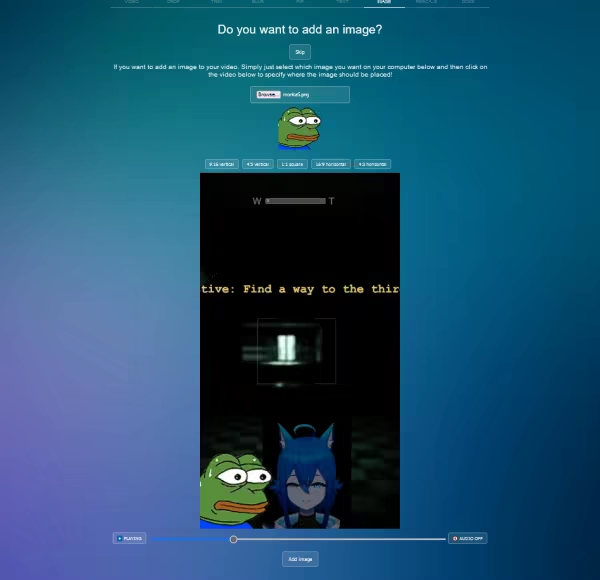
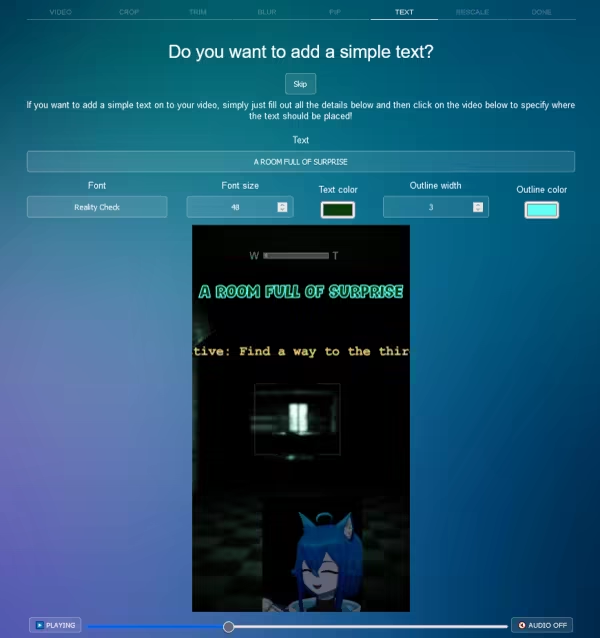
  • Add images & texts on top of your video
  • Convert images (such as screenshots) to videos
  • Flip, mirror and rotate your videos
  • More features are planned, but please give your feedback and suggestions on how to improve the tool!

More about adding images


It is possible to add and resize images stored on your computer on your video. Perfect if you want to add your logotype or watermark your video!

More adding texts

It is possible to add simple texts onto your video, for example maybe you want to a caption or mention your Twitch channel!

More about the blur effect


With the blur effect, you can make your main video blurred and then add a Picture-in-Picture on top of it creating some nice effects.

システム要件

    最低:
    • 64 ビットプロセッサとオペレーティングシステムが必要です
    • OS *: Windows 7
    • メモリー: 1024 MB RAM
    • ネットワーク: ブロードバンドインターネット接続
    • ストレージ: 400 MB の空き容量
    推奨:
    • 64 ビットプロセッサとオペレーティングシステムが必要です
* 2024年1月1日(PT)以降、SteamクライアントはWindows 10以降のバージョンのみをサポートします。
この製品のレビューはありません

この製品の自分のレビューを書いて、コミュニティとあなたの経験を共有してみましょう。このページの購入ボタンの上のエリアを使用して、レビューを書きましょう。